
Introduction
Purpose of the API
The STAGE Northbound API enables remote control of Applications hosted by a STAGE system. It is designed to allow external systems such as broadcast controllers, automation systems, or custom software solutions to interact programmatically with STAGE.
Typical use cases include:
-
Controlling Application behavior from external control systems
-
Changing Parameters of Applications running in STAGE
-
Accessing Meter data, particularly for audio‑related Applications
The API can be used both for:
-
Dedicated integrations into larger control or automation systems
-
Small‑scoped, project‑based or ad‑hoc integrations, where only a limited subset of functionality is required
Intended Audience
This documentation is intended for:
-
Software developers working on broadcast or media control systems
-
System integrators creating custom integrations involving STAGE
-
Technical teams building project‑specific or customer‑specific control solutions
Readers are expected to be familiar with general software development concepts and have basic knowledge of APIs, networking, and authentication.
API Technology
The API is available through two different technologies, each targeting different integration needs: gRPC and REST.
If no strong constraint exists, gRPC should be considered the default integration choice.
gRPC API
The gRPC interface is the primary and recommended way to integrate with STAGE.
Key characteristics:
-
Provides the full API functionality
-
Supports real‑time streaming updates, including:
-
Parameter changes
-
High‑frequency data such as audio Meters
-
-
High performance and low latency
-
Well suited for long‑running connections and complex integrations
This interface is the preferred choice for:
-
Full‑scale, generic integrations into other software systems
-
Control Applications that require flexible access to all STAGE Parameters
-
Integrations that rely on real‑time updates or continuous data streams
REST API
In addition to gRPC, the API is also exposed as an HTTP‑based REST interface.
Key characteristics:
-
Uses standard HTTP request/response patterns
-
Lower performance compared to gRPC
-
Does not support streaming updates
-
High‑frequency data (such as audio Meters) is not available
-
Parameter Value changes must be polled manually
This interface is intended for:
-
Quick, ad‑hoc integrations
-
More static or configuration‑oriented use cases
-
Scenarios where real‑time updates are not required
Other APIs provided in STAGE
STAGE provides other APIs alongside the one described here. These APIs complement the Northbound API and are typically used together in larger integrations. Further information on these APIs is available in the documentation.
|
APIs |
See |
|---|---|
|
An AMWA NMOS IS-04, IS-05 Node to control senders and receivers exposed by STAGE. |
SAME Putting a SAME DSP Engine Under Northbound Control. For users of the Adobe Acrobat (PDF) version of this user guide, see Putting a SAME DSP Engine Under Northbound Control in the SAME User Guide. See STAGE Resources. |
|
An AMWA NMOS IS-08 API to control patching of senders and receivers to Applications (for Hosts in Direct Control Mode only). |
|
|
A Grafana Loki API to pull Logs collected by STAGE into other systems. |
|
|
A Prometheus Northbound API to pull Metrics collected by STAGE into other systems. |
Available Assets
To support development and integration, Riedel provides an API Development Toolkit. This toolkit contains all assets required to get started with the API.
The toolkit includes:
-
Protobuf definitions for the gRPC API
-
An OpenAPI specification for the REST API
-
A sample Application written in Go, demonstrating authentication and basic API usage. Documentation explaining this sample Application is also provided.
These assets are intended to serve as both reference material and practical examples for implementing integrations with STAGE. To download this package, see STAGE Northbound API | STAGE Northbound API Changelog.
Quick Start
This section describes a quick way to get started with using the API in STAGE.
-
Login to STAGE with a user with System Admin permission
-
In System Management / Northbound APIs, enable the API and create an API client. Note the
Client Id,Client TokenandAccess Token URL
See STAGE Northbound API | STAGE configuration below.
REST
-
navigate your browser to
<https://<stage-base-url>>:<configured-api-port>/docs/swagger#(the default port is 8444) -
click "Authorize" and provide the
Client IdandClient Token -
select a command from the documentation and run it (e.g.
GET /hosts)
Note that the access token expires after 60 seconds, since refreshing the token automatically is not supported in this documentation renderer, you will need to re-authorize again periodically
gRPC
To get started with the gRPC API, run the stage-api-go-client available in API Integration Toolkit. Provide the Client Id and Access Token when prompted and follow the menu of the client to interact with the API.
Configuration steps
Deployment
By default, the port used for the API is 8444. When installing STAGE using Riedel Software Manager, the port used for the API can be configured in the package configuration of STAGE. See also STAGE Installation.
To set the Northbound API port number to be used, see RSM STAGE Suite Package Settings.
The base URL for the API is <https://[stage-fqdn-or-ip]:[configured-api-port]/v1>
The API uses the same HTTPS/SSL certificate as the rest of the Deployment. By default this is a self-signed certificate. The STAGE Administrator can replace this certificate with a trusted one using Riedel Software Manager.
STAGE configuration
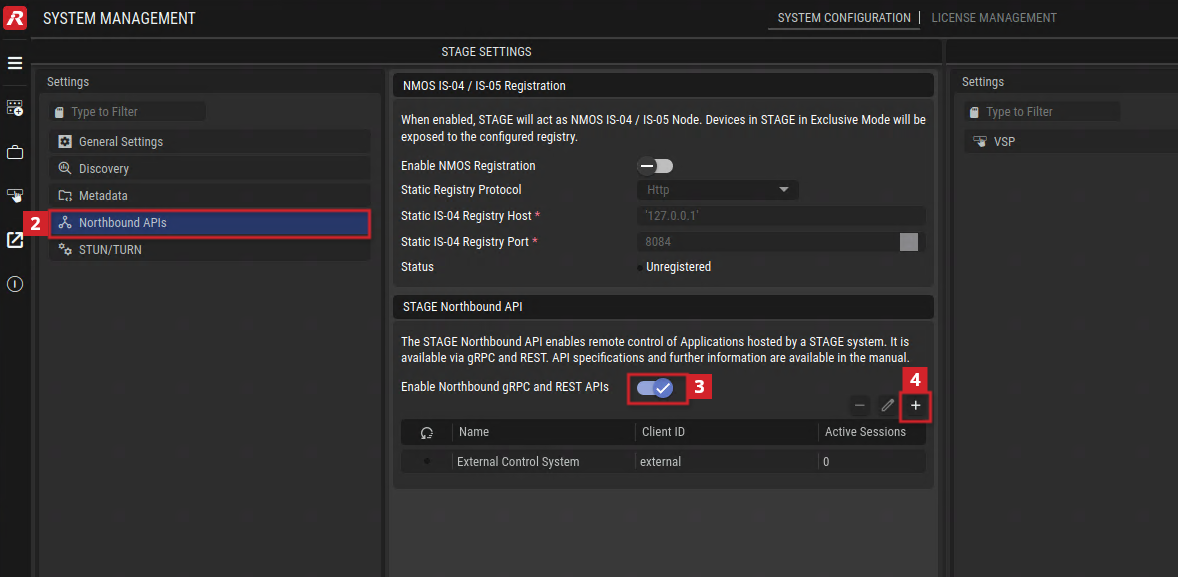
The Northbound API is disabled by default. To start using the API:
-
Log in to STAGE with a user with System Administrator permission.
-
Navigate to "System Management", select "Northbound APIs" from the menu.
-
Enable the "Northbound gRPC / REST APIs".
-
Create a new API client by clicking the plus icon.
-
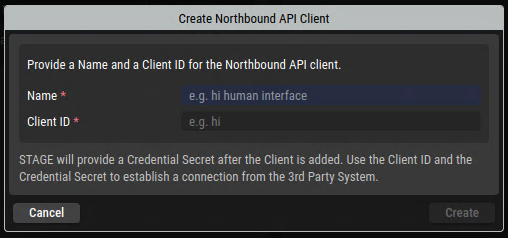
Provide a friendly name and a Client ID for this connection and click Create:
-
Once the Northbound API Client is created, a window will appear:
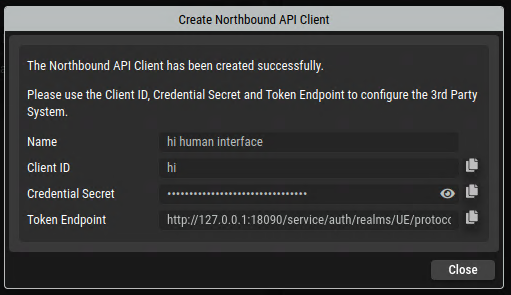
Note the
-
Client ID
-
Client Secret
-
Token Endpoint URL.
You will need this information in a later step to authenticate to the API.
See also System Configuration.
Authentication & Authorization
All API endpoints are protected and require authentication. Access is granted using OAuth 2.0 / OpenID Connect, with STAGE acting as the authorization authority.
The only currently supported authentication mechanism is:
OAuth 2.0 Client Credentials Grant with Refresh Tokens
This mechanism is intended for machine‑to‑machine integrations and does not require interactive user login.
Additional authentication mechanisms may be introduced in later releases.
Overview
Each third‑party integration is represented as an API client in STAGE.
The client authenticates using its own credentials and receives cryptographically signed tokens that authorize access to the API.
The authentication work flow involves three parts:
-
Client – your Application integrating with the API
-
Authorization Server – STAGE’s OpenID Connect provider (Keycloak)
-
Resource Server – the API (REST and gRPC)
A valid access token is required before calling any API endpoint.
Client Credentials
To access the API, you will receive the following information from a STAGE administrator:
-
Client ID
-
Client Secret
-
Token Endpoint URL
See also STAGE Northbound API | STAGE configuration.
The Token endpoint URL follows this scheme:
https://<stage-host>:<configured-api-port>/service/auth/realms/UE/protocol/openid-connect/token
Client registration and permission management are handled by STAGE administrators. Dynamic self‑registration is not supported.
Obtaining an Access Token
To obtain an access token, your client must send a request to the token endpoint using HTTP Basic authentication.
Access Token Request
POST https://<stage-host>/service/auth/realms/UE/protocol/openid-connect/token
Authorization: Basic <base64(client_id:client_secret)>
Content-Type: Application/x-www-form-urlencoded

grant_type=client_credentials
Access Token Response (Example)
{
  "access_token": "eyJhbGciOiJSUzI1NiIsInR5cCI6IkpXVCJ9...",
  "refresh_token": "eyJhbGciOiJSUzI1NiIsInR5cCI6IkpXVCJ9...",
  "expires_in": 300,
  "refresh_expires_in": 1800,
  "token_type": "Bearer",
  ...
}
Using the Access Token
All endpoints require a valid access token.
REST API
Include the access token in the Authorization header:
GET https://<stage-host>/v1/system/info
Authorization: Bearer <access_token>
gRPC API
Send the token as gRPC request metadata:
authorization: Bearer <access_token>
Refreshing Access Tokens
Access tokens are intentionally short‑lived and will expire after 60 seconds. When an access token expires, use the refresh token to obtain a new one.
POST https://<stage-host>/service/auth/realms/UE/protocol/openid-connect/token
Content-Type: Application/x-www-form-urlencoded

grant_type=refresh_token
client_id=<client_id>
refresh_token=<refresh_token>
A new access token (and possibly a new refresh token) is returned.
Clients are responsible for:
-
Tracking token expiration
-
Refreshing tokens proactively
-
Retrying failed requests caused by token expiry
Token Revocation
STAGE administrators can revoke access at any time by revoking active client sessions or deleting the configured API client in STAGE.
Once revoked, API calls using affected tokens will immediately fail with authorization errors.
Clients should handle authentication failures gracefully and re‑authenticate when required.
Core Domain Concepts
The STAGE 3rd‑Party API exposes a small set of core domain models that represent the operational structure of a STAGE system. These models are designed to be stable, discoverable, and consistent regardless of whether functionality is accessed through gRPC or REST.
At a high level, Hosts run Applications, Applications are structured using Control Nodes, and expose Parameters, Meters, Presets, and Snapshots. Parameters use ValueModels to describe valid data and constraints.
General
Names and Labels
Some objects will expose name properties, some other will expose label properties. A name property is exposed, when the name is defined by the system and cannot be changed by the user. Names are stable. A label is a user-defined value and can change at any time.
Hosts
A Host represents a physical or virtual system registered in STAGE that provides computing and processing capabilities. Hosts are the starting point for discovering Applications through the API.
Each Host operates in exactly one of the following modes:
Direct Control Mode
In Direct Control Mode, a host exposes all of its configured Applications directly to third‑party systems through the STAGE Northbound API.
Characteristics:
-
Applications running on the host are exposed to the API directly
-
Resources are not managed as part of STAGE Jobs
-
Intended for direct external control and monitoring when advanced workflows in STAGE are not required
Direct Control Mode is typically used when a host is dedicated to specific tasks, used in a static fashion and controlled entirely from an external system.
In this version of the API only Applications running on Hosts in Direct Control Mode are available. Thus the API will also only expose Hosts in Direct Control Mode.
Applications
An Application represents a functional processing unit running on a host in Direct Control Mode . Examples include SAME Mixers, Network Plugins, Signal Generators and Analyzers, or other signal‑processing components.
Key characteristics:
-
Applications have stable identifiers
-
Applications are always addressed through a consistent API structure
-
The same Application Model applies regardless of where the Application is hosted
-
Each Application defines its own Parameters, Meters, Presets, and Snapshots
-
An Application provides a URL and a recommended viewport size to the operational UI of the Application
Applications are the primary entities that third‑party systems interact with.
Control Nodes
Applications expose their internal structure through Control Nodes.
A Control Node represents a logical grouping within an Application, such as:
-
A channel strip
-
A processing block
-
A functional section of the Application
Characteristics:
-
Control nodes form a hierarchical tree
-
Each Control Node may contain child Control Nodes
-
Control nodes group related Parameters and Meters
This structure allows clients to navigate complex Applications in a predictable and structured way.
Parameters
Parameters represent controllable or readable values exposed by an Application.
Examples include:
-
Gain values
-
Mute or enable switches
-
Frequency or timing settings
-
Mode selectors
Key properties:
-
Each Parameter belongs to exactly one Application
-
Parameters have stable identifiers
-
Parameters relate to a ValueModel that describes the meaning and constraints of a Parameter Value
-
A Parameter can have a single value or a tuple value. Tuple values are used to describe a set of values that needs to be applied at the same time.
Parameters are organized under Control Nodes for readability and structure.
ValueModels
Each Parameter is described by a ValueModel, which defines the structure and constraints of its value.
The following ValueModels are defined:
-
NumericModel: defines a numeric Parameter. The ValueModel defines a minimum and maximum value, a unit as string and a default value -
BoolModel: defines a boolean Parameter. The ValueModel defines a default value only. -
LookupModel: defines a Parameter where its value can be picked from a list of predefined values. The ValueModel defines a list of entries, where each entry is defined by a value (a numeric value that the Parameter will display for the entry) and a name (which is a human-readable name for the entry). It will also define a default value. -
TextModel: defines a Parameter where its value is a text. Additional constrains can be defined for the text, such as minimum and maximum amount of characters, not being blank, not including spaces, numbers or special characters. For complex cases a regex can be specified. It will also define a default value.
ValueModels enable generic clients to interpret and validate Parameters without Application‑specific logic.
Meters
Meters provide runtime measurement and monitoring data from Applications, most commonly for audio processing.
Examples include:
-
Audio level Meters
-
Signal activity indicators
-
Other continuously updated metrics
Characteristics:
-
Meters are read‑only
-
Meter Values may update at high frequency (up to 10 times per second)
-
Meters are available only through streaming using the gRPC API
-
Meters are always associated to a Control Node and an Application
-
Meter Values are transported in an array. In case multiple Meter Values are available for a signal (e.g. for a stereo or 5.1 audio signal), the Meter object will transport an array of values for each individual Meter channel. In case of a single Meter Value, the array will have a length of 1
Meters are designed for monitoring and diagnostics rather than control.
Presets
A Preset represents a predefined set of Parameter Values for a specific part of an Application.
Key characteristics:
-
Presets are always associated with a Control Node
-
Applying a Preset sets multiple Parameters simultaneously
-
Presets provide a convenient way to recall known or approved configurations
-
Presets are Application‑defined and Application‑specific
-
Presets can only be created from the STAGE UI, not from the API itself
Presets are used to switch all Parameters of a Control Node into a predefined state without individually setting each Parameter.
Snapshots
A Snapshot represents a captured state of an Application at a given point in time.
Key characteristics:
-
Snapshots capture the values of Parameters across a broader scope
-
Snapshots can typically be recalled to restore a previous state
-
Snapshots are associated with Applications, not with individual Control Nodes
-
Snapshot availability and behavior are Application‑dependent
Snapshots are commonly used for operational workflows, such as saving and recalling complete Application states during production.
Relationship Overview
The core domain models relate as follows:
-
A Host runs one or more Applications
-
An Application exposes a hierarchy of Control Nodes and may expose Snapshots
-
Control Nodes group Parameters, Meters, and Presets
-
Parameters use ValueModels to define valid data and behavior
-
Presets apply predefined Parameter Value sets
-
Snapshots capture and recall Application states
-
Meters provide real‑time measurement data
This domain model ensures that control, monitoring, and state management remain consistent, extensible, and independent of the Application Type used on the STAGE platform.
Working with the API
This section describes typical interaction patterns when integrating with the API. While the API supports both gRPC and REST, the overall workflow remains the same, with differences mainly in how data is retrieved and updated.
Typical Workflows
Fetching Applications
After authenticating, a client begins by discovering available hosts. Using gRPC, the client typically subscribes to the host list to receive updates; with REST, the host list is fetched on demand.
For each host, the client retrieves or subscribes to the list of Applications running on that host.
Then the client fetches an individual Application. This returns the full Application structure, including the Control Node hierarchy, Parameter definitions including their ValueModels and references to Meters. This provides a complete view of an Application’s Parameters and Meters.
Opening Operational UI of an Application
All Applications expose a dedicated operational UI.
The client reads the Application’s ApplicationOperationalUI property, which include a URL and a recommended viewport size, and opens it in a browser or embedded window. The user is required to log in to STAGE and is then presented with the operational UI scoped to that specific Application.
Controlling Parameters
Clients interact with Application Parameters and Meters using their identifiers. A Parameter is identified by both the id of the Application and the id of the Parameter. Parameters of Applications of the same Application Type will have the same Parameter Id across different instances of the Application. Control Nodes include the definition of Parameters and Meters, but not their values.
With gRPC, clients can subscribe to Parameter and Meter Values to receive the initial value and real‑time updates. With REST, Parameter Values can be polled, but Meter data is not available.
To change a Parameter, the client sends a new value for the a Application id and Parameter id. A successful response indicates acceptance of the request, while the resulting Parameter Value is propagated through subscriptions or subsequent fetches. Changes made through the API and changes made through the STAGE UI are reflected consistently in both directions.
Using Snapshots and Presets
The API supports two complementary mechanisms for restoring predefined Application states: Snapshots and Presets. While both are used to apply multiple Parameter changes at once, they differ in scope, structure, and intended usage.
Snapshots represent a global, Application‑wide state. They capture the values of multiple Parameters across the entire Application at a specific point in time. Snapshots are not part of the Control Node hierarchy and are not included when fetching an Application or its Control Nodes. Instead, dedicated endpoints are provided to retrieve the list of Snapshots available for an Application and to recall a specific Snapshot. Recalling a Snapshot restores the Application to the captured state, potentially affecting Parameters across many Control Nodes simultaneously.
Presets, on the other hand, are scoped more narrowly. A Preset is always associated with a specific Control Node and represents a predefined set of Parameter Values relevant to that node only. Similar to Snapshots, Presets are not embedded directly in the Control Node structure returned by the Application fetch. Clients use separate endpoints to list Presets available for a Control Node and to recall a selected Preset. Recalling a Preset applies Parameter changes only within the scope of the associated Control Node.
Rate Limiting
To protect system stability and prevent misuse, the API enforces rate limits on incoming requests for both gRPC and REST access.
Rate limiting is applied at the API ingress layer and monitors the frequency of requests per client over a defined time window. The rate limit is set to 200 requests per second with a burst capacity (buffer /queue depth) of 2. See https://en.wikipedia.org/wiki/Token_bucket for more information about how this rate and burst throttling / bandwidth limiting mechanism works.
If a client exceeds the allowed request rate, further requests are temporarily rejected.
When a rate limit is exceeded:
-
The API responds with HTTP status code 429 (Too Many Requests) for REST clients.
-
For gRPC clients, the request is rejected with the corresponding resource‑exhausted error.
-
An Event is generated inside STAGE and can be reviewed in the Event Viewer, allowing engineers to identify and diagnose excessive API usage.
Clients are expected to handle rate‑limit responses gracefully by slowing down request rates, applying backoff strategies, or, where available, relying on subscriptions and streaming updates instead of frequent polling.
High Availability
The API is designed to operate in a high‑availability (HA) environment. API access is provided by a clustered STAGE deployment, allowing requests to be handled by multiple nodes within the system.
In normal operation, clients interact with the API through a stable endpoint without needing to be aware of individual cluster nodes. Requests may be served by any active node in the cluster.
In the event of a failure or restart of a cluster node, API communication may be briefly interrupted. Existing connections, particularly long‑lived connections such as gRPC streams, may be closed and need to be re‑established by the client. After failover, the API remains available and continues to operate as normal. The failover is expected to complete in less than 10 seconds.
Clients are expected to:
-
Tolerate short‑lived interruptions
-
Reconnect subscriptions or streams if a connection is lost
-
Resume normal operation without manual intervention
The API does not guarantee seamless session continuation across node failures, but it is designed to recover quickly and consistently, ensuring robust operation in clustered and redundant deployments.
STAGE Northbound API Changelog
|
Version |
Changes |
Date |
Released with STAGE Version |
API Toolkit Download |
|---|---|---|---|---|
|
v1 |
Initial Release |
08/2026 |
STAGE 2.1 |
About the API Toolkit v1
Download and unzip the API Toolkit.
|
Zip File / Directory |
Description |
|---|---|
|
|
An OpenAPI v3 compatible *.yaml file describing the HTTP / JSON API. |
|
|
Contains a zip file with These parameters are both available on the OpenAPI REST API and the gRPC API. 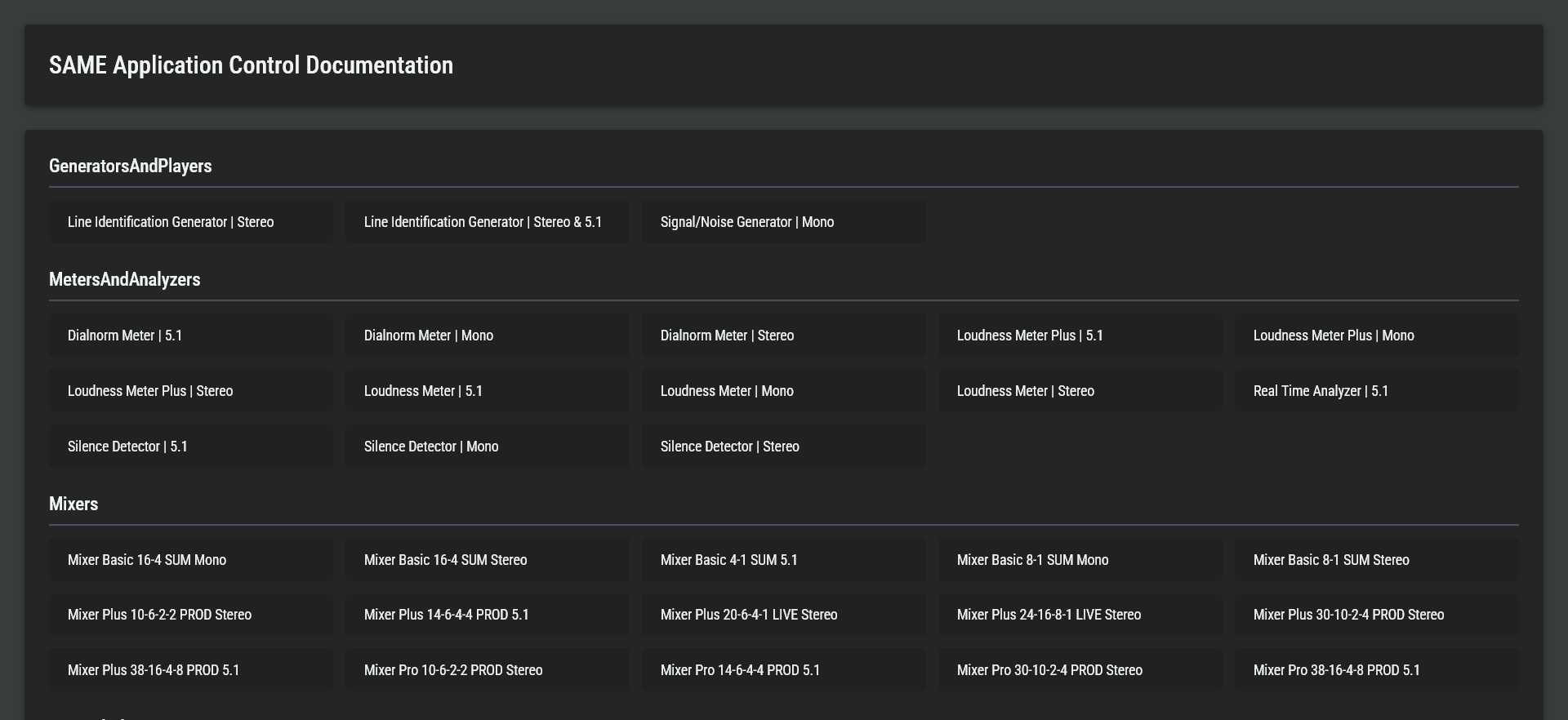
|
|
|
A set of *.proto files describing the gRPC API. |
|
|
A sample application written in Go, demonstrating authentication and basic API usage. This has a zip file in the |
|
|
A brief overview of the API Toolkit zip file contents. |
For more information about the API Toolkit, see STAGE Northbound API | Available Assets.
Support
For further support please reach out to Riedel Customer Success through https://my.riedel.net/s/contactsupport/request-technical-support.