
Introduction
STAGE can discover AMWA NMOS devices that are available on the network. STAGE relies on an external NMOS Registry to do this. First, you must configure STAGE’s connection to the NMOS Registry; see chapter System Configuration | NMOS IS 04 / IS 05 Discovery.
Once this has been configured, discovered NMOS hosts appear in Registration | [mediaInline] Discovered Hosts.
In order to configure an NMOS host, it must first be registered in STAGE. See chapter Registration. NMOS host configuration is limited. You can:
-
Edit its name and description.
-
Assign a network scope to individual Network interfaces.
All other host configuration parameters are read-only in STAGE; this configuration information comes from the NMOS host having been configured by its third-party software, or by the NMOS Registry.
How the Number of Audio Channels in STAGE works with AMWA NMOS
NMOS does not describe the number of audio channels of a receiver. The reason is that NMOS expects most receivers to be flexible in regards to the actual audio channel count being sent; this means the receiver should adapt to the channel count of the connected sender. Since STAGE will set up dedicated senders to be patched on receivers, STAGE needs to know how many audio channels are necessary to be set up. This is why it is important for you to configure the number of channels that a given NMOS receiver should have. By default, this is set to 8, but you can set another channel count as needed under Leg Count.
Since NMOS does not manage or transfer this information, this can lead to confusion: if you setup a third party device to use a certain channel count for a receiver, STAGE will not know the expected number of channels and will only show the locally configured channel count number configured in STAGE.
Overview
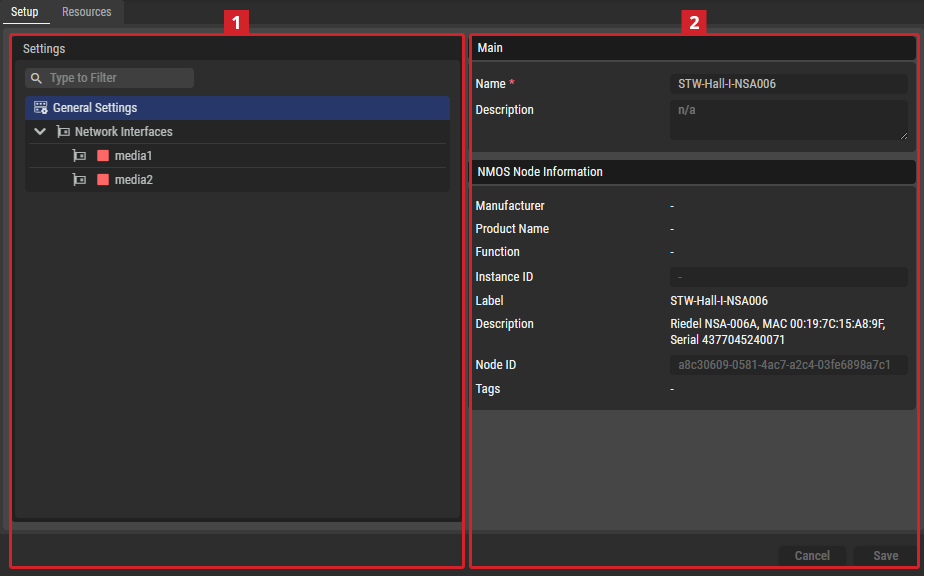
Setup Tab
Settings
Depending on the selected item in the Settings section
General Settings
Main
|
Name |
Set a friendly name for this host. This host will be identified throughout STAGE by this name. |
|---|---|
|
Description |
Set a meaningful description for this host. |
NMOS Node Information
|
Manufacturer |
This section provides read-only information from the NMOS Node Object. Fields that may be useful to copy (e.g., the Node ID or Instance ID) are read-only input fields to simplify the copying process. |
|---|---|
|
Product Name |
|
|
Function |
|
|
Instance ID |
|
|
Label |
|
|
Description |
|
|
Node ID |
|
|
Tags |
Network Interfaces
Network Management
|
Network Scope |
Set the type of traffic to exchange on this interface. See also Network Architecture Requirements for more information about the different network types used by STAGE. See also chapter Network Scopes for more information about how to configure the different network scopes used by STAGE.
When two network interfaces are set to the same network scope, STAGE assumes that the network is capable of routing packets between those interfaces. That is, if you have one sender on a network scope and a receiver on the same network scope, then the network will pass multicast traffic flows between these hosts. This setting must represent the real world network topography for each host. |
|---|


NMOS Information
|
Chassis ID |
This section provides information about the Chassis ID and Port ID of the selected NMOS interface, as well as the connected variants that reflect the MAC address and ports of the connected switch. |
|---|---|
|
Port ID |
|
|
Connected Chassis ID |
|
|
Connected Port ID |
Resources Tab
Resources

|
Set a filter to display only content whose search text is found in the name. |
|---|---|

|
Indicates wheter a sender/receiver is active. |
|
STAGE Resource |
Name of the Resource used in STAGE. |
|
NMOS Resource |
Name of the Resource used in NMOS. |
|
Type |
Displays the items type: Device, Prosumer Group, Audio Producer, Audio Consumer, Number of Legs |
STAGE Device Information
|
Label |
Field to rename the related System Hardware Device. |
|---|---|
|
Type |
The type of the selected resource is a Device. |
NMOS Device Information
|
Manufacturer |
This section provides information about the selected NMOS device. This information is read-only and is for informational purposes only.
The user also sets up the preferred control endpoints for this NMOS Device. STAGE automatically selects reachable control endpoints for NMOS Hosts when they are registered, but the user can manually change this endpoint later. A status indicator shows whether the selected endpoint is available or not. |
|---|---|
|
Product |
|
|
Function |
|
|
Instance Identifier |
|
|
Label |
|
|
Description |
|
|
Type |
|
|
Device ID |
|
|
IS-05 Connection API Endpoint |
|
|
Tags |
STAGE Consumer / Sender Information
|
Label |
This section has an input field where the selected Consumer/Sender can be renamed and the type of the selected item (Audio Consumer/Producer) is displayed. |
|---|---|
|
Type |
|
|
Leg Count For STAGE Consumer Information configuration table only |
Set the number of audio channels (legs) that STAGE allocates for this Audio Consumer. Since NMOS does not communicate the expected channel count of a Receiver, this value must be configured locally in STAGE. The default value is 8 channels but can be adjusted as required. A warning is displayed when the sender currently connected to this receiver contains a different number of audio channels than the configured Leg Count. Changes made to the channel count in third-party NMOS devices are not visible to STAGE and may result in a mismatch between the displayed and actual configuration. See below. |
Audio Channel Count (Leg Count) Handling
NMOS does not provide a dedicated parameter that describes how many audio channels an NMOS Receiver is currently configured to. This is because NMOS generally assumes that Receivers are flexible and can adapt to the channel count of a connected Sender on the fly. However, STAGE creates and manages its own audio routing resources and therefore must know how many audio channels to allocate for each Receiver. For this reason, STAGE requires a configured Leg Count value for every Audio Consumer (Receiver). The default value is 8 channels, but it can be adjusted to match the Receiver’s intended use.
Because this information is not exchanged through NMOS, STAGE cannot detect channel count changes made in third-party management systems. As a result, the Leg Count shown in STAGE may differ from the channel count configured elsewhere. You should ensure that the configured Leg Count in STAGE matches the actual Receiver configuration to avoid unexpected routing behavior.
STAGE Sender Information
|
Label |
This section has an input field where the selected Consumer/Sender can be renamed and the type of the selected item (Audio Consumer/Producer) is displayed. |
|---|---|
|
Type |
NMOS Receiver/Sender Information
|
Receiver/Sender State |
The NMOS Receiver and Connected Sender Information sections show information about the related NMOS Receiver and a connected Sender if something is connected. This information is read-only and is for informational purposes only. |
|---|---|
|
Label |
|
|
Description |
|
|
Receiver/Sender ID |
|
|
Media Types |
|
|
Tags |
|
|
Interface Bindings |
|
|
Audio Channels |
|
|
Source / Destination |
The Connected Sender information section also offers a download for the related SDP (transport file) of the connected sender (direct link to the according NMOS resource). |
|
Transport File |
Related NMOS Flow Information
|
Label |
This section shows information about the related Flow. This information is read-only and is for informational purposes only. |
|---|---|
|
Description |
|
|
Flow ID |
|
|
Media Types |
|
|
Tags |
|
|
Sample Rate |