
This defines the audio processing to make available for use on this SAME DSP-Engine. For example, this can be mixers, limiters, and other audio processing plugins.
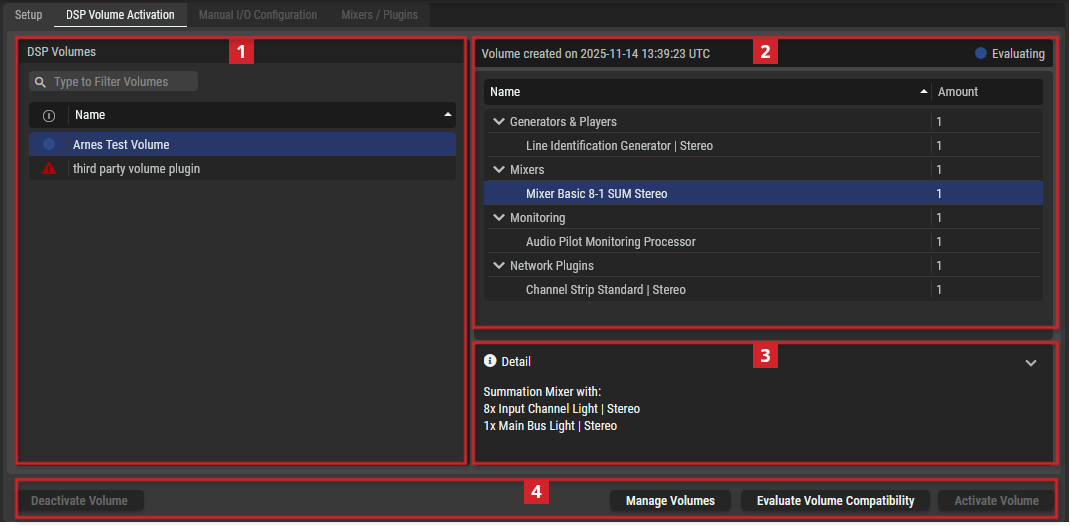
SAME DSP Engine - DSP Volume Activation Tab
|
|
DSP Volumes section |
|
|---|---|---|
|
|
Filter to display only content whose search text is found in the name (case insensitive). |
|
|
|
Indicates the current availability of the DSP Volume. First click Evaluate DSP Volume Compatibility to do a test on the actual SAME DSP-Engine server to see if it has the processing capacity to reliably run this DSP Volume. |
|
|
Name |
Select one of the DSP Volumes to display its mixers on the right. |
|
|
|
This section displays the available mixers of the DSP Volume selected in the DSP Volumes section. |
|
|
|
This section shows more information about the mixer selected in the mixer section. |
|
|
|
Buttons: |
|
|
Deactivate Volume |
Click to deactivate the selected audio Processing Units. |
|
|
Manage Volumes |
Click to create a customized volume tailored to your needs. |
|
|
Evaluate Volume Compatibility |
Click to validate if the STAGE server(s) have enough processing power to run all the active DSP Volumes. This is required because the amount of processing power required to run a Processing Unit varies from one type of Processing Unit to the next and it is difficult to predict how even even a minor change can impact the load on a server’s CPUs. |
|
|
Activate Volume |
Click to activate the selected DSP Volume Processing Units. |
|


Manage DSP Volumes
DSP Volumes can be created with specific SAME Applications needed for a Job. Tailoring a DSP Volume to a Job keeps the DSP Volume lightweight; this reduces the required processing power needed on the SAME DSP-Engine, which in turn may allow two or more DSP Volumes to run on the same SAME DSP-Engine. This optimizes and rationalizes the available computer resources.
|
|
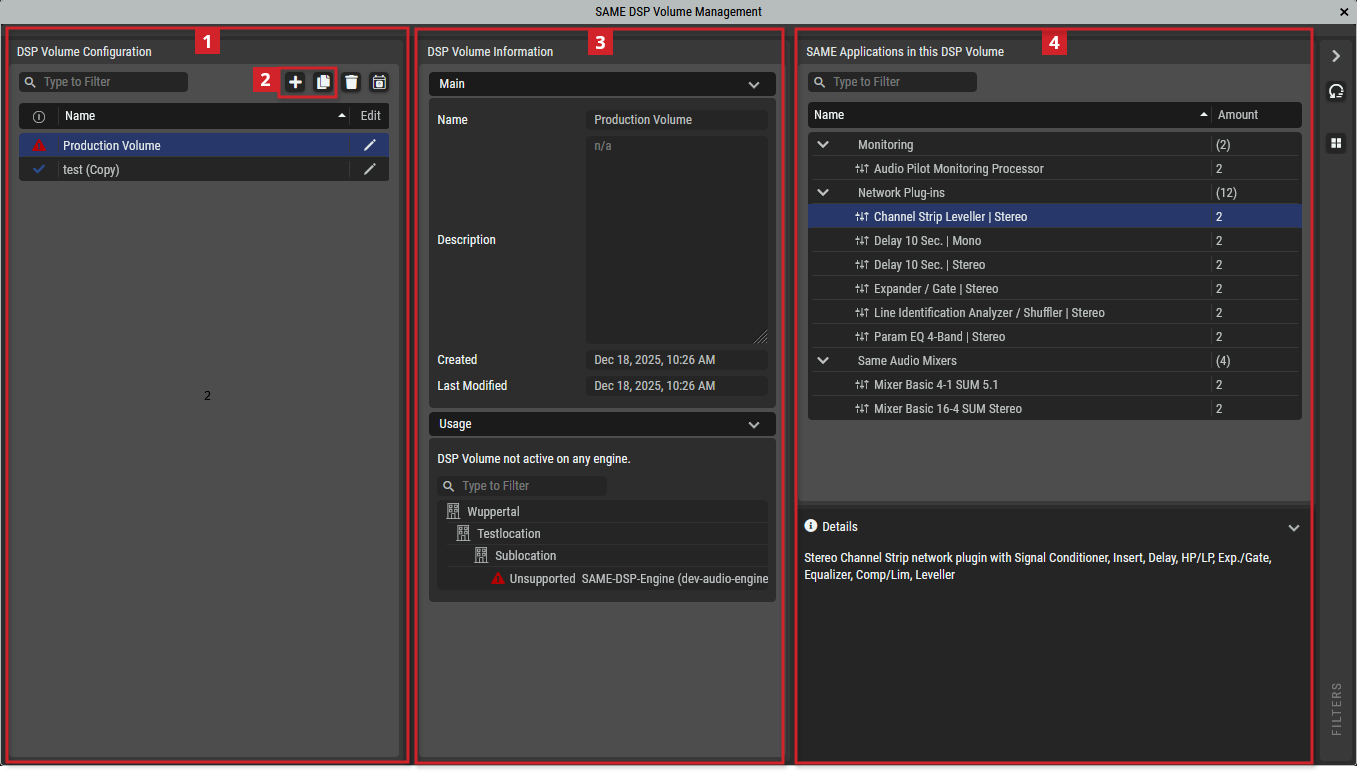
DSP Volume Configuration |
|
|---|---|---|
|
|
Filter to display only content whose search text is found in the name (case insensitive). |
|
|
|
Indicates the current availability of the DSP Volume. |
|
|
Name |
Select one of the DSP Volumes to display its mixers on the right. |
|
|
|
Edit |
Click to modify the currently selected DSP Volume. See below. |
|
|
Create a new DSP Volume: Click to add a new DSP Volume or make a copy of the selected DSP Volume. See below. |
|
|
|
This section shows more information about the DSP Volume. |
|
|
|
Name |
Set a friendly name for this DSP Volume. This DSP Volume will be identified throughout STAGE by this name. |
|
|
Description |
Set a meaningful description for this DSP Volume. |
|
|
Created Last Modified |
Shows the creation date and the last DSP Volume modification date. |
|
|
Usage |
Shows where the selected DSP Volume is currently being used. |
|
|
Same Applications in this DSP Volume |
|
|
Name |
Shows the DSP Volume’s name. |
|
|
Amount |
Shows the number of DSP Volume instances. Numbers in parenthesis () are totals for that DSP Volume type. |
|


Adding, Copying, or Editing a DSP Volume
You can create a new DSP Volume or edit an existing one.
-
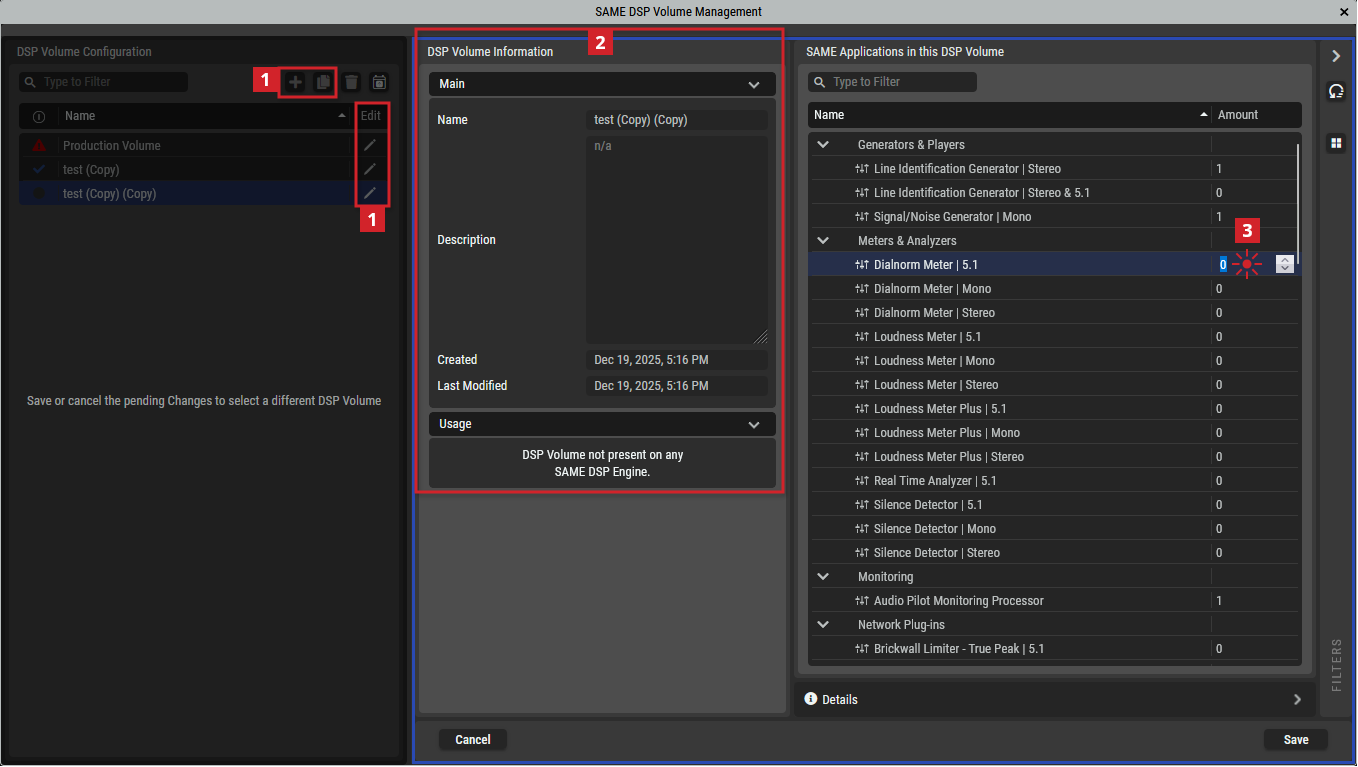
Click add, copy, or edit a selected DSP Volume.
-
Add or change the information about the DSP Volume in the Name and Description fields.
-
Double-click a SAME Application in the Amount column to set the number of SAME Application instances to be part of this DSP Volume using the up/down arrows.
-
Repeat step 3 as necessary on other SAME Applications to set their quantity in this DSP Volume.
-
Click Save to apply your changes.
Available DSP Volumes
The first step of creating a job is to choose a DSP Volume that has the Processing Units that you will need for the application. There are two general DSP Volume categories:
-
Mixers and Monitoring DSP Volumes
-
Network Plugins DSP Volumes
-
Super Plugin Voice-Over DSP Volume
See below for more information.
DSP Volumes support a Mono Signal/Noise Generator Network Plugin. This generates a sine tone, white noise, or pink noise for test and calibration purposes.
Mixers and Monitoring DSP Volumes
A special DSP Volume, Demo Volume, contains all available audio Processing Units. It is to be used as a sand box in which you can gain hands-on experience by playing with any of the available Processing Units to:
-
Become familiar with them.
-
Make tests to prove out the sound of a processing chain, to find the results you are looking for.
SAME mixers allow for up to 3 users to connect and having their own monitoring, listening and metering functionality.
|
Volume Name |
Generators & Players |
Mixers |
Monitoring |
|---|---|---|---|
|
Audio Pilot Monitoring Processor Volume 4 Instances |
Mono Signal/Noise Generator Network Plugin. Generates a sine tone, white noise or pink noise |
- |
Standard Audio Pilot monitoring processor | 5.1 | Stereo | Mono |
|
Demo Volume For test purposes. This DSP Volume includes certain Network Plugins; for more information about these Network Plugins, see below. |
Standard Audio Pilot monitoring processor | 5.1 | Stereo | Mono |
Mixer with: 2x Input Channel Voice Leveller | Mono 4x Input Channel Leveller | Mono 4x Input Channel Leveller | Stereo 1x Automix | 4 4x Aux Bus Light | Mono 2x Aux Bus Light | Stereo 2x Group Bus Light | Stereo 2x Main Bus Light | Stereo |
Standard Audio Pilot monitoring processor | 5.1 | Stereo | Mono |
|
Mixer with: 2x Input Channel Voice Leveller | Mono 4x Input Channel Leveller | Mono 4x Input Channel Leveller | Stereo 4x Input Channel Leveller | 5.1 1x Automix | 4 4x Aux Bus Light | Mono 2x Aux Bus Light | Stereo 2x Group Bus Light | Stereo 2x Group Bus Light | 5.1 2x Main Bus Light | Stereo 2x Main Bus Light | 5.1 |
|||
|
Mixer Basic 4-1 SUM 5.1 |
Mono Signal/Noise Generator Network Plugin. Generates a sine tone, white noise or pink noise |
Summation Mixer with: 4x Input Channel Light | 5.1 1x Main Bus Light | 5.1 |
Standard Audio Pilot monitoring processor | 5.1 | Stereo | Mono |
|
Mixer Basic 8-1 SUM Mono |
Mono Signal/Noise Generator Network Plugin. Generates a sine tone, white noise or pink noise |
Summation Mixer with: 8x Input Channel Light | Mono 1x Main Bus Light | Mono |
Standard Audio Pilot monitoring processor | 5.1 | Stereo | Mono |
|
Mixer Basic 8-1 SUM Stereo |
Mono Signal/Noise Generator Network Plugin. Generates a sine tone, white noise or pink noise |
Summation Mixer with: 8x Input Channel Light | Stereo 1x Main Bus Light | Stereo |
Standard Audio Pilot monitoring processor | 5.1 | Stereo | Mono |
|
Mixer Basic 16-4 SUM Mono |
Mono Signal/Noise Generator Network Plugin. Generates a sine tone, white noise or pink noise |
Summation Mixer with: 16x Input Channel Light | Mono 4x Main Bus Light | Mono |
Standard Audio Pilot monitoring processor | 5.1 | Stereo | Mono |
|
Mixer Basic 16-4 SUM Stereo |
Mono Signal/Noise Generator Network Plugin. Generates a sine tone, white noise or pink noise |
Summation Mixer with : 16x Input Channel Light | Stereo 4x Main Bus Light | Stereo |
Standard Audio Pilot monitoring processor | 5.1 | Stereo | Mono |
|
Mixer Plus 10-6-2-2 PROD Stereo |
Mono Signal/Noise Generator Network Plugin. Generates a sine tone, white noise or pink noise |
Mixer with: 6x Input Channel Standard Plus | Mono 4x Input Channel Standard | Stereo 1x Automix | 4 4x Aux Bus Light | Mono 2x Aux Bus Light | Stereo 2x Group Bus Light | Stereo 2x Main Bus Light | Stereo |
Standard Audio Pilot monitoring processor | 5.1 | Stereo | Mono |
|
Mixer Plus 14-6-4-4 PROD 5.1 |
Mono Signal/Noise Generator Network Plugin. Generates a sine tone, white noise or pink noise |
Mixer with: 6x Input Channel Standard Plus | Mono 4x Input Channel Standard | Stereo 4x Input Channel Standard | 5.1 1x Automix | 4 4x Aux Bus Light | Mono 2x Aux Bus Light | Stereo 2x Group Bus Light | Stereo 2x Group Bus Light | 5.1 2x Main Bus Light | Stereo 2x Main Bus Light | 5.1 |
Standard Audio Pilot monitoring processor | 5.1 | Stereo | Mono |
|
Mixer Plus 20-6-4-1 LIVE Stereo |
Mono Signal/Noise Generator Network Plugin. Generates a sine tone, white noise or pink noise |
Mixer with: 16x Input Channel Standard Plus | Mono 4x Input Channel Standard | Stereo 1x Automix | 8 4x Aux Bus Light | Mono 2x Aux Bus Light | Stereo 4x Group Bus Standard | Stereo 1x Main Bus Standard | Stereo |
Standard Audio Pilot monitoring processor | 5.1 | Stereo | Mono |
|
Mixer Plus 24-16-8-1 LIVE Stereo |
Mono Signal/Noise Generator Network Plugin. Generates a sine tone, white noise or pink noise |
Mixer with: 16x Input Channel Standard Plus | Mono 8x Input Channel Standard | Stereo 1x Automix | 4 1x Automix | 8 8x Aux Bus Light | Mono 8x Aux Bus Light | Stereo 8x Group Bus Standard | Stereo 1x Main Bus Standard | Stereo |
Standard Audio Pilot monitoring processor | 5.1 | Stereo | Mono |
|
Mixer Plus 30-10-2-4 PROD Stereo |
Mono Signal/Noise Generator Network Plugin. Generates a sine tone, white noise or pink noise |
Mixer with: 14x Input Channel Standard Plus | Mono 16x Input Channel Standard | Stereo 2x Automix | 4 6x Aux Bus Light | Mono 4x Aux Bus Light | Stereo 4x Group Bus Standard | Stereo 4x Main Bus Light | Stereo |
Standard Audio Pilot monitoring processor | 5.1 | Stereo | Mono |
|
Mixer Plus 38-16-4-8 PROD 5.1 |
Mono Signal/Noise Generator Network Plugin. Generates a sine tone, white noise or pink noise |
Production Mixer with: 14x Input Channel Standard Plus | Mono 16x Input Channel Standard | Stereo 8x Input Channel Standard | 5.1 1x Automix | 4 1x Automix | 8 10x Aux Bus Light | Mono 6x Aux Bus Light | Stereo 2x Group Bus Standard | Stereo 2x Group Bus Standard | 5.1 4x Main Bus Light | Stereo 4x Main Bus Light | 5.1 |
Standard Audio Pilot monitoring processor | 5.1 | Stereo | Mono |
|
Mixer Pro 10-6-2-2 PROD Stereo |
Mono Signal/Noise Generator Network Plugin. Generates a sine tone, white noise or pink noise |
Mixer with: 2x Input Channel Voice Leveller | Mono 4x Input Channel Leveller | Mono 4x Input Channel Leveller | Stereo 1x Automix | 4 4x Aux Bus Light | Mono 2x Aux Bus Light | Stereo 2x Group Bus Light | Stereo 2x Main Bus Light | Stereo |
Standard Audio Pilot monitoring processor | 5.1 | Stereo | Mono |
|
Mixer Pro 14-6-4-4 PROD 5.1 |
Mono Signal/Noise Generator Network Plugin. Generates a sine tone, white noise or pink noise |
Mixer with: 2x Input Channel Voice Leveller | Mono 4x Input Channel Leveller | Mono 4x Input Channel Leveller | Stereo 4x Input Channel Leveller | 5.1 1x Automix | 4 4x Aux Bus Light | Mono 2x Aux Bus Light | Stereo 2x Group Bus Light | Stereo 2x Group Bus Light | 5.1 2x Main Bus Light | Stereo 2x Main Bus Light | 5.1 |
Standard Audio Pilot monitoring processor | 5.1 | Stereo | Mono |
|
Mixer Pro 30-10-2-4 PROD Stereo |
Mono Signal/Noise Generator Network Plugin. Generates a sine tone, white noise or pink noise |
Mixer with: 3x Input Channel Leveller | Mono 3x Input Channel Voice Leveller | Mono 8x Input Channel Standard Plus | Mono 8x Input Channel Leveller | Stereo 8x Input Channel Standard | Stereo 2x Automix | 4 6x Aux Bus Light | Mono 4x Aux Bus Light | Stereo 4x Group Bus Standard | Stereo 4x Main Bus Light | Stereo |
Standard Audio Pilot monitoring processor | 5.1 | Stereo | Mono |
|
Mixer Pro 38-16-4-8 PROD 5.1 |
Mono Signal/Noise Generator Network Plugin. Generates a sine tone, white noise or pink noise |
Production Mixer with: 3x Input Channel Leveller | Mono 3x Input Channel Voice Leveller | Mono 8x Input Channel Standard Plus | Mono 8x Input Channel Leveller | Stereo 8x Input Channel Standard | Stereo 8x Input Channel Leveller | 5.1 1x Automix | 4 1x Automix | 8 10x Aux Bus Light | Mono 6x Aux Bus Light | Stereo 2x Group Bus Standard | Stereo 2x Group Bus Standard | 5.1 4x Main Bus Light | Stereo 4x Main Bus Light | 5.1 |
Standard Audio Pilot monitoring processor | 5.1 | Stereo | Mono |
Where a:
|
Type |
Typically have the following processing blocks or features |
|---|---|
|
Mixer Basic |
Insert, Delay, High Pass / Low Pass, Expander Gate, Parametric Equalizer, and Compressor / Limiter. |
|
Mixer Plus |
Insert, Delay, High Pass / Low Pass, De-Esser, Expander Gate, Parametric Equalizer, and Compressor / Limiter. |
|
Mixer Pro |
Leveller: Insert, Delay, High Pass / Low Pass, Expander Gate, Parametric Equalizer, Compressor / Limiter, and Leveller. Leveller+: Insert, Delay, High Pass / Low Pass, Deesser, Expander Gate, Parametric Equalizer, Compressor / Limiter, and Leveller. Voice Leveller: Insert, Delay, High Pass / Low Pass, Deesser, Expander Gate, Parametric Equalizer, Spectral Signature, Compressor / Limiter, and Leveller. |
|
SUM |
A summation mixer with a mono, stereo, or 5.1 output. |
|
PROD / LIVE |
|
Network Plugins DSP Volumes
Network Plugins are a kind of a "channel strip", which can contain one or more SAME DSP Plugins. The order of the individual network plugins can be changed during run-time, though there will be audible artifacts.
|
Network Plugins |
Description |
|---|---|
|
Brickwall Limiter - True Peak | 5.1 / Mono / Stereo |
5.1 / Mono / Stereo Brickwall limiter with true peak network plugin. |
|
Brickwall Limiter | 5.1 / Mono / Stereo |
5.1 / Mono / Stereo Brickwall limiter network plugin. |
|
Channel Strip Leveller | 5.1 / Stereo |
5.1 / Stereo Channel Strip network plugin with Signal Conditioner, Insert, Delay, Hi-pass/Low-pass, Expander / Gate, Equalizer, Compressor/Limiter, Leveller. |
|
Channel Strip Leveller+ | Mono |
Mono Channel Strip network plugin with Signal Conditioner, Insert, Delay, Hi-pass/Low-pass, De-Esser, Expander / Gate, Equalizer, Compressor/Limiter, Leveller. |
|
Channel Strip Standard | 5.1 / Stereo |
5.1 / Stereo Channel Strip network plugin with Signal Conditioner, Insert, Delay, Hi-pass/Low-pass, Expander / Gate, Equalizer, Compressor/Limiter. |
|
Channel Strip Standard+ | Mono |
Mono Channel Strip network plugin with Signal Conditioner, Insert, Delay, Hi-pass/Low-pass, De-Esser, Expander / Gate, Equalizer, Compressor/Limiter. |
|
Channel Strip Voice | Mono |
Mono Voice Channel Strip network plugin with Signal Conditioner, Insert, Delay, Hi-pass/Low-pass, De-Esser, Expander / Gate, Equalizer, Spectra-Match, Compressor/Limiter. |
|
Channel Strip Voice Leveller | Mono |
Mono Voice Leveller Channel Strip network plugin with Signal Conditioner, Insert, Delay, Hi-pass/Low-pass, De-Esser, Expander / Gate, Equalizer, Spectra-Match, Comp/Limiter, Leveller. |
|
Compressor / Limiter | 5.1 / Mono / Stereo |
5.1 / Mono / Stereo Compressor/Limiter network plugin. |
|
De-esser | Mono |
Mono de-esser network plugin. |
|
Delay 10 sec. | 5.1 / Mono / Stereo |
5.1 / Mono / Stereo delay network plugin. |
|
Downmix | 5.1 to Mono |
Downmix 5.1 to Mono. |
|
Downmix | 5.1 to Stereo |
Downmix 5.1 to Stereo. |
|
Downmix | Stereo to Mono |
Downmix Stereo to Mono. |
|
Expander / Gate | 5.1 / Mono / Stereo |
5.1 / Mono / Stereo Expander / Gate network plugin. |
|
Format Converter | Mono to Stereo |
Format Converter Mono to Stereo |
|
K-Leveller | 5.1 / Mono / Stereo |
5.1 / Mono / Stereo auto level network plugin. |
|
Level Perfect | 5.1 / Mono / Stereo |
5.1 / Mono / Stereo level perfect network plugin. |
|
Line Identification Analyzer / Shuffler | 5.1 / Stereo |
5.1 / Stereo Line identification analyzer / shuffler network plugin. Analyzes tone bursts according to EBU R49/BLITZ/EBU/GLITZ. |
|
Param EQ 4-Band | 5.1 / Mono / Stereo |
5.1 / Mono / Stereo Parametric 4 Band Equalizer network plugin. |
|
Shuffler | 5.1 / Stereo |
5.1 / Stereo Shuffler network plugin. |
|
Sectra-Match | 5.1 / Mono / Stereo |
5.1 / Mono / Stereo Spectra-Match detector network plugin. The plugin performs dynamic filtering. It dynamically changes the spectral content of the signal to match a given spectral envelope. |
|
Upmix | Stereo to 5.1 |
Upmix Stereo to 5.1 |
Network Plugin Channel Strip
This is a digital representation of the classic mixing board channel strip input processing section.
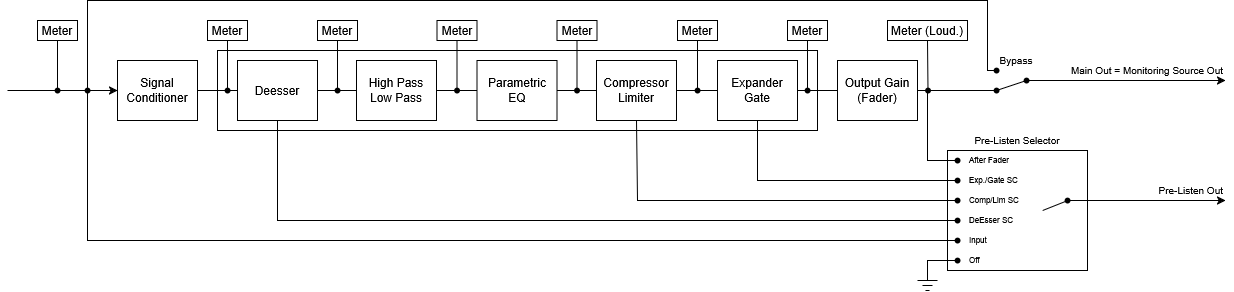
Typical Channel Strip Network Plugin Processing Sequence
-
Main Out & Monitoring Source Out:
This output is actual "Plug-In Output", switchable between processed audio and bypass signal.
The same output is also tagged as the "Monitoring Source Out", which will be routed by conductor if the Plugin Channel has to feed a Workplace Monitoring process -
Pre-Listen Out:
This output carries the selected pre-listen signal and it's the source which will be routed by conductor if the Plugin Channel has to feed a Workplace Monitoring's Pre-Listening input.
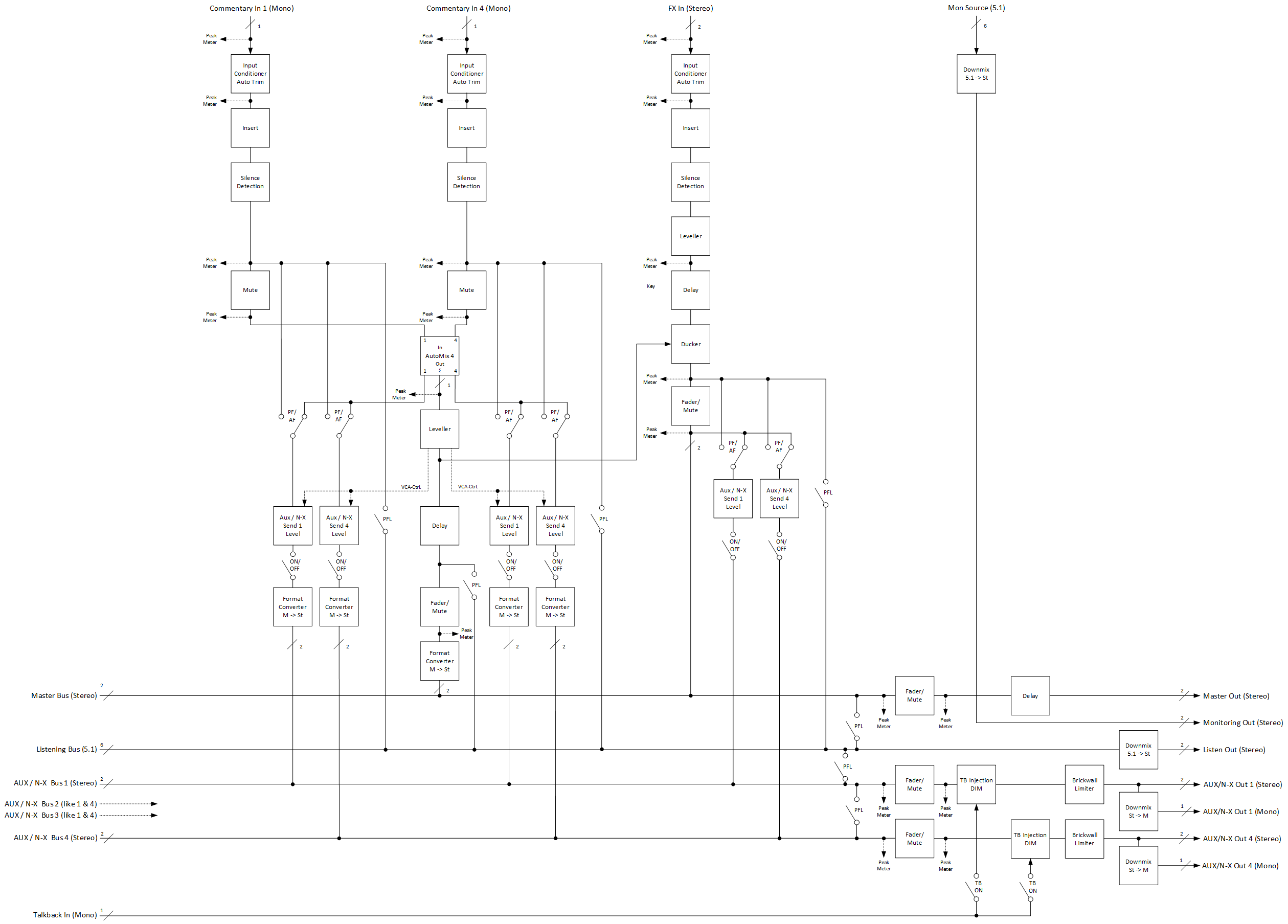
Super Plugin Voice-Over DSP Volume
The Voice-Over Processor is used to automatically control the mix levels of Commentary and FX/Program-Beds according to loudness measurements. It can be used as a pre-processing tool in front of a traditional mixing console as well as a standalone mini-mixer, feeding the mix directly to broadcast output.
The Voice-Over Process allow for 2 users to connect and having their own monitoring:
-
2 x Listening Bus with individual feeds
-
2 x Loudness-Meter with individual source selection
-
2 x Monitoring Source Output with individual selection
Stereo Voice-Over Process
The Stereo version of the Voice-Over Process is intended for broadcasters working only in Stereo.
It processes/mixes up to 4 mono Commentary voices with a stereo FX signal and mixes into a stereo Program-Out respectively a Stereo-Mix.
Each Commentator has its own N-X/AUX Master-Send, which can be used as an individual monitoring/IFB return channel.
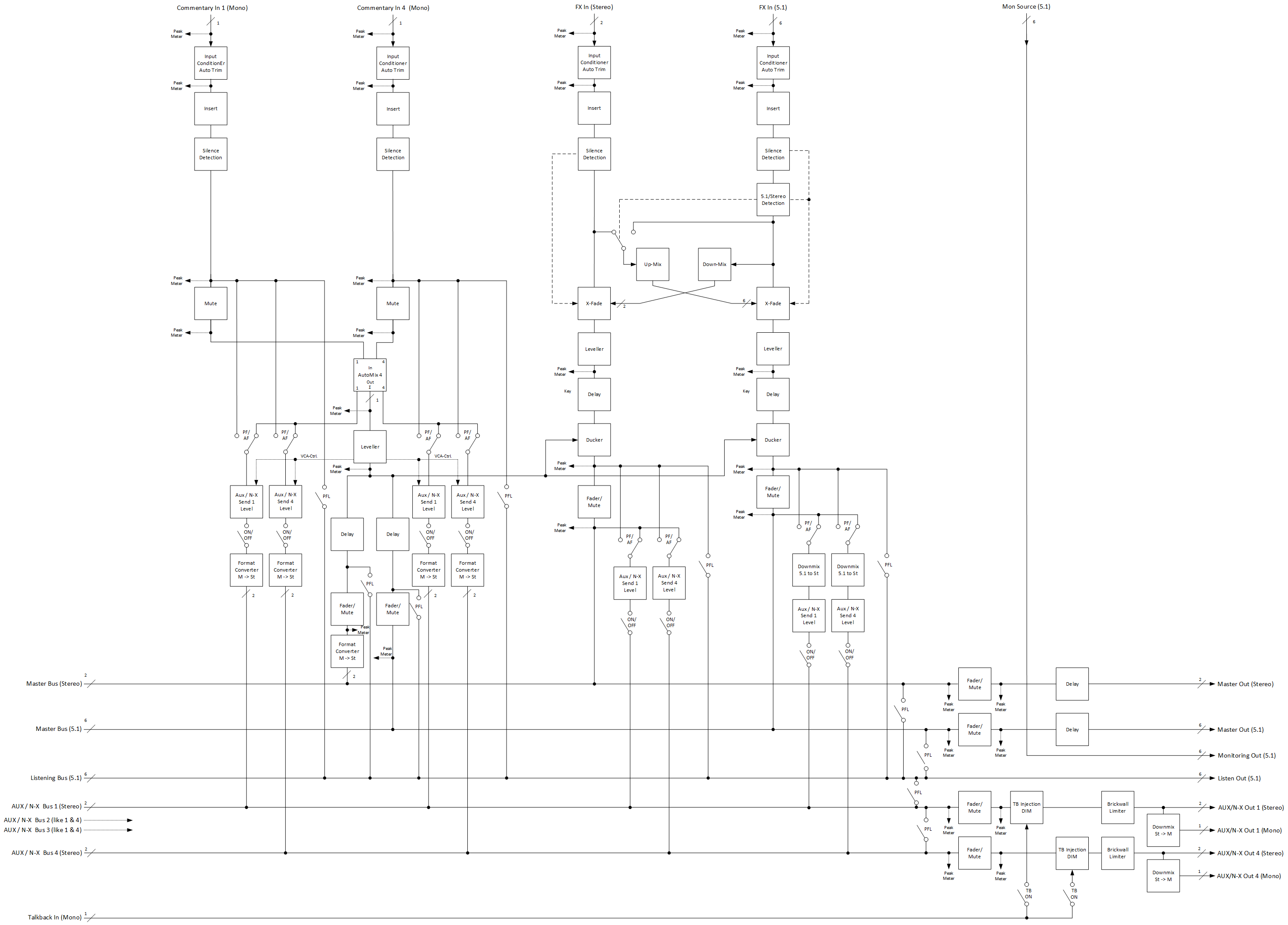
Stereo & 5.1 Voice-Over Process
The 5.1 version of the Voice-Over Process is intended for broadcasters working typically in 5.1 but alternatively also in Stereo or even both together (Simulcast).
It processes/mixes up to 4 mono Commentary voices, a stereo and/or a 5.1 FX signal and mixes into a stereo and/or a 5.1 Program-Out.
Each Commentator has its own N-X/AUX Master-Send, which can be used as an individual monitoring/IFB return channel.
Using the DSP Volume Activation
Activating an audio processing module
-
Select one DSP Volume item in the state qualified

-
Click on the

Deactivating an audio processing module
-
Select one DSP Volume item in the state active

-
Click on the
