General Questions
What is ViBox?
ViBox refers to the main software application that is deployed on the SimplyLive commercial solutions for live production that offers live switching and replay control UIs with integration to NDI graphics and audio mixers to offer intuitive and collaborative solutions for your productions.
This ViBox application is provided in the SimplyLive Production Suite Flex or RiMotion bundles.
What is RefBox?
RefBox refers to the main software application that is deployed for the Video Review interface in the SimplyLive portfolio of solutions. This software application is specific to the user requirements for video review, which includes synchronous control across all sources with pinch and zoom, clipping, frame by frame controls, etc. used for official review, coaches reviews and similar workflows.
The RefBox application is provided in the SimplyLive Production Suite Flex or RiView bundles.
What is the SimplyLive Production Suite Flex in comparison to RiMotion, RiCapture and RiView?
The SimplyLive Production Suite Flex is the most versatile commercial offering for all SimplyLive applications. This integrated production solution offers a scalable offering for live production for live switching, instant replay, graphic, audio mixing integration, playlists, video review, and more. As the “Flex” implies, this commercial offering gives you the ultimate flexibility and options to configure the system across the main production verticals. It allows live switching, replay, video review, streaming, playback and more.
RiMotion, RiCapture and RiView are commercial bundles that focus on a specific application and requirement, to offer cost effective options when focused on a particular need.
-
RiMotion: commercial bundles for instant replay for single or multiple operators
-
RiCapture: commercial bundles for ingest & playback
-
RiView: commercial bundles for video review with single or multiple operators
Technical Specifications
What is the SimplyLive logic with regards to "channels" when referencing server configurations?
The channel logic refers to the total I/O (inputs and/or outputs) for a server configuration. The inputs and outputs refer to the specific type of channel.
For example, 16CH is the total I/O - but we also take into consideration the “users vs. outputs", as we allocate 2 outputs to each user in the SimplyLive solutions. Those outputs can be whatever is needed for the production, but are more allocated for the systems processing of the users operations.
Basic rule: For 3 users, 6 outs need processing – 10 IN / 6 OUT. Internal recording of PGM Clean and PGM Dirty should also be considered as channels, since they use processing and storage resources. Therefore this calculation, with the 3 users and recording of PGM Clean/Dirty would account for 8 channels.
Are the channels switchable between input and output modes? Are there rules or restrictions to these channel configurations?
Yes, they can be configured in any form you like, but will depend on the production format, 50i / 50p / 59.94 SDR / HDR / UHD, and the users across that server – but you can split even with a maximum of 8 outputs per server, or set it to 13 IN / 3 OUT.
In UHD, you should refer to the technical specifications of the server model to determine supported configurations, since playback channels are more resource intensive than record channels. SLPS Flex Datasheets
What is the maximum number of playback channels available on SimplyLive servers?
A Backend server supports up to 8 simultaneous playback channels (PGM1 to PGM8, or PGM1 to PGM6 + AUX1 and AUX2, replacing PGM7 and PGM8). This number can be constrained by the hardware resources of the server, as reflected in the description of the server and managed with the backend licenses.
Which codecs are supported for ingest and playback?
DNxHD is the native format, and you can then transcode for ingest and export in ProRes (10-bit), XDCAM (extra license needed) and H264.
What are the typical bitrates used during ingest and playout?
This depends on the server, but the only codec we support natively on the server record train is DNx – below you see the options available based on HD / UHD / SDR / HDR:
|
Native Recording Codec |
|
|
HD 8-bit |
DNxHD 120/145/240/290 Mbps 8-bit |
|
HD 10-bit |
DNxHD 185/220/365/440 Mbps 10-bit |
|
UHD 8-bit |
DNxHR 920/1100 Mbps 8-bit |
|
UHD 10-bit |
DNxHR 1390/1665 Mbps 10-bit |
For Export the current range of codecs is much more diverse:
|
Export |
|
|
Contribution Streaming |
|
|
Streaming Formats |
RTMP, HTTP, UDP, SRT, RTP (H264) |
|
File Export |
|
|
Export of Clips or Playlists |
DNxHD MXF OP1a, DNxHD MXF OPAtom, DNxHD MOV,
|
|
Export from Live Input |
DNxHD MXF OP1a, DNxHD MXF OPAtom, DNxHD MOV, XDCAM MXF OP1a (option),
|
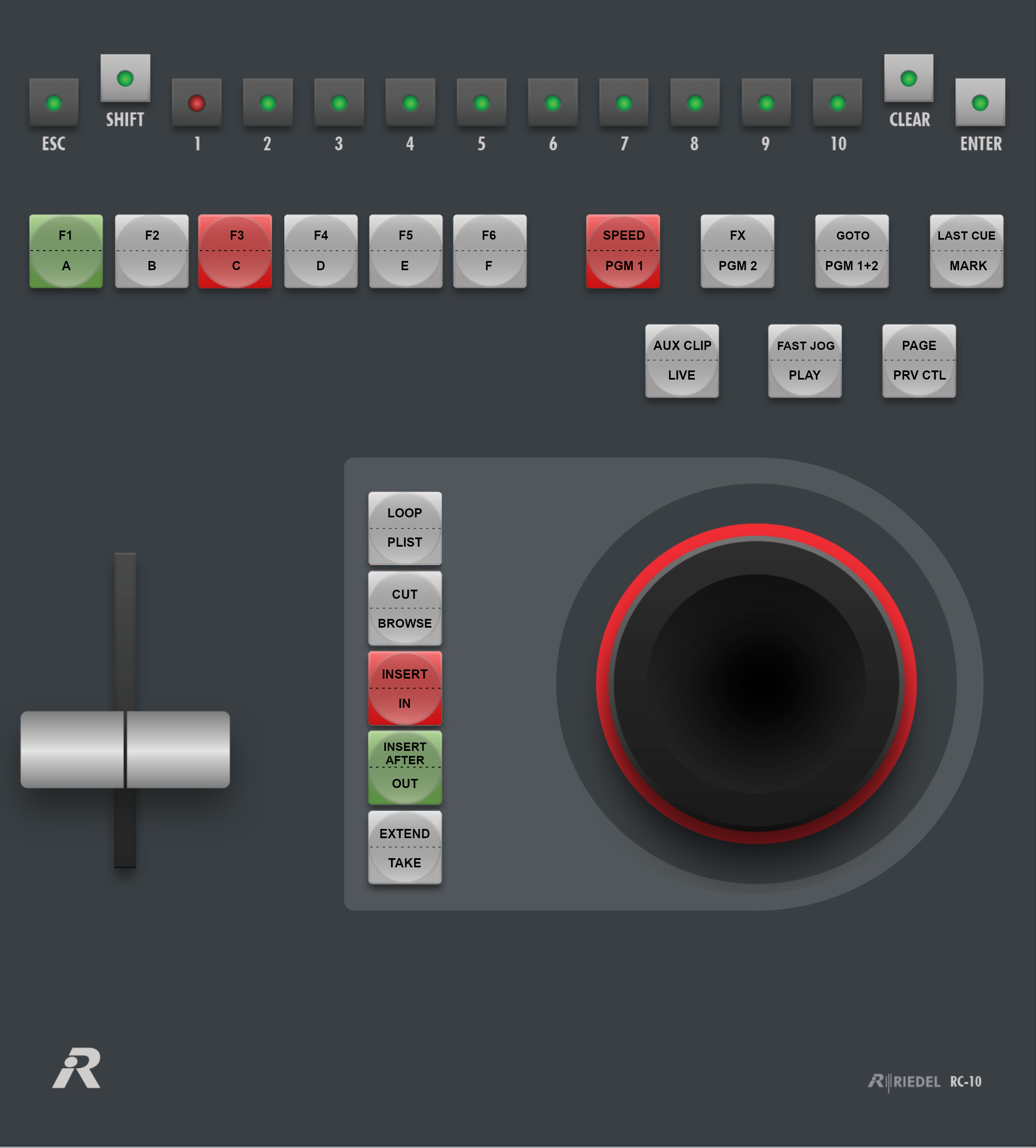
Can you explain the differences with the RC-10 and the RC-200 replay controllers?
The RC-10 is your basic operations remote controller that allows you to assign 6 shortcuts to the camera angle shift functions, but overall, it performs your expected operations. The RC-10 would be recommended for new operators or workflows such as studio shows, VT playout and editorial heavy content, where your operations are calling clips/playlists to PGMs (program outputs).
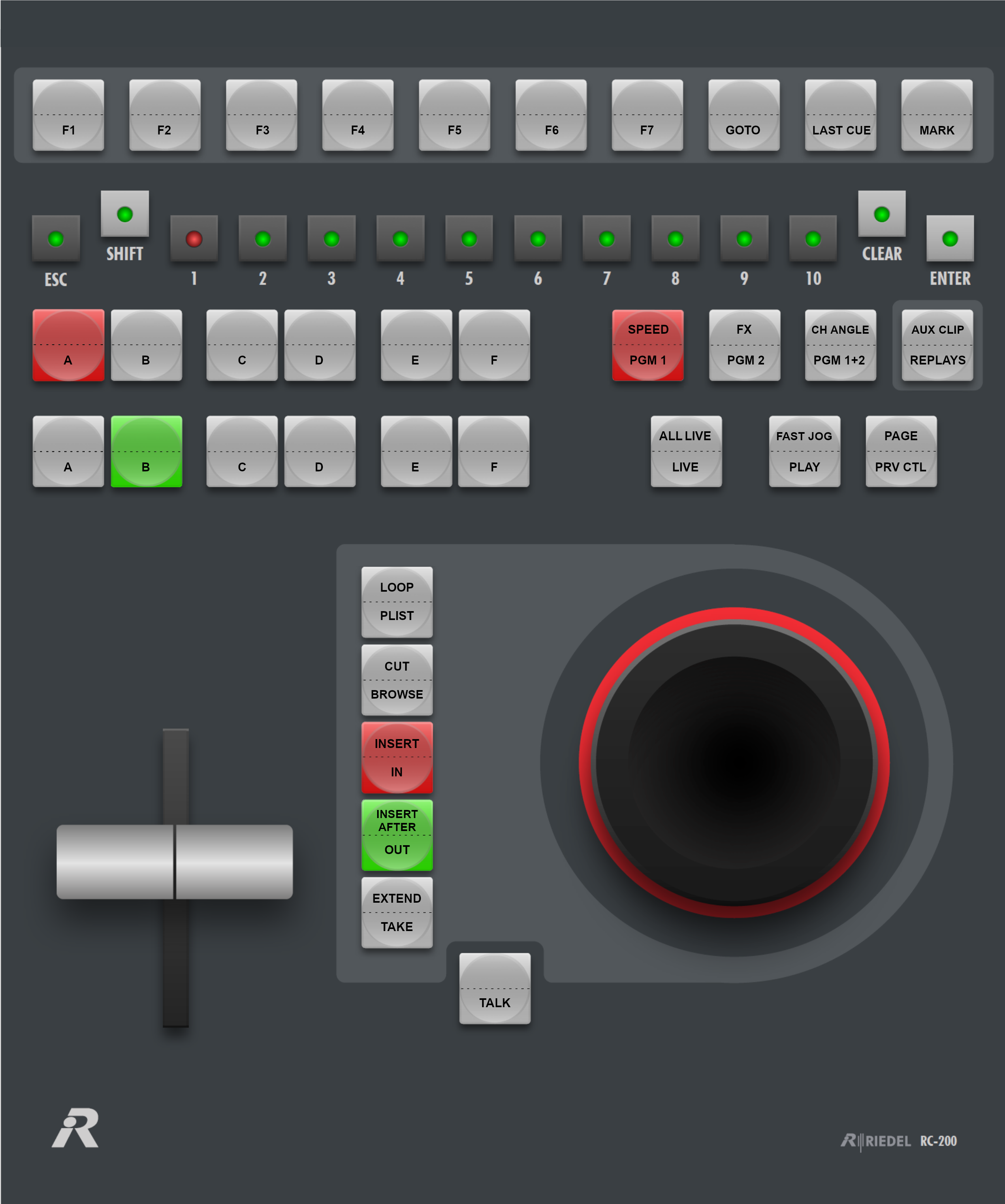
The RC-200 remote controller is the step-up from the RC-10 (replacing the legacy RC-100 controller), which offers more functionalities such as:
-
The option of 17 shortcuts to be assigned, including macros
-
Includes two rows of camera angles to output, 1 row for PGM 1 and 1 row for PGM 2 / PRV
-
Includes the best button in the industry, “Replay” to control all input angles at the same time for easy multi-cam replays.
-
Natively operates within the cloud as the remote acts as a “CALLER” to connect directly
See operational manual for details on RC-200 operation Replay Controller Operation
What is the difference between the PS-NUC and the PS-NUC-Remote units?
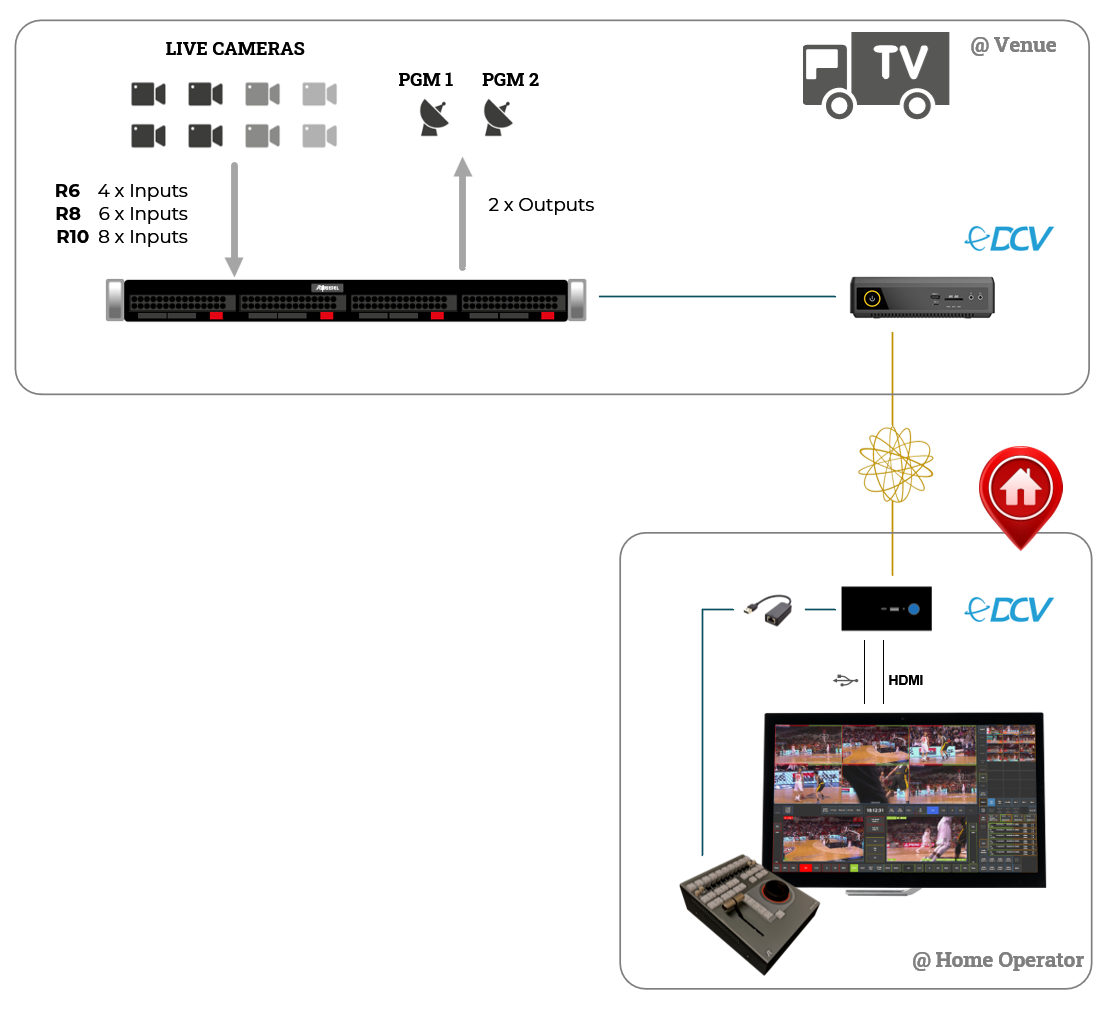
The PS-NUC is physically smaller, and economically the PS-NUC is more cost-effective. It is provided as the standard UI PC in local workflows, where the setup will typically involve a LAN architecture.
The PS-NUC-REMOTE is larger and includes a dedicated GPU card, more memory, and is typically required for workflows where the operator is in a different physical location from the server. In this remote operation scenario, the bandwidth and latency using a standard client-server network connection becomes a problem. The PS-NUC-REMOTE includes the NiceDCV server license, which is used to negate this latency and optimize bandwidth usage in this remote operation architecture.
In a typical remote production workflow, the PS-NUC-REMOTE is installed next to the Backend server with a LAN connection, and the PS-NUC is with the user, connected to the PS-NUC-Remote through a WAN connection.
Could you explain how the PS-NUC-Remote works to allow a SimplyLive operator to work remotely?
Installed on the PS-NUC-Remote is Amazon DCV server. The PS-NUC-Remote is installed by the server with a direct connection like a normal setup, and runs the SimplyLive client application (ViBox, BMR, etc).
On the operator end, the user who is remote installs “DCV Client” on their computer and remotely connects to the DCV server instance on the PS-NUC-Remote to perform operations. The Amazon DCV app acts as an optimized remote desktop app for WAN connections.
Is the SimplyLive system architecture always designed as one NUC per one remote controller?
Not mandatory, but that would be the recomended best practice.
Technically, the architecture is always such that we have one (1) ViBox Application + (1) User per remote controller. For example, ViBox running with User 1 = RC-200 #1, and then ViBox running User 2 = RC-200 #2.
For specific workflows, it is possible to attach 2 remotes to 1 ViBox UI, where the first remote typically controls only the first PGM, and the second remote controls the 2nd PGM/PRV channel, both remotes being operated by the same person. Each ViBox UI position requires its own host PC.
With RiMotion servers, one (1) ViBox user can run directly on the Backend server without using the NUC, but any additional ViBox users would require its own NUC.
In the SimplyLive Production Suite Flex, each ViBox UI runs on a dedicated NUC to ensure proper performance and reliability.
Can a single remote controller manage more than two program outputs — for example, up to four independent program channels?
No, one remote controller can manage 2 outputs = 1 PGM and 1 PVW / two PGM in the backend software.
If you need to control more than 2 outputs by a single operator, you can user the VDR Panel web application, that allows control for up to 8x output channels from the same UI.
Can we have more than two remote controllers connected to the same server?
Yes, the remote controllers connect to the ViBox application, not the server. The remotes connect over IP so allocation and routing of control to application is managed via the IP address. There is a maximum of 3 users possible per backend/server instance.
Can we configure the system so that a replay operator controls only one program output instead of two for smaller productions?
No, each user requires two outputs (PGM & PVW/PGM2) resources from the backend server. Technically, you can configure the server to only output a single PGM out, but the second output source will still be running and consuming resources on the backend.
What is the maximum UHD configuration achievable on the SimplyLive platform both in SDR and HDR modes?
The UHD configurations depend on the server model and software licenses installed. There are several options for UHD across the SLPS Flex, RiMotion and RiCapture offerings.
SLPS Flex options for UHD:
UHD HDR: Up to 8 Channels (8 IN + 0 OUT, or 6 IN + 2 OUT)
UHD SDR: Up to 12 Channels (12 IN + 0 OUT, 10 IN + 2 OUT or 8 IN + 4 OUT)
RiMotion options for UHD:
UHD HDR: R84 (2 IN + 2 OUT) & R166 (3 IN + 2 OUT)
UHD SDR: R84 (2 IN + 2 OUT) & R166 (4 IN + 2 OUT)
RiCapture options for UHD:
UHD HDR: i44 & i84 (4 IN + 0 OUT, or 2 IN + 2 OUT)
UHD SDR: i44 & i84 (4 IN + 0 OUT, or 2 IN + 2 OUT)
In models like the RiMotion R166, where both HD and UHD inputs are available. does this mean that HD and UHD feeds can be mixed?
No. The system offers the flexibility to work on HD or UHD, but it must be in one format or the other for a given production.
What is the maximum number of ingest channels supported in RiCapture or SLPS Flex across a network of servers?
For pure ingest applications, video content is ingested and recorded locally on each server and exported from each server to its destination (usually networked attached storage). Therefore, there is no need to create a “real-time video network” like you would with ViBox for replay applications, where you want to access any live input in real time across the network, to any playback channel. Therefore, in such a pure ingest workflow, there is no limit to the number of ingest channels in a SimplyLive multi-server setup.
SimplyLive Software
In the SLPS ViBox Production setup, can we use a single server to handle multiple roles simultaneously? For example, live switching, plus two replay operator positions, while at the same time exporting or ingesting media to a NAS?
Yes, this is one of the key differentiators and strengths of the SimplyLive solution to offer an integrated production platform to address all these functions from a single server engine.
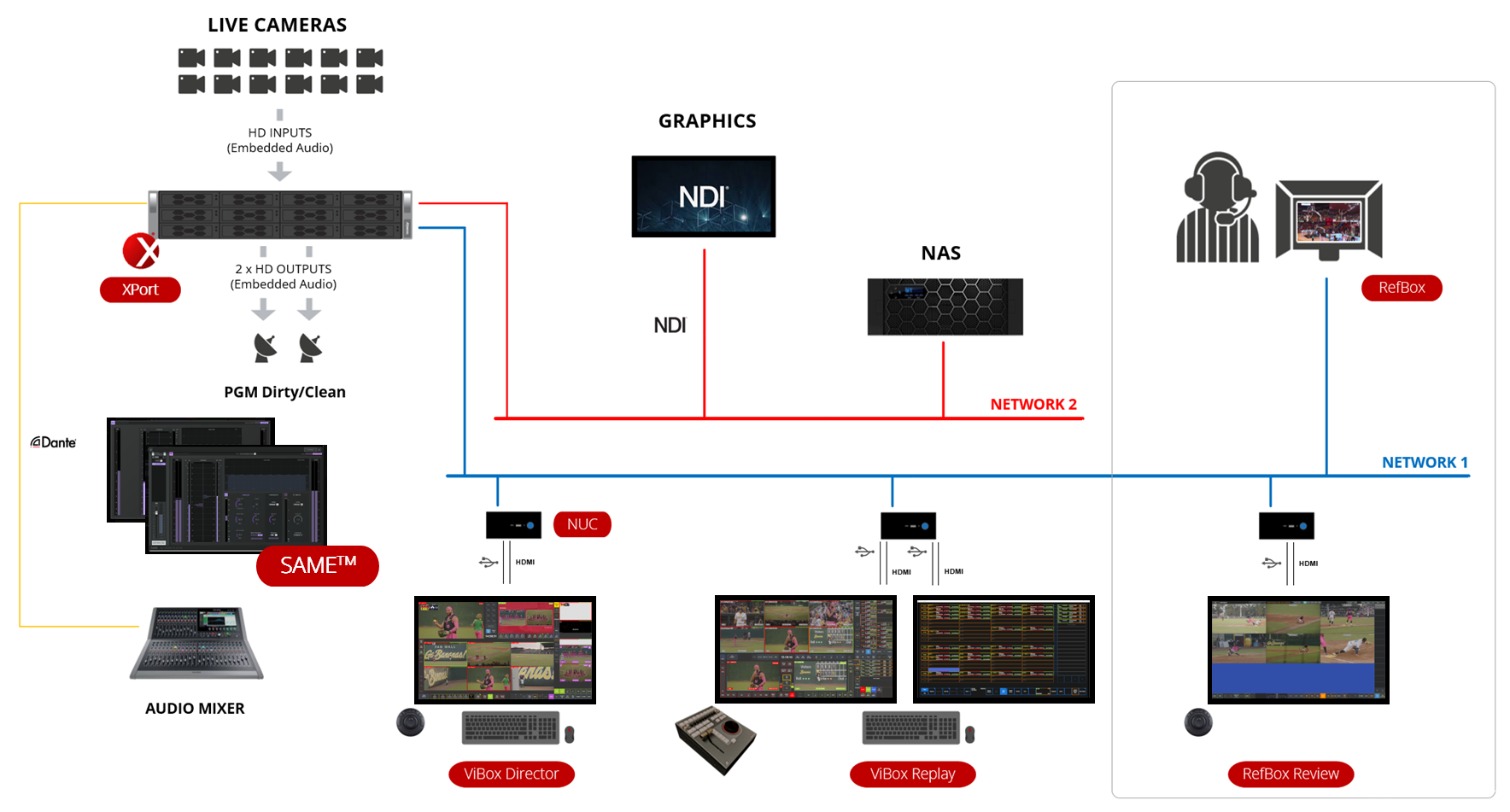
You can have up to 3 users per server, with each of the users in the Flex ViBox model licensed for the option to be ViBox AIO (Director/TD), or ViBox replay, or RefBox video review. It can be 3 users across these disciplines:
-
ViBox Director + 2x ViBox replay
-
ViBox Director + ViBox Replay + RefBox Video Review
-
3x RefBox Video Review operators/officials
-
3x ViBox Replay operators.
At the same time, you can be using XPort to send clips to NAS and/or BMR to send PGM records to NAS, etc.
The bandwidth limits will be determined on formats and server power. For example, the most powerful configuration for AIO (All-In-One production) will manage a live production with up to 14 cameras in 1080p HDR with 3 users (such as 1 director and 2 slomo operators).
Can the system trigger graphics (GFX) elements through NDI (e.g. sending score bugs or lower thirds from an external graphics engine into the production stream)?
No, external NDI GFX are normally triggered by the 3rd party application. SimplyLive can only trigger imported graphics files to the ViBox application, that would be local to the operation. External graphics coming from 3rd party applications can be connected as NDI feeds (max. 2 external NDI feeds) to the Simplylive server and keyed on any video output channel of the server with several types of transitions, and possible scenario-based automation.
Does XPort operate as an independant application module? How does the XPort application fit into the SimplyLive ViBox solution?
Yes, XPort is an independent software application. The XPort application allows you to export clips and playlists created by ViBox or VDR Panel users, based on user-defined export profiles. In these profiles, you can select the codec, format, audio configuration (which can be set differently for specific inputs), the naming and location of the file you want to export. Once created, these profiles can then be triggered with the ViBox or VDR panel applications to initiate the export or triggered from the XPort application itself.
Also, the features available with XPort will also be integrated within the new SSE web app, where you can create more profiles, create auto export rules and can also export clips from another server across the network.
Does BMR operate as an independent application module seperate from the XPort application?
Yes, the BMR application is used for master recording and file streaming in a dedicated module separate of the XPort.
How are BMR and VDR Panel used for ingest & playback workflows?
BMR has the capabilities to record out to multiple target sources (up to 10) at the same time, as well as streaming to OTT platforms, all from the click of one button! The added value of the BMR solution is the local loop recording of all sources prior to streaming off to attached storage. This adds another layer of redundancy to your critical recordings.
VDR Panel is used for playback, with flexible output configurations to control up to 8x outputs for quick turnaround of inputs for delayed playback, creating clips and playlists, and loading them for playout or ganged playback of channels for monitor walls and other similar playback workflows. The VDR Panel is a lot more basic that the ViBox Slomo application, but similar functionalities are possible for sports and non-sports scenarios.
Can files be imported or exported without either XPort or BMR, or are one of these components mandatory for file-based media exchange?
The ability to import is inherently part of the SimplyLive Backend server and can be accomplished with or without the ViBox application. Importing can be triggered via the ViBox UI (manual import) or directly managed by the Backend server through one or multiple watched folders via an auto ingest implementation.
Exporting from the Backend requires either XPort (for clips and playlists exports) or BMR (live feeds exporting/streaming) to be licensed when using the ViBox applications.
Note that with RefBox, clip exporting to files is managed directly by the RefBox application via the Backend server, therefore the XPort app is not required with the RefBox.
Can BMR recorded files be segmented automatically (e.g. every 30 minutes with 1-minute overlap) to support fast access for post-production as an option to avoid very large, long files?
Yes, BMR offers this option of “chunk record” if you wanted to create these segmented files. The settings allow you to select the chunk/segment duration and the overlap duration.
Can the system simultaneously export streams, import files from NAS, and archive or export finished media back to NAS, all while operating in live production mode?
Yes, all possible at the same time within the SimplyLive Production Suite with ViBox, Xport and BMR applications working simultaneously.
Is multi-format export or streaming possible? For example, simultaneously recording a UHD stream and an HD stream from the same machine using two different codecs?
You are able to ingest/export in multiple formats at the same time with the options for 1 “high-bitrate” format (DNxHD, ProRes 10-bit or XDCAM) and 1 “low-bitrate” format (H264) from the SimplyLive backend server.
But, you cannot mix the resolutions, as the server must be configured as either HD or UHD and as SDR or HDR, so your formats must fit within that set resolution of the server.
Do SimplyLive systems offer a delay function for time-zones or censorship type workflows?
Yes, there is a built-in delay function available in the ViBox and VDR panel applications to quickly set a delay for the playback channel(s). You can also take advantage of the playlist editing features to edit the program and remove or add sequences to the playback.
Can the same playlist be loaded on two different outputs to allow for editing while playing back?
Yes, the same playlist can be playing back from one output, while also being recalled on another output for continued editing while playing.
What is the MultiBrowse option and how is it different from the VDR Panel, BMR or other similar applications?
MultiBrowse is a web-based application that allows the user to view any of the live ingest sources across one or multiple Backend servers and browse back synchronously across all visible feeds to mark segments of those feeds and export those selected sequences to files on connected storage.
It is a remarkably simple and intuitive UI designed for non-technical people to review and select content to send to other destinations. You can achieve the same with ViBox or VDR Panel, but these are more complex UIs, also intended for playback control. With BMR, you can also do multi-camera export from live inputs, but you do not have browsing capability. MultiBrowse is a licensed add-on that is available in SLPS Flex or RiCapture.