
General
|
Term |
Description |
|---|---|
|
Cluster Setup |
A set of one or multiple Nodes (servers, computers, virtual machines) working together as a single system. Multiple Nodes can provide high availability to a server setup. |
|
FQDN |
Fully Qualified Domain Name |
|
High Availability Mode |
If a Server Setup consists of three nodes, it can provide high-availability as it is protected against the failure of one of these nodes. |
|
Node |
Each single node can be a server, a computer or a virtual machine. |
|
RR |
RTCP Receiver Report |
|
RSM |
Riedel Software Manager |
|
RTCP |
Real-time Transport Control Protocol |
|
RTP |
Real-time Transport Protocol |
|
Server Configuration |
Specifies the application and its configuration parameters, which can then be installed on a Cluster Setup. |
|
Server Setup |
A set of one or multiple Nodes (servers, computers, virtual machines) working together as a single system. Multiple Nodes can provide high availability to a server setup. |
|
SR |
RTCP Sender Report |
|
SSRC |
Synchronization Source |
|
UI |
User Interface |
|
Node File |
A file containing all required software packages to create a Cluster Setup on nodes which have been prepared with the factory default setup of an operation system only. |
|
Suite File |
A file containing all required software packages for the application specified in a Server Configuration. |
|
Host |
Hardware Platform which is connected on the IP network.
For example:
Note: A host corresponds to an AWMA NMOS Node. |
|
Discovery |
Process by which Hosts are discovered over the IP network. |
|
Riedel Discovery |
Process by which Hosts are discovered over the IP network using the Riedel Discovery protocol. |
|
NMOS Discovery |
Process by which Hosts are discovered over the IP network using NMOS IS-04 mechanisms. |
|
NMOS Host |
Any media device that runs NMOS-enabled software and participates in the Networked Media Open Specifications (NMOS) ecosystem by making its resources and services discoverable and manageable over a network. Refer to AMWA NMOS. |
|
NMOS Device |
NMOS specifications, such as IS-04 for discovery and IS-05 for connection management, allow different manufacturers' devices to automatically discover each other, register their capabilities, and establish media connections on an IP network, facilitating easier system integration in broadcast and AV environments. Refer to AMWA NMOS. |
|
Network Scope |
Represents a section of an IP Network that is configured in such a way that Hosts having network interfaces within this Network Scope can communicate with each other; they have IP connectivity. For example, networks can be segmented into the following Network Scopes:
|
|
Packet Time |
The duration of the audio data captured and transmitted in a single digital packet over a network. See https://en.wikipedia.org/wiki/AES67 for more information. |
STAGE
General
|
Host Type |
The Host Type establishes the driver(s) STAGE uses to communicate with the Hosts and the corresponding features that are available in STAGE to support a given Host Type. |
|
Discovered Host |
Host that has been discovered over the IP Network and is visible to a STAGE instance. |
|
Registration |
Process by which a Host is added to a STAGE instance so it can be managed by STAGE. |
|
Registered Host |
Host registered to a STAGE instance. A Registered Host will appear in Discovered Hosts in other STAGE instances, but cannot be registered in another STAGE instance.
|
|
Unmanaged Host |
Host that STAGE cannot discover nor control. |
|
Location |
Locations are metadata representing actual physical locations of equipment in a system managed by STAGE. Locations can be arranged in a Tree structure. Hosts, Hardware Devices, and Virtual Devices can be assigned to a Location to simplify finding them in larger systems. For example: Amsterdam, Studio 1, France, Control Room 2, Ground floor. |
|
Host Configuration |
Basic, non-operational configuration settings specific to a Host. For example: IP Address, PTP Settings. |
|
Matching [a Host] |
Refers to the process of assigning a Discovered Host to a Prepared Host. The Prepared Host instance then becomes a Registered Host. |
|
System Resources |
A Class of Devices and Hosts that are used in System Commissioning, representing physical realities of the system STAGE is controlling. The Types of System Resources are:
The counterpart to System Resources are Job Resources (see below). |
|
(System) Hardware Device |
The I/O Structure and the available features on a Host. Simple Hosts (for example, an MNIP SDI/IP Gateway) will present only one Hardware Device with the Inputs and Outputs of the Gateway. Complex Hosts might expose multiple Hardware Devices. For example, a Riedel SmartPanel through NMOS will expose the Audio Monitoring App and the Control Panel App as separate Devices. The I/O Structure is defined by the Host and cannot be edited. Note: A Hardware Device corresponds to an AMWA NMOS Device. |
|
(System) Virtual Device |
Virtual Devices are used to represent elements of the real world. For example, a Mono Microphone. It is an I/O Structure of a set of features that are not directly visible to STAGE through Hosts. By creating Virtual Devices and mapping their I/O structures to Hardware Device I/O structures, you can create abstract elements you can use for Signal Management and other Workflows. |
|
This term is not used in STAGE; it is only used in this glossary. |
Representation of the Audio/Video Input/Output structure of a Hardware Devices or Virtual Devices. A Device I/O Structure is a hierarchical representation composed of Prosumer Groups, Prosumers, and Legs. For example:
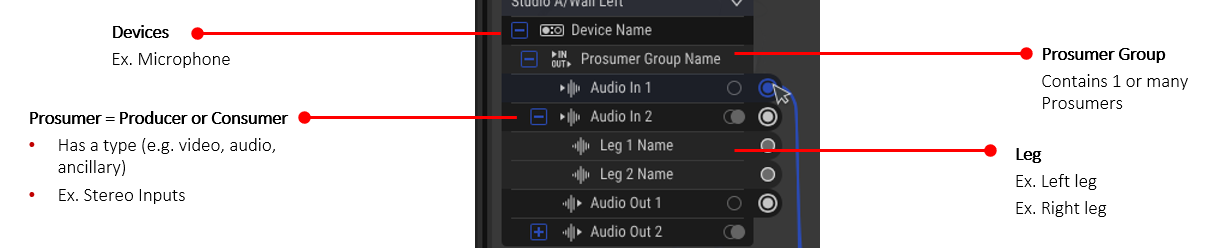
|
|
Producer |
A Producer represents one or more channels that are created on a Host and each channel is represented as a leg. Note: This is the equivalent of an AWMA NMOS Sender, although not every Producer directly corresponds to a Sender on a Host. |
|
Consumer |
A Consumer represents one or more signals that are to be received on a Host and can have one or more legs. Note: This is comparable to AWMA NMOS Receiver, although not every Consumer actually corresponds to a Receiver on a Host. |
|
Leg |
A discrete channel in a Producer or a Consumer. Note: This corresponds to an AMWA NMOS Channel in IS-08. |
|
Prosumer |
Abbreviation referring to either a Producer or a Consumer. |
|
Prosumer Group |
A group of one or many Prosumers. Used to organize Prosumers in Devices. |
|
Prosumer Type |
The signal type of a Producer or Consumer. For example, this can be one of Video, Audio, or Ancillary, when supported. |
|
I/O Mapping |
Association of a (System) Hardware Device and a (System) Virtual Device. The Mapping is stored on the leg level, and individual Legs of a Virtual Device Prosumer can be mapped to Legs of Hardware Device Prosumers. |
|
Unmanaged Device |
I/O Structure of a set of functionalities present by an Unmanaged Host. Since an Unmanaged Host cannot be controlled, the Unmanaged device it provides can only have producers. Since an Unmanaged Host cannot be discovered, the I/O Structure of the Unmanaged device is manually defined. |
|
Workplace |
A special type of a Location that contains devices that are meant to be used by an Operator. |
Job Management
|
Job |
Overarching configuration of a production event. All Configuration of Devices, Connections, that is specific to a production or an event lives inside a Job. For example, a Job can be named for it production: “News Hour” or “Phantom of the Opera”. |
|
Operator (also known as a Job Participant) |
Representing a person participating in a live Production. For example, Video Mixer Operator, Audio Mixer Operator, Video Shader Operator, or Replay Operator. |
|
Job Resource |
Describes everything that can be put in a Job, such as Roles, Members, Job Devices and Applications. |
|
Role |
Categories of people that participate to Productions. Roles are used to create Members. For example, Technical Directors or Audio Engineers. |
|
System Roles |
Roles global to entire STAGE instance. System Roles are available to all Jobs of a STAGE instance and typically represent categories of people in the environment where STAGE is used. For example, Audio Engineers or Technical Directory. |
|
Job Roles |
Roles created for a specific Job. Job Roles can be added to a specific Job, if for a specific Job the globally defined System Roles are not sufficient. For example, Space Field Reporter. |
|
Member |
Represents a single participant in a Production Event. A Member always has a Role, and a Job can consist of multiple Members of Multiple Roles. For example, Technical Director, Audio Engineer 1 (A1), Camera Operator 1, Camera Operator 2. |
|
Job Device |
Device created inside a Job. A Device can belong to a Member or to a the Job itself. Job Devices can be divided into:
|
|
Job Virtual Device |
Device created in a Job corresponding to a System Virtual Device. This involves adding Microphones, Line Ins, and so on to a Job Member or the Job itself. |
|
Job Hardware Device |
Device created in a Job corresponding to a System Hardware Device. For example, adding an NSA-Box to a Job Member or the Job itself. |
|
Application |
A piece of processing software designed to perform specific tasks or functions in a Job. An Application requires a Host to run when the Job is activated. For example, a JPEG-XS APP or an Audio Mixer APP. |
|
Job Setup |
Process by which Job Resources are added to a job and configured. |
|
Job Adoption |
Plan that defines which System Resources are chosen for each of the Job Resources of a particular job. Job Adoption is split in two parts:
While a Job can have multiple Adoptions, only one Adoption can be loaded at the same time. |
|
Manual Adoption |
Process by which a User responsible for a Production event has to manually select the System Resources to use for each Job Resource. |
|
Automatic Adoption |
Process by which STAGE is able to identify and select the Hosts to run the Job Resources from. For example, the automatic selection of the Audio Mixer App on SAME Engine Host. |
|
Job Activation |
Process by which the User responsible for a Production event indicates that the Production event is starting. The Job Adoption plan is executed upon Job Activation. For Example, “News Hour” triggers the Adoptions of “Studio A” and “Studio B”. |
System Management
|
System Management |
Category of tasks that include the adjustment of settings global to the entire STAGE instance. |
|
License Management |
STAGE uses licensing to make certain features available for use. An overview allows you to see what licenses are available and know the quantity of licensed features currently being used, any expiry time warnings for time specific licenses. |
|
License Verification |
STAGE must validate the authenticity of a license before applying it. |
|
License Option |
Optional features can be electronically enabled through a licensing scheme. For example, one or more feature can be made available for a given time period or in a permanent fashion. One or more licenses can be applied to STAGE to make one of more features available for use. |
|
System Settings |
Global settings for the STAGE platform (core application). |
|
Product Settings |
Settings for the individual applications that are part of the STAGE product portfolio. |
User Management
Category of tasks that include the management of Users and User Groups, as well as the setup of connections to Identity Providers or to User Directories.
|
User |
A specific individual, who has potential access to any part of STAGE. A user may be part of of one of more User Groups. For example, John Smith. |
|
Local User |
A user who is onsite and is using the local network to connect. |
|
Remote User |
A user who is offsite, and has to connect from the World Wide Web to STAGE though a firewall. |
|
User Group |
A named collection of users who share a common goal or job category within an organization. Members of the User Group (Users) can be managed as a unit with regards to their collective permissions to certain features, configuration pages, and so on. |
|
User Directories |
STAGE’s database that stores Users and User Groups for managing access to STAGE. This database manages User credentials, roles (User Groups), and permissions. |
|
Identity Providers |
An external service that creates, stores, and manages digital user identities. |
|
Permission (or Access Level) |
Determines a User’s or User Group’s access to use certain features, configuration pages, and so on. |
System Health
A category of tasks that include the review of Events and monitoring of Live Metrics collected from managed devices and services.
|
Events |
STAGE flags and logs anomalous operations as events. These logs can be reviewed for troubleshooting purposes. |
|
[Live] Metrics |
Live measurement data. |