
The following Registration details apply to SAME only.
Unmanaged Host
An unmanaged host represents in STAGE a device that STAGE is unable to configure or control. However, this host can send and receive AES67 audio stream(s). These types of devices must be added through one of the following methods:
-
Manually to add their audio stream IP addresses.
-
Using the device’s SDP file.
Once an unmanaged host has been added to STAGE:
-
It is understood that the audio stream IP addresses will not change (remain static).
-
The STAGE network ports for the Host must be configured in Configuration. It is important to set the Network Scope for each Host Ethernet connection. See chapter Host Configuration.
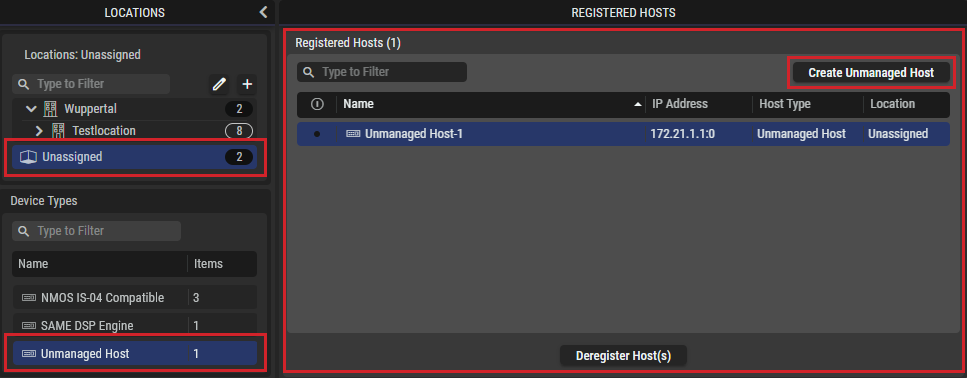
|
Create Unmanaged Host |
Click to add an unmanaged host. Create Manually: Use the device’s static stream IP addresses that have been previously configured on the device by adopting them into STAGE as named audio streams. This adds the host as an Unmanaged Host to STAGE. Create From SDP File: Use the host’s SDP file to add the host as an Unmanaged Host to STAGE. |
|---|
Manually Create an Unmanaged Host
This option assigns the device’s static stream IP addresses that have been previously configured on the device by adopting them into STAGE as named audio streams.
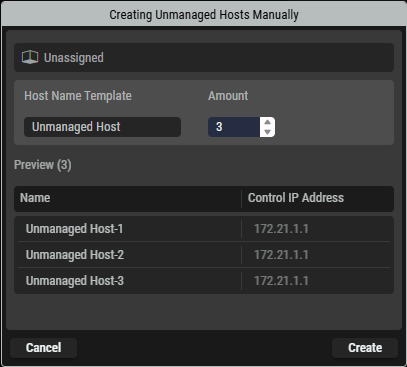
|
Host Name Template |
Set the name by which this unmangaged host will be known by throughout STAGE. |
|---|---|
|
Amount |
Set the number of audio stream interfaces the host supports / that you want to use. |
|
Name |
Shows the automatically generated name for each audio stream by which it will be know by throughout STAGE. |
|
Control IP Address |
Set the static unicast Control IP Address of the unmanaged host. |
Create an Unmanaged Host through its SDP File
This option uses an SDP file that has been generated for the device to make the device’s streams available in STAGE.
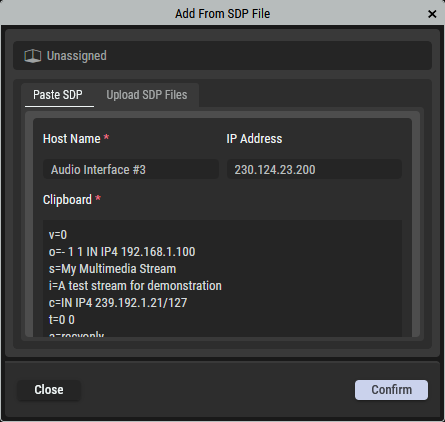
By Pasting an SDP File’s Contents
In the Paste SDP tab, copy the SDP file contents and paste it into STAGE.
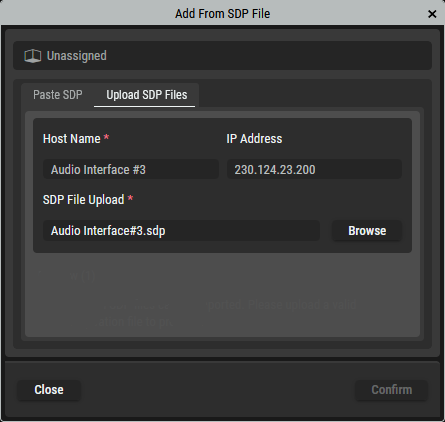
By Uploading an SDP File
In the Upload SDP Files tab, find the device’s SDP file on your filesystem and upload the file into STAGE.
|
Host Name |
Set the name by which this unmangaged host will be known by throughout STAGE. |
|---|---|
|
IP Address |
Set the static IP address for the audio stream. |
|
Clipboard |
Paste into this field the contents of the device’s SDP file. |
|
SDP File Upload |
Click Browse to find and select the device’s SDP file on your PC’s filesystem. |
|
Close |
Click to cancel this operation. |
|
Confirm |
Click to proceed. |