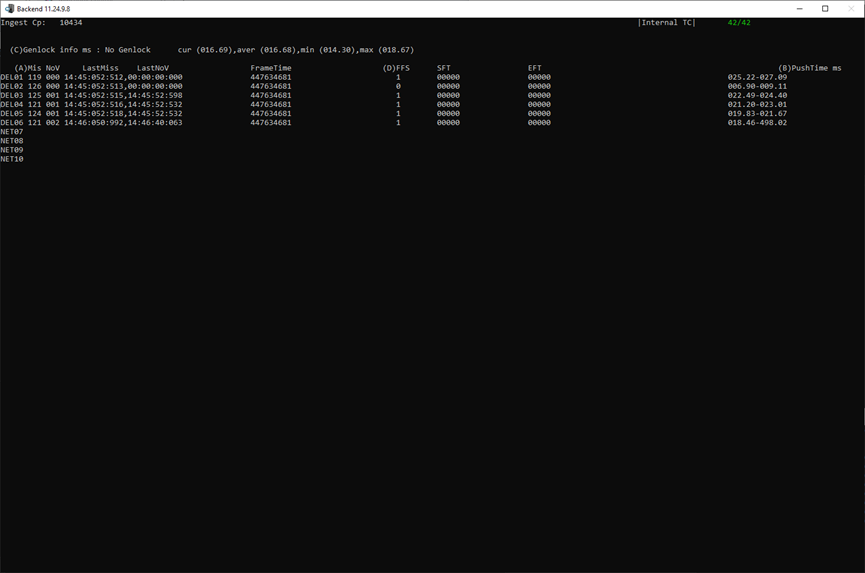
How to Navigate in the debug screen
-
You can navigate to next and previous page with the left and right arrow keys
-
You can display the name of all pages by clicking of TAB
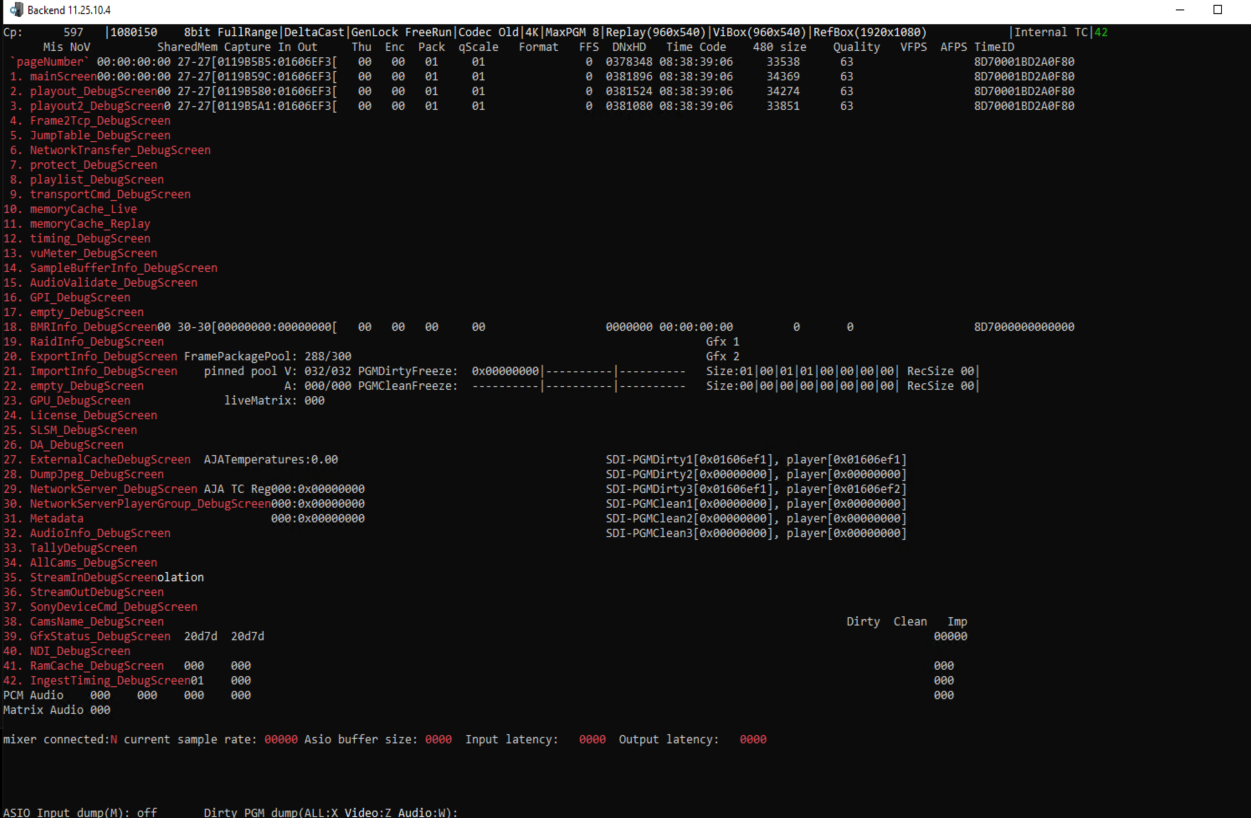
-
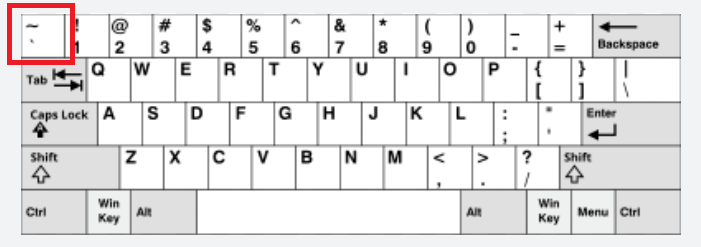
You can go directly to a specificific page by using the following steps
-
Type “`”
-
Type the number of the page “xx”
-
Type “`”
-
-
You can go directly to page 1 by double clicking on “`”
MainScreen 1/42
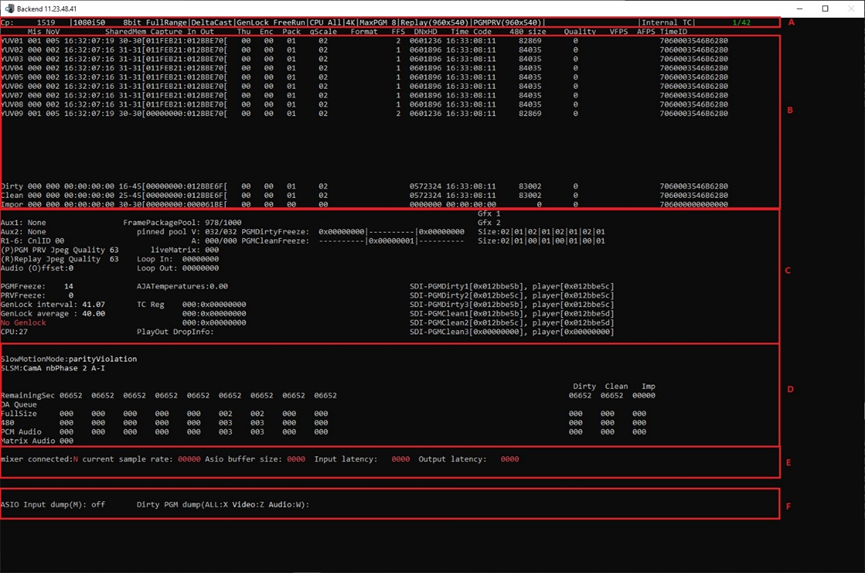
For A part:

|
No. |
Parameters |
Description |
|---|---|---|
|
① |
Cp |
Displays the number of frames that have been ingested. |
|
② |
1080i50 8bit |
Displays ingest format from webconfig configuration. |
|
③ |
FullRange |
Or ShorterRange. (It depends on the value of “VideoFullRange” from hardware.ini) VideoFullRange=1, it’s FullRange VideoFullRange=0, it’s ShorterRange |
|
④ |
DeltaCast |
Displays board type (It depends on the value of “Card_Type” from hardware.ini) Card_Type=0, it’s AJA Card_Type=3, it’s BlackMagic Card_Type=4, it’s DeltaCast Card_type=7, it’s Magewell |
|
⑤ |
GenLock |
FreeRun or External. (It depends on the “video reference” parameter of the webconfig page.) FreeRun, it uses the genlock of the board, apply to AJA and DeltaCast. External, it uses the external genlock. |
|
⑥ |
CPU |
ALL (It means that all cpus of the machine are made available to BE.) |
|
⑦ |
4K |
Display the carrying capacity of the machine. (It depends on the value of “ServerType” from hardware.ini) |
|
⑧ |
MaxPGM |
8, Display the machine can run 8 PGM. |
|
⑨ |
Replay(960x540) |
Display the resolution of REPLAY. |
|
⑩ |
PGMPRV(960x540) |
Display the resolution of PGMPRV. |
|
⑪ |
Internal TC |
Or External TC. (It depends on the “Timecode Input” parameter of the webconfig page.) Internal TC, embedded time code. External TC, external time code. |
|
⑫ |
1/42 |
Debug current page number /Debug total page number. Press “`” and numeric page number. Then press “`”, can jump directly to the corresponding page. Press “<--” or “-->”, can turn forward page or backward page. |
For B part:
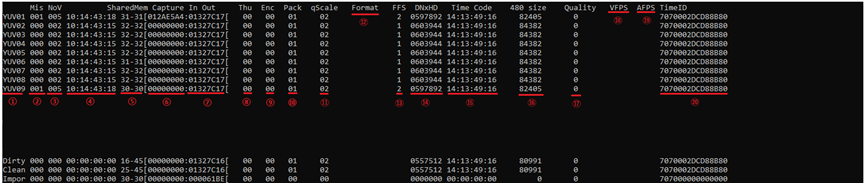
|
No. |
Parameters |
Description |
|---|---|---|
|
① |
YUV01 YUV02 … YUV09 Dirty Clean Impor |
Input type. (It depends on the “Type” parameter of the Servers Channels in webconfig page.) When Type is SDI, display value depends on the value of “Card_Type” from hardware.ini. Card_Type=0, show AJA; Card_Type=3,show BM; Card_Type=4,show DEL. When Type is NDI, show NDI. When Type is RTP, show RTP. When Type is SRT, show SRT. When Type is UDP, show UDP. When Type is RTMP, show RTM. When Type is INTERNAL, show Loc. When Type is FILE, show YUV. When Type is QUAD, show Qud. When Type is SNICKO, show Snc. When Type is ST2110, show MEL. |
|
② |
Mis |
The number of frames that were dropped when the input signal was too fast or the program was too slow to process it. |
|
③ |
NoV |
The number of frames missing if the input signal is too slow or the program is too fast.If no signal comes in, this value will keep increasing. |
|
④ |
|
The last frame timecode that was dropped for “Mis” parameter. |
|
⑤ |
ShareMem |
It means a linked list between programs within a BE suite, The value here indicates the number of remaining linked lists. |
|
⑥ |
Capture In |
Write to the disk starting block of the storage. |
|
⑦ |
Capture Out |
Write to the disk end block of the storage. |
|
⑧ |
Thu |
Thumbnail. JPG compressed linked list length, 0 means no cache, real-time compression. |
|
⑨ |
Enc |
GPU encoding to CPU pack, the length of the linked list used. |
|
⑩ |
Pack |
Reserve 2 frames of LIVE data in shared memory for live playback. |
|
⑪ |
qScale |
The complexity of a high-quality resource, A high value means that the program needs to be compressed multiple times to meet DNxHD standards. |
|
⑫ |
Format |
The format of the streaming media incoming signal. |
|
⑬ |
FFS |
Full frame sync, Synchronization between different cameras. |
|
⑭ |
DNxHD |
High quality size after encoding, here referring to the data before pack. |
|
⑮ |
TimeCode |
When the external time code is not used, the native machine time is used as the internal time code, The value is the time code of the incoming frame. |
|
⑯ |
480 size |
JPEG size after encoding |
|
⑰ |
Quality |
The picture quality of JPEG, 0 to 100, should be 63, which controls the bit rate of JPEG encoding for low-res. |
|
⑱ |
VFPS |
When streaming input, how many frames per second of the video. |
|
⑲ |
AFPS |
When streaming input, how many frames per second of the audio. |
|
⑳ |
TimeID |
Timestamp for each frame. |
For C part:
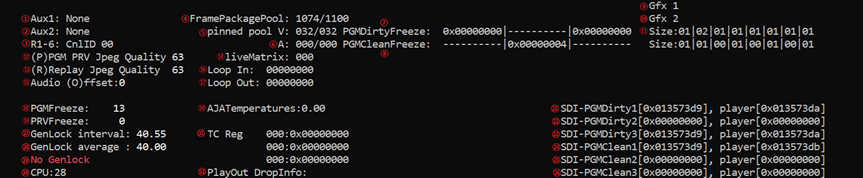
|
No. |
Parameters |
Description |
howto |
|---|---|---|---|
|
① |
Aux1 |
Aux1(auxiliary) broadcast the viewing camera. |
|
|
② |
Aux2 |
Aux2(auxiliary) broadcast the viewing camera. |
|
|
③ |
R1-6 |
The channel ID of the replay when auxiliary broadcast. |
|
|
④ |
FramePackagePool |
The size of the data included back in the memory pool. Unused size/total size. |
|
|
⑤ |
pinned pool V |
Page lock memory, will not be swapped to disk, for encoding and broadcast video use, the value is the number of remaining/total number. |
|
|
⑥ |
A |
page lock memory, will not be swapped to disk, for encoding and broadcast audio use, the value is the number of remaining/total number. |
|
|
⑦ |
PGMDirtyFreeze |
Shows the first 3 PGMDirty in the webconfig configuration, the number of times freeze. |
|
|
⑧ |
PGMCleanFreeze |
Shows the first 3 PGMClean in the webconfig configuration, the number of times freeze. |
|
|
⑨ |
Gfx1 |
When live, GFX1 comes in each frame size. |
|
|
⑩ |
Gfx2 |
When live, GFX2 comes in each frame size. |
|
|
⑪ |
Size |
Length of cache linked list for playout. |
|
|
⑫ |
(P)PGM PRV Jpeg Quality |
The picture quality of JPEG, 0 to 100, should be 63, which controls the bit rate of JPEG encoding for PGM and PRV. |
To modify the value use the key shift +P the value turn RED use + and - to adjust the value. To save and quit the modification mode shift +P.
|
|
⑬ |
(R)Replay Jpeg Quality |
The picture quality of JPEG, 0 to 100, should be 63, which controls the bit rate of JPEG encoding for REPLAY. |
To modify the value use the key shift +R the value turn RED use + and - to adjust the value. To save and quit the modification mode shift +R.
|
|
⑭ |
liveMatrix |
Length of cache linked list for audio. |
|
|
⑮ |
Audio (O)ffset |
The offset of the audio and video after ingested. |
|
|
⑯ |
Loop In |
Drop |
|
|
⑰ |
Loop Out |
Drop |
|
|
⑱ |
PGMFreeze |
The number of times the PGM is frozen. |
|
|
⑲ |
PRVFreeze |
The number of times the PRV is frozen. |
|
|
⑳ |
AJATemperatures |
The temperature of the board when using the AJA card. |
|
|
㉑ |
SDI-PGMDirty1 |
Which frame is going to be broadcast to PGMDirty1, and player is the corresponding player to figure out which frame needs to be broadcast, and compare it with the value of player, so that you can see how many frames the player is off from the actual broadcast. |
|
|
㉒ |
SDI-PGMDirty2 |
Which frame is going to be broadcast to PGMDirty2, and player is the corresponding player to figure out which frame needs to be broadcast, and compare it with the value of player, so that you can see how many frames the player is off from the actual broadcast. |
|
|
㉓ |
SDI-PGMDirty3 |
Which frame is going to be broadcast to PGMDirty3, and player is the corresponding player to figure out which frame needs to be broadcast, and compare it with the value of player, so that you can see how many frames the player is off from the actual broadcast. |
|
|
㉔ |
SDI-PGMClean1 |
Which frame is going to be broadcast to PGMClean1, and player is the corresponding player to figure out which frame needs to be broadcast, and compare it with the value of player, so that you can see how many frames the player is off from the actual broadcast. |
|
|
㉕ |
SDI-PGMClean2 |
Which frame is going to be broadcast to PGMClean2, and player is the corresponding player to figure out which frame needs to be broadcast, and compare it with the value of player, so that you can see how many frames the player is off from the actual broadcast. |
|
|
㉖ |
SDI-PGMClean3 |
Which frame is going to be broadcast to PGMClean3, and player is the corresponding player to figure out which frame needs to be broadcast, and compare it with the value of player, so that you can see how many frames the player is off from the actual broadcast. |
|
|
㉗ |
GenLock interval |
Interval of interrupts. |
|
|
㉘ |
GenLock average |
Average interruption interval during 30 seconds. |
|
|
㉙ |
No Genlock |
Or Valid GenLock, or Invalid GenLock. |
|
|
㉚ |
CPU |
the CPU usage of the process for Backend. |
|
|
㉛ |
TC Reg |
The TC value inside the AJA card. |
|
|
㉜ |
PlayOut DropInfo |
Drop |
|
For D part:

|
No. |
Parameters |
Description |
|---|---|---|
|
① |
SlowMotionMode |
Parity Violation, or Line Double. This is the mode that handles super slow motion, it depends on the “Show Motion Mode” parameter under the video configuration in webconfig page. |
|
② |
SLSM |
Super slow motion, camera configuration. It depends on the “Mode” parameter under the servers channals in webconfig page. |
|
③ |
RemainingSec |
Corresponding to different channels, the remaining capacity of the local disk, how many seconds can be written. |
|
④ |
DA Queue |
Data access queue. RAM cahce before to write DnxHD and Jpeg frame to storage |
|
⑤ |
FullSize |
The linked list of high-res. |
|
⑥ |
480 |
The linked list of low-res. |
|
⑦ |
PCM Audio |
Embedded audio come from the signal. |
|
⑧ |
Matrix Audio |
Embedded audio come from the mixer. |
For E part:

|
No. |
Parameters |
Description |
|---|---|---|
|
① |
Mixer connected |
The status of mixer. |
|
② |
Current sample rate |
Current sampling rate of mixer. |
|
③ |
Asio buffer size |
Asio buffer size. |
|
④ |
Input latency |
Input latency. |
|
⑤ |
Output latency |
Output latency. |
For F part:

|
No. |
Parameters |
Description |
|---|---|---|
|
① |
ASIO Input dump |
Default off, press “M”, Write the mixer audio as a PCM file to C:\Users\ViBox\AppData\Local\Simplylive\VideoEngine |
|
② |
Dirty PGM dump |
Write the contents of the PGM broadcast as YUV files to C:\Users\ViBox\AppData\Local\Simplylive\VideoEngine Press “X”, write all, Press “Z”, write video, Press “W”, write audio. |
Playout_DebugScreen 2/42
This page shows the information used by the user. There are 3 users in total.
Each column shows the usage information of user1/user2/user3.
The following description uses user1 as an example.
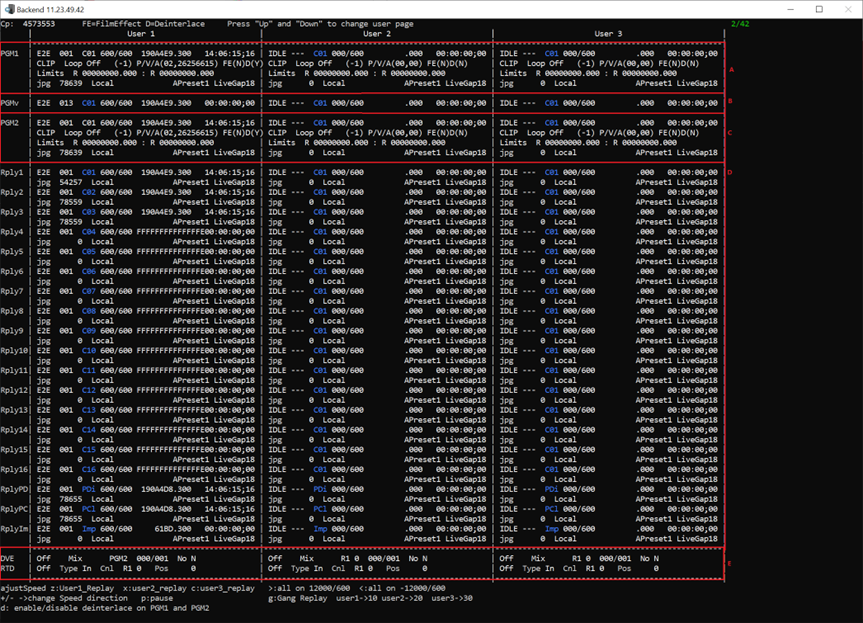
For A part:

|
Parameters |
Description |
|---|---|
|
PGM1 |
This section shows the PGM play information. |
|
E2E |
Player status, or Replay, or IDLE, or E2E E2E, it’s live. Replay, it’s replay. IDLE, it’s in idle. |
|
001 |
Group number of a group, it’s used by UI. |
|
C01 |
Camera1 |
|
600/600 |
The speed of play. This value is real play. |
|
1914A4A |
The number of frames currently being played. |
|
.300 |
Part frame. |
|
14:18:01;26 |
The current playing timecode, the last one is the odd or even field. |
|
CLIP |
This section shows the clip play information. |
|
Loop off |
The status of clip loop play. |
|
(-1) |
The number of loops played, without loops, is -1. |
|
P/V/A |
Player/Video/Audio, |
|
(02,26298952) |
The first value is the gap of player and video, The second value is the gap of video and audio. |
|
FE(N) |
Film effect, (N) is off, (Y) is on. |
|
D(Y) |
Deinterlaced, (N) is off, (Y) is on. |
|
Limits |
On the internal program timeline, clip in frame number and out frame number. |
|
Jpg 78639 |
JPG size for this PGM. |
|
Local |
It’s channel from local BE, Or IP, is channel from remote BE, and show remote ip. |
|
Apreset1 |
This is the audio prefab parameter used. It depends on the “Audio presets” parameter of the webconfig page. |
|
LiveGap18 |
The gap between PGM and live. |
For B part:

|
Parameters |
Description |
|---|---|
|
PGMv |
Internal virtual player, the player used when doing special effects BE. |
|
E2E |
Player status, or Replay, or IDLE, or E2E E2E, it’s live. Replay, it’s replay. IDLE, it’s in idle. |
|
013 |
Group number of a group, it’s used by UI. |
|
C01 |
Camera1 |
|
600/600 |
The speed of play. This value is real play. |
|
1914A4A |
The number of frames currently being played. |
|
.300 |
Part frame. |
|
00:00:00;00 |
The current playing timecode, the last one is the odd or even field. |
For C part:

|
Parameters |
Description |
|---|---|
|
PGM2 |
This section shows the PRV play information. |
|
E2E |
Player status, or Replay, or IDLE, or E2E E2E, it’s live. Replay, it’s replay. IDLE, it’s in idle. |
|
001 |
Group number of a group, it’s used by UI. |
|
C01 |
Camera1 |
|
600/600 |
The speed of play. This value is real play. |
|
1914A4A |
The number of frames currently being played. |
|
.300 |
Part frame. |
|
14:18:01;27 |
The current playing timecode, the last one is the odd or even field. |
|
CLIP |
This section shows the clip play information. |
|
Loop off |
The status of clip loop play. |
|
(-1) |
|
|
P/V/A |
Player/Video/Audio, |
|
(02,26298952) |
The first value is the gap of player and video, The second value is the gap of video and audio. |
|
FE(N) |
Film effect, (N) is off, (Y) is on. |
|
D(Y) |
Deinterlaced, (N) is off, (Y) is on. |
|
Limits |
On the internal program timeline, clip in frame number and out frame number. |
|
Jpg 78639 |
JPG size for this PGM. |
|
Local |
It’s channel from local BE, Or IP, is channel from remote BE, and show remote ip. |
|
Apreset1 |
This is the audio prefab parameter used. It depends on the “Audio presets” parameter of the webconfig page. |
|
LiveGap18 |
The gap between PGM and live. |
For D part:
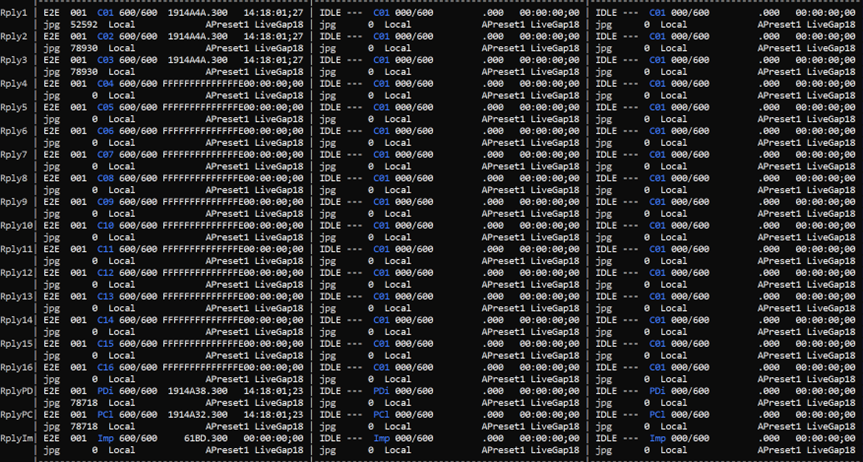
|
Parameters |
Description |
|---|---|
|
Rply1 Rply2 … Rply16 RplyPD RplyPC RplyIm |
This section shows the channel of replay information. Camera1 Camera2 … PGMDirty PGMClean Import |
|
E2E |
Player status, or Replay, or IDLE, or E2E E2E, it’s live. Replay, it’s replay. IDLE, it’s in idle. |
|
001 |
Group number of a group, it’s used by UI. |
|
C01 |
Camera1 |
|
600/600 |
The speed of play. This value is real play. |
|
1914A4A |
The number of frames currently being played. |
|
.300 |
Part frame. |
|
14:18:01;27 |
The current playing timecode, the last one is the odd or even field. |
|
Jpg 52592 |
JPG size for this channel. |
|
Local |
It’s channel from local BE, Or IP, is channel from remote BE, and show remote ip. |
|
Apreset1 |
This is the audio prefab parameter used. It depends on the “Audio pFresets” parameter of the webconfig page. |
|
LiveGap18 |
The gap between PGM and live. |
For E part:

|
Parameters |
Description |
|---|---|
|
DVE |
Special effect state |
|
Off |
Turn off effects. |
|
Mix |
The content of effects. Now, only mix. |
|
PGM2 |
Which channel is used to PGM1, When there is no special effect, R1 0 is displayed by default. |
|
000/001 |
The length of the effect, the effect length that is currently playing/the effect length that is set to be played. |
|
No |
The position of the special effect cut, the value of No represents the length of the special effect. |
|
N |
Effect transparency, N means the UI does not set transparency. |
|
Parameters |
Description |
|---|---|
|
RTD |
PNG onto the screen, do animation, transition when switching。 |
|
Off |
Turn off animation. |
|
Type In |
RTD in and RTD out, which type is used. |
|
Cnl R1 0 |
Using the first channel of User1 to PGM1, R1 0 is displayed by default when there is no animation. |
|
Pos 0 |
Animation position. |
Playout2_DebugScreen 3/42
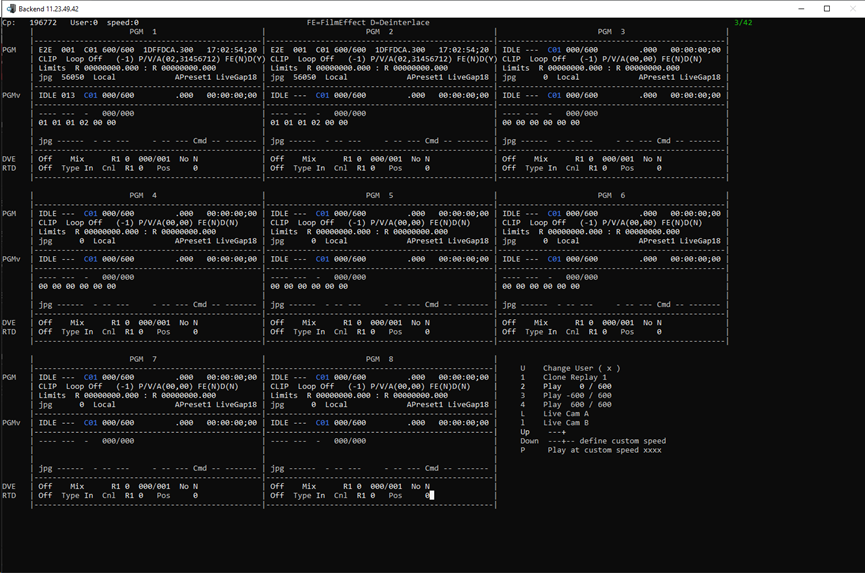
This page shows the information used by PGM. There are eight PGMs in total.
Each section shows the usage information fromPGM1 to PGM8.
Each parameter has the same meaning as page2.
Frame2TCP_DebugScreen 4/42
This page displays the connection information between the BE and the UI.
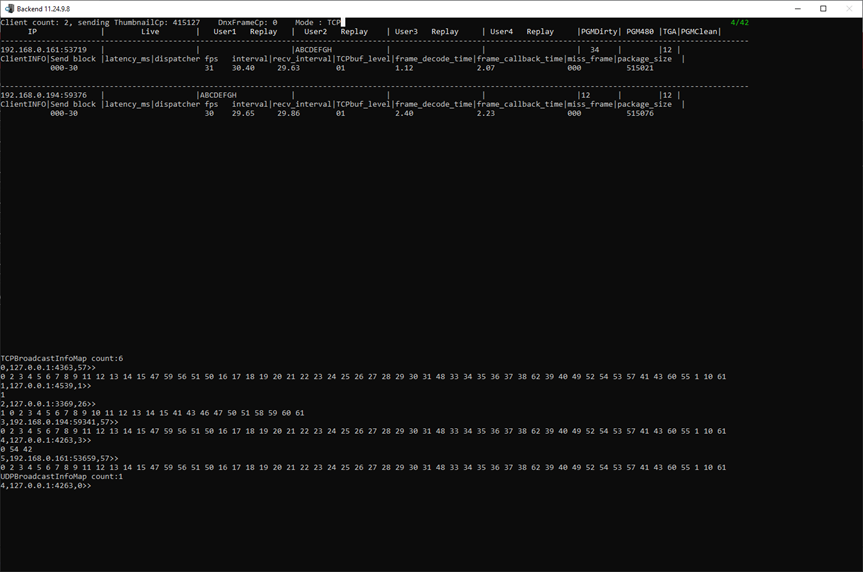
The top half of the page, showing the UI connected to BE, takes the thumbnail message.

|
Parameters |
Description |
|---|---|
|
Client count |
The number of UIs connected to BE. |
|
Sending thumbnailCp |
The number of times thumbnails were sent. |
|
DnxFrameCp |
BE the number of times a high-res thumbnail is sent, suitable for Refbox stave SDI. |
|
Mode |
TCP, or UDP Depends on the configuration of the WebConfig-Advanced configuration-Video Configuration-Frame Sender Mode. |
|
IP |
UI ip and port. |
|
Live |
01 02 03 04 05 06 07 It means 7 channels. |
|
User1 Replay |
As user1, channel 1 is replay. |
|
User2 Replay |
ABCDEFGHI As user2, channel 1 to 9 both is replay. |
|
PGMDirty |
12 User1 registers to PMGDirty using the thumbnail of the PGM12 channel. 34 User2 registers to PMGDirty using the PGM34 channel. |
|
PGM480 |
3 5 Low-res thumbnails are sent to user1 using 3 and 5 PGM channels in 960*540 format, depending on the configuration of WebConfig-Advanced configuration-Video configuration-rPGM1 channel and rPGM2 channel. |
|
TGA |
12 LIVE TGA, registered thumbnail, now has only two external input NDI, used as GFX animation, depending on the configuration of WebConfig-Advanced configuration-Graphics setting-1st NDI channel name and 2nd NDI channel name. |
|
PGMClean |
Thumbnail of which PGM channel to use to register to PMGClean, for refbox role R.O.2 Master. |
|
Send block |
000-26 000 is the number of send failures, 26 is the frequency (P50, P5994,P60, all over 30 frame rate, frame rate halved) |
|
Latency_ms |
Delay of thumbnail from BE to UI |
|
Dispatcher fps |
Frequency of sent. |
|
interval |
Sending interval. |
|
Recv_interval |
Interval of reception. |
|
TCPbuf_level |
Length of cache. |
|
Frame_decode_time |
Decode time (ms). |
|
Frame_callback_time |
After receiving the data, give UI time (ms). |
|
Miss_frame |
The number of frames lost. |
|
Package_size |
The total size of all thumbnails, in bytes. |
The bottom half of the page is debug information for the UI to fetch the state from the BE.

|
Parameters |
Description |
|---|---|
|
TCPBroadcastInfoMap count |
5 There are 5 TCP debug messages. |
|
0, |
Serial number |
|
192.168.0.160:53380 |
IP and port. |
|
57 |
57 status messages notifying, by each number (internally defined by development), what do BE each channel now do. |
|
UDPBroadcastInfoMap count |
1 There are 1 UDP debug messages. |
JumpTable_DebugScreen 5/42
This page is the timecode table, which records the time jump points.
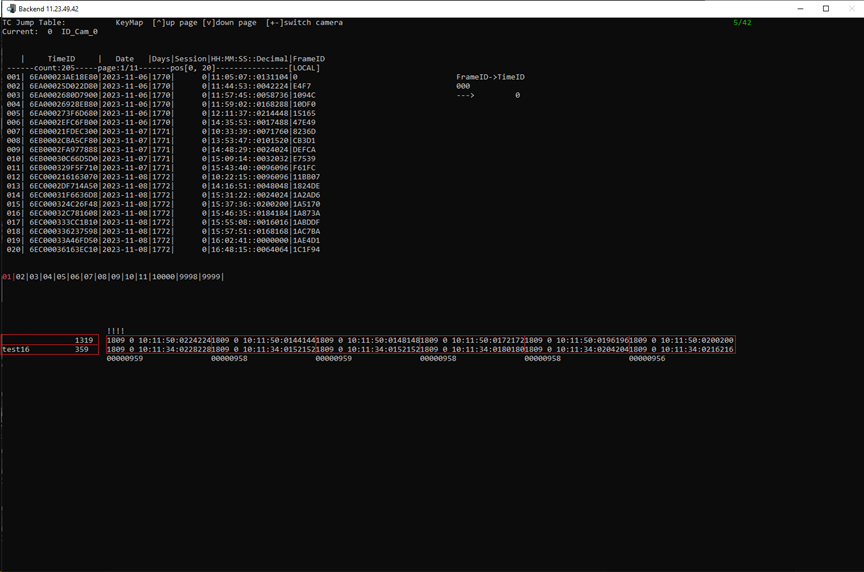
|
Parameters |
Description |
|---|---|
|
KeyMap |
Click “up” or “down” to turn the page, and click “+” or “-” to switch cameras. |
|
Current |
Current camera. |
|
TimeID |
TimeID |
|
Date |
The date of time jump. |
|
Days |
The number of days starting at 20190101 and ending at the current date. |
|
Session |
The number of TC changes in natural days. |
|
HH:MM:SS::Decimal |
Timecode |
|
FrameID |
Frame number |
|
Count |
The number of times the current camera time code has changed. |
|
Page |
Current page number, 20 records per page. |
|
Pos |
Current page number, range to display. |
|
01|02|03|04|05|06|07|08|09|10|11 |
11 cameras, The red color represents the current camera. |
|
10000 |
Import |
|
9998 |
PGM Dirty |
|
9999 |
PGM Clean |
|
1319 |
Local BE, and the total number of recorded TC jumps. |
|
Test16 359 |
Network BE, name is test16, and the total number of recorded TC jumps. |
|
1809 0 10:11:50:0224224 1809 0 10:11:34:0228228 |
Days session timecode. This line shows the 6-frame time code. |
|
00000959 |
The gap between local and network. The correct value is 0. When it’s not 0, it means that the local and network are not synchronized, and it needs to be investigated. (Here is 00000959, the reason is that the local and network times are not synchronized and there is no genlock) |
NetworkTransfer_DebugScreen 6/42
This page displays information about the network camera.
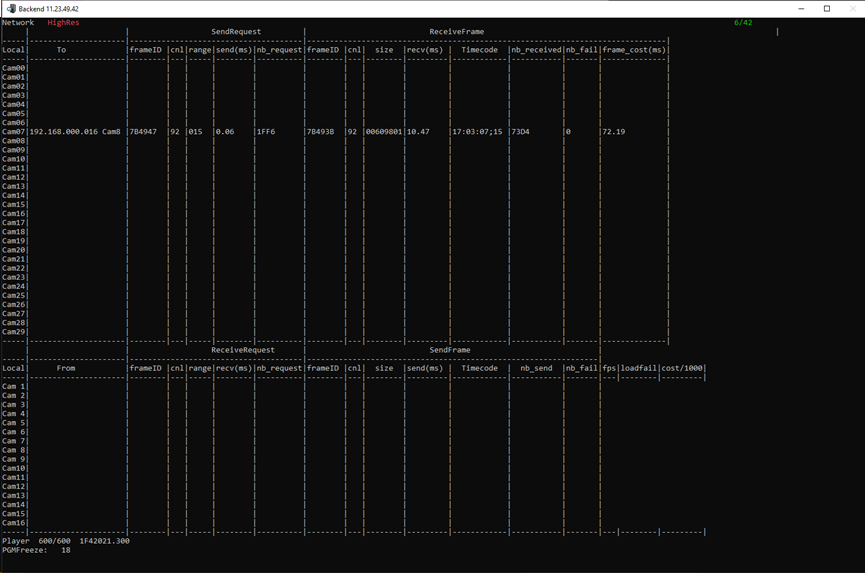
This is the information displayed by the local BE .
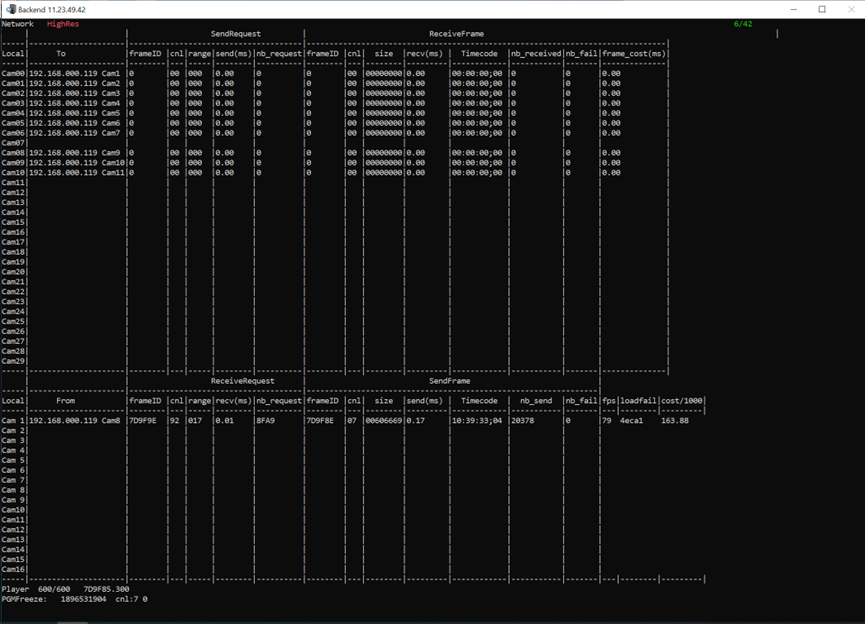
This is the information displayed by the network BE.
|
Parameters |
Description |
|---|---|
|
HighRes |
Display high-res reception. click “up” or “down” to turn the page, and show low-res or PCMAudio or MatrixAudio |
|
To |
Display the network camera IP and name. |
|
SendRequest |
The request sent from local to network. |
|
Receiveframe |
The frame received by local from network. |
|
From |
As a network, it receives information from the local, including camera IP and name. |
|
ReceiveRequest |
As a network, the request received from the local. |
|
SendFrame |
As a network, the frame sent to the local. |
|
Player |
600/600, real time play. PGM1 play speed. |
|
1F42021.300 |
PGM1 is currently playing the frame number. |
|
PGMFreeze |
The number of PGM freezes. |
Protect_DebugScreen 7/42
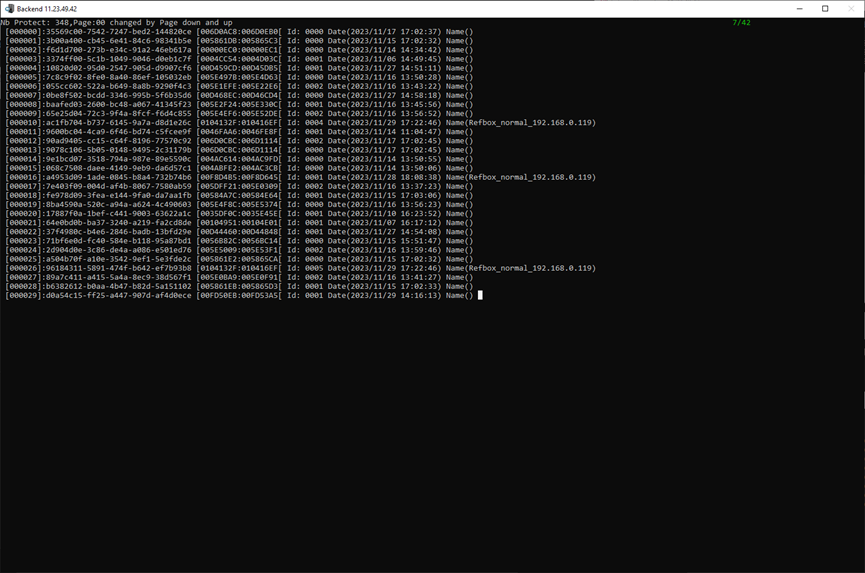
This page displays the clip stored in storage, up to 30.
|
Parameters |
Description |
|---|---|
|
Nb Protect |
348, A total of 348 Protects. |
|
Page |
00, Current on the first page, changed by page down and up. |
|
[000000] [000001] … [000029] |
Protect sequence number. |
|
35569c00-7542-7247-bed2-144820ce |
Protect ID, unique identifier stored in storage. |
|
[006D0AC8:006D0EB0[ |
Protect in and out. Close front and open back. |
|
Id: |
000, train ID, corresponding train ID on page 19. |
|
Date |
Created time of the protect. |
|
Name |
UI gives the name protect. |
Playlist_DebugScreen 8/42
This page displays information about playlist.
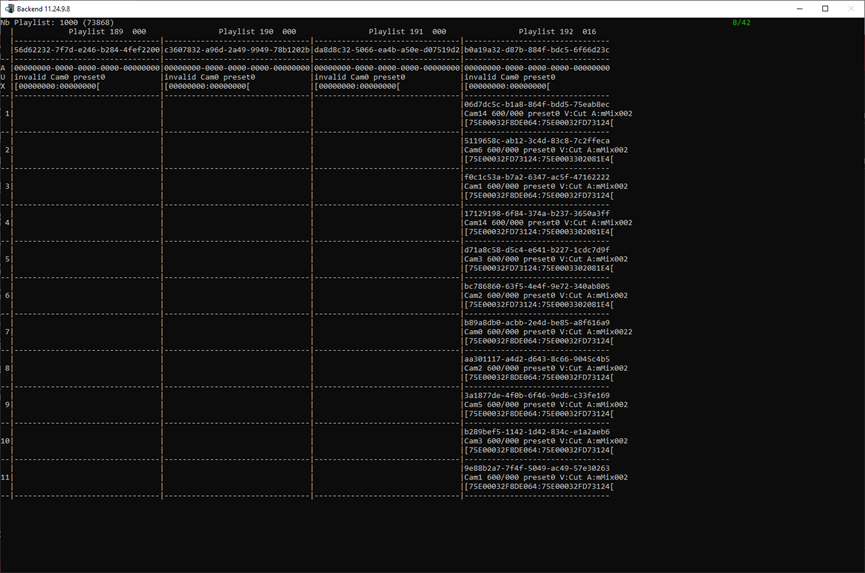
|
Parameters |
Description |
|---|---|
|
Nb Playlist |
1000, 1000 playlist automatically created by the UI.
|
|
Playlist 64 |
In UI, Serial number is 015. The playlist sequence does not correspond to the playlist sequence number seen in the UI. The debug page is sorted by the GUID of playlist, which is not continuous. |
|
016 |
There are 16 clips in this playlist. |
|
b0a19a32-d87b-884f-bdc5-6f66d23c |
Playlist GUID |
|
AUX |
Aux audio, When playlist plays, the external audio (commentary audio) to playlist. |
|
06d7dc5d-b1a8-864f-bdd5-75eab8ec |
Clip GUID |
|
Cam14 |
Clip from camera14. |
|
600/000 |
It means to control the playback speed with the global speed of the player. You can also edit the clip in playlist and define the playback speed of each clip, such as 600/600,real-time play. |
|
Preset0 |
Audio preset, which audio preset to use when playing this clip. |
|
V:Cut |
Effects and length of the video. |
|
A:mMix002 |
Effects and length of the audio. |
|
[75E00032F8DE064:75E00032FD73124[ |
TimeID range, front closed and back open. |
TransportCmd_DebugScreen 9/42
This page is a list of commands sent by the UI.
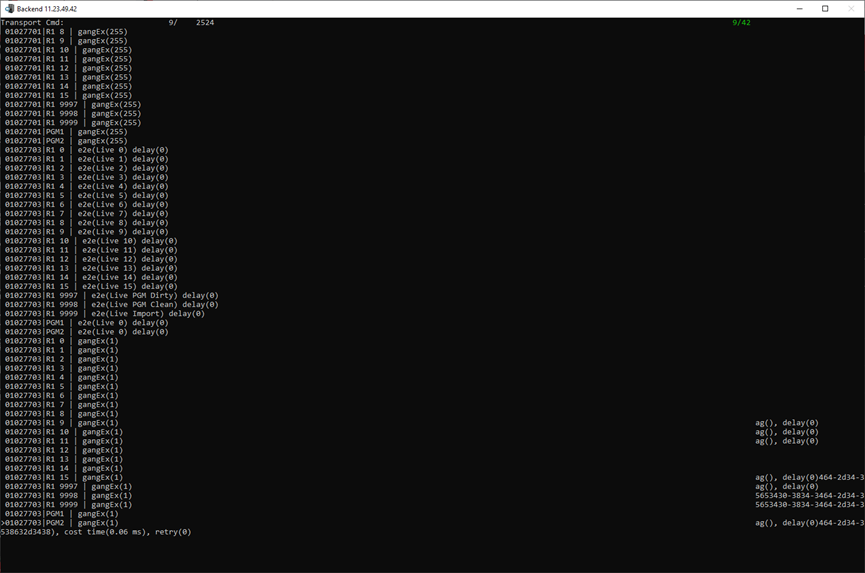
MemoryCache_Live 10/42
Live uses information cached in memory.
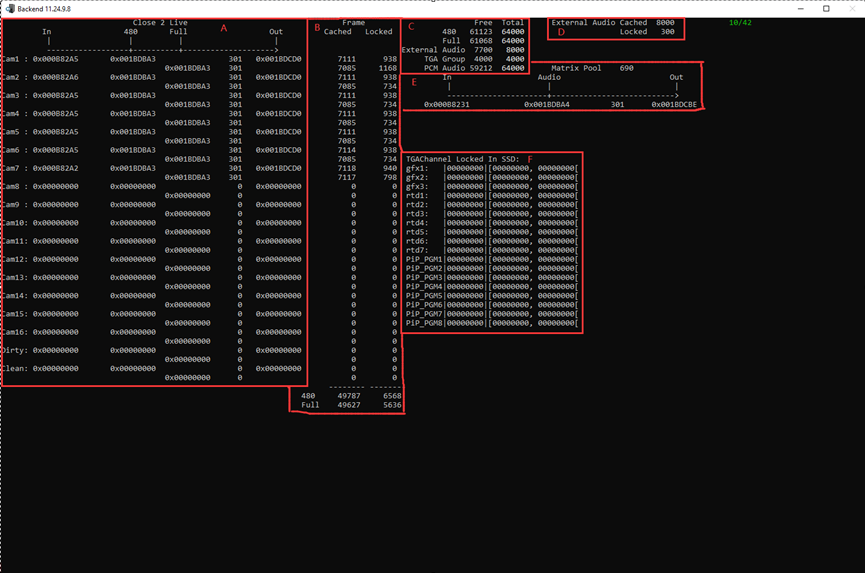
Describing the information in the above figure ABCDEF in order.
|
Parameters |
Description |
|---|---|
|
A |
|
|
Close 2 Live |
The gap from Live. |
|
In |
Frame id, range of train, carema1 on storage, location of video in. |
|
480 |
In memory, the low-res in point location of the cache. |
|
Full |
In memory, the high-res in point location of the cache. |
|
301 |
The range protected in the cache, 150 frames before and after the current position. |
|
Out |
Frame id, range of train, carema1 on storage, location of video out. |
|
B |
|
|
Cached |
Number of frames cached in memory by camera1. |
|
Locked |
Number of frames locked in memory by camera1. |
|
480 |
The total number of low-res caches in memory. |
|
Full |
The total number of high-res caches in memory. |
|
C |
|
|
480 Free |
The number of low-res cache frames available to the memory pool. |
|
480 Total |
Total number of low-res frames that can be cached by the memory pool. |
|
Full Free |
The number of high-res cache frames available to the memory pool. |
|
Full Total |
Total number of high-res frames that can be cached by the memory pool. |
|
External Audio Free |
Number of cached frames available for external audio in a memory pool, such as mixer. |
|
External Audio Total |
Total number of frames that external audio can be cached in a memory pool, such as mixer. |
|
TGA Group Free |
The number of frames available for the animation cached in memory. |
|
TGA Group Total |
Total number of frames of the animation cached in memory. |
|
PCM Audio Free |
Input embedded audio, number of cached frames available in the memory pool。 |
|
PCM Audio Total |
Input embedded audio, the total number of frames that can be cached in the memory pool. |
|
D |
|
|
External Audio Cached |
Number of cached frames corresponding to external audio. |
|
Locked |
Number of locked frames corresponding to external audio. |
|
E |
|
|
In |
Frame id, range of train, external audio on storage, location of in. |
|
Audio |
The location of the external audio cache in memory. |
|
301 |
The range protected in the cache, 150 frames before and after the current position. |
|
Out |
Frame id, range of train, external audio on storage, location of out. |
|
F |
|
|
TGAChannel Locked In SSD |
Second level cache, read from the raid, into the second level cache. |
|
|0000000| |
The total number of locks in the SSD cache. |
|
[00000000,00000000[ |
Frame id range. |
MemoryCache_Replay 11/42
This page shows the number of frames cached by the memory pool.
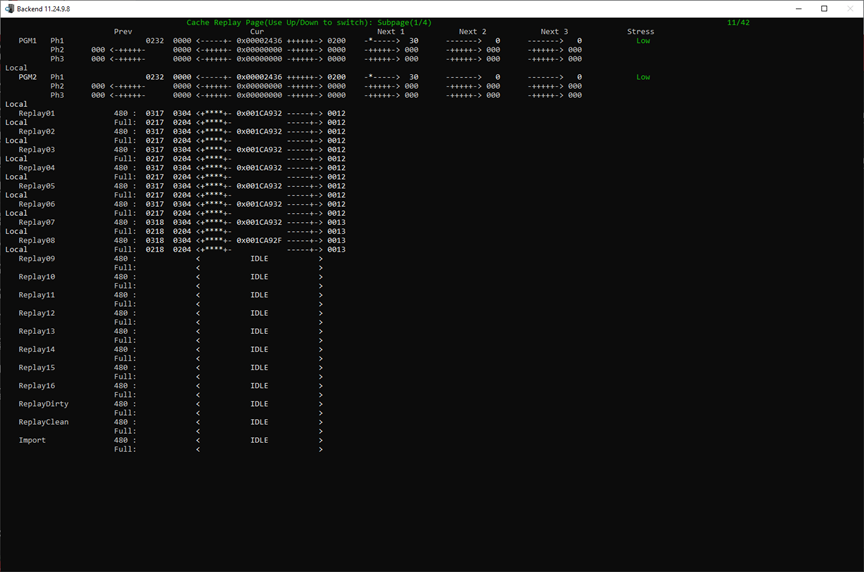
|
Parameters |
Description |
|---|---|
|
PGM1 PGM2 … Replay16 ReplayDirty ReplayClean Import |
This shows the channel of replay information. |
|
Local |
Or network, it means local camera or network camera. |
|
Ph1 Ph2 Ph3 |
The phase channel of SLSM, Only three phases are shown. |
|
Prev |
0216, 216 frames are cached in the memory pool. 0199, the first 199 frames. 0016, the last 16 frames. |
|
Cur |
The frame number currently playing. |
|
Next1 Next2 Next3 |
The next clipto play on our Playlist. |
|
Stress |
Stress on the PGM cache. |
Press up or down to switch subpage, total 4 pages and 4 users, 2 PGM per page.
Timing_DebugScreen 12/42
This page shows the time taken for each step.
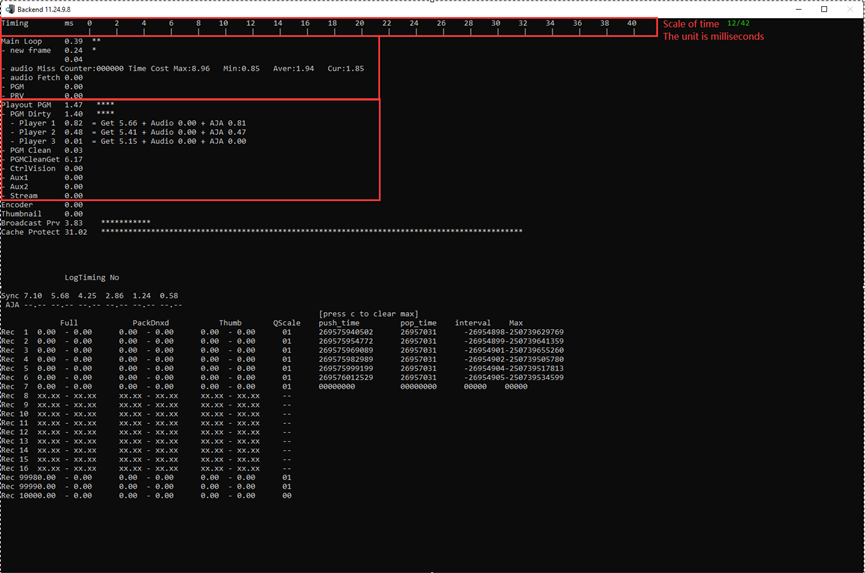
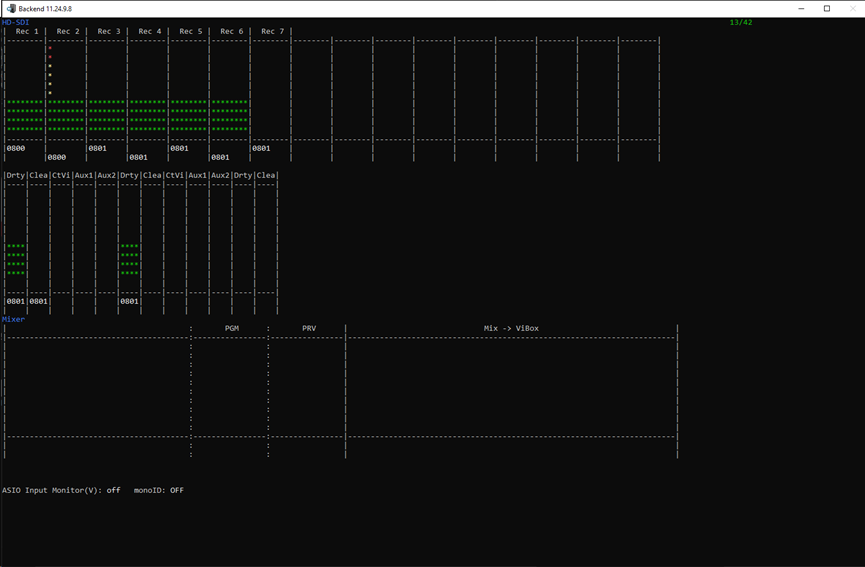
VuMeter_DebugScreen 13/42
This page displays the audio bar information, which can be used to observe whether the sound is normal.
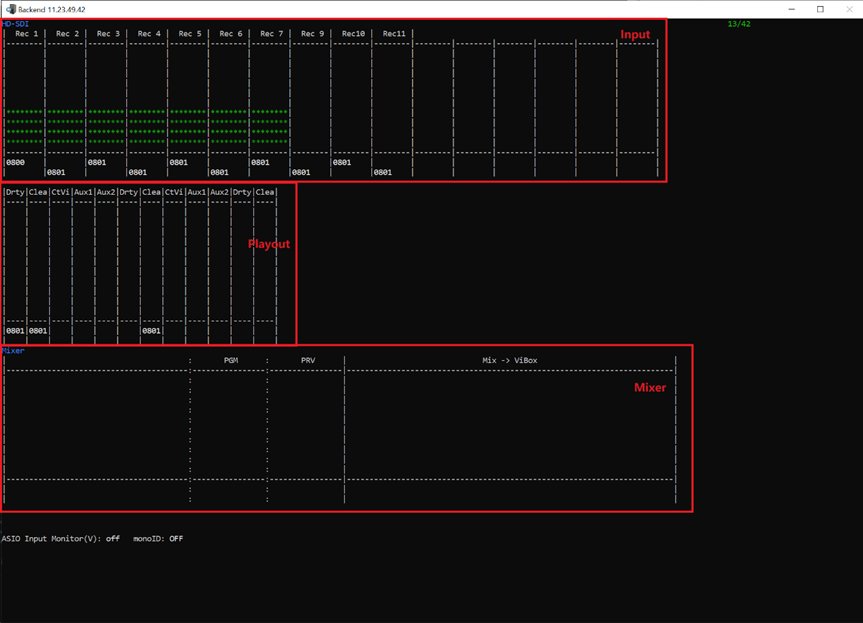
For Input, Maximum of 16 inputs are supported. The 8 dash lines represent the eight audio tracks, and only the first 8 are shown.
For Playout, Maximum of 12 inputs are supported. The 4 dash lines represent the eight audio tracks, and only the first 4 are shown.
For Mixer, The first box shows the sound that the ViBox sends to mixer, and the last box shows the sound that comes back from Mixer.
PGM, PRV, ASIO will be dropped.
SampleBufferInfo_DebugScreen 14/42
This page monitors the data between MIXER and the UI.
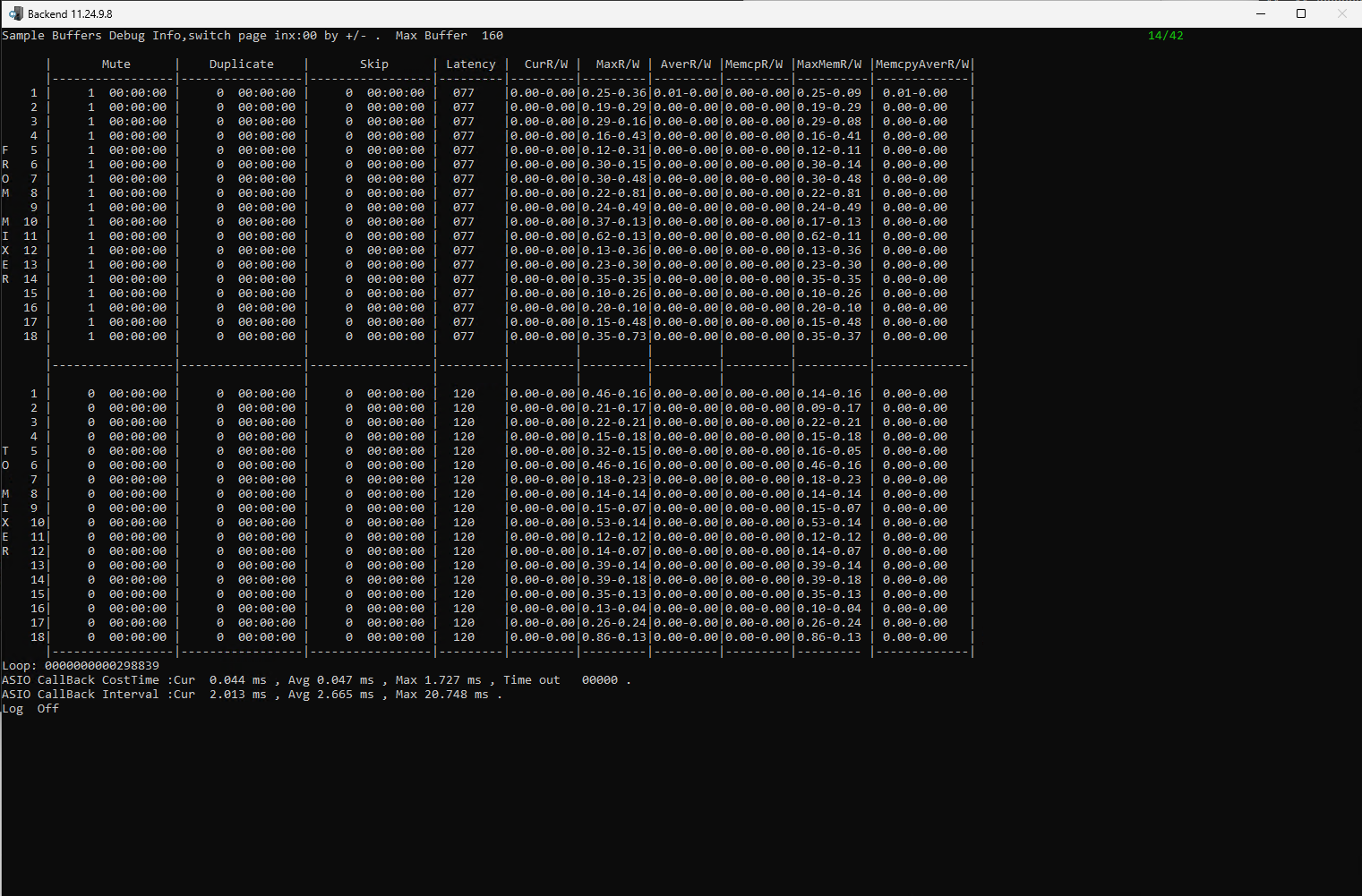
|
Parameters |
Description |
|---|---|
|
From mixer |
Data returned from mixer. |
|
To mixer |
Data sent to mixer. |
|
Mute |
The corresponding track, the number of times it has been muted, and the corresponding time point. |
|
Duplicate |
The corresponding track, the number of times it has been duplicated, and the corresponding time point. |
|
Skip |
The corresponding track, the number of times it has been skip, and the corresponding time point. |
|
Latency |
The number of samples remaining in the cache. |
|
CurR/W |
Current read and write time. |
|
MaxR/W |
Maximum read and write time. |
|
AverR/W |
Average read and write time. |
|
MemcpR/W |
The current memory copy takes time. |
|
MaxMemR/W |
Maximum memory copy time. |
|
MemcpyAverR/W |
Average memory copy time. |
|
ASIO CB CostTime Cur |
the current cost time inside the asio call back in ms |
|
ASIO CB CostTime Avg |
the average cost time inside the asio call back in ms |
|
ASIO CB CostTime Max |
the max cost time inside the asio call back in ms |
|
ASIO CB CostTime Time out |
how many times the cost time is longer than annual. |
|
ASIO CB Interval Cure |
the current interval between the latest 2 times asio callback come up in ms |
|
ASIO CB Interval Avg |
the average interval in ms |
|
ASIO CB Interval Max |
the max interval in ms |
|
Log Off |
by Press 'L' to switch on/off recording the timing info of the interval at c:\log\frametcp\asio-interval.csv |
AudioValidate_DebugScreen 15/42
This page is useful to make some tests with audio.
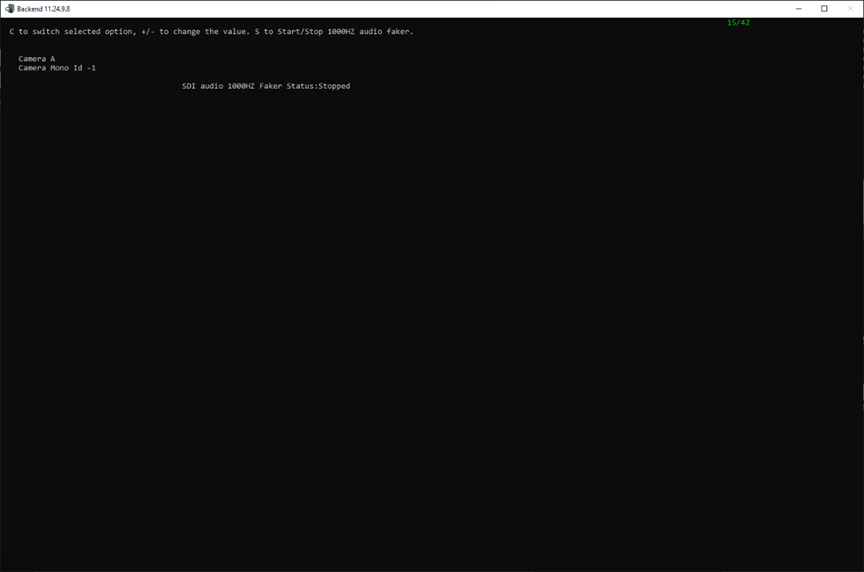
|
Key |
Description |
|---|---|
|
C |
To switch selected option, red is selected. |
|
+/- |
For the selected Camera or camera Mono id, to switch. |
|
S |
For the selected Camera Mono id, start/stop emulated audio faker at 1000hz. |
Here's an example, CameraB Mono 1, simulating 1000hz audio faker.
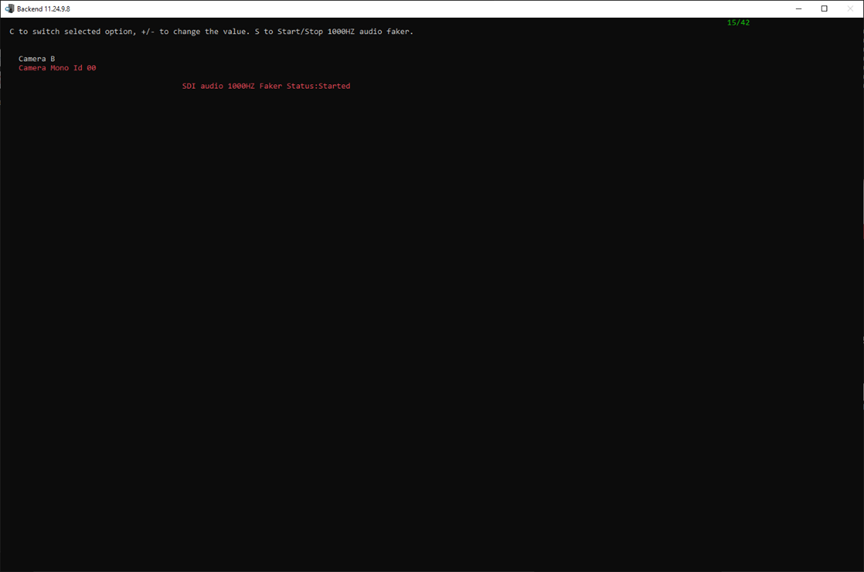
GPI_DebugScreen 16/42
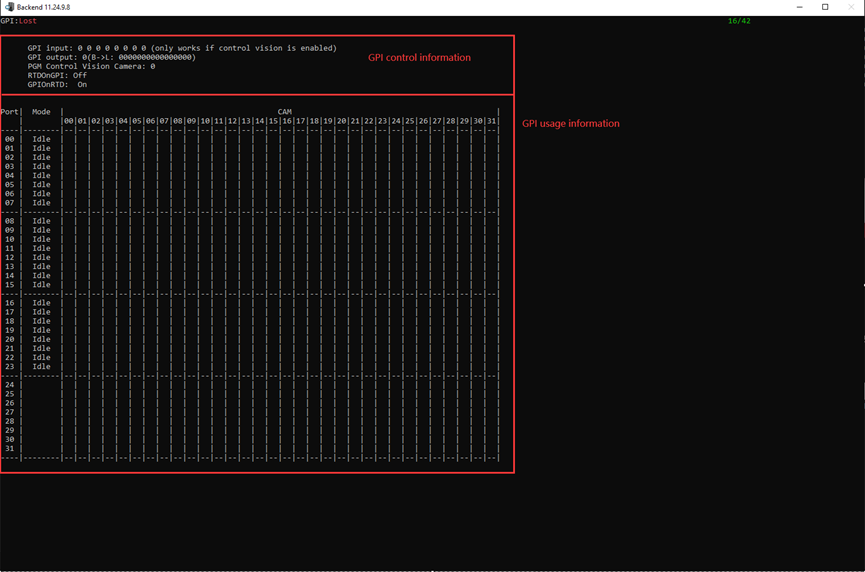
|
Parameters |
Description |
|---|---|
|
GPI input |
The status of GPI input. |
|
GPI output |
The status of GPI output. |
|
PGM Control Vision Camera |
When PGM plays live, the lamp of GPI corresponds to which live. |
|
RTDOnGPI |
Buttons on the GPI, which define seven RTD animations, are used for whichever button is clicked. |
|
GPIOnRTD |
PGM whether to start RTD animation. |
Empty_DebugScreen 17/42
This is empty page.
BMRInfo_DebugScreen 18/42
This page shows the configuration and working information of the BMR.
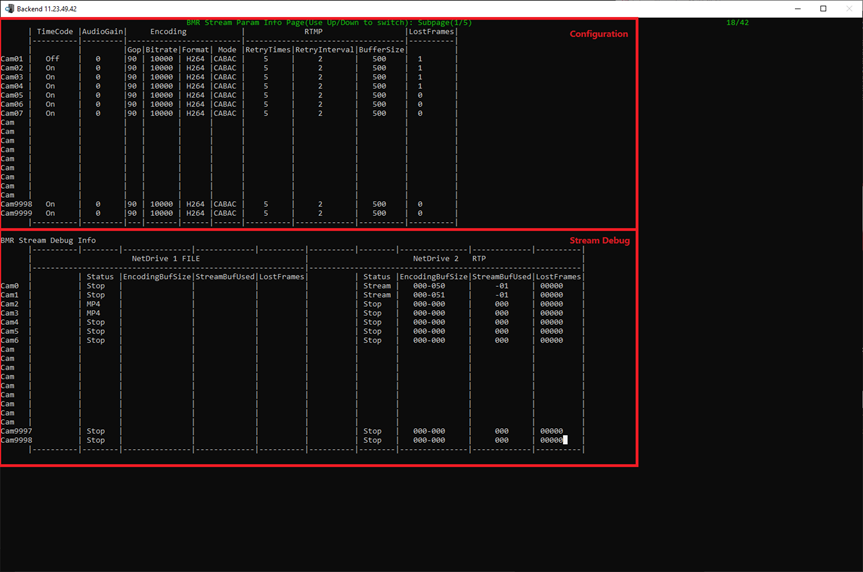
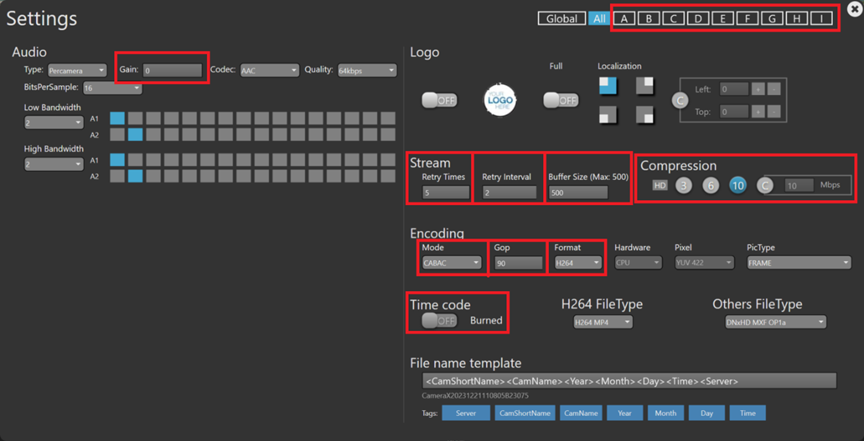
For configuration, The information displayed comes from the configuration page of the BMR, and the following is the correspondence between them.
|
BE debug screen |
BMR configuration |
|---|---|
|
Cam01 Cam02 … Cam9999 |
A B C … |
|
TimeCode |
Timecode, on or off |
|
AudioGain |
Gain |
|
Encoding Gop |
Gop |
|
Encoding Bitrate |
Compression |
|
Encoding Format |
Format |
|
Encoding Mode |
Mode |
|
RTMP RetryTimes |
Stream Retry Times |
|
RTMP RetryInterval |
Stream Retry Interval |
|
RTMP BufferSize |
Stream BufferSize(Max:500) |
|
LostFrames: The number of frames of the video and audio that were not picked up by the playout thread. |
|
BMR Stream Debug Info:
|
Parameters |
Description |
|---|---|
|
NetDrive 1 NetDrive 2 … |
Corresponds to the NetDrive on the BMR page. FILEà This NetDrive export is file. RTPà This NetDrive export is RTP. … NONEà No exported tasks. |
|
Status |
Displays the type of export, display stop when there is no export. |
|
EncodingBufSize |
How many videos to encode - FPS to encode. |
|
StreamBufUsed |
How many frames are not sent in the buffersize. |
|
LostFrame |
The number of frames that have been encoded but have not yet been placed in the buffer. |
RaidInfo_DebugScreen 19/42
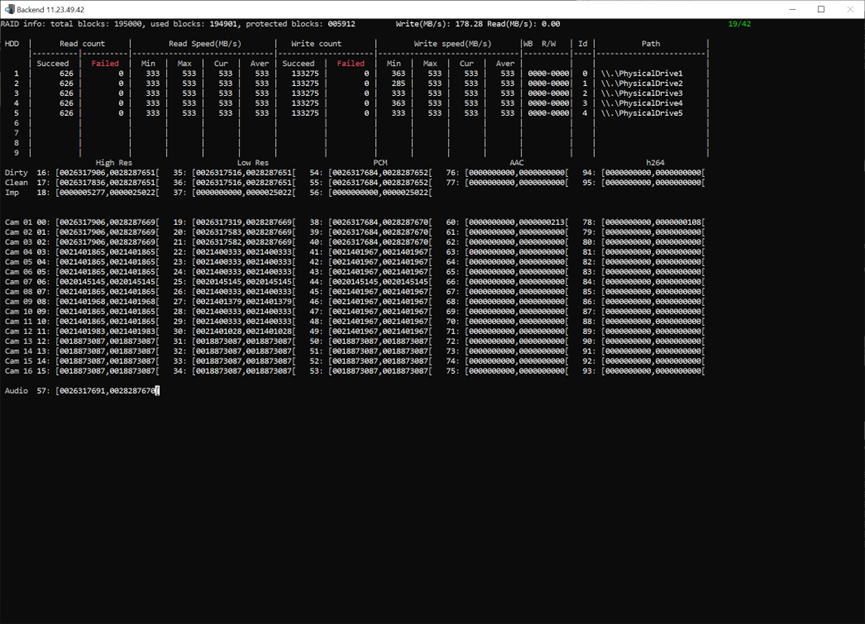
|
Parameters |
Description |
|
|---|---|---|
|
RAID info |
Total blocks |
195000, The total number of blocks is crossed. |
|
Used blocks |
194901, Number of blocks used. |
|
|
Protected blocks |
005912, Number of protected blocks. |
|
|
Write(MB/s) |
178.28, the speed of write. |
|
|
Read(MB/s) |
0.00, the speed of read. |
|
|
HDD |
Read count |
Succeed, Read the number of successes. Failed, Read the number of failures. |
|
Read Speed(MB/s) |
Min, Minimum read speed. Max, Maximum read speed. Cur, Current read speed. Aver, Average read speed. |
|
|
Write count |
Succeed, write the number of successes. Failed, write the number of failures. |
|
|
Write Speed(MB/s) |
Min, Minimum write speed. Max, Maximum write speed. Cur, Current write speed. Aver, Average write speed. |
|
|
WB R/W |
Indicates the number of waiting blocks to be read or written on the physical disk. The first indicates the number of waiting read blocks and the second indicates the number of waiting write blocks. |
|
|
Id |
Logical sequence. |
|
|
Path |
Physical ID. |
|
|
Dirty Clean Imp |
High Res LOW Res PCM AAC H264 |
Train ID, Protect in and out. |
|
Cam |
01 |
Channal ID. |
|
00 |
Train ID |
|
|
[0026317906, 0028287669[ |
Protect in and out. |
|
|
Audio |
57 |
Train ID, it’s from mixer. Protect in and out. |
ExportInfo_DebugScreen 20/42
This page shows information about the exporter tasks triggered by the different UI.
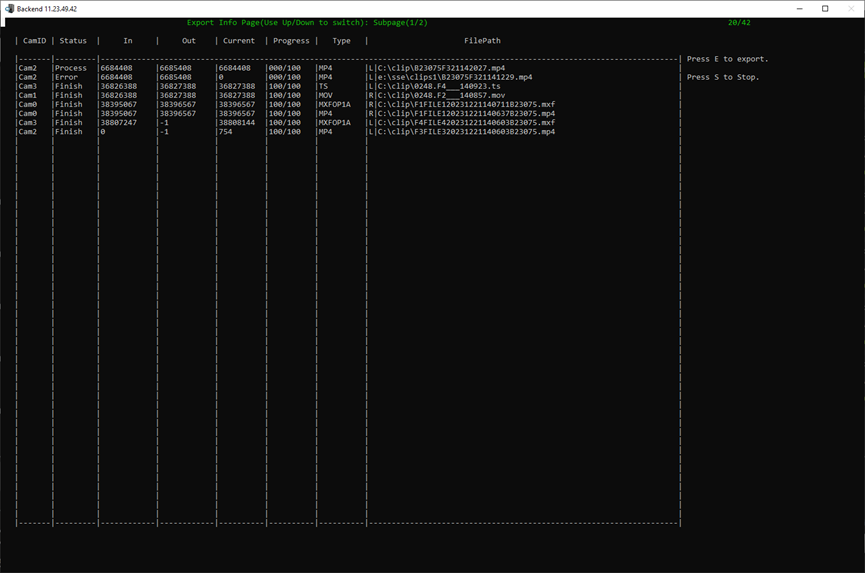
|
Parameters |
Description |
|---|---|
|
CamID |
Which camera to export the task from. |
|
Status |
The status of export task. Process, In export. Finish, Export completed. Error, Export failure. |
|
In |
Export the start frame of the task. 0, live stream. |
|
Out |
Export the end frame of the task. -1, live stream. |
|
Current |
Which frame to export current. |
|
Progress |
Exporting progress. |
|
Type |
Encoding format. |
|
FilePath |
Export destination path and filename. L, it means local for BE, Export triggered on the BE machine. R, it means remote for BE, Exports that are not triggered on the BE machine. |
ImportInfo_DebugScreen 21/42
This page displays the automatically import information.
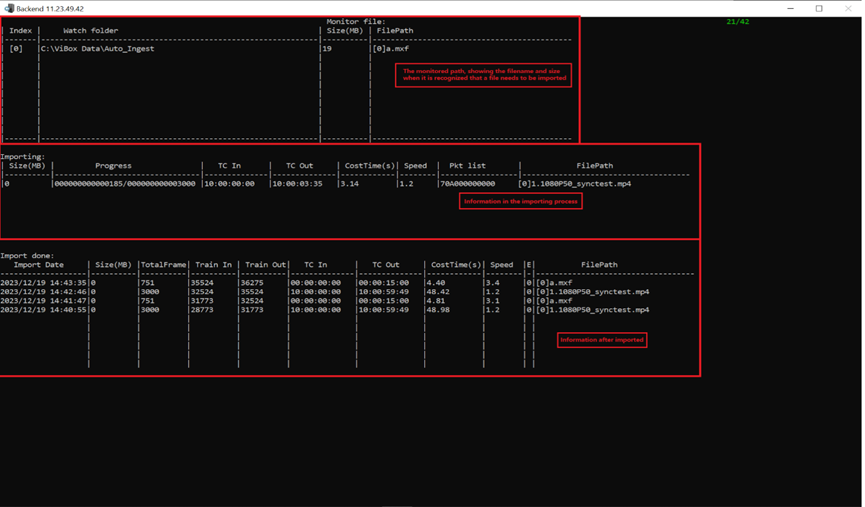
Description of the error code column E Clip import error in Vibox UI
Empty_DebugScreen 22/42
This is empty page.
GPU_DebugScreen 23/42
This page shows GPU usage, and audio volume meter.
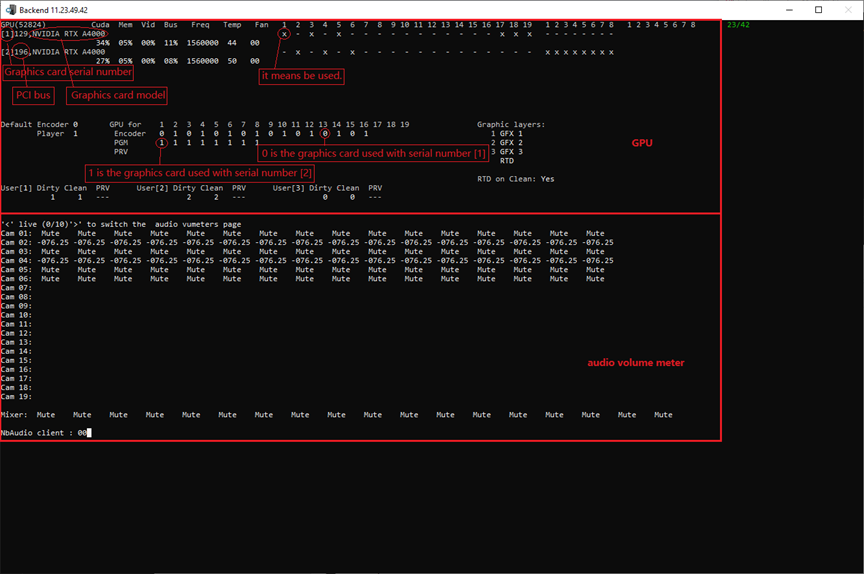
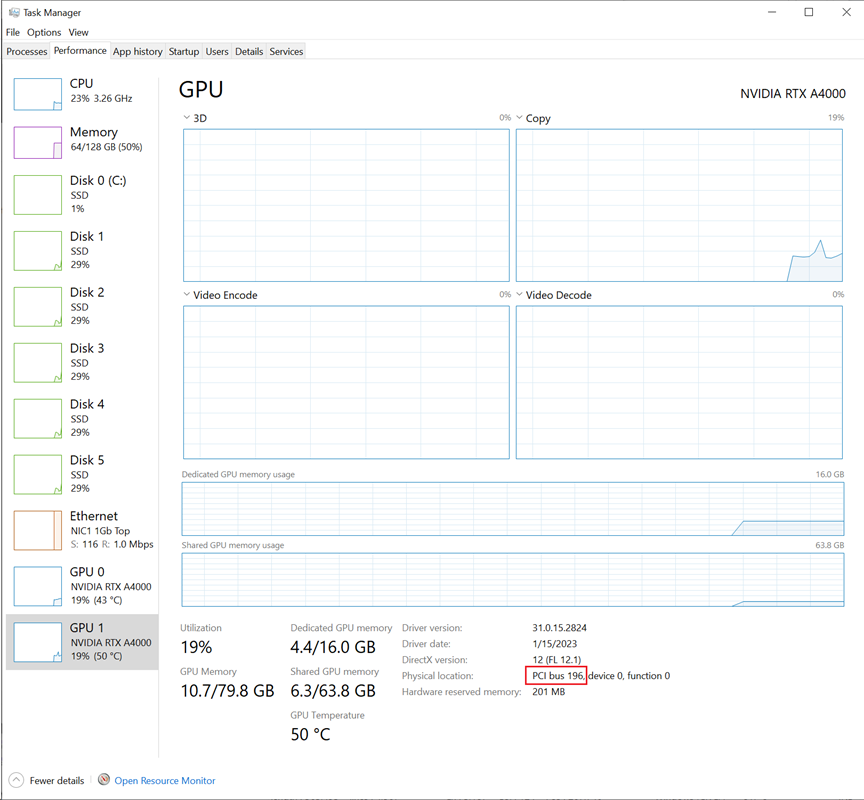
PCI bus information, as seen from the physical location of the task manager GPU.
1~16, it means that 16 cameras.
17, it means that PGMDirty.
18, it means that PGMClean.
19, it means that Import.
The default encoder depends on the GPU node configuration in the hardware.ini file.
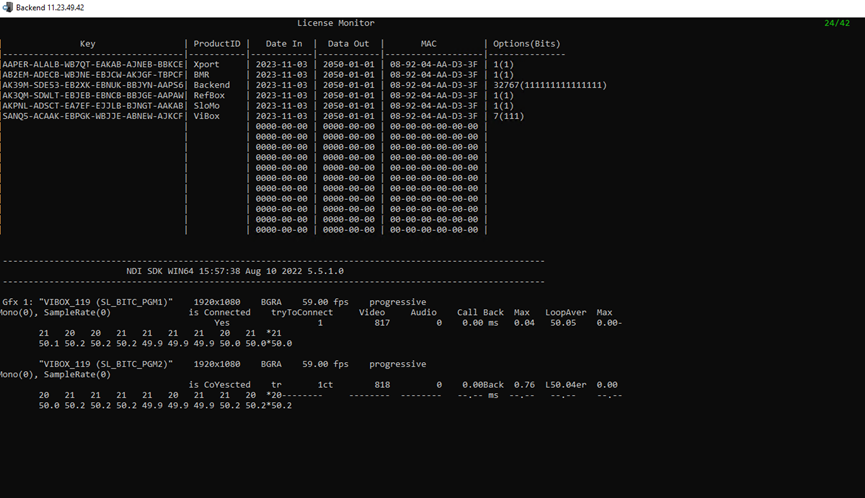
License_DebugScreen 24/42
This page is license information, same as WatchDog. The lower part of the page shows information about live GFX.
SLSM_DebugScreen 25/42
This page displays information about the SLSM.
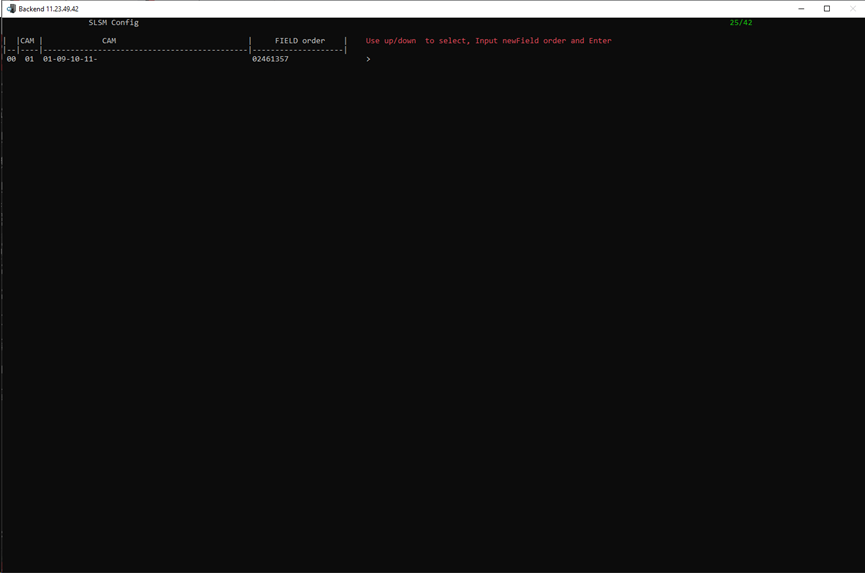
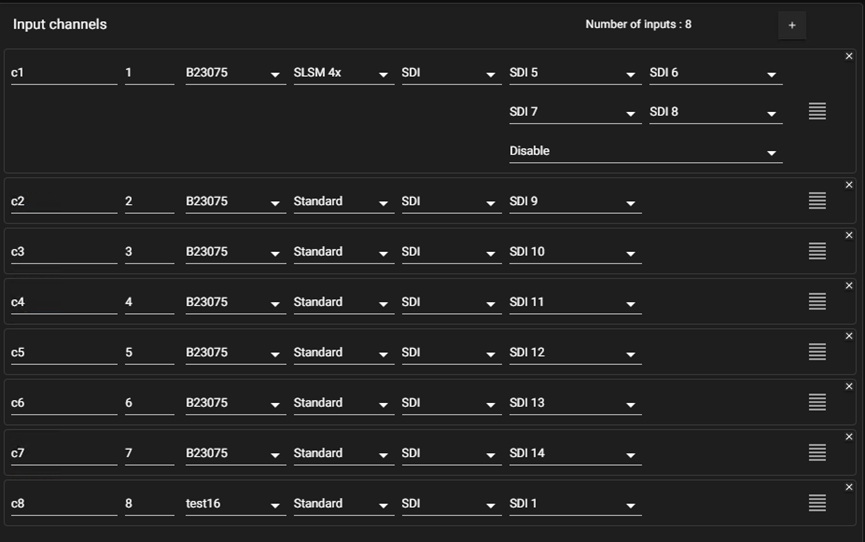
|
Parameters |
Description |
|---|---|
|
00 |
ID |
|
01 |
channel ID |
|
CAM |
Channel sequence number identified by BE. |
|
01-09-10-11- |
01 first channel 09-10-11 Because BE has 8 channels configured, SLSM's 4X configuration starts at 9 and goes up to 11. |
|
FIELD order |
Field serial number. You can manually adjust the order of the fields by configuring the SLSM in config.json. "CAMERA_CONFIG_SLSM_4X": "Cam1,Cam9,Cam10,Cam11:FIELD_1,FIELD_3,FIELD_5,FIELD_7,FIELD_2,FIELD_4,FIELD_6,FIELD_8" |
DA_DebugScreen 26/42
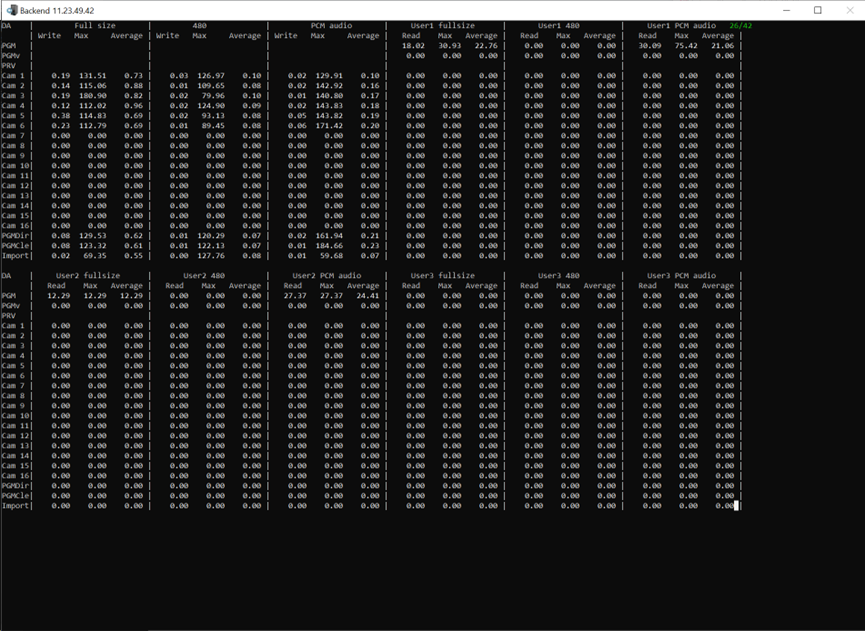
This page displays information about data access. current, maximum, and average read and write times.
Full size -> high-res
480 -> low-res
PCM audio -> audio
Externalcache_DebugScreen 27/42
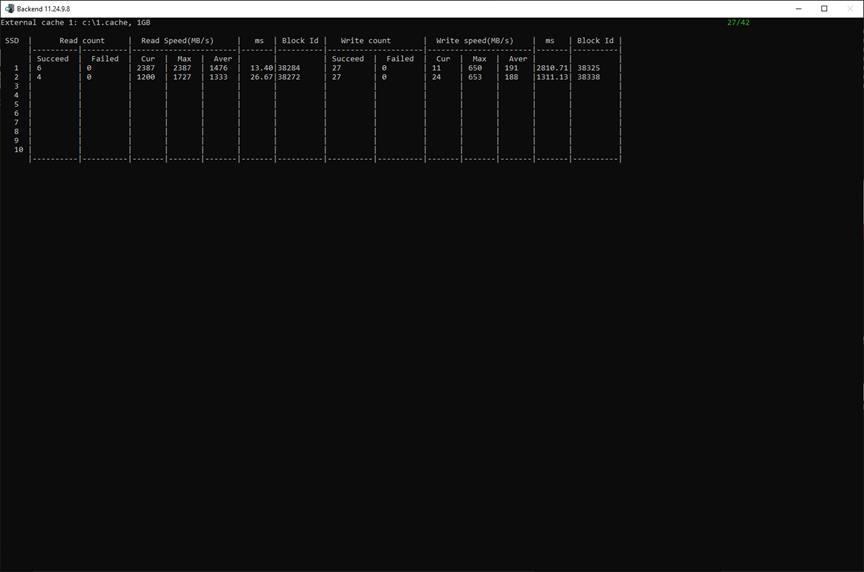
This page shows the second-level cache, which is used to speed up reads (normal writes also write to the second-level cache, automatically block writes when reading fast).
Up to two second-level caches, cache path and size, are configurable (The configuration depends on the configuration of the EXTERNAL_CACHE node in the BE hardware.ini).
DUMPJpeg_DebugScreen 28/42
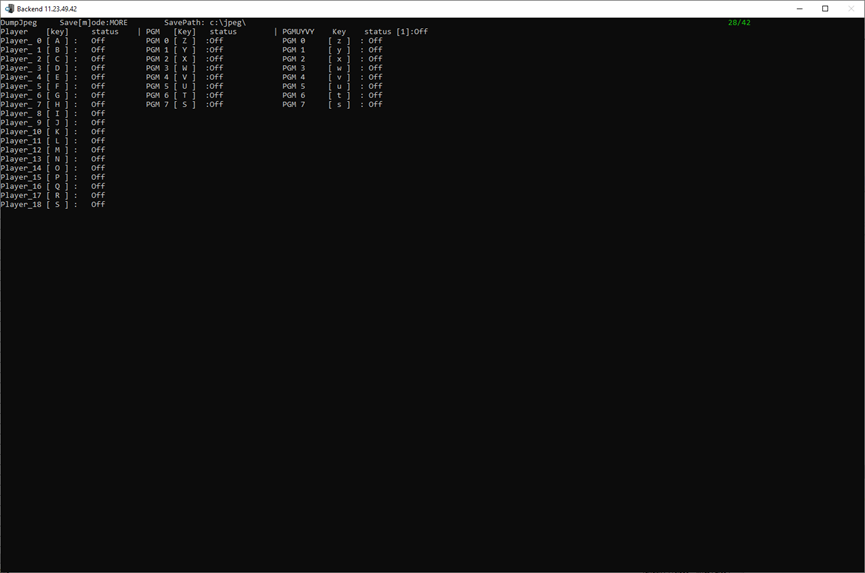
On this page, you can use the shortcut key dump JPG.
Press the letter in square brackets after each player or PGM to dump the corresponding JPG, and save it in the c:\jpeg\.
Press “m”, can switch single or more mode.
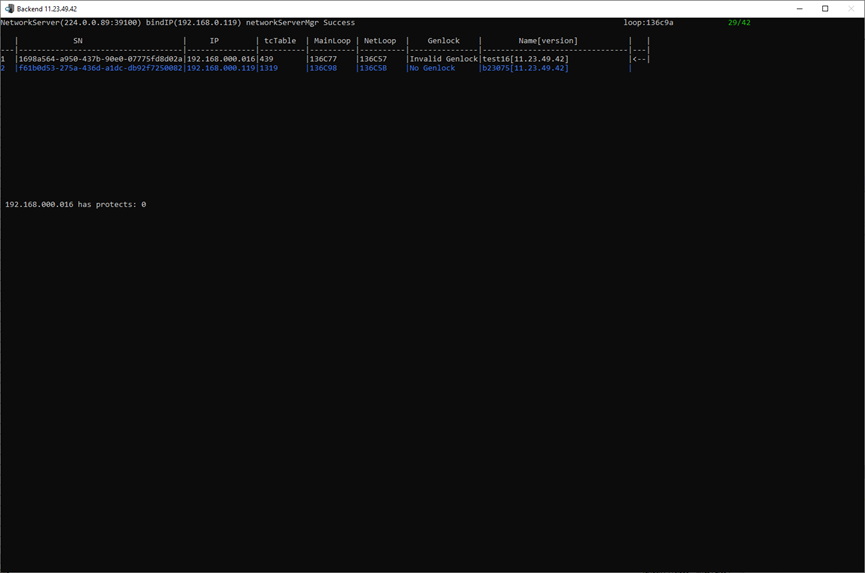
NetworkServer_DebugScreen 29/42
This page displays a list of Network hosts. The blue line, this is the base for this machine.
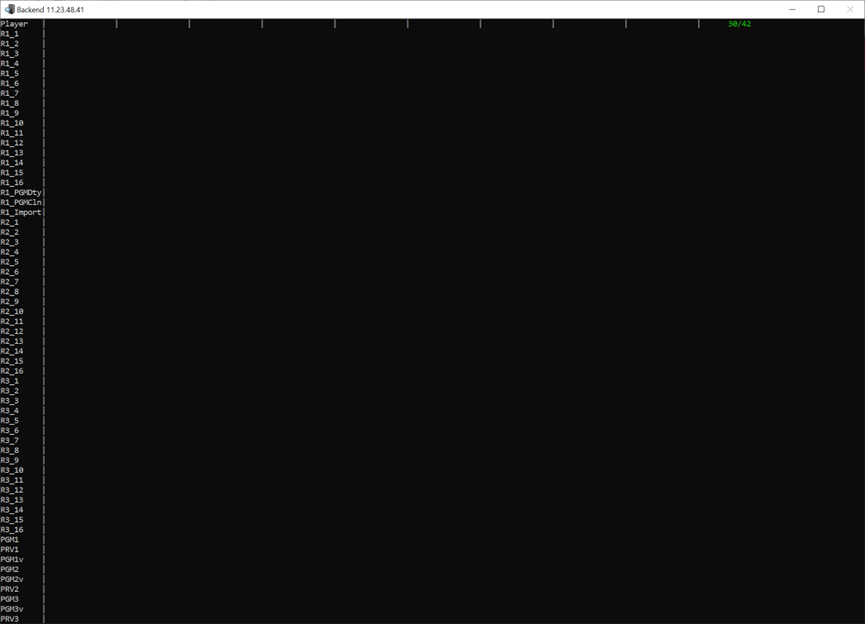
NetworkServerPlayerGroup_DebugScreen 30/42
When the network camera is used, the grouping information of the BE where the network camera is located is displayed (same as the grouping information on the second page of the BE debug page).
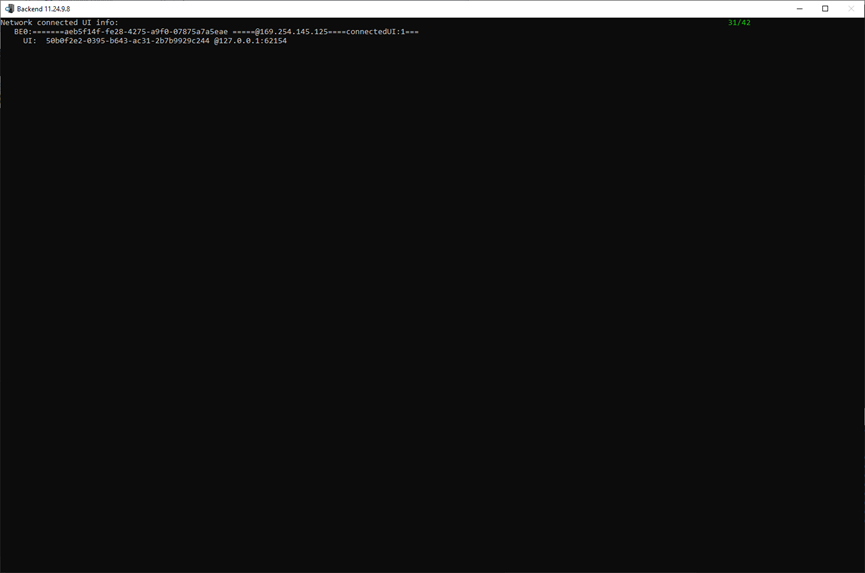
Metadata 31/42
This page shows the link information (SN, IP, UI number) of the BE where the network camera is located, and the link UI information (SN, IP, port).
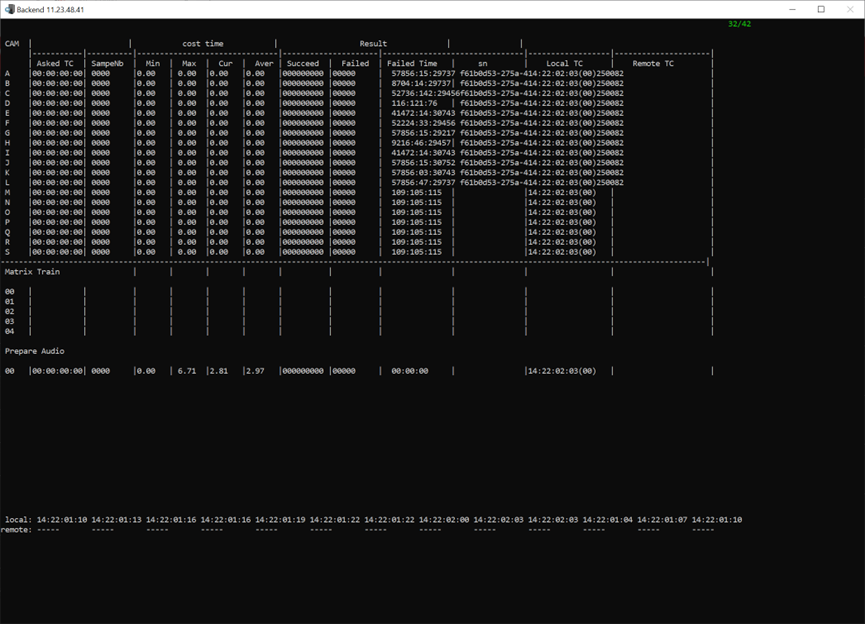
AudioInfo_DebugScreen 32/42
Tally_DebugScreen 33/42
This page shows the interaction between BE and tally.
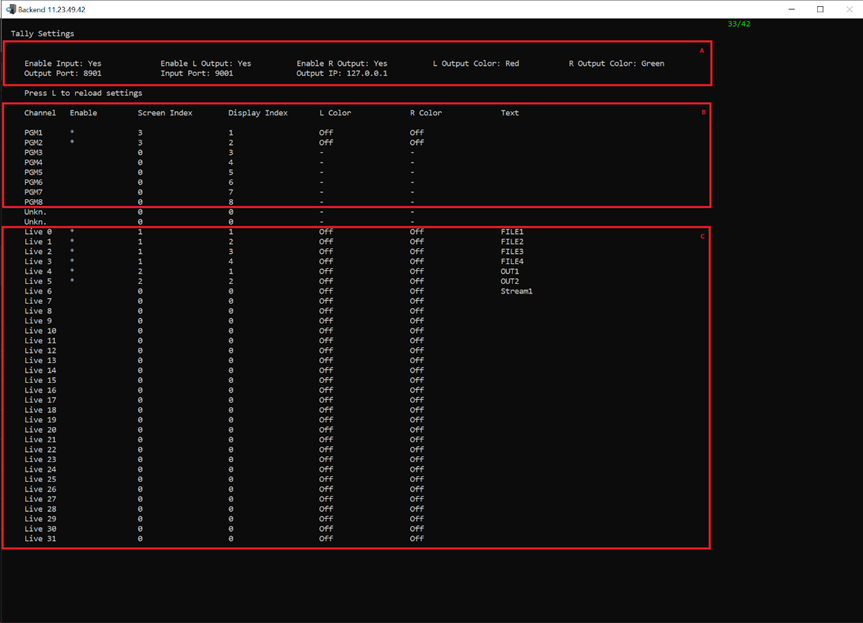
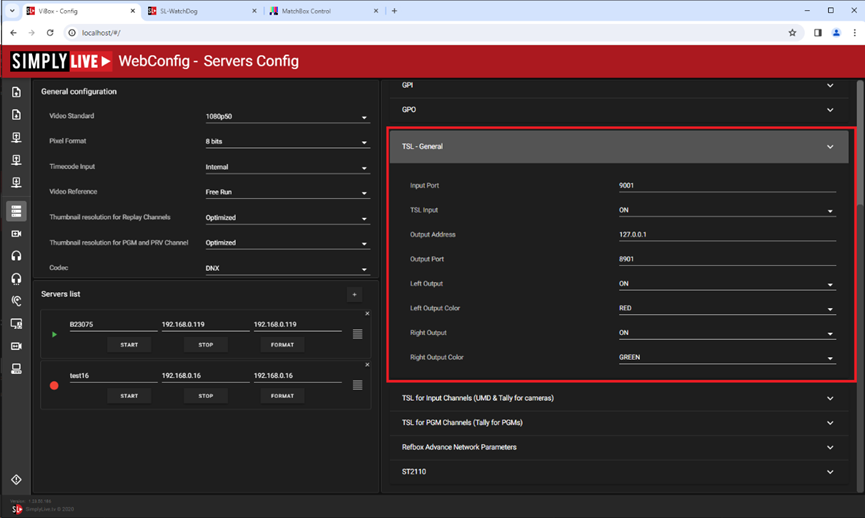
For A part, it depends on the TSL-general configuration in webconfig.
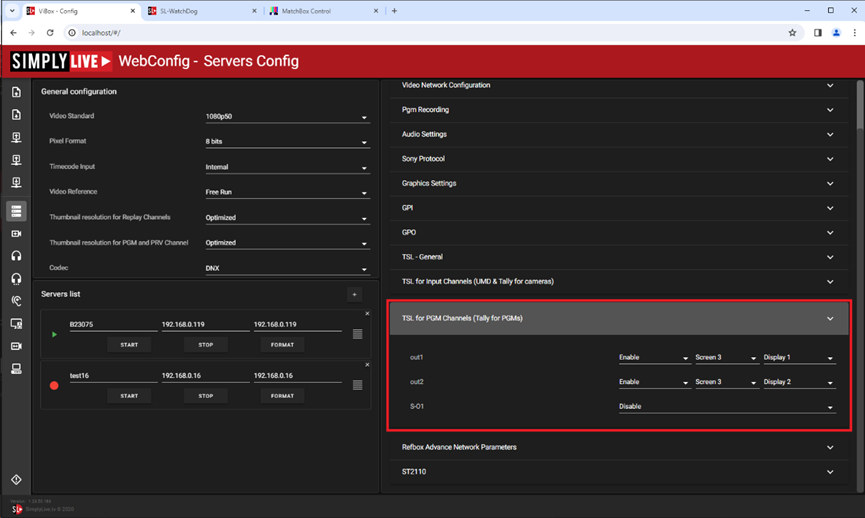
For B part, it depends on the TSL for PGM Channels (Tally for PGMs) configuration in webconfig.
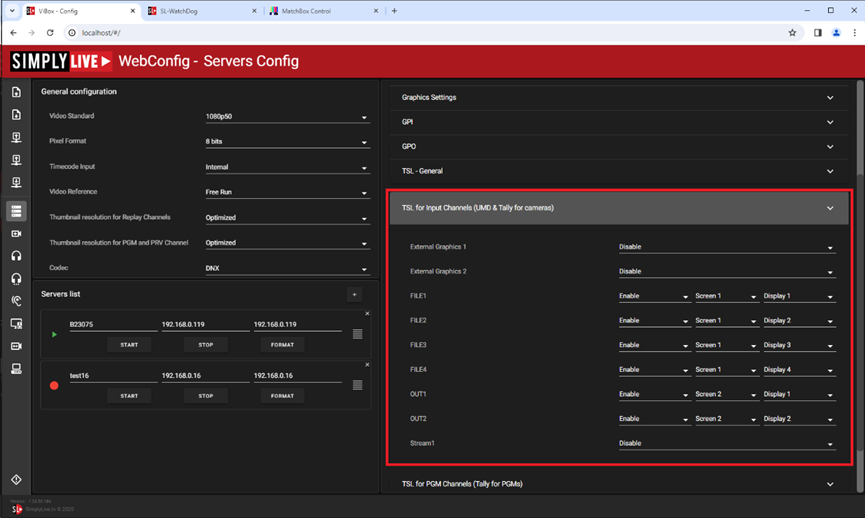
For C part, it depends on the TSL for Input Channels (UMD & Tally for cameras) configuration in webconfig.
ALLCams_DebugScreen 34/42
This page shows the usage information of all cameras, same as part B of the first page.
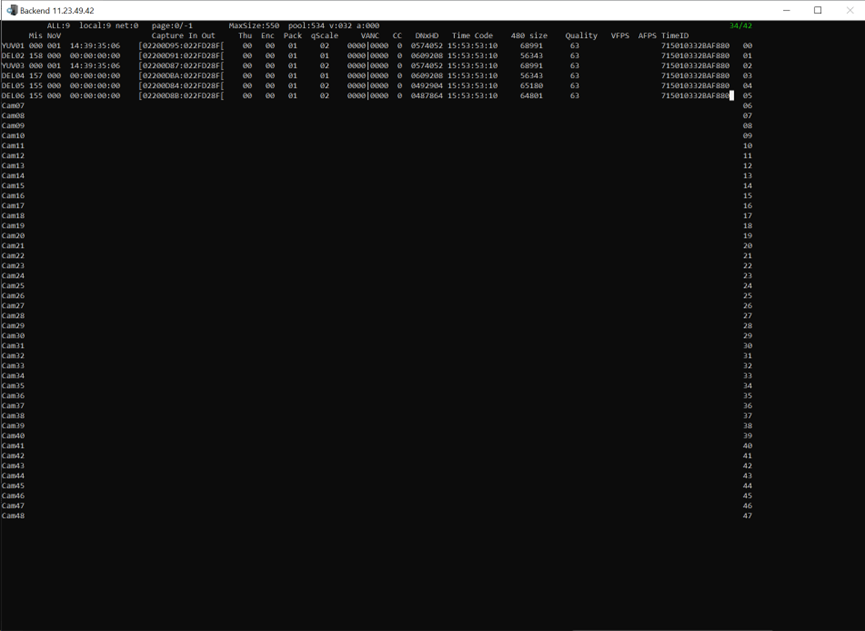
StreamIn_DebugScreen 35/42
This page displays information about incoming streams:
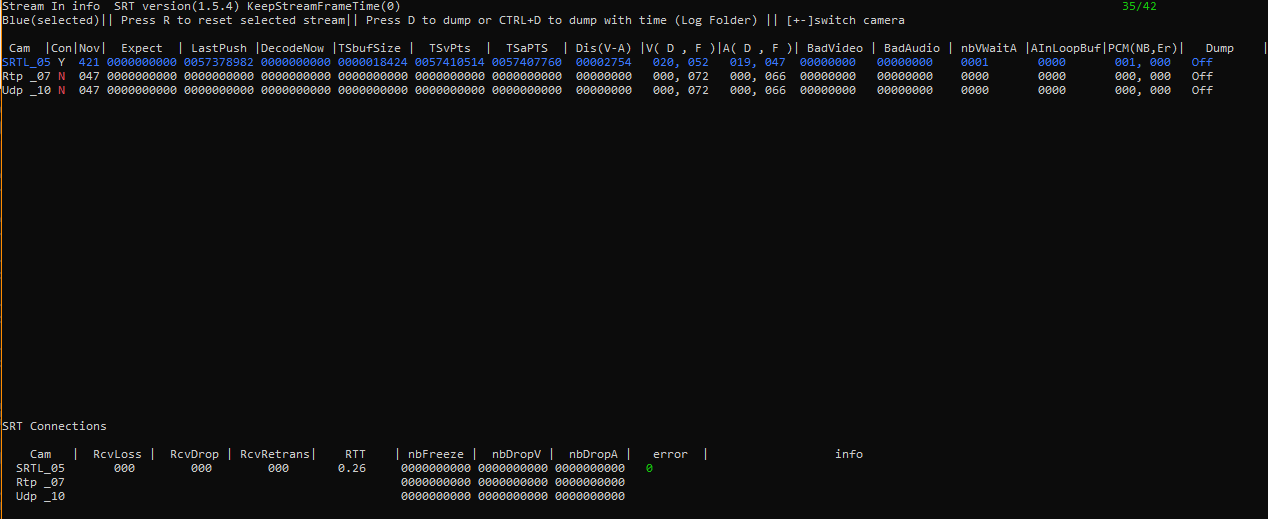
|
Information displayed |
Description |
|---|---|
|
SRT version |
SRT protocol installed with this backend |
|
KeepStreamFrameTime |
0: default 1: incoming timecode information is kept and not discarded. Can be set via hardware.ini |
|
|
|
|
Press: D |
start/stop dump of selected stream.
example filename:
|
|
Press: CTRL-D |
start/stop dump of selected stream. The file includes SRT timestamps. This file cannot be played back with any video player.
example filename:
|
|
Press: R |
Restarts current stream.
|
|
Per Stream Details |
Description |
|
Cam |
Type of icoming stream: Example: SRTL_05
|
|
Con |
Connection status:
|
|
Nov |
NoVideoCounter:
|
|
Expect |
The expected timestamp of the next incoming frame. |
|
LastPush |
Timestamp of last Video PTS pushed. |
|
DecodeNow |
Current decoded PTS timestamp |
|
TSbufSize |
The number of bytes in buffer. |
|
TSvPts |
Current demuxed video PTS. |
|
TSaPTS |
Current demuxed audio PTS. |
|
Dis(V-A) |
The difference between TSvPTS and TSaPTS timestamp |
|
V(D,F) |
The number of video frames available in the linked list. D is data, F is frame. |
|
A(D,F) |
The number of audio frames available in the linked list. D is data, F is frame. |
|
BadVideo |
Number of failed video frames to be decoded due to demux errors. |
|
BadAudio |
Number of failed audio frames to be decoded due to demux errors. |
|
nbWaitA |
Number of video frames for which no matching audio was found. |
|
AInLoopBuf |
In PCM buffer, the number of frames after decoding. |
|
PCM(NB,Er) |
The number of PCM after decoding.
|
|
Additional Connection Infos |
Description |
|
RcvLoss |
Number of packets detected as lost during transmission, based on sequence number gaps.
|
|
RcvDrop |
Number of packets dropped by the receiver and not processed. Occurs when packets arrive too late to be useful (exceeding the configured SRT latency) or when the receiver buffer is full, forcing the system to discard them to maintain stream continuity. Those are therefore not delivered to the recording train and will lead to NoV increase. |
|
RcvRetrans |
Number of packets successfully retransmitted after being lost.
|
|
RTT |
Smoothed round-trip time (SRTT), an exponentially-weighted moving average (EWMA) of an endpoint's RTT samples, in milliseconds. |
|
nbFreeze |
Summary of freeze frames due to dropped frames |
|
nbDropV |
Summary of dropped video frames |
|
nbDropA |
Summary of dropped audio frames |
|
error |
Error code and error output. |
StreamOut_DebugScreen 36/42
This page displays information about the stream out.
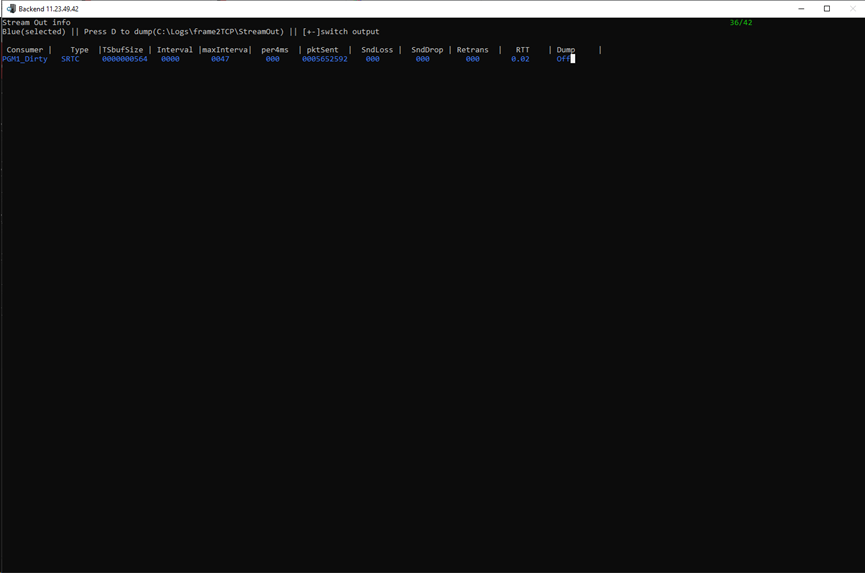
|
Parameters |
Description |
|---|---|
|
Consumer |
The consumer type, which depends on the output channel player configuration of the webconfig page. |
|
Type |
Stream type. SRTC: SRTàType CàCaller |
|
TSbufSize |
The buffer size of save TS. |
|
Interval |
The interval between sending ts packets (1316 bytes). |
|
maxInterval |
The maximum interval between sending 2 ts packets. |
|
Per4ms |
Every 4 ms, how many packets to send, for UDP. |
|
pktSent |
The number of ts packets that have been sent. |
|
SndLoss |
The total number of data packets considered or reported as lost at the sender side. Does not correspond to the packets detected as lost at the receiver side. |
|
SndDrop |
The total number of dropped by the SRT sender DATA packets that have no chance to be delivered in time. |
|
Retrans |
The total number of retransmitted packets sent by the SRT sender. |
|
RTT |
Smoothed round-trip time (SRTT), an exponentially-weighted moving average (EWMA) of an endpoint's RTT samples, in milliseconds. |
|
Dump |
Press D to dump, The target path is C:\Users\ViBox\AppData\Local\Simplylive\VideoEngine\StreamOut. |
SonyDeviceCmd_DebugScreen 37/42
This page displays records of interactions with Sony device commands.
Here's an example:
Com 01:14-36-10-0 Play => ACK
|
Com 01 |
Com port |
|
14-36-10-0 |
Time, HH-MM-SS-MS |
|
Play => ACK |
Command ACK: The command returned from the sony device is accept. NAK: The command returned from the sony device is fail. |
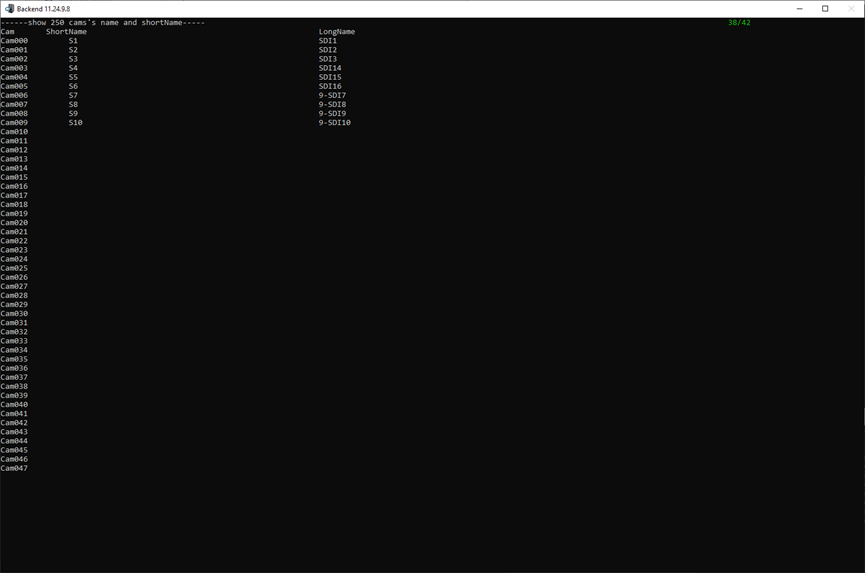
CamsName_DebugScreen 38/42
This page displays the names of all cameras, both short and long.
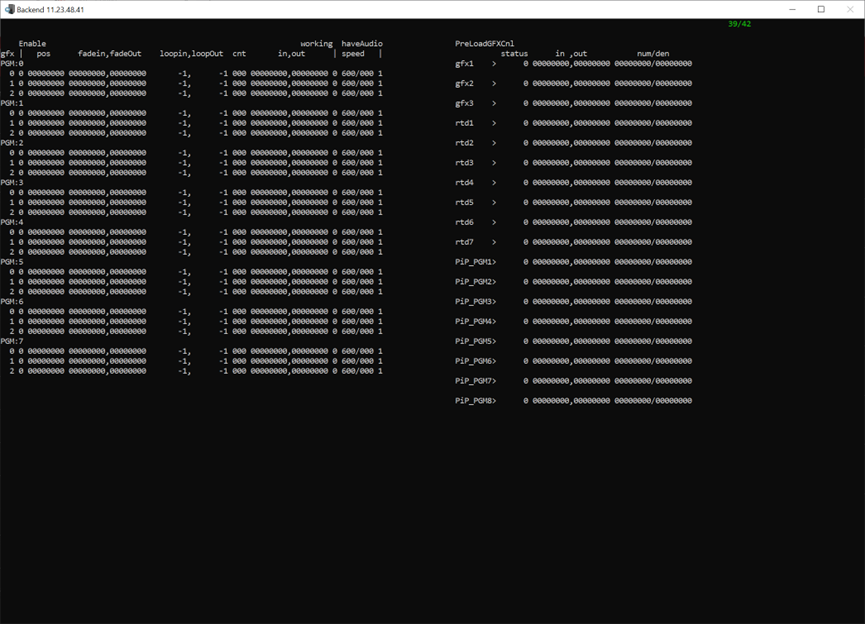
GfxStatus_DebugScreen 39/42
This page displays information about GFX usage.
|
Parameters |
Description |
|---|---|
|
gfx |
The following shows each PGM doing the gfx |
|
pos |
Current postion |
|
fade in |
Start point |
|
fade out |
End point |
|
loop in loop out |
Scope of loop |
|
cnt |
Length |
|
in out |
Part frame on storage |
|
speed |
Speed of play |
|
working have audio |
Is there audio |
|
PreLoadGFXCnl |
Before GFX, we need to read from disk to the second-level cache |
|
status |
0 Not started 1 Reach the safe playback range 2 All loaded |
|
in out |
Part frame on cache |
|
num/den |
Length of the cache/total length. |
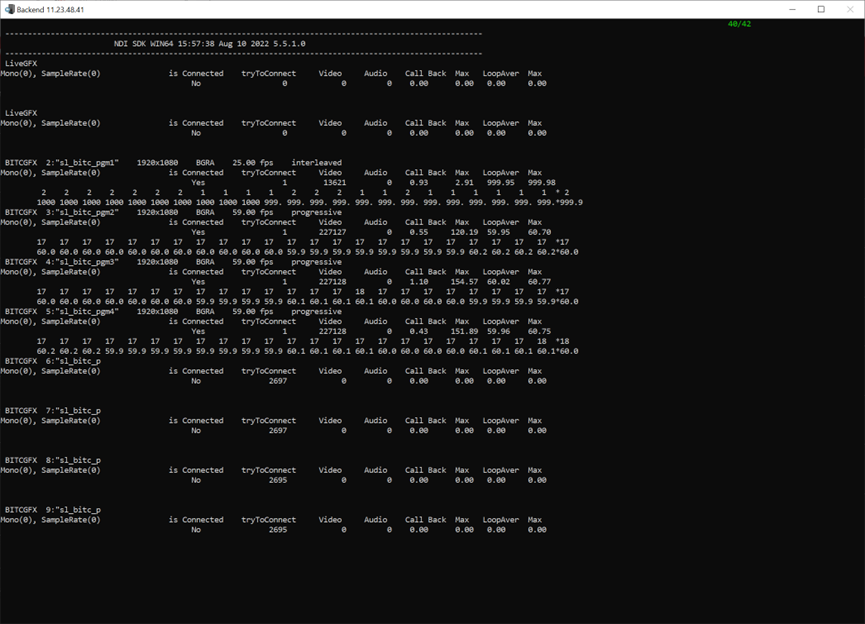
NDI_DebugScreen 40/42
This page shows the usage information of LiveGFX and BITCGFX
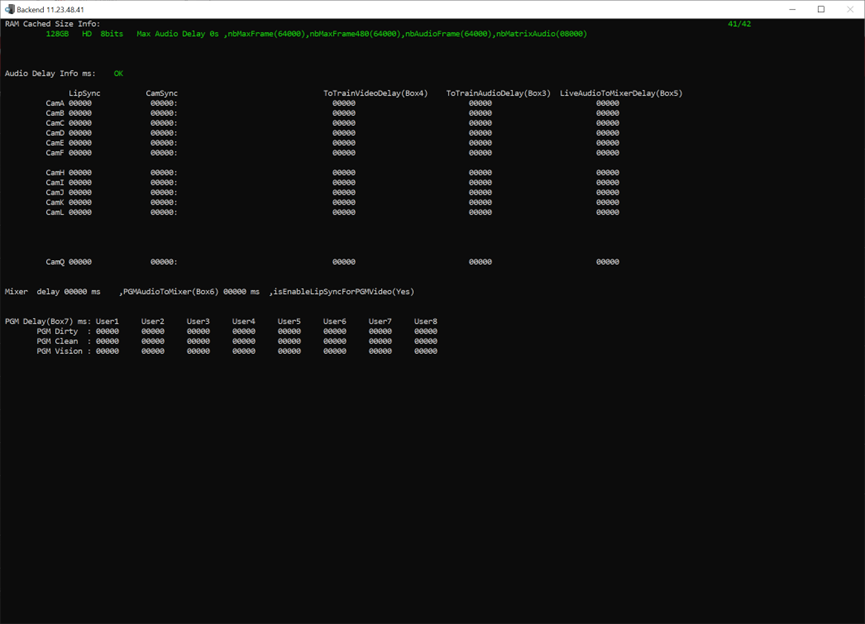
RamCache_DebugScreen 41/42
IngestTiming_DebugScreen 42/42