
These plug-ins are Consumers only and are used to probe the audio signal at any point in the signal processing chain.
Dialnorm Meter Configuration
Variants are available to support the following audio leg group types:
|
Mono |
Stereo |
5.1 |
|---|---|---|
|
|
|
|
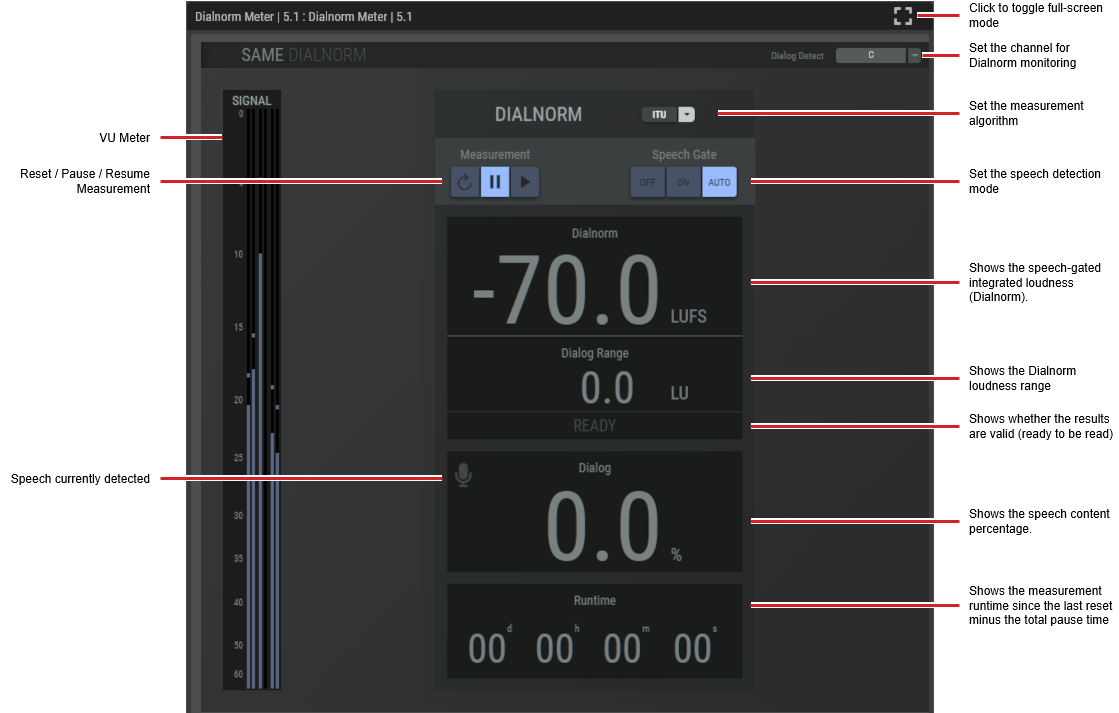
The Dialnorm meter plugin computes the speech-gated integrated loudness (Dolby Dialnorm).

For this plugin, you need to set the LUFS/LKFS units to use in the Network-Plug-in’s Mixer settings.
|
Dialog Detect |
Select the channels in which the speech Dialnorm measurement should be made. C: Only the center channel, LRC: Left, right and center channels. LR: Left and right channels, L: Only the left channel, R: Only the right channel This selection is only available in the 5.1 plugin version. In Stereo mode, the detection is always performed on the sum of the left and right channels. |
|
VU Meter |
Shows the input signal levels. |
|
[Measurement Algorithm] |
Set the measurement algorithm type. ITU BS.1770-1: An International Telecommunication Union standard for measuring audio loudness and true-peak levels. Leq(A): The Equivalent Continuous Sound Level using A-weighting, representing the constant sound level with the same total acoustic energy as a fluctuating noise over a given period of time. |
|
Measurement: Reset |
Click to reset the Dialnorm measurements. 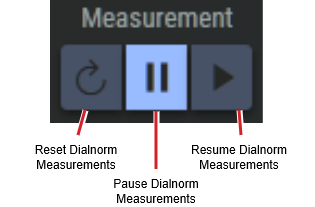
|
|
Measurement: Pause / Resume |
Click to control Dialnorm operation. Pause: Click to pause Dialnorm measurement. Resume: Click to continue Dialnorm measurement. |
|
Dialnorm |
Shows the speech-gated integrated loudness (Dialnorm). |
|
Dialog Range |
Shows the Dialnorm loudness range. |
|
Status |
Shows whether the results are valid (ready to be read). |
|
Dialog |
Shows the speech content percentage. |
|
Runtime |
Shows the measurement runtime since the last reset minus the total pause time. |
Loudness Meter Configuration
Variants are available to support the following audio leg group types:
|
Mono |
Stereo |
5.1 |
|---|---|---|
|
|
|
|
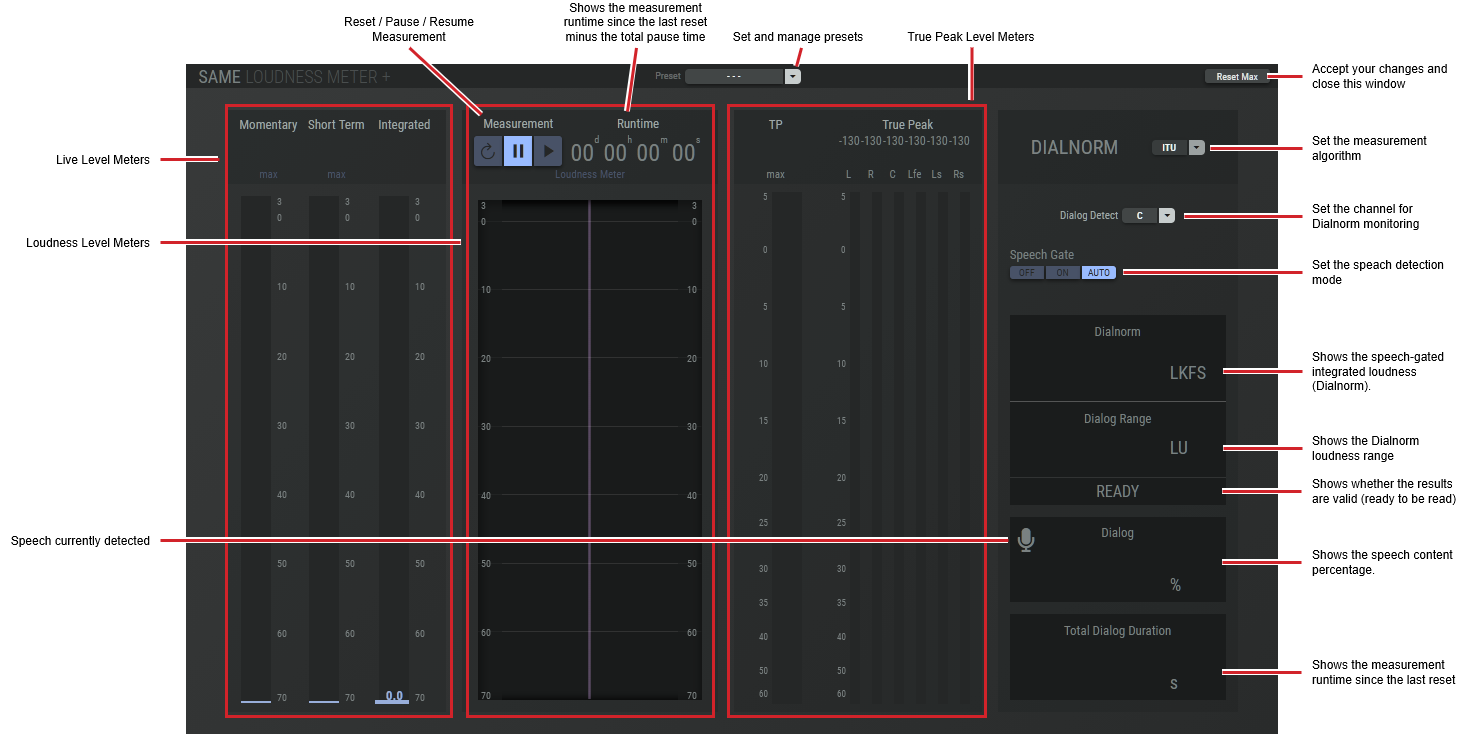
The loudness meter plugin computes the true peak, momentary loudness, short-term loudness, integrated loudness and the loudness range of an audio signal in accordance with EBU R 128 and ITU-R BS.1770-4 standards.

For this plugin, you need to set the LUFS/LKFS units to use in the Network-Plug-in’s Mixer settings.
|
Preset |
The configuration of a SAME Application can be memorized as a preset for instant recall. See SAME Application Preset Configuration. |
|
Reset Max |
Click to reset the peak levels shown by the Max meters. |
|
Live Level Meters |
Shows the measured signal levels. Momentary: Momentary loudness (based on a 400 ms window). Short Term: Short-term loudness (based on a 3 s window). Integrated: When the Speech Gate option in Dialnorm is:
|
|
Loudness Meters |
Shows the loudness range. |
|
True Peak Level Meters |
Shows the peak signal level(s). TP Max: Historic maximum true peak value since the last reset of Reset Max. True Peak: True peak meter. |
|
Measurement: Reset |
Click to reset the integrated loudness and loudness range measurements.
|
|
Measurement: Pause / Resume |
Click to control integrated loudness and loudness range operation. Pause: Click to pause integrated loudness and loudness range measurement. Resume: Click to continue integrated loudness and loudness range measurement. |
|
Runtime |
Shows the measurement runtime since the last reset minus the total pause time. |
Loudness Meter Plus Configuration
Variants are available to support the following audio leg group types:
|
Mono |
Stereo |
5.1 |
|---|---|---|
|
|
|
|
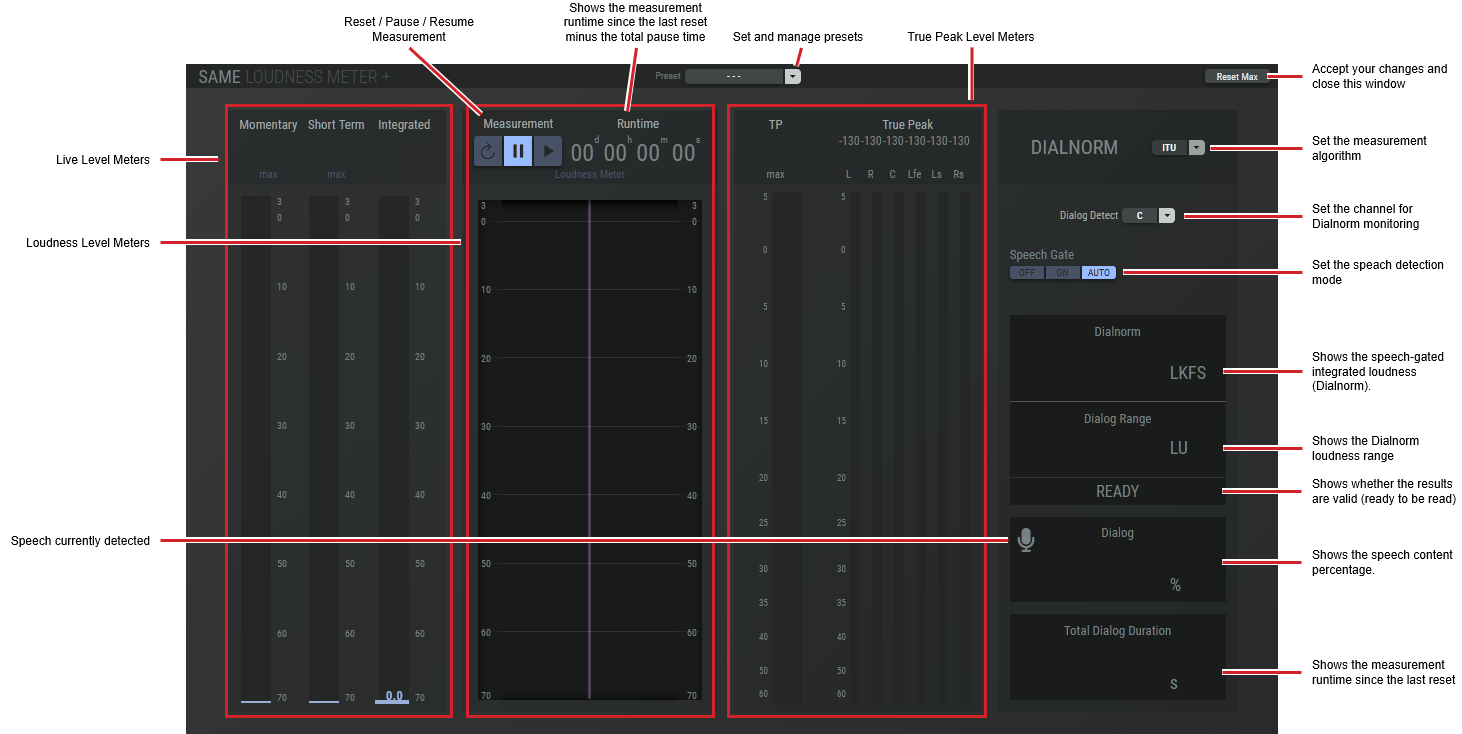
The loudness meter plus plugin computes the true peak, momentary loudness, short-term loudness, integrated loudness and the loudness range of an audio signal in accordance with EBU R 128 and ITU-R BS.1770-4 standards as well as the speech-gated integrated loudness (Dolby Dialnorm).

|
Preset |
The configuration of a SAME Application can be memorized as a preset for instant recall. See SAME Application Preset Configuration. |
|
Reset Max |
Click to reset the peak levels shown by the Max meters. |
|
Live Level Meters |
Shows the measured signal levels. Momentary: Momentary loudness (based on a 400 ms window). Short Term: Short-term loudness (based on a 3 s window). Integrated: When the Speech Gate option in Dialnorm is:
|
|
Loudness Meters |
Shows the Dialnorm loudness range. |
|
True Peak Level Meters |
Shows the peak signal level(s). TP Max: Historic maximum true peak value since the last reset of Reset Max. True Peak: True peak meter. |
|
Dialog Detect |
Select the channels in which the speech Dialnorm measurement should be made. C: Only the center channel, LRC: Left, right and center channels. LR: Left and right channels, L: Only the left channel, R: Only the right channel This selection is only available in the 5.1 plugin version. In Stereo mode, the detection is always performed on the sum of the left and right channels. |
|
[Measurement Algorithm] |
Set the measurement algorithm type. ITU BS.1770-1: An International Telecommunication Union standard for measuring audio loudness and true-peak levels. Leq(A): The Equivalent Continuous Sound Level using A-weighting, representing the constant sound level with the same total acoustic energy as a fluctuating noise over a given period of time. |
|
Measurement: Reset |
Click to reset the Dialnorm measurements.
|
|
Measurement: Pause / Resume |
Click to control Dialnorm operation. Pause: Click to pause Dialnorm measurement. Resume: Click to continue Dialnorm measurement. |
|
Dialnorm |
Shows the speech-gated integrated loudness (Dialnorm). |
|
Dialog Range |
Shows the Dialnorm loudness range. |
|
Status |
Shows whether the results are valid (ready to be read). |
|
Dialog |
Shows the speech content percentage. |
|
Runtime |
Shows the measurement runtime since the last reset minus the total pause time. |
Real Time Analyzer Configuration
Variants are available to support the following audio leg group types:
|
Mono |
Stereo |
5.1 |
|---|---|---|
|
|
|
|
This plugin measures the frequency spectrum of a signal with a 12 bins/octave resolution.

The Real Time Analyzer actually is a Mono Process but uses a 5.1 Input. For Mono and Stereo use, it must be routed accordingly (Mono → Centre, and Stereo → Left /Right)
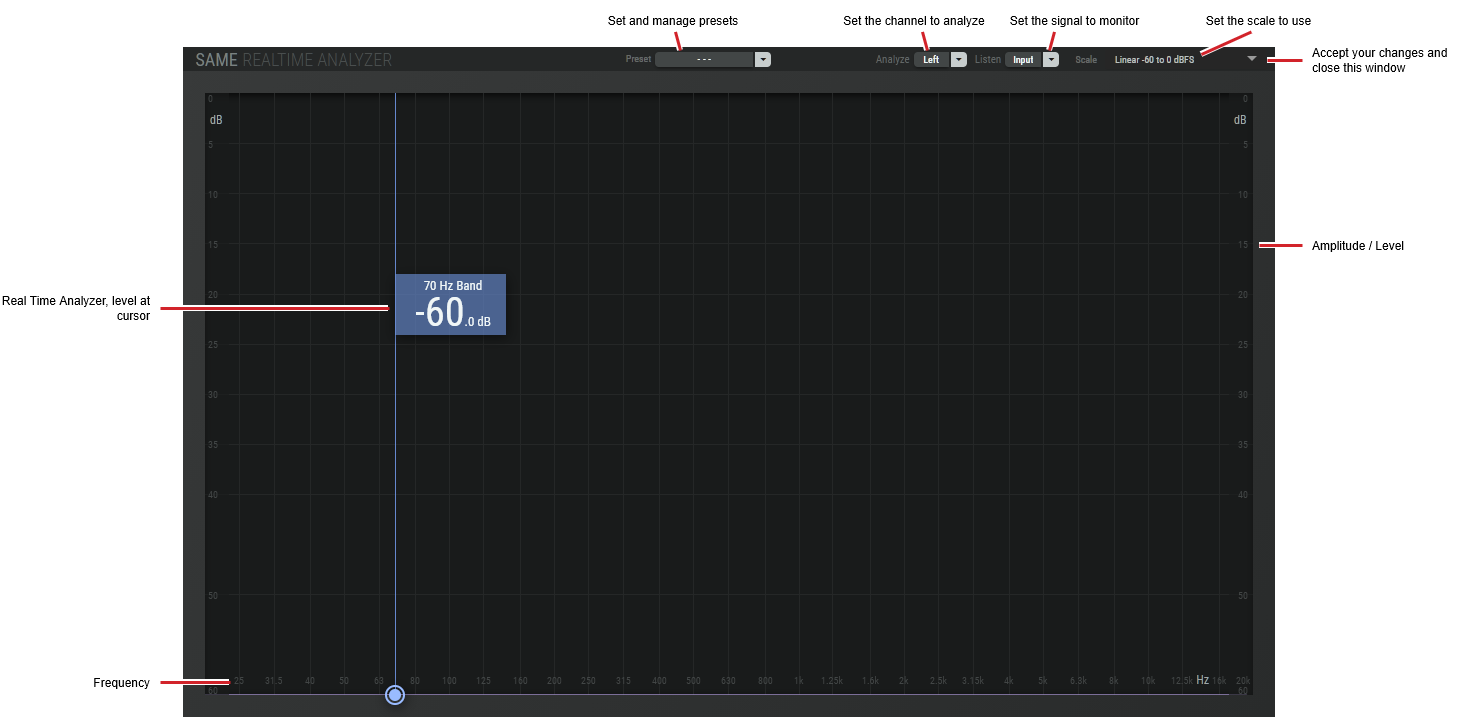
|
Preset |
The configuration of a SAME Application can be memorized as a preset for instant recall. See SAME Application Preset Configuration. |
|
Analyze |
Set the channel to analyze. ITU 5.1 to Mono: (Left + Right) / sqrt(2) + Center + (Ls + Rs)/2, ITU Surround 5.1 to Mono downmix
|
|
Listen |
Set the signal to monitor. Input: Listen to the analyzer’s input. Analyzer Downmix: Listen to the downmix, as selected in Analyze. |
|
Scale |
Set the measurement scale. IEC-268-18 Linear -60 to 0 dBFS |
Silence Detector Configuration
Variants are available to support the following audio leg group types:
|
Mono |
Stereo |
5.1 |
|---|---|---|
|
|
|
|
This plugin detects when a signal is below a threshold for a given amount of time.

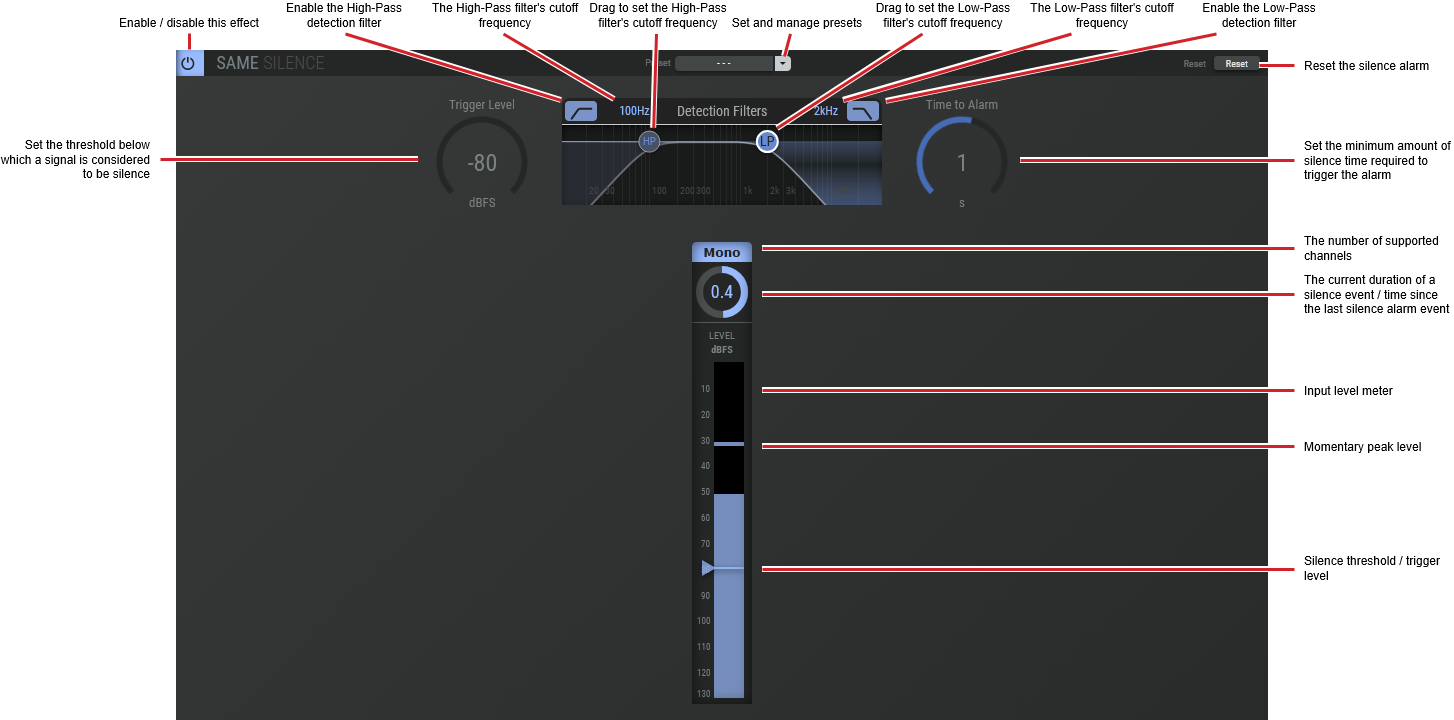
|
Preset |
The configuration of a SAME Application can be memorized as a preset for instant recall. See SAME Application Preset Configuration. |
|
Reset |
Click to reset the silence alarm. |
|
Trigger Level |
Set the threshold below which a signal is considered to be silence. |
|
Detection Filters |
Set the frequency range used to detect sound energy levels that are used for silence detection. The high-pass filter is useful to eliminate hum from masking silence. The low-pass filter is useful to eliminate hiss from masking silence. Click and drag HP or LP to set the filter’s cut-off frequencies. |
|
Time to Alarm |
Set the minimum amount of silence time required to trigger the alarm. |
|
Last Silence Count-down timer |
Shows how much time has passed since the last silence alarm was triggered. Shows a count-down timer that starts with the value set by Time to Alarm. If this count-down timer gets to zero, a silence alarm is triggered. |
Line Identification Analyzer / Shuffler
Variants are available to support the following audio leg group types:
|
Mono |
Stereo |
5.1 |
|---|---|---|
|
|
|
|
This plugin analyzes and detects line identification tone bursts, according to:
-
EBU R49 (Two channel audio identification).
-
BLITS (Black and Lanes’ Ident Tones for Surround).
-
EBU multichannel identification signal.
-
GLITS (Graham's Line Identification Tone System).
This plugin is intended to be used with the Line Identification Generator as a signal source. See Generators & Players.
It also includes functionality to automatically delay the channels to align them, and to invert the phase of the channels that have been detected out of phase.
This plugin can then automatically reorder multichannel legs.
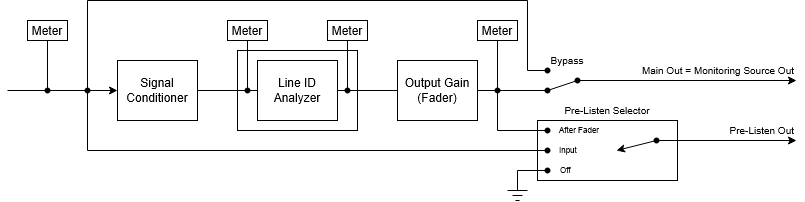
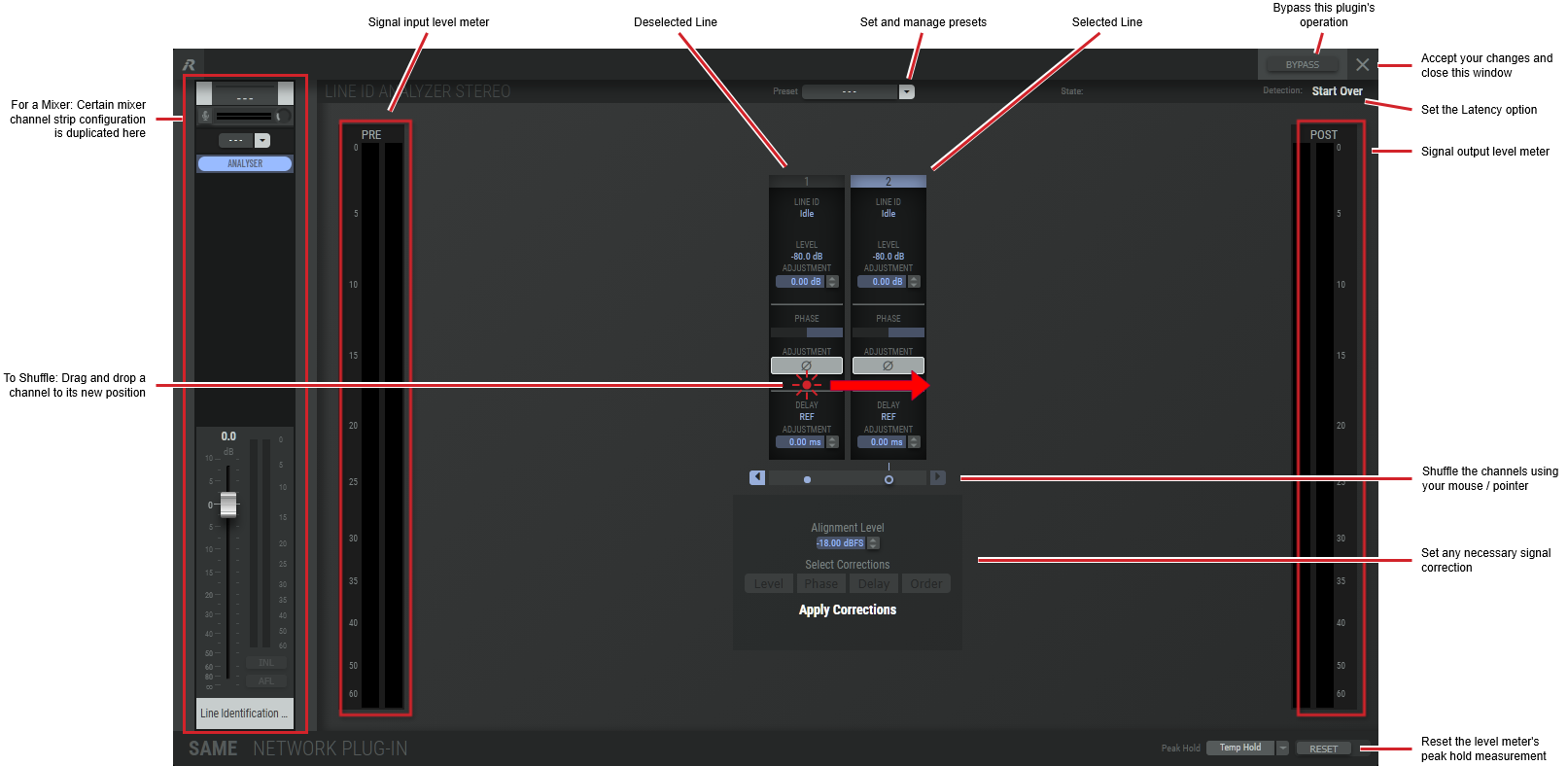
|
Preset |
The configuration of a SAME Application can be memorized as a preset for instant recall. See SAME Application Preset Configuration. |
|
Bypass |
Set to bypass this plugin's operation. |
|
Start Over |
Click to clear all test measurements. |
|
Line ID |
Shows the current detection state. Idle: No test measurement has been started. Detecting: The test measurement has started. Completed: The test measurements have completed. |
|
Level |
Shows the detected channel level. |
|
Adjustment |
Set the amount of gain (boost or cut) needed to equalize the signal levels between channels. |
|
Phase |
Shows the phase measurement for the channel.
|
|
Adjustment Ø |
Click to invert the phase by 180°. |
|
Delay |
Set the amount of delay to apply to the channel. Click the up / down buttons and drag your mouse up or down to set the delay. |
|
Ref |
Set the reference signal level. |
|
Adjustment |
Set the amount of delay to apply to the channel. |
|
Alignment Level |
Suggested channel gain required to achieve the Alignment Level. |
|
Select Corrections |
Once the Line ID tests have completed, corrections that can be applied are shown as necessary. Level: Adjust the signal level to equalize all channels according to the test. Phase: Correct the channels with phase inversion according to the test, by 0° or 180°.
Delay: Adjust the time alignment delay according to the test, up to 1 second. Order: Reorder the outputs to the proper order according to the test. |
|
Peak Hold |
Click No hold: Shows sound levels. Transient peaks are not frozen. Temp hold: Shows sound levels while also freezing the display of the highest instantaneous peaks for a short period. Cont. hold: Shows sound levels while also freezing the display of the highest instantaneous peaks. Click RESET ALL to clear the peak signal display on all level meters. |
|
Reset |
Reset the level meter's peak hold measurement. |
There are two ways to shuffle the channels by:
-
Dragging and dropping the channel to its new position.
-
By using your mouse / pointer to move a channel left or right.