Using SimplyLive BMR file recording engine together with the Telestream Vantage Open Workflow mode, SimplyLive BMR recordings can be conformed to Avid MXF OP-Atom and checked into Interplay while the recording is still in progress. Editors working in Media Composer can open and cut the material before the event has finished, using Avid frame chase editing.
Validated format
After several rounds of testing on this setup, the following formats have been validated.
With the XDCAM HD50 codec in an MXF OP1a wrapper
-
1080i50
With the DNxHD codec in an MXF OP1a wrapper
-
1080i50
-
1080p59.94 (8-bit and 10-bit)
-
1080p23.98
-
1080p29.97
Other frame rates and codecs have not been tested. Their absence from this list does not necessarily mean they are unsupported.
The chain requires no re-encoding. SimplyLive BMR writes XDCAM HD50 in an MXF OP1a wrapper directly into a watch folder on Avid NEXIS; Vantage detects the growing file, rewraps it and generates the OP-Atom media and the AAF; Interplay catalogues the asset. The essence that reaches the edit suite is bit-for-bit the essence SimplyLive BMR recorded.
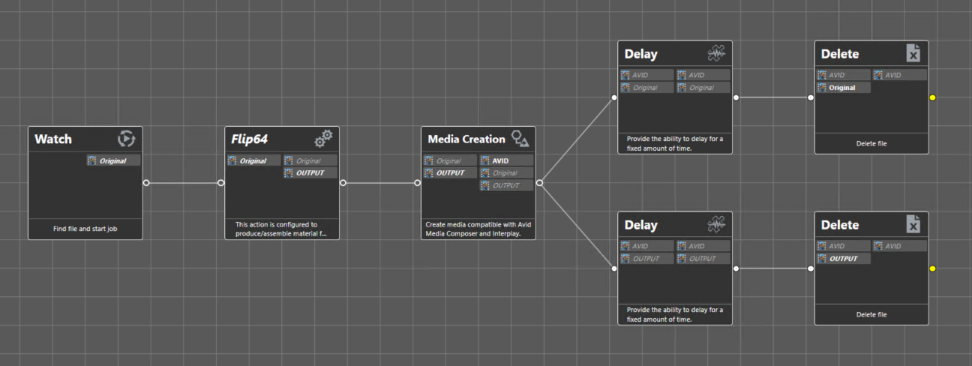
This guide explains how to configure a SimplyLive BMR and a Telestream Vantage domain so that recordings appear in Avid Interplay automatically, and how to run and monitor the chain in production. It covers SimplyLive BMR recording parameters, the Vantage workflow and each of its actions, the Avid-side prerequisites, and the troubleshooting steps for the faults most commonly encountered during commissioning.
Scope
|
Item |
Value |
|---|---|
|
Codec |
XDCAM HD50 |
|
Wrapper |
MXF OP1a |
|
Picture format |
1080i50 |
|
Video bit rate |
approx. 50 Mbit/s, i.e. approx. 6.25 MB/s per stream |
|
Source write mode |
Growing file |
|
Delivery to Avid |
MXF OP-Atom + AAF, checked into Interplay |
|
Editing mode |
Frame chase editing in Media Composer |
Open Workflow
In the default closed mode, every Vantage action waits for the action before it to finish. On a 90-minute recording the first processing step would therefore only start at the end of the event. Open Workflow lets the actions run concurrently on a file that is still being written, which is what makes frame chase editing possible. It requires an Open Workflows licence on the Vantage domain.
Workflow step by step
|
Step |
System |
Format |
|---|---|---|
|
1 — Recording |
Riedel SimplyLive BMR |
XDCAM HD50 in MXF OP1a, growing file |
|
2 — Drop |
Watch folder on Avid NEXIS |
Written directly, no temporary directory |
|
3 — Detection |
Vantage — Watch action |
Submit Immediately on a growing file |
|
4 — Conditioning |
Vantage — Flip64 action |
Direct Convert rewrap to MXF OP1a |
|
5 — Avid conforming |
Vantage — Media Creation action |
MXF OP-Atom + AAF |
|
6 — Cataloguing |
Avid Interplay |
Check-in to the target folder |
|
7 — Editing |
Avid Media Composer |
Frame chase editing |
|
8 — Purge |
Vantage — Delay then Delete |
Removal of transit files |
Pre-Requisites
-
The SimplyLive server must be running a release that writes XDCAM MXF OP1a from the XPort module.
-
Validated on ViBox Backend 11.26.22.12 with SimplyLive BMR_6.26.22.2 - therefore please use these versions or later.
-
-
The Telestream Vantage domain must be licensed for Open Workflows.
-
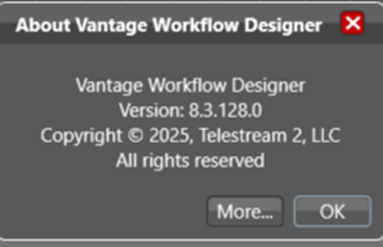
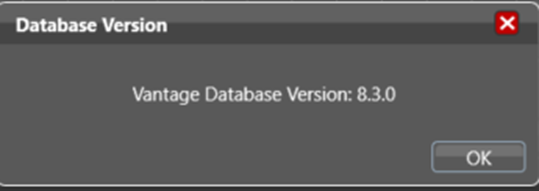
Validated on Vantage 8.3 — Workflow Designer 8.3.128.0, domain database 8.3.0.
-
The Avid ComponentPac must be installed; validated on Avid.2025.2.420.
-
-
The Avid environment must provide a NEXIS workspace, a reachable Interplay engine and a running Media Indexer.
-
Validated on Media Composer 2025.12.1.58982 and Interplay 2024.10 (Build 5.1.0.20380).
-
-
A service account with write permissions on the NEXIS workspace and Interplay check-in rights.
Checking the installed versions
Riedel SimplyLive
SimplyLive modules are versioned independently; each executable carries its version in its filename.
Ensure that the system is using versions detailed in SimplyLive Version 2.2 or later.
Telestream Vantage
Vantage reports the Workflow Designer build and the domain database schema separately. Both must belong to the same 8.3 family.