
Only the RC-200 is recommended for remote / cloud Slomo use — it works over DHCP and calls out to DCV Server connection.
Requirements
Ports open on the DCV Server side:
-
20502 TCP & UDP (RCU 1)
-
20503 TCP & UDP (RCU 2 — only if a second panel)
Connect the RC-200
Plug the RC-200 into the local network / NUC and set it to DHCP:
-
Assign the RC-200 an IP address in the local DHCP network’s range, so it can be accessed locally
-
Set the RC-200’s gateway to the DHCP network’s gateway, so it can reach ViBox
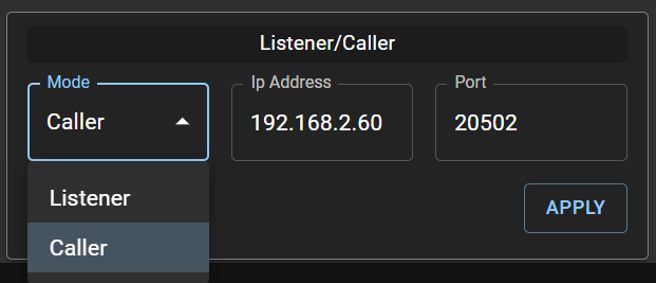
Set the RC-200 to Caller
This page can only be accessed once the RC-200 has a local IP address set (Step 1).
-
From a device on the same network, browse to http://<RC-200 local IP>:20093
-
Listener/Caller > Mode: Caller
-
IP Address: the public IP of the ViBox / DCV Server
-
Port: 20502 (20503 for a second RC-200) > Apply
Link in ViBox UI
-
ViBox UI > Setup > Prefs > RCU 1
-
Set to RC 200 – ViBox as listener on port 20502 (RCU 2 → port 20503)