

On this tab, the GPInputs and GPOutputs of the SmartPanel can be monitored and tested.
In general, the GPIO configuration is done via Director. When using the DSP-1216HL with the Commentary Control App, you can configure the 'GPInput 1 & 2' and 'GPOutput 1 & 2' functions.
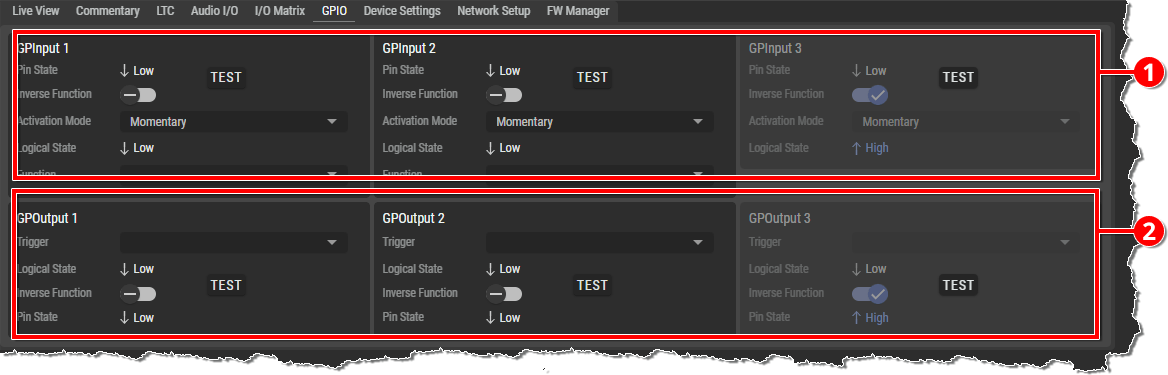
|
|
GPInputs
|
|
|
GPOutputs
|

GPInput x
|
Pin State |
Displays the physical state of the input pin: ↓Low (0/off) or ↑High (1/on). |
|
|
TEST |
The state is inverted as a test as long as the button is pressed. This is useful when the external GPI wiring has not yet been installed, but the input function need to be tested. |
|
|
Inverse Function |
If activated, the configured function of the input is triggered inverted. |
|
|
Activation Mode |
Specifies whether the switching state is latching, non-latching (momentary), or automatic (short input signal: latching, long input signal: momentary). |
|
|
Logical State |
Displays the logical state of the input that triggers the configured function:
|
|
|
Function |
Specifies the function that is triggered when Logical State is ↑High (1/on). |
|
|
Mute
|
The GPI state triggers the Mute function of the selected Commentator. |
|
|
On-Air
|
The GPI state triggers the On Air function of the selected Commentator. |
|
|
Lock On-Air Commentator A/B* |
The GPI state triggers the Active Always function of the selected Commentator. |
|
|
GPOutput
|
The GPI state triggers the selected GPOutput state. |
|
|
* see the corresponding functions in the SmartPanels web interface on the Commentary tab |
||

GPOutput x
|
Trigger |
Specifies the function that is to switch the state of the output pin. |
|
|
Mute
|
The GPO state is switched according to the Mute state of the selected Commentator. |
|
|
On-Air
|
The GPO state is switched according to the On Air state of the selected Commentator. |
|
|
Lock On-Air Commentator A/B* |
The GPO state is switched according to the Always Active state of the selected Commentator. |
|
|
GPInput
|
The GPO state is switched according to the selected GPInput state. |
|
|
Logical State |
Shows the logical state of the configured function at the output:
|
|
|
Inverse Function |
If activated, the configured function of the output is triggered inverted. |
|
|
Pin State |
Displays the physical state of the output pin: ↓Low (0/off) or ↑High (1/on). |
|
|
TEST |
The state is inverted as a test as long as the button is pressed. This is useful when the external GPO wiring has not yet been installed, but output function need to be tested. |
|
|
* see the corresponding functions in the SmartPanels web interface on the Commentary tab |
||