
On this tab, general device settings such as PTP, NMOS, and NTP can be made.
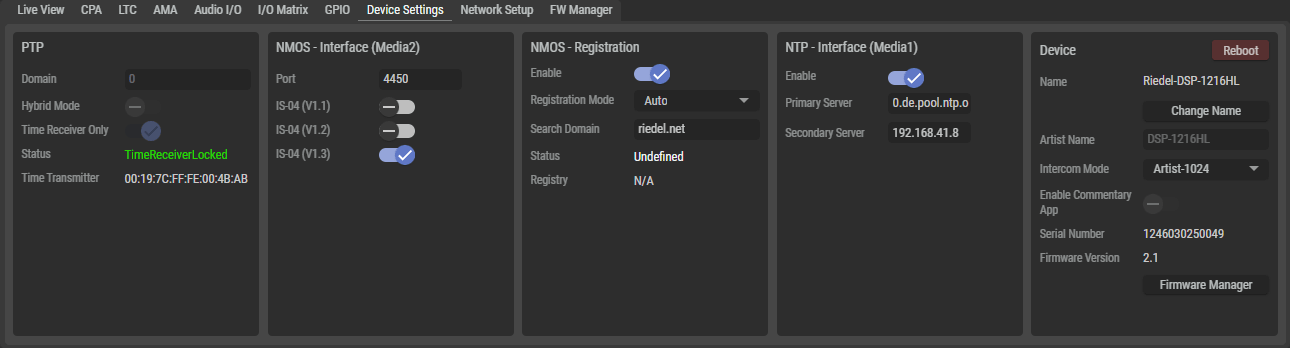
PTP
|
Domain |
Set the same domain number for the PTP clock available in the network. Permissible values are between 0 and 127, whereby the default value is 0. |
|
Hybrid Mode |
Set the PTP network packet transmission mode. Inactive: All messages are sent and received via multicast messages between the device and the TimeTransmitter. Active: Messages from the devices are sent to the grandmaster via unicast messages and the grandmaster publishes the messages via multicast. |
|
Time Receiver only |
Forces the use of an external grandmaster. |
|
Status |
Displays the current PTP status. TimeReceiverLocked, TimerReceiverUnlocked, TimeTransmitter |
|
Time Transmitter |
Displays the ID of the time transmitter with which the SmartPanel is currently synchronized. |
NMOS - Interface
|
Port |
Field for configuring the port on which the SmartPanel accepts the NMOS messages. The default value is 4450. |
|
IS-04 (V1.x) |
Field for configuring the IS-04 version in which the NMOS messages to the SmartPanel are expected. |
NMOS - Registration
|
Enable |
Enables registration via NMOS. |
|
Registration Mode |
This selection determines whether the NMOS registry is to be set up manually in this section or whether it is to be discovered automatically. Automatic: NMOS IS04 is used to discover a registry in the subnet. If a registry is found, the SmartPanel directly connects to it. Manual: NMOS attempts to connect directly to the NMOS registry specified in the following entries (IP Address, Port, NMOS Version). |
|
Search Domain*A |
Field for entering the domain in which the registration server is located. |
|
IP-Address*M |
Field for configuring the IP address via which the SmartPanel accesses the NMOS registry. |
|
Port*M |
Field for configuring the port via which the SmartPanel accesses the NMOS registry. The default value is 4450. |
|
NMOS Version*M |
Field for configuring the IS-04 version in which the SmartPanel accesses the NOMOS registry. The default selection is V1.3. |
|
Status |
Shows the current status of NMOS registration. |
|
Registry |
The values depend on the Registration Mode. Auto: If registry is found in the search domain, the URL + Port of the registry server is displayed. If no registry is found, the device uses peer-to-peer mode and displays N/A. Manual: The IP address and port number of the registry server are displayed here. |
*A only if Registration Mode = Auto
*M only if Registration Mode = Manual
NTP
|
Enable |
Enables the connection to the NTP server. |
|
Primary/Secondary Server |
Fields for entering the URL/IP address of the primary and secondary NTP servers. This setting appears as read-only in the SmartPanels Settings Menu > Network. |
Device
|
Reboot |
Click to reboot the device. Confirmation via pop-up required. |
|
|
Name |
Displays the name of the device. |
|
|
Change Name |
Click to change the name of the device.
|
|
|
Artist Name |
Displays the long name of the SmartPanel configured in Director. |
|
|
|
Selection of the Artist matrix type to which the SmartPanel should connect.
(Artist-32/64/128, Artist-1024) Changing the Intercom Mode requires a restart of the device, which must be confirmed first. |
|
|
|
On DSP-1216HL the Commentary Control App can be started.
|
|
|
Serial Number |
Displays the serial number of the device. |
|
|
Firmware Version |
Displays the current firmware version of the device. |
|
|
Firmware Manager |
Click to navigate to the FW Manager tab. |
|

*CCA only on DSP-1216HL with CCA license