
Front view
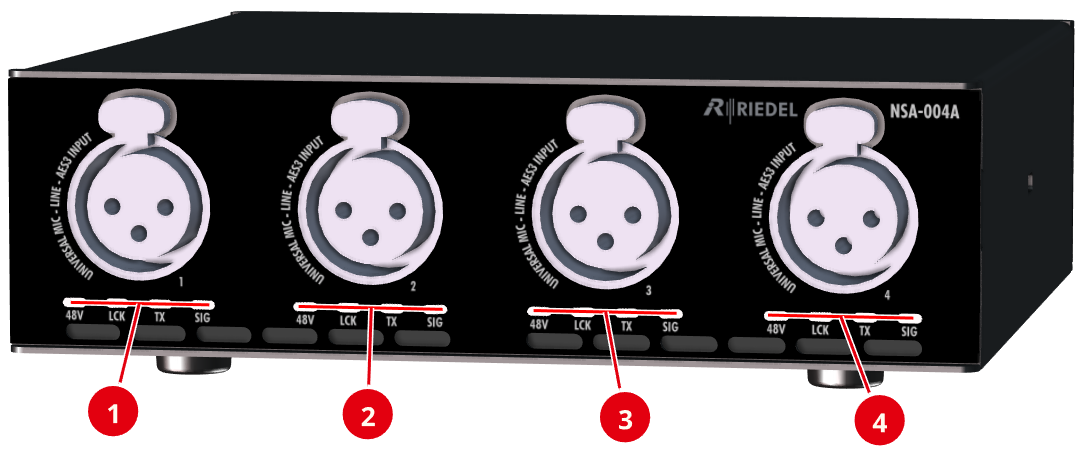
|
|
48V |
off |
The 48V phantom power supply is disabled. |
|
red |
The 48V phantom power supply is active. |
||
|
red flashing |
The 48V phantom power supply is switched to Auto and no microphone requiring phantom power is detected. |
||
|
|
LCK |
off |
No valid AES3 signal detected. |
|
yellow |
Locked, but not in sync with the PTP clock (only if SRC-OFF). |
||
|
green |
Locked, and synchronized to the AES3 input signal. |
||
|
|
TX |
off |
The input signal is not part of an AES67 stream. (Connection is interrupted and/or the stream is not configured). |
|
magenta |
The input signal is part of at least one AES67 stream that is sent from the device. |
||
|
|
SIG |
off |
Audio level < -60 dBFs |
|
green |
Audio level ≥ -60 dBFs |
||
|
yellow |
Audio level ≥ -20 dBFs |
||
|
red |
Audio level ≥ -1 dBFs |


All LEDs on the front flash when the localization function of the device is active. This can be triggered both via the Find button on the device and via the web interface.
Rear view
The rear of the devices NSA-004A and NSA-005A is identical.
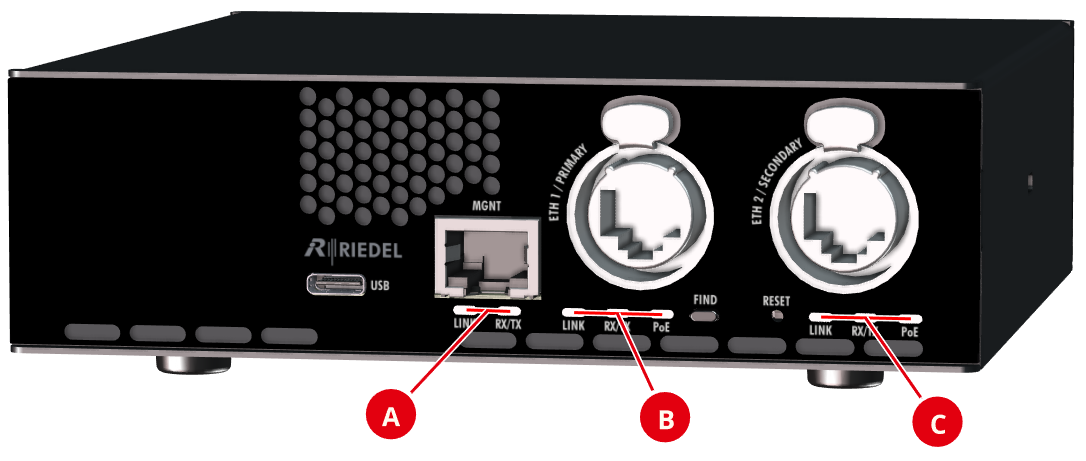
|
|
LINK |
off |
Network is not connected. |
|
green |
Network is connected. |
||
|
|
RX / TX |
off |
No Ethernet activity. |
|
green |
Ethernet activity. |
||
|
|
PoE |
off |
PoE power is not available. |
|
green |
PoE power is available. |


The USB audio status is only visible in the web interface. There are no LEDs on the device for this interface. The audio status indicates the current input/output level according to the SIG interface.