
📁 Release // 🆕 New Device Integrations // 🚀 New Features // 🐞 Bug Fixes // 🌟 New Hardware // 🛠️ Breaking Changes // ✍️ Documentation Changes // 💽 Driver Versions
📁 Previous package (PRP-2024-11)
-
Vibox Backend 11.24.47.44
-
SimplyLiveSDK 1.24.23.281 (Installer included in the backend 11.24.47.44)
-
ViBoxSetup_UI_6_2444_554
-
PiPTool 2.24.24.64
-
XPort 12.24.35.72
-
BMR_6.24.47.16
-
MetadataService_3.24.25.9
-
RefBox_7.24.45.30
-
VenueGateway_14.24.41.02
📁 New package (PRP-2025-04)
-
Vibox Backend 11.25.13.7
-
SimplyLiveSDK 1.25.12.347 (Installer included in the backend 11.25.13.7)
-
ViBoxSetup_UI_6_2513_569
-
PiPTool 2.25.18.65
-
XPort 12.24.49.74
-
BMR_6.25.9.17
-
MetadataService_3.24.25.9 (same as previous PRP)
-
RefBox_7.25.13.35
-
VenueGateway_14.25.03.01
Backend
💽 Prerequisite
-
AJA (same as previous PRP)
-
Driver: 16.1.0.3
-
Firmware: corvid_88_2021-04-28.bit(3F)
-
-
Blackmagic
-
Driver: Blackmagic_Desktop_Video_Windows_14.4.1
-
If you don’t upgrade this Black magic driver, your backend won’t be able to start and will be stuck in “Waiting Genlock” in the frame2tcp debug screen
ALWAYS UNINSTALL THE PREVIOUS DRIVER BEFORE UPGRADE TO THE NEW ONE
-
Deltacast
-
Driver: videomaster-win.x64-6.26.2
-
-
GPU (same as previous PRP)
-
Driver: 566.14-desktop-win10-win11-64bit-international-nsd-dch-whql.exe
-
🐞 Bug fixes
-
BAC-1571 BMR set CPU YUV422 Top Bottom does not work when format is 1080i50 (the result always progressive)
-
BAC-1582 BE takes more than 2'00" to start when a SRT Out is configured with a specific address
-
SUP-347: Refbox - RO2 Master - Interlacing issue with PGMs
-
SUP-311: Audio output muted when we mix audio from PGM and from camera
-
SUP-350: 1080i50 - 4X SLSM - vertical Jitter at 25%
-
SUP-361 SSM from VGW sometimes has timing issue
-
SUP-299 Sometimes Juddering on the clean output
-
Fix 4K 10bits encode time out
-
SUP-396: XDCAM HD-422 needs to use fixed GOP length
-
SUP-337 Dual Alpha sometimes timeout
-
BAC-1612 support read '512G' from CacheSizeV2.json
-
SUP-390: Networked Servers. Audio problem with audio from a remote source
🚀 New features
-
SUP-333 SRT from BMR - passphrase supported
-
BAC-1583 Upgrade SRT from 1.4.4 to 1.5.4
-
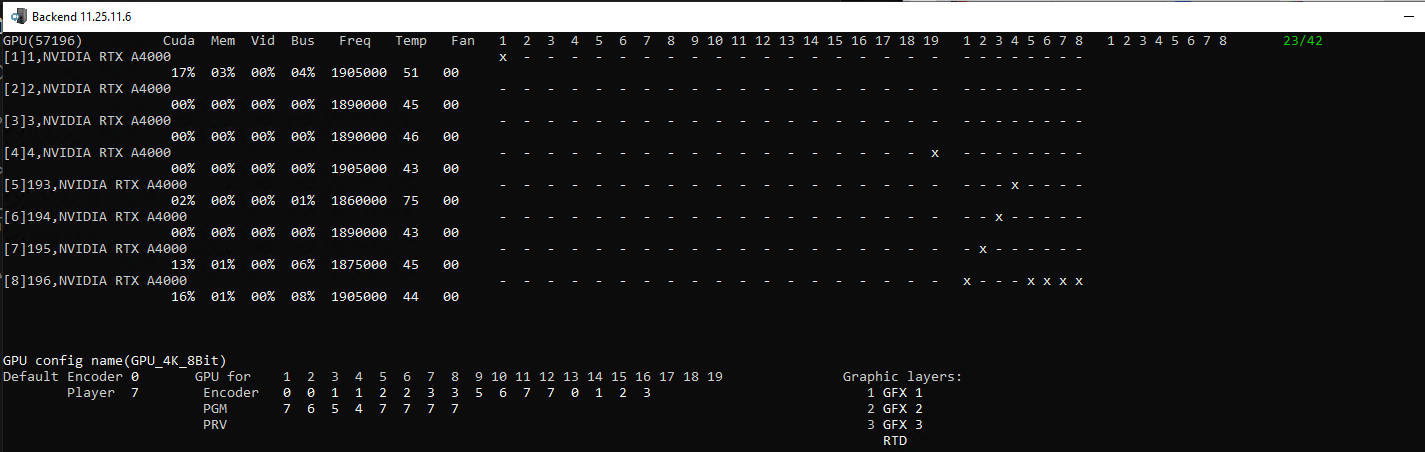
New GPU assignement for 4K 10 bits and 8 bits
ViBox UI
🐞 Bug fixes
-
VU-1739 VIBOX UI : When a clip is deleted in a playlist, this clip in the clipboard is added automatically at the end of the playlist when we hit enter
-
VU-1756 VIBOX UI : Replay/Slomo/AUX tab - Slomo Speed 1 and 2 are not local user anymore
-
VU-1752 VIBOX UI : Change tab (clips, cues,...) in extended DB view is too slow
-
VU-1746 VIBOX UI : With 2 RCU on the same UI, If "Allowed Controled Channel" is "PGM1", don't interact with playlist edition (Speed, FX, Change Angle, Extend, Insert, Insert After Mode, Edit Playlist Windows)
🚀 New feature
-
VU-1737 VIBOX UI : allow in the ViBox config file to have RCU mode ViBox as listener on a custom TCP port
-
VU-1732 VIBOX UI : Add support to “Move Clip” on RCU
-
VU-1760 VIBOX UI : Prefs - add a parameter to hide RPGM2 in Live mode
-
VU-1757 VIBOX UI : 1st RCU and 2nd RCU tab - RC 10 - Assigned function to camera button should be F1 to F6
-
VU-1751 VIBOX UI : Disable keyboard shortcuts when focus is on text (Edit, search,...)
-
VU-1745 VIBOX UI : Load playlist on PGM1 from RCU
-
VU-1744 VIBOX UI : Add a new custom clipping rule in ViBox
-
VU-1743 VIBOX UI : Replace slider by speed buttons for speed control in ViBox Prod/Live mode
-
VU-1740 VIBOX UI : Add an option to not create shortcut and startup menu entry
Simplylive SDK
As a reminder the Simplylive SDK is part of the Backend software installer.
We have seen some issue during the upgrade from SimplyLiveSDK 1.24.23.281 to SimplyLiveSDK 1.25.12.347. 2 services are crashing (you can see it form the SDK watchdog)
The quickest way to is format the SDK
If you format the SDK you will start from a fresh install of the SDK and you will need to create the weblinks, Presets of SSE,….
If the customer machine you are upgrading was not using VDR panel or SSE we strongly suggest the format the SDK to start with a fresh install
🚀 New feature
-
Improvment of VDR Panel
-
Improvment of Riview
-
Improvment of SSE
-
Improvment of Clip companion
-
Improvment of the BITC output from ViBox
Pip tool
🐞 Bug fixes
-
SUP-385 PiP tool - Thumbnail preview does not work in when the server is set to UDP
Xport
🐞 Bug fixes
-
SUP-331 Timecode Exported Clip issue
BMR
🚀 New feature
-
SUP-380: BMR - Dumps location changed to the new loaction
RefBox
🐞 Bug fixes
-
RU-920(SUP-348): Support Duplicate Video in Master when using Full Screen shortcut
-
RU-927: after load the clip or cue, if scroll clips or cues to next page, and then back to scroll before page, the loaded clip or cue status is not correct
-
SUP-357: Refbox no zoom on PGM Channels
-
RU-933: MASTER - Keep zoom when switching is not working anymore in PGM mode
🚀 New feature
-
RU-907: Support Fast Jog for the RC10
-
RU-918(SUP-349): Support RC10 Last Cue on GHT
-
RU-919(SUP-349): Support RC10 Last Cue on RO2Master
-
RU-912: Support the take for the RC10
-
RU-911: Support Browse for the RC10
-
RU-910: Support loop for the RC10
-
RU-909: Support speed1 for the RC10
-
RU-908: Support GOTO for the R10
-
RU-911: Support Browse for the RC10
-
RU-916: Sync UI player status to RC10
-
RU-934: Refbox - RCU - Assign function to Live button
-
RU-930: Refbox - RO2 master - Layout with 16 cams in 2 rows
-
RU-931: Refbox - Keyboard shortcut2 created available in the "RCU assign" function
-
RU-902: Export SSM clip
VGW
💽 Prerequisite
-
Blackmagic
-
Driver: Blackmagic_Desktop_Video_Windows_14.4.1
-
ALWAYS UNINSTALL THE PREVIOUS DRIVER BEFORE UPGRADE TO THE NEW ONE
-
Deltacast (that version is an .exe to run, much more easier)
-
Driver: videomaster_redist_windows_v62103
-
-
GPU
-
Driver: 566.14-desktop-win10-win11-64bit-international-nsd-dch-whql.exe
-
-
VS2022_redist.x64
-
Version : 14.42.34433.0
-
Need to be installed after the VGW installation
-
🐞 Bug fixes
-
SUP-336 ERROR IN MONITORING VGW
Description of some new features
New GPU assignement for 4K 10 bits and 8 bits
Needed ONLY for 4K configuration
In that version we can have different GPU repartition
[GPU] Used for all video and pixel format except 4K 8 bits and 10 bits
[GPU_4K_8bit] Used only for 4k 8 bits
[GPU_4K_10bit] Used only for 4k 10 bits
[GPU]
EncodeDefault  = 0
PlayoutDefault = 7
Import = 3
PGM_DIRTY = 3
PGM_CLEAN = 3
CamA = 0
CamB = 1
CamC = 1
CamD = 2
CamE = 3
CamF = 3
CamG = 4
CamH = 5
CamI = 5
CamJ = 6
CamK = 7
CamL = 7
CamM = 0
CamN = 1
CamO = 2
CamP = 3
PGM0 = 7
PGM1 = 6
PGM2 = 5
PGM3 = 4
[GPU_4K_8bit]
EncodeDefault  = 0
PlayoutDefault = 7
Import = 3
PGM_DIRTY = 3
PGM_CLEAN = 3
CamA = 0
CamB = 0
CamC = 1
CamD = 1
CamE = 2
CamF = 2
CamG = 3
CamH = 3
CamI = 5
CamJ = 6
CamK = 7
CamL = 7
CamM = 0
CamN = 1
CamO = 2
CamP = 3
PGM0 = 7
PGM1 = 6
PGM2 = 5
PGM3 = 4
[GPU_4K_10bit]
EncodeDefault  = 0
PlayoutDefault = 7
Import = 3
PGM_DIRTY = 3
PGM_CLEAN = 3
CamA = 0
CamB = 1
CamC = 1
CamD = 2
CamE = 3
CamF = 3
CamG = 4
CamH = 5
CamI = 5
CamJ = 6
CamK = 7
CamL = 7
CamM = 0
CamN = 1
CamO = 2
CamP = 3
PGM0 = 7
PGM1 = 6
PGM2 = 5
PGM3 = 4
We can see in the debug screen p23 which GPU is used
Add support of Move Clip on RCU
Since that version we have the possibility to Move a clip with the RCU. Before only Copy was available.
-
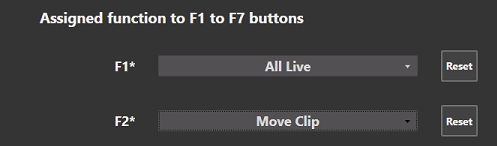
To have access to that feature you need to assign the function to a “F” button
-
On the RCU press F2
-
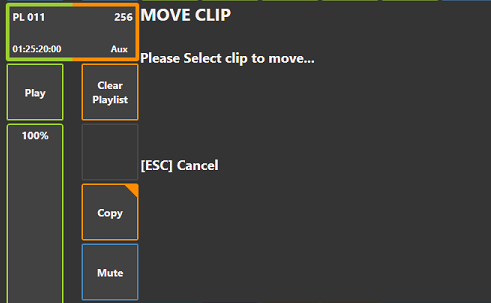
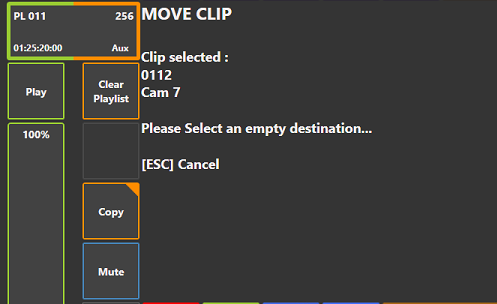
Follow the instructions displayed of the Playlist area
-
Select clip to move with the 1 to 10 buttons of the current page and bank
-
Select a destination to copy the selected clip using the the 1 to 10 buttons of the current page and bank
-
Available only in Slomo
Prefs - add a parameter to hide RPGM2 in Live mode
In the vibox UI prefs - Role/UI you will find a new parameter called Hide rPGM2 in ViBox Live
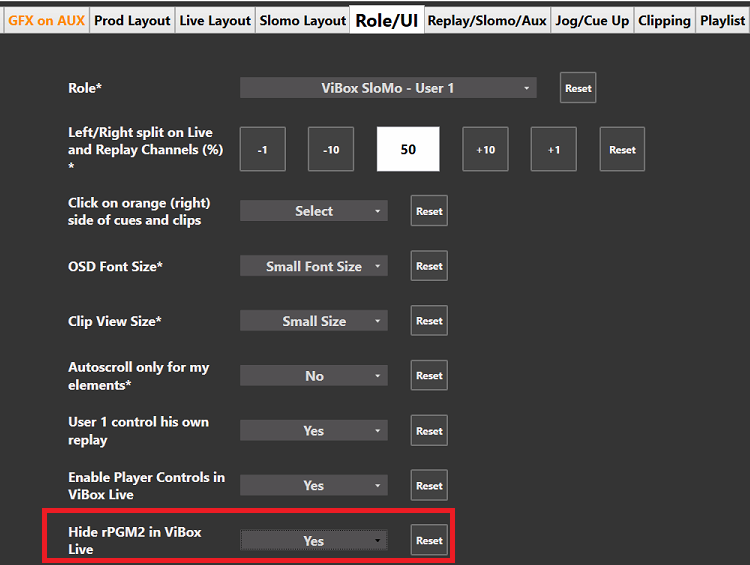
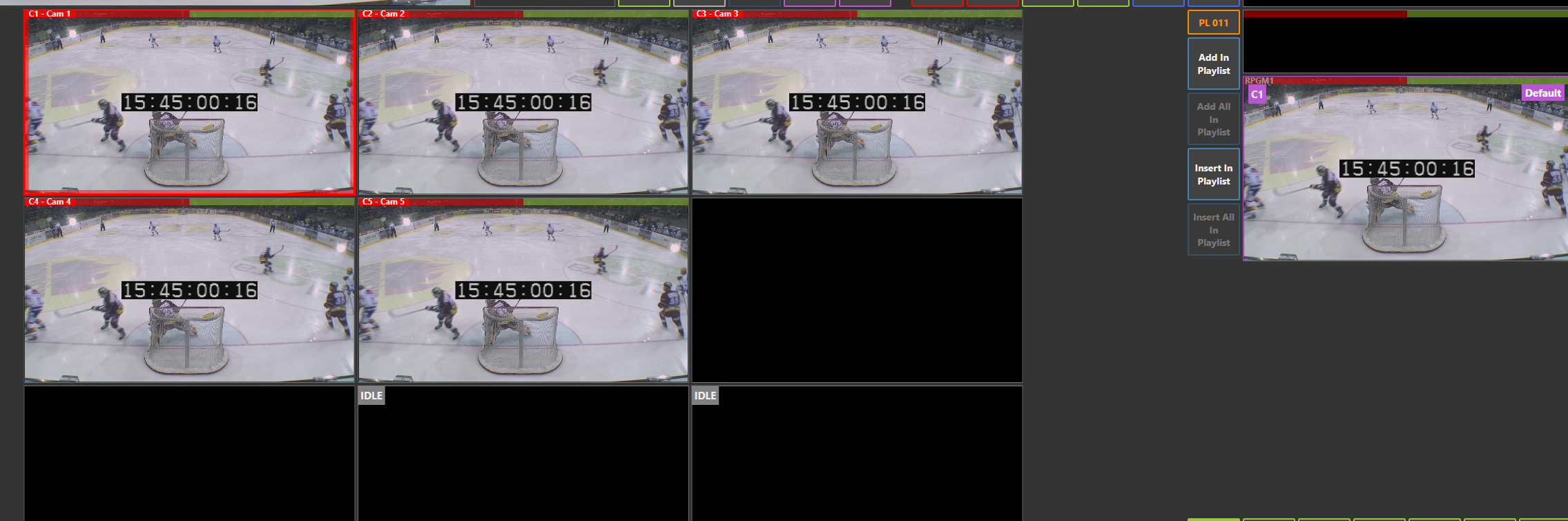
It was requested to avoid a switch to something unexpected to PGM or PRV
The default value is NO so we can display both rPGM
as a reminder we can define the PGM we want to display is rPGMs from the webconfig
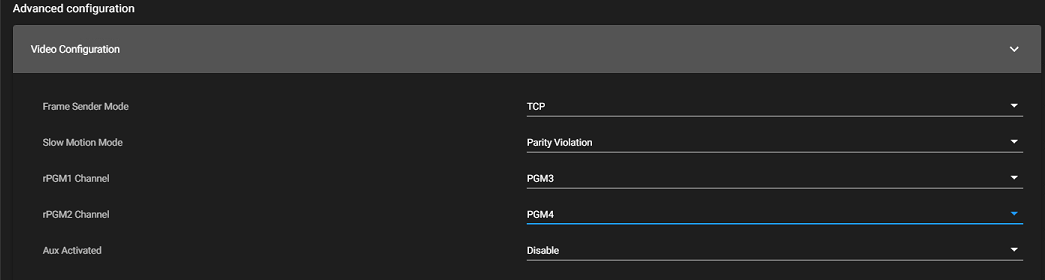
Load playlist on PGM from RCU
Before the new version, with the RCU, you were able to load the playlist ONLY in the PRV.
We have now the possibility, with a new prefs in the Playlist tab in prefs, to load the playlist on PGM (with the Palylist button) when the RCU is in PGM 1 control
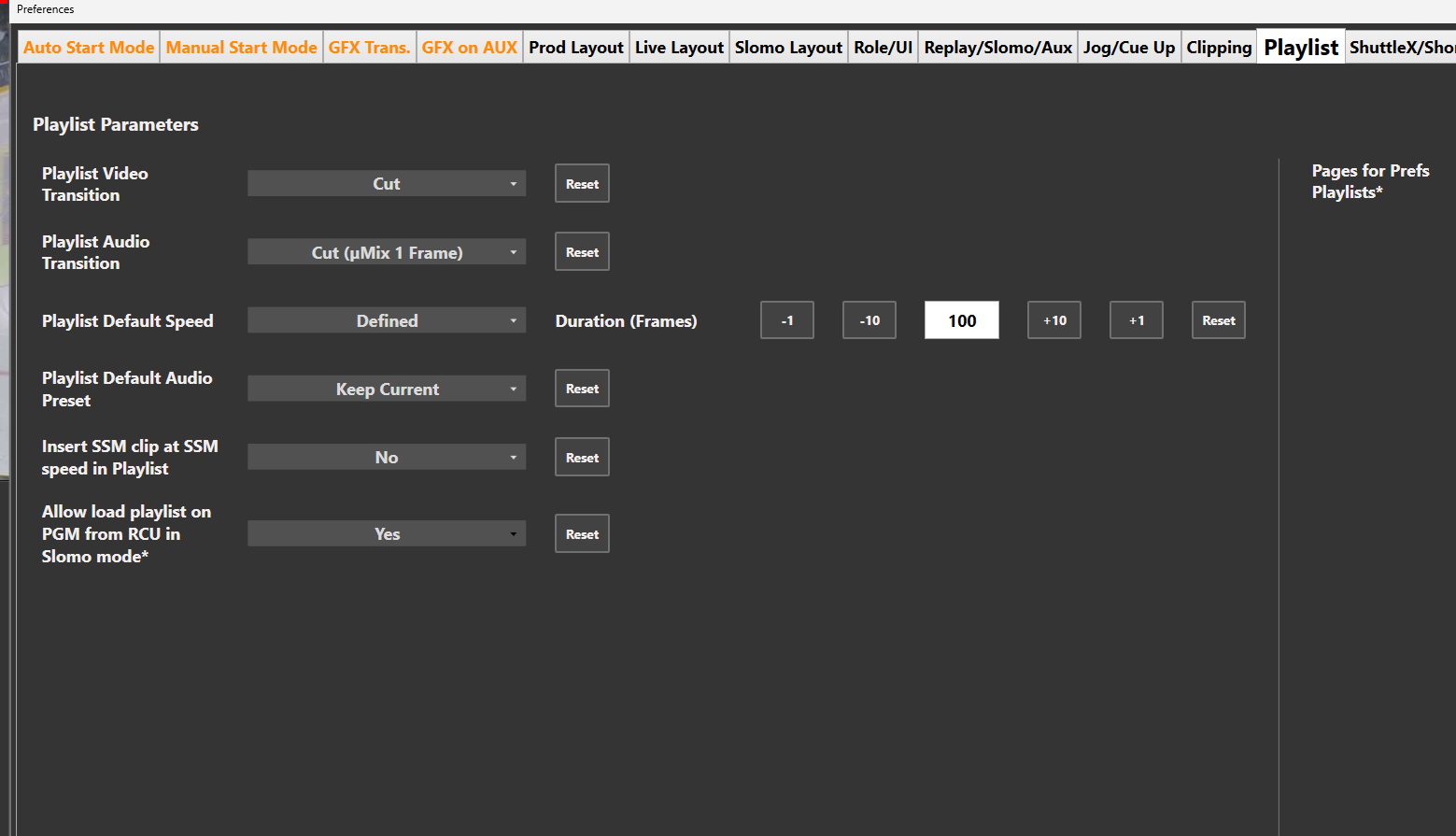
The default value is No
Playlist edit features are ONLY available on Preview
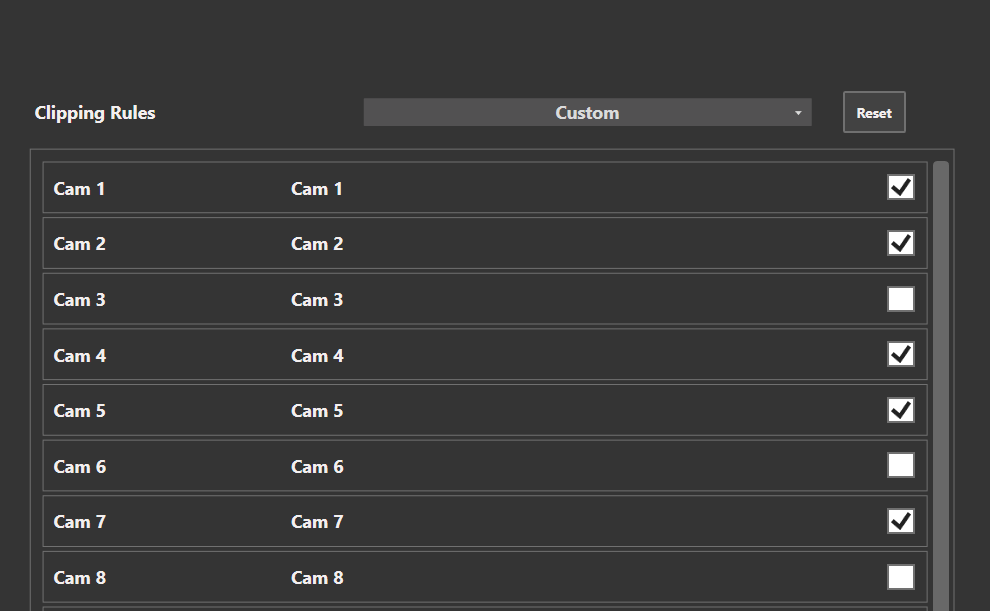
Add a new custom clipping rule in ViBox

A Custom Clipping Rules has been added
If you select that rule, you just need to Check the camera you want to protect when you create a clip
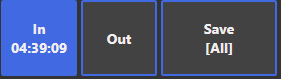
Now in the save button, the clipping rule is displayed
Replace slider by speed buttons for speed control in ViBox Prod/Live mode
In that version, the operator has the possibility to change the slider to adjust the speed by speed buttons
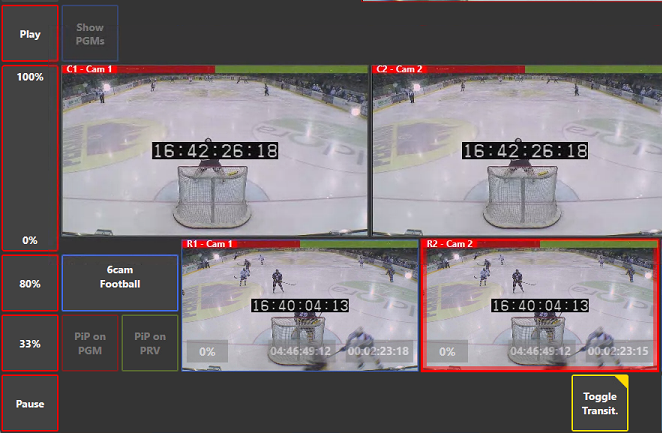
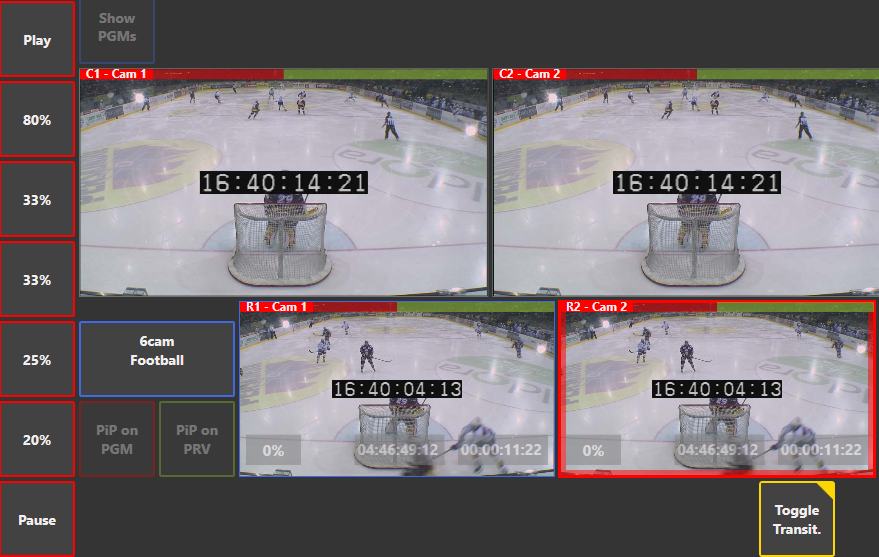
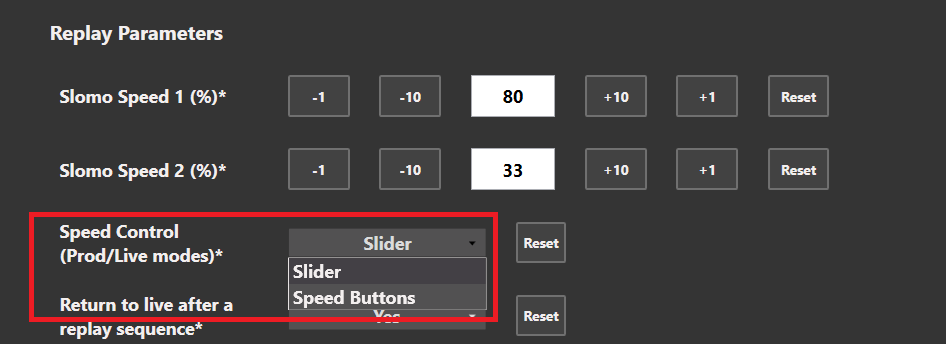
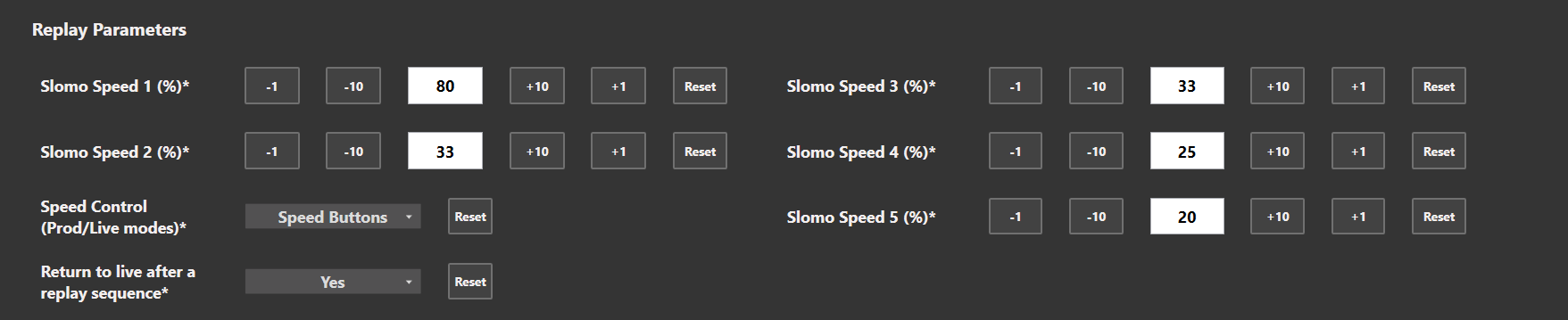
Slider is the default value
Add an option to not create shortcut and startup menu entry
With RiCapture we have the possibility to have the VDR pannel without any ViBox Licenses.
To make clips, cues and playlist with the VDR it’s mandatory to install ViBox software
To avoid any misunderstanding for the user (ViBox installed and no licenses to use it) there is an option to isntall ViBox whithout any vibox icon on the desktop and Start Menu.
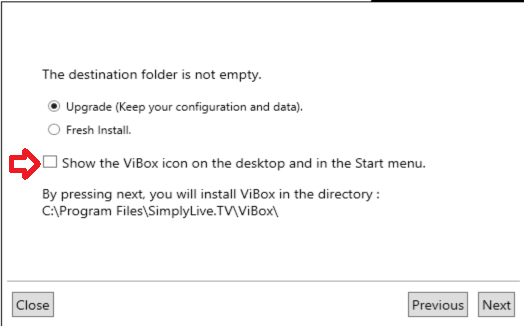
If you need to update a customer with VDR and without any Vibox License :
-
Update the ViBox software with the one in that PRP
-
Don’t forget to Uncheck the “Show the Vibox icon on desktop and in Start menu”