
The Control Panel app (CPA) allows the exchange of control data and status information via NMOS and supports NMOS IS-04, IS-05 and IS-07. It enables the sending of control commands of the hybrid lever keys and their rotary encoders, as well as the receiving of control commands for LED rings and displays including text, icons and color.
-
This app requires a license file (CPA_1200_PLUS).
Further information can be found in the chapter SmartPanel Apps/Licenses. -
Depending on the application, the 1200 series SmartPanel with CPA serves as an input/output-only device in conjunction with a third-party control system. Please visit the Riedel website to learn more about the supporting third-party vendors.
-
CPA uses the interface selected in the Settings menu Applications > NMOS Interface for communication (MEDIA 1, MEDIA 2, MGNT). The network settings of the selected interface are set in the Settings menu Network.
Follow these steps to use the Control Panel app.
Open the web interface of the SmartPanel:
-
Enter the IP address in the web browser (e.g. 192.168.41.159).

The web interface opens:
-
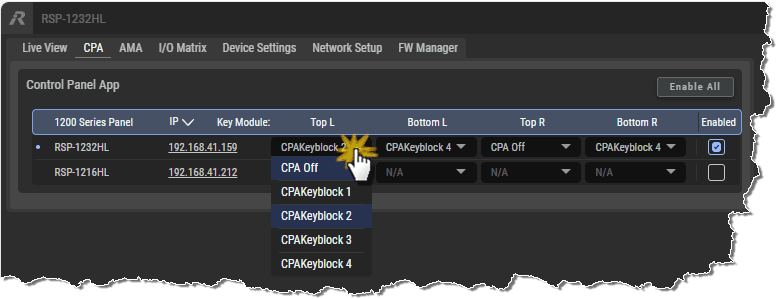
Navigate to the CPA tab.

-
Click the Enable All button if you want to launch the app on all listed SmartPanels.
-
Select the checkbox for the corresponding SmartPanel on which the app should be activated.

There are four columns with the following Key Modules to choose from:
-
Top Left
-
Bottom Left
-
Top Right
-
Bottom Right
Select a CPA Keyblock 1...4 in the column of the desired Key Module and row of the desired SmartPanel, or switch off the respective Key Module (CPA Off).
An additional key bank called control is now available in the SmartPanel info display. The Control Panel App can be used on this key bank while other apps (e.g., Intercom) continue to run at the same time.

The following functions are supported by the Control Panel app:
|
Send Functions |
Lever Key Up State |
|
|
Lever Key Down State |
|
|
|
Rotary Increment/Decrement (+/-) |
|
|
|
Rotary Push Button State |
|
|
|
Receive Functions |
Key Label |
8 Characters |
|
Key Label Subtitle |
16 Characters |
|
|
Key Label Border Color |
16 Colors |
|
|
Key Activity State |
On / Off / Flashing |
|
|
Pre-Defined Icon |
21 |
|
|
Key Bank Border Color (main + info display) |
16 Colors |
|
|
Key Bank Name |
10 Characters |
|
|
LED Upper Ring Color |
16 Colors |
|
|
LED Lower Ring Color |
16 Colors |
For more information on the individual configuration of NMOS commands, please contact your system integrator, the manufacturer of your control system or the Riedel support.