The NMOS Explorer is a tool to discover, manage and connect IP Media devices following AMWA IS-04 and IS-05.
It allows IS-04 discovery in registered mode (default) and peer to peer discovery, when no registry is available.
IS-05 parameters can be read and set individually, so it can also be used to connect senders and receivers.
By offering an import/export SDP option, the NMOS Explorer can also be used to connect devices that do not support IS-04/05, but can exchange SDP objects.
The Riedel NMOS Explorer is not an official Riedel product, but a development app for troubleshooting. No service support is offered for this support tool.
Download the NMOS-Explorer from the Riedel website and install it on your windows PC.
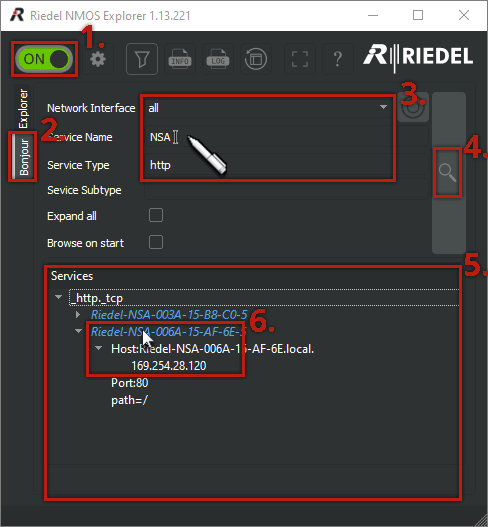
After starting the NMOS-Explorer:
-
Start browsing if this is not yet activated.
-
Select the index Bonjour.
-
Limit the amount of results:
-
If necessary, select your network adaptor in the field Network Interface that is attached to the NSAs network.
-
Enter 'NSA' in the Service Name field.
-
Enter ‘http’ in the Service Type field.
-
-
Click on the magnifier.
-
All devices found that match the entered search criteria are listed.
The NSAs announce themselves with the name "Riedel-NSA-xxxx-xx-xx-xx". The last three places represents the NSA's MAC address. -
Double-clicking a device will open its web interface.
The devices IP address is displayed by opening the respective tree structure.