
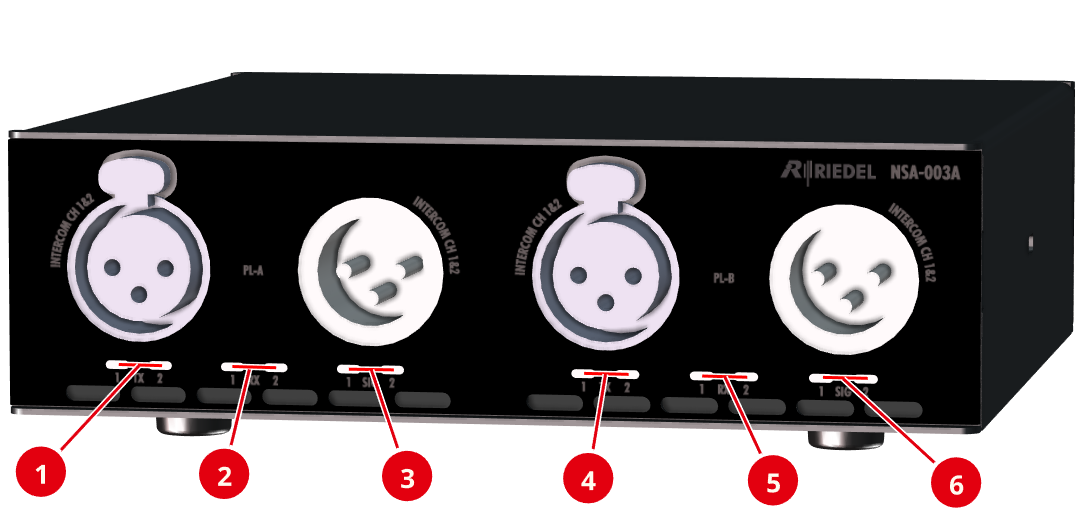
Front view
|
|
Partyline A/B TX 1/2 |
off |
The input signal channel 1/2 is not part of an AES67 stream. (Connection is interrupted and/or the stream is not configured). |
|
magenta |
The input signal channel 1/2 is part of at least one AES67 stream that is sent from the device. |
||
|
magenta blinking |
Light call from partyline channel 1/2 to the AES67 stream. |
||
|
|
Partyline A/B RX 1/2 |
off |
The output signal channel 1/2 does not receive an audio signal from an AES67 stream. |
|
magenta |
The output channel 1/2 receives audio from an AES67 stream. |
||
|
magenta blinking |
Light call from the AES67 stream to party line channel 1/2. |
||
|
|
Partyline A/B SIG 1/2 |
off |
Audio level < -60 dBFs |
|
green |
Audio level ≥ -60 dBFs |
||
|
yellow |
Audio level ≥ -20 dBFs |
||
|
red |
Audio level ≥ -1 dBFs |


All LEDs on the front flash when the localization function of the device is active. This can be triggered both via the Find button on the device and via the web interface.
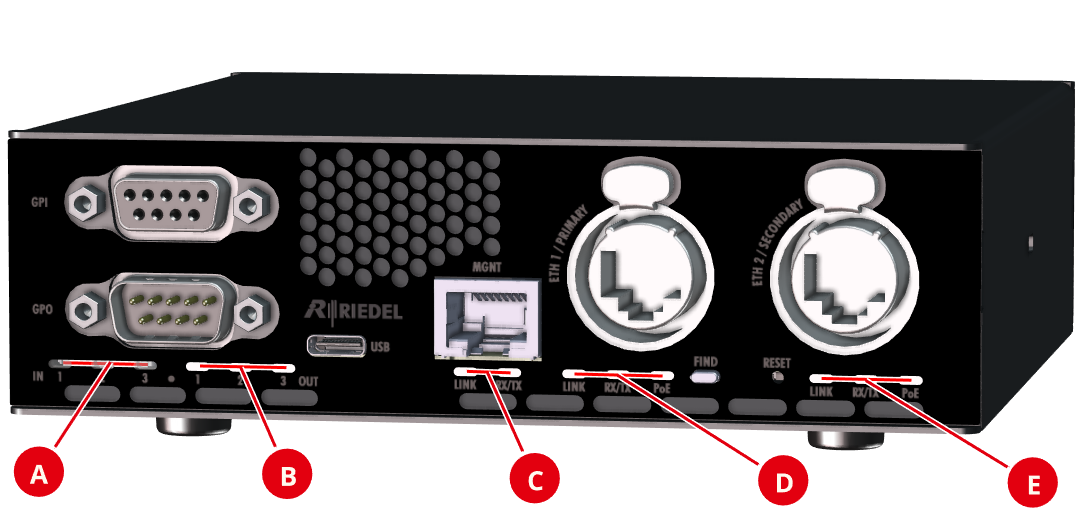
Rear view
The rear of the devices NSA-003A, NSA-006A and NSA-007A is identical.
|
|
In 1/2/3 |
off |
GPI (input) is switched off. |
|
green |
GPI (input) is switched on. |
||
|
|
Out 1/2/3 |
off |
GPO (output) is switched off. |
|
yellow |
GPO (output) is switched on. |
||
|
|
LINK |
off |
Network is not connected. |
|
green |
Network is connected. |
||
|
|
RX/TX |
off |
No Ethernet activity. |
|
green |
Ethernet activity. |
||
|
|
PoE |
off |
PoE power is not available. |
|
green |
PoE power is available. |


-
The GPIO status LEDs on the rear flash when the localization function of the device is active. This can be triggered both via the Find button on the device and via the web interface.
-
The USB audio status is only visible in the web interface. There are no LEDs on the device for this interface. The audio status indicates the current input/output level according to the SIG interface.