
On this tab, general device settings such as PTP or NMOS can be made.
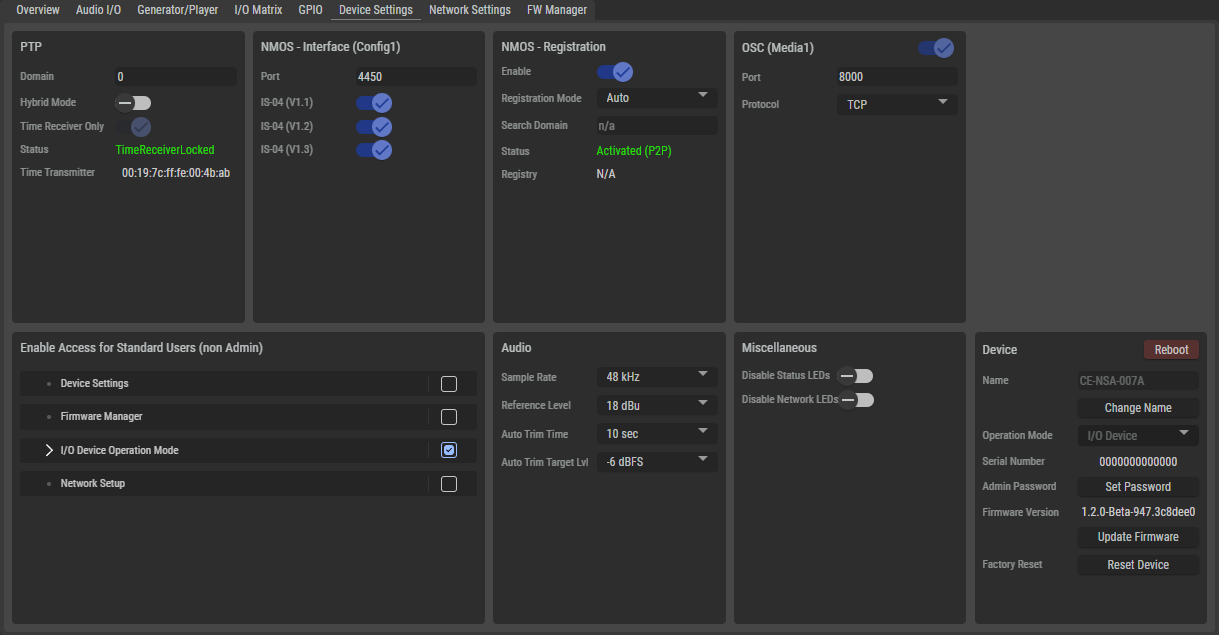
PTP
The PTP section is only available for the NSA types:
NSA-003A , NSA-006A, NSA-007A, and NSA-008A.
|
Domain |
Set the same domain number for the PTP clock available in the network. Permissible values are between 0 and 127, whereby the default value is 0. |
|
Hybrid Mode |
Set the PTP network packet transmission mode. Inactive: All messages are sent and received via multicast messages between the device and the TimeTransmitter. Active: Messages from the devices are sent to the grandmaster via unicast messages and the grandmaster publishes the messages via multicast. |
|
Time Receiver only |
Forces the use of an external grandmaster. |
|
Status |
Displays the current PTP status. TimeReceiverLocked, TimerReceiverUnlocked, TimeTransmitter |
|
TimeTransmitter |
Displays the ID of the current "PTP Grand Master" to which the NSA is synced to. |
NMOS - Interface
|
Port |
Field for configuring the port on which the NSA expects the NMOS messages. The default value is 4450. |
|
IS-04 (V1.x) |
Field for configuring the IS-04 version in which the NMOS messages to the NSA are expected. |
NMOS - Registration
|
Enable |
Switch to enable or disable the NMOS registration. |
|
Registration Mode |
This selection determines whether the NMOS registry is to be set up manually in this section or whether it is to be configured automatically via a registry server. |
|
Search Domain |
If Registration Mode is set to Auto:
|
|
IP-Address |
If Registration Mode is set to Manual:
|
|
Port |
If Registration Mode is set to Manual:
|
|
NMOS Version |
If Registration Mode is set to Manual:
|
|
Status |
Shows the current status of NMOS registration. |
|
Registry |
Displays the currently valid setting. [IP address:Port] |

OSC (Media1)
|
Port |
Field for configuring the port via which the NSA accesses the Open Sound Controller. The default value is 8000. |
|
Protocol |
Field for configuring the transport mode that the NSA uses to communicate with the Open Sound Controller. (TCP, UDP, TCP & UDP) If UDP or TCP & UDP is selected, |
Enable Access for Standard Users
The logged-in admin can define which functions are available to users who are not logged in.
Audio
|
Sample Rate |
Selection of the sample rate. A change requires a restart of the device. (44.1, 48, 96 kHz, not available for NSA-010C) |
|
Reference Level*4-8A |
Selection of the analog reference level of the device.
|
|
Auto Trim Time*4A, 6-8A |
The time in which the automatic trimmer measures the input signal to determine the automatically set target trim level.
|
|
Auto Trim Target Lvl*4A, 6-8A |
Target level to be reached by the auto trim function after automatically adjusting the trim gain after measuring.
E.g. the peak level which was measured during auto trim was -40 dBFS, the Auto Trim Target is set to -10 dBFS, so the auto trim function will set the Trim Gain up by 30 dB right after the measurement period. |
|
*4-8A only for NSA-004A, NSA-005A, NSA-006A, NSA-007A, NSA-008A
|
|
Miscellaneous
|
Disable
|
If this option is enabled, all status LEDs of the device except for the network LEDs (MGNT, ETH 1, and ETH 2) are switched off. |
|
Disable
|
If this option is activated, the network LEDs (MGNT, ETH 1 and ETH 2) on the back of the device are switched off. |
Device
|
Reboot |
Click to restart the device after confirming the confirmation pop-up. |
|
|
Name |
Displays the name of the device. |
|
|
Change Name |
Click to change the name of the device.
|
|
|
Operation Mode |
The device functions as a simple I/O device. Further operating modes are planned for the future. |
|
|
Serial Number |
Displays the serial number of the device. |
|
|
Admin Password |
Click to enter or change the administrator password of the device. If a password already exists, the button gets renamed to "Change Password". |
|
|
Firmware Version |
Displays the current firmware version of the device. |
|
|
Update Firmware |
Click to update the firmware ('.rfp' file) of the device.
|
|
|
Factory Reset |
Click to reset the device to factory settings. |
|