

On this tab, the network settings for the StageLink device can be configured.
Overview
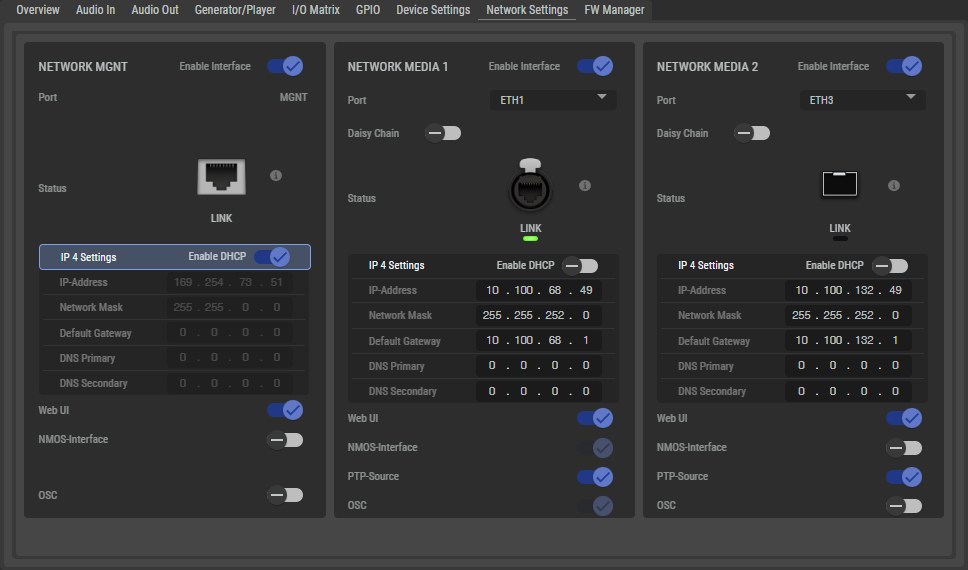
Network MGNT (Management) / Media 1 / Media 2
|
Enable Interface |
Switch to enable or disable the Interface. |
|
|
Port |
Name of the corresponding port.
|
|
|
Daisy Chain |
NSA devices have an internal Ethernet switch that can be activated via this setting. When Daisy Chain is enabled, one of the two media ports (ETH1 … ETH4) can be used to connect another device for chaining the network. The NSA's internal switch supports RSTP (Rapid Spanning Tree Protocol) for creating network ring topologies.
|
|
|
Status |
Illustration of the LINK status for the corresponding network connections MGNT, Media 1, and Media 2. |
|
|
DHCP |
If DHCP client mode is selected and the Ethernet port is connected to a network with an active DHCP server, the device attempts to obtain a dynamic IP address automatically. If no server is available, the device assigns a unique link-local address (ZeroConf) to the port itself. The IP parameters obtained are displayed as raed-only for this port. If DHCP mode is deactivated, the IP parameters are set by the user. |
|
|
IP-Address |
Depending on the DHCP function set:
|
|
|
Network Mask |
Depending on the DHCP function set:
|
|
|
Default Gateway |
Depending on the DHCP function set:
|
|
|
DNS Primary / Secondary |
Depending on the DHCP function set:
|
|
|
Web UI |
Specifies which interface(s) can be used to access the NSA's web user interface. |
|
|
NMOS |
Specifies which interface the device uses to access the NMOS register and communicate with other IS-04/05/07/08 APIs. Only one interface can be selected. |
|
|
PTP Source |
Specifies which of the two Media Ports (ETH1/ETH2) the NSA expects media and PTP data on. If Media/PTP is enabled on both Media Ports, the NSA operates in SMPTE 2022-7 mode, supporting hitless merge redundant networks. If an NSA is configured in Riedel Artist-1024, this setting also determines which interfaces are used for the connection to Artist-1024. When running SMPTE 2022-7 (PTP on both interfaces), the device’s PTP Role can only be ‘PTP TimeReceiver Only’. (see chapter Device Settings #PTP) |
|
|
OSC |
Specifies which interface the device uses to access the Open Sound Controller.
|
|