
AUX 1 and AUX 2 are Video AUX Outputs, distinct from AUX Audio. They allow you to create different outputs at the same time from the same system.
Think of a vision switcher: M/E 1 and M/E 2 let you build separate video mixes, while AUX outputs send video feeds to other destinations. For example, your main Program can feed the broadcast, AUX 1 the venue screen, and AUX 2 a separate stream.
An AUX output can follow the main production, then use Macros to switch to a different camera whenever a specific camera is on PGM. You can also replace a replay sequence on the AUX output with another camera angle.
Single AUX Operation
Left-click or single-tap the AUX output button. You can then switch an input or take PRV to that AUX output. After this operation, control automatically returns to the main PGM.
Permanent AUX Operation
Right-click or press and hold the AUX output button to keep controlling that AUX. This lets you continue switching or mixing on it until you press the button again.
Pro Tip — Using Video AUX Outputs on Main PGM
You cannot take AUX 1 or AUX 2 directly to PGM, but you can use them as PiP layers on PGM. The PiP must fill the entire frame, so the AUX video appears like a normal full-screen camera source.
This is useful when using an AUX output as a clip playback channel. Play Clip A on AUX 1 and show it on PGM through the full-frame PiP. Cut to a live camera while Clip A continues playing with its audio. Then return to the AUX 1 PiP to rejoin the clip as it continues.
Info
With two users working in the Live and SloMo modules, each can use a different PiP on their respective output, allowing two different PiPs to be broadcast simultaneously.
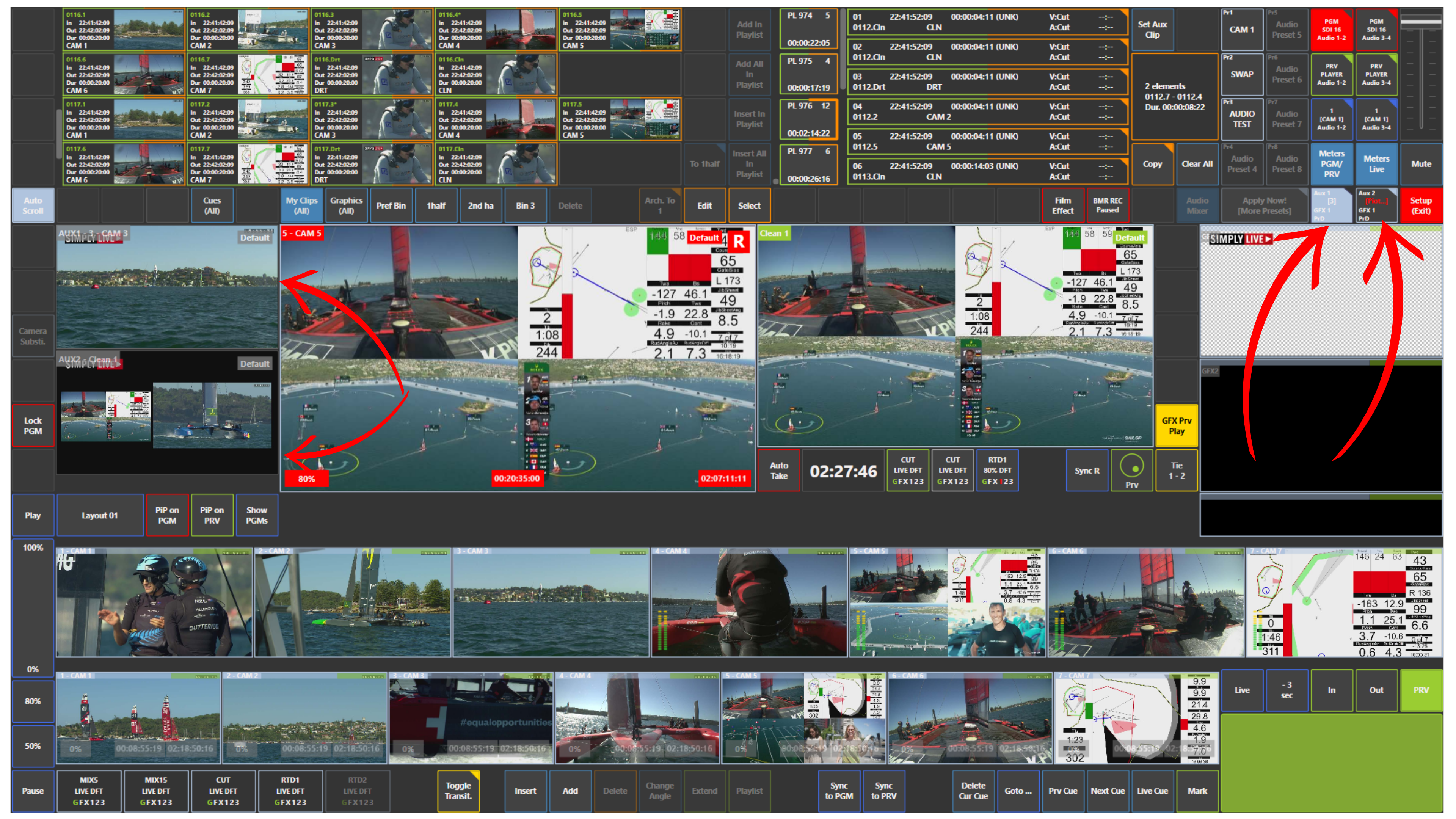
What You Can Do with AUX Outputs
Using AUX 1 and AUX 2, you can create additional productions in parallel with the main output.
For example, you can:
-
send one signal to the main client
-
send another signal to LED screens at the venue
-
send a third signal to an internet stream
You can also play different clips and different playlists on:
-
PGM Dirty
-
AUX 1
-
AUX 2
Use Case – Live Production Scenario
You are producing a football match.
You send the main feed to the client.
At the same time:
-
AUX 1 is used for the LED screens in the venue
-
AUX 2 is used for the internet stream
Each output can carry different content depending on the production needs.
Info
You can play multiple playlists from different outputs at the same time.
For example:
-
PGM Dirty can play Playlist 1
-
AUX 1 can play Playlist 2
-
AUX 2 can play Playlist 3
This gives you three separate outputs instead of only one.
Pro Tip
Use AUX outputs when one production needs multiple versions of the same event, for example a main programme feed, a venue feed, and a digital feed. This makes Production much more flexible and powerful.
Info
With PGM Dirty, AUX 1, and AUX 2, you can deliver three different signals at the same time from one system.