
hi System Overview
Overview
hi human interface provides a common control layer for supported media, production, and facility systems. Operators use the hi web interface or supported Hardware Panels to route signals, control parameters, monitor state, and run configured workflows.
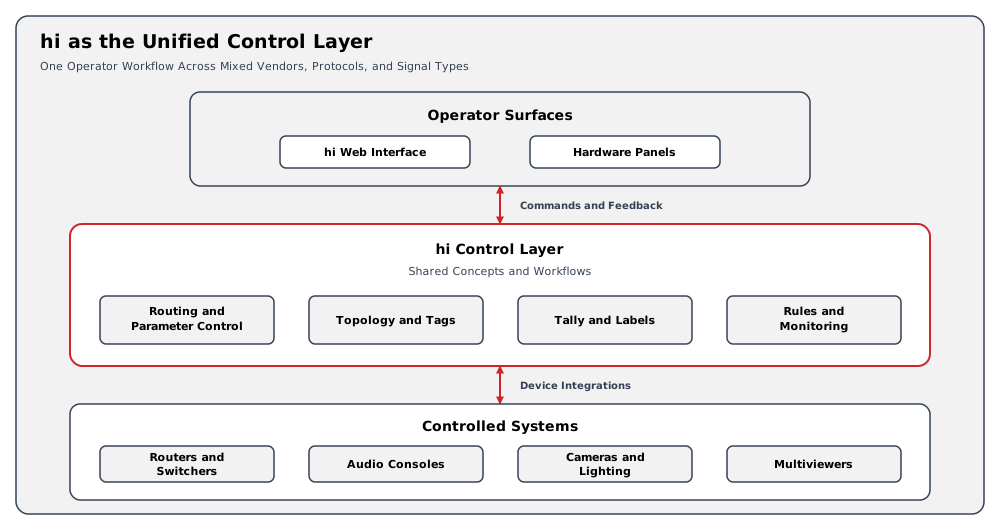
The hi system does not replace the controlled equipment. It connects to supported devices through integrations and presents their available capabilities through shared hi concepts.
Information
Capitalized terms, including Node, Port, Source, Destination, Tally, and Topology, are defined in the Glossary.
The Control Model
The hi system represents controlled equipment and signal infrastructure using these principal objects:
-
A Node represents a device, service, or other controlled component.
-
A Port represents an input, output, or bidirectional interface on a Node.
-
A Source provides a signal, and a Destination receives a signal.
-
The Topology represents configured wiring and logical links between Ports.
-
Tags organize resources and control which resources appear in operator workflows.
-
Presets adapt routing views, Port Containers route related Ports together, and Portals provide persistent virtual routing endpoints.
The available objects and actions depend on the installed version, active licenses, user access, commissioned Topology, and supported integrations.
Operator Workflows
The hi web interface can provide workflows for:
-
Routing supported Sources to Destinations.
-
Reading and changing supported device parameters.
-
Propagating Tally and Dynamic Labels through the configured Topology.
-
Organizing Ports with Tags and Presets.
-
Saving supported operational state in Snapshots.
-
Managing Monitor Walls, Hardware Panels, Rules, users, and Backups where configured.
Not every integration exposes every workflow. Use the Integrations catalog for the capabilities of a specific device or protocol.
Deployment Model
The hi system uses a client-server architecture. Browser clients and Hardware Panels connect to a commissioned server deployment. See High Availability for single-server and standard multi-server deployments.
Server platforms, client requirements, and minimum sizing are documented in System Requirements. Customer responsibilities include physical hosts and host operating-system security, hardening, patching, and updates, as agreed for the installation. These responsibilities do not imply that customers should repair the hi cluster or its database.
Availability, recovery, and cluster-fault handling follow the support boundary in High Availability: Operational Implications.
Operational Implications
-
Routing and Tally behavior depend on an accurate Topology.
-
Resource visibility depends on user roles, assigned Tags, and active licenses.
-
Device behavior depends on the relevant integration and device-side configuration.
-
Recovery actions must follow the procedure supplied for the installation.
Related Tasks and Reference
-
Follow the guided onboarding path in Getting Started.
-
Review the system model in Concepts.
-
Find operational procedures in Operations.
-
Confirm deployment requirements in System Requirements.
-
Diagnose observable failures in Troubleshooting.