
System Requirements
Overview
This page lists browser client types, server platforms, operating-system support, and baseline hardware sizing. Confirm the final design against the target hi release and approved project specification.
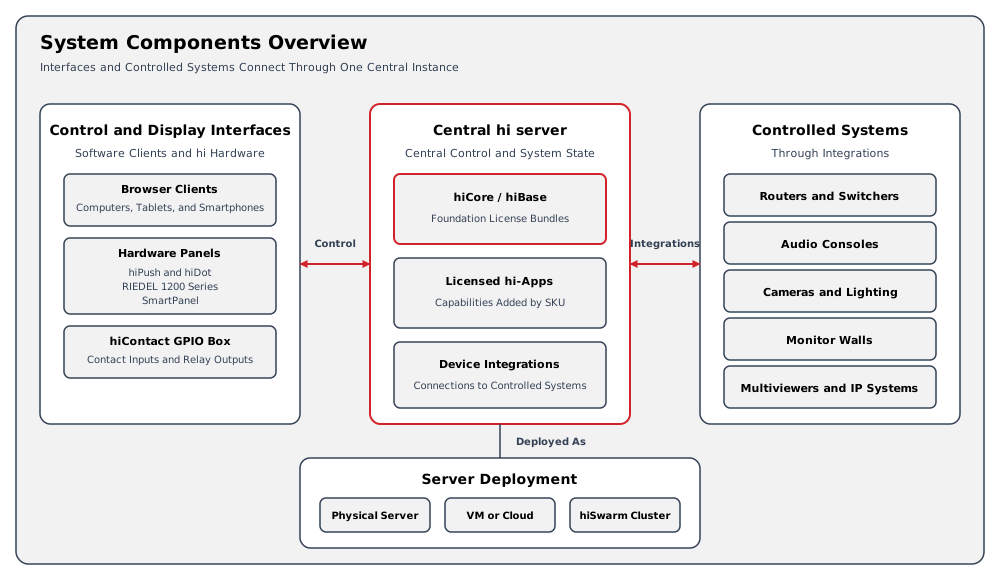
Client-Server Model
A central hi server deployment maintains control connections and system state. Browser clients and supported Hardware Panels connect to that deployment through the commissioned network.
Client access, redundancy, storage, and recovery behavior depend on the approved installation design.
Clients
The hi web interface is intended for modern browser clients on desktop, notebook, tablet, or smartphone platforms. Use Google Chrome, Microsoft Edge, or Apple Safari. A browser that does not identify itself as one of these browsers shows an unsupported-browser page.
Browser support can change with a hi release or operating-system update. Confirm the approved client matrix during project planning when a specific browser, mobile platform, kiosk mode, or long-term support policy is required.
Client devices require:
-
Network access to the supplied hi server address.
-
Trust in the certificate chain used by the installation when HTTPS is enabled.
-
A viewport and input method suitable for the intended workflow.
-
A supported authentication method and sufficient user access.
Server Platforms
The hi server deployment uses Linux-based hosts. Depending on the commissioned design, hosts can be physical servers or virtual machines in an on-premises or cloud environment.
A single-server installation is not redundant. A multi-server installation requires a project-specific design, the applicable license, and defined acceptance tests. See High Availability.
Supported Operating Systems
|
hi Release |
Server Operating System |
Planning Note |
|---|---|---|
|
3.0.0 and later |
Ubuntu 24.04 Server LTS |
Use the release-specific installation and upgrade procedure supplied for the installation. |
|
2.7.9 and 2.8.0 |
Ubuntu 20.04 Server LTS or Ubuntu 24.04 Server LTS |
Ubuntu 24.04 requires the installation package supplied for that operating system. Plan the operating-system upgrade before moving to hi 3.0.0 or later. |
|
2.7.4 to 2.7.8 |
Ubuntu 20.04 Server LTS |
The installation and infrastructure update procedure requires Ubuntu 20.04. Arrange migration of an Ubuntu 16.04 installation with Riedel Customer Success before upgrading. |
|
2.6.0 to 2.7.3 |
Ubuntu 16.04 Server LTS or Ubuntu 20.04 Server LTS |
Ubuntu 20.04 was added as an alternative in 2.6.0. Plan the operating-system migration before upgrading to 2.7.4 or later. |
The Release Notes record version-specific operating-system changes. Confirm support for any other release directly with Riedel Customer Success.
The older releases in this table describe their historical operating-system requirements. Use the requirements for the target release when planning a new installation or upgrade.
For a migration to Ubuntu 24.04 Server LTS, Riedel recommends a fresh server installation instead of an in-place Ubuntu upgrade. Issues can arise during the Ubuntu upgrade process. Coordinate the installation and hi upgrade with Riedel Customer Success.
For hi 2.7.9 and 2.8.0 on Ubuntu 24.04, obtain the appropriate installation package from Riedel Customer Success. The installer bundled with these releases requires Ubuntu 20.04 and cannot be used to install on Ubuntu 24.04.
Internet Connectivity
Internet connectivity is required during installation and when obtaining updates for the hi system. Offline installation and offline updates are not currently supported.
After installation or an update, the hi system can operate on an air-gapped network. Continuous internet access is not required for normal operation. A virtual installation on an air-gapped network must renew its license identity lease offline. See Renew an Offline License Identity Lease. Features that use an online service still require outbound connectivity. See Network and Firewall Ports for online license verification and other network requirements.
Host Maintenance Responsibility
The customer is responsible for:
-
Physical host maintenance, including hardware health, power, cooling, filter cleaning, and replacement.
-
The host operating system. For hi 3.0.0 and later, that host operating system is Ubuntu 24.04 Server LTS.
-
Host operating-system security, hardening, patching, and updates.
Riedel recommends host operating-system patching and updates as standard regular maintenance, together with physical host maintenance such as cleaning fan filters and checking cooling.
Riedel is not responsible for failures in those customer-managed host areas.
Caution
Use the hi installation and upgrade procedure only for the hi system. Do not treat hi release notes as a host operating-system patching plan. See Security Posture for the hi security boundary.
Minimum Hardware Specifications
The minimum baseline for a server or virtual machine is:
-
250 GB SSD storage.
-
32 GB RAM.
-
8 CPU cores, or 4 physical cores providing 8 threads with simultaneous multithreading.
These values are a baseline, not a complete sizing model. Node count, integrations, concurrent sessions, retention, redundancy, and performance targets can require additional resources.
Caution
Confirm final sizing with Riedel Customer Success during project planning. Do not infer supported capacity from the minimum values alone.
CPU Instruction Set and Virtualization
The server CPU must support Advanced Vector Extensions (AVX). The MongoDB version used by the hi system does not run on a CPU without AVX support.
When the hi server runs in a virtual machine, set the virtual CPU type to Host where the hypervisor allows it. The Host type passes the AVX capability of the physical CPU through to the virtual machine. A generic or emulated CPU type can hide AVX from the guest operating system.
Caution
Shut down the virtual machine before changing its CPU type, then start it again. For example, in Proxmox VE, open the virtual machine, select Hardware > Processors, set Type to Host, and start the virtual machine.
To check AVX support, run grep avx /proc/cpuinfo or grep avx2 /proc/cpuinfo on the server or in the virtual machine. A CPU that supports AVX returns at least one matching line.
Hardware Extensions
Supported Hardware Panels and GPI/O interfaces can extend the hi installation. See Hardware User Manual for hardware specifications, power requirements, and commissioning values. See Integrations and Licensing for integration behavior and license requirements.
Constraints
-
The target hi release determines operating-system and upgrade requirements.
-
Site-specific performance and redundancy requirements determine final server sizing.
-
Network, certificate, firewall, and segmentation requirements are project-specific.
-
Device-specific connection values belong to the relevant Supported Integration page.
Related Procedures
-
Use Network and Firewall Ports for deployment-level network planning.
-
Use Security Posture for authentication, authorization, transport, and logging information.
-
Use Risk Context for intended use, residual risks, and security support.
-
Use Getting Started after the installation is commissioned.