
Riedel 1200 Series SmartPanel
Production
Recommended for normal production use.
Caution
Compatibility Note: This information is a general guide and may be incomplete, may not match a specific project implementation, and is subject to change as supported products and versions evolve. Confirm the exact implementation and requirements for each project with Riedel and the relevant equipment vendor, then validate the required functions end to end in the target environment before deployment.
This integration covers the RSP-1232HL, RSP-1216HL, and DSP-1216HL models.
Minimum hi Version: v2.0.0
Overview
The Riedel® SmartPanel RSP-1232HL, RSP-1216HL, and DSP-1216HL integration uses NMOS IS-04, IS-05, and IS-07. It receives physical control events and sends labels, colors, and LED states for hi Hardware Panel workflows.
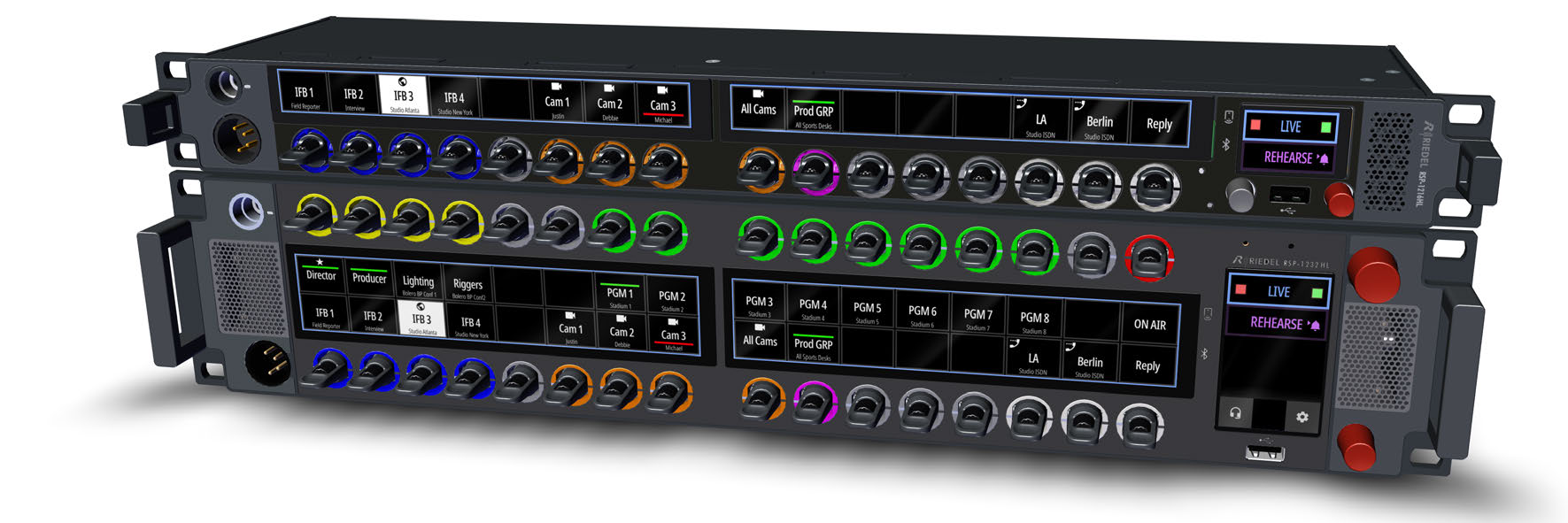
Riedel 1200 Series SmartPanel product view.
The integration discovers panel resources and receives lever and rotary-turn events. Operators can assign the controls to routing, Parameter, Trigger, Preset, and locking workflows in hi.
Network Requirements
-
Connection Model: hi queries the panel's NMOS APIs and connects to its advertised event WebSocket. The panel connects to a WebSocket endpoint hosted by hi for display and LED updates.
-
Multicast / Unicast: Unicast only.
-
Bandwidth: Control data only.
-
Firewall: Allow outbound TCP from hi to the panel on Port
4450and to the panel-advertised event endpoints. Allow the panel to reach the configured hi WebSocket endpoint.
Standards Conformance
|
Standard |
Conformance |
Notes |
|---|---|---|
|
AMWA NMOS IS-04 v1.3 |
Implemented |
Device, Source, Sender, and Receiver resource discovery. |
|
AMWA NMOS IS-05 v1.1 |
Implemented |
Sender inspection and Receiver connection management. |
|
AMWA NMOS IS-07 v1.0 |
Implemented |
Lever and rotary events, labels, colors, and LED state. |
Operator Workflow
The SmartPanel uses the generic Hardware Panel edit and Router Panel Preset delegation workflows in hi. Operators can assign supported physical controls to routing and disconnect operations, Parameters, Triggers, Presets, and Destination locks.
These panels do not use the static Hardware Panel layout editor or Hardware Panel simulator.
Connection Methods
Connection: AMWA NMOS IS-04 Node API
|
Property |
Value |
|---|---|
|
Protocol |
AMWA NMOS IS-04 v1.3 |
|
Transport |
HTTP |
|
Default Port |
4450 |
|
Authentication |
None; the integration does not configure panel credentials. |
|
Encryption in Transit |
None; the fixed panel API uses plaintext HTTP. |
|
Connection Model |
Request/Response API connection initiated by hi |
|
Required License |
hiGlue |
|
Traffic Flow |
Bidirectional API requests and responses |
Connection: AMWA NMOS IS-05 Connection API
|
Property |
Value |
|---|---|
|
Protocol |
AMWA NMOS IS-05 v1.1 |
|
Transport |
HTTP |
|
Default Port |
4450 |
|
Authentication |
None; the integration does not configure panel credentials. |
|
Encryption in Transit |
None; the fixed panel API uses plaintext HTTP. |
|
Connection Model |
Request/Response API connection initiated by hi |
|
Required License |
hiGlue |
|
Traffic Flow |
Bidirectional API requests and responses |
Connection: AMWA NMOS IS-07 Event Input
|
Property |
Value |
|---|---|
|
Protocol |
AMWA NMOS IS-07 v1.0 |
|
Transport |
HTTP or HTTPS for current state
|
|
Default Port |
Advertised by the panel through IS-05 |
|
Authentication |
None |
|
Certificate Trust |
System trust store when the panel advertises a secure URL |
|
Encryption in Transit |
Optional; determined by the panel-advertised URLs. |
|
Connection Model |
Event and state connections initiated by hi |
|
Required License |
hiGlue |
|
Traffic Flow |
Lever and rotary events from the panel to hi |
Connection: AMWA NMOS IS-07 Control Output
|
Property |
Value |
|---|---|
|
Protocol |
AMWA NMOS IS-07 v1.0 |
|
Transport |
WebSocket |
|
Listener Port |
Configured by the hi deployment |
|
Authentication |
None |
|
Encryption in Transit |
None; hi advertises a plaintext WebSocket URL. |
|
Connection Model |
Inbound panel connection to an endpoint hosted by hi |
|
Required License |
hiGlue |
|
Traffic Flow |
Labels
|
Required Configuration
The integration requires hiGlue. Each connected panel also consumes one hiUser session. Confirm available capacity using hiUser before connecting panels.
|
Parameter |
Description |
Default |
|---|---|---|
|
Host / IP Address |
Hostname or IP address of the SmartPanel |
- |
Caution
The SmartPanel NMOS API Port is configurable on the panel but fixed in hi. hi 3.0.0 uses Port 4450; earlier hi releases used Port 4490. The IS-07 sender endpoints are read from the panel's IS-05 transport parameters. The hi-hosted WebSocket endpoint is configured by the deployment.
Device-Side Setup
Follow Riedel 1200 Series SmartPanel Integration Configuration for the device-side and hi-side configuration steps.
Supported Features
|
Direction |
Control |
Description |
|---|---|---|
|
RX |
Lever actuation |
Receive lever-up and lever-down numeric events. |
|
RX |
Rotary turn |
Receive rotary-turn numeric events. |
|
TX |
Key label |
Set the key label. |
|
TX |
Key sublabel |
Set the key sublabel. |
|
TX |
Key-display background |
Set the key-display background color. |
|
TX |
Top and bottom key LEDs |
Set the top and bottom key LED colors. |
|
TX |
Keybank color |
Reset the keybank color to No Color. |
|
TX |
Disconnected indication |
Turn off the key LEDs and backgrounds, clear the key labels, and show |
Generic Hardware Panel Behavior
Within the limits of the controls above, Hardware Panel workflows provide Preset delegation, routing and disconnect actions, Parameter Control, Triggers, Port Container selection, and Destination locking.
Device Coverage
Tested With identifies devices that have been tested with hi. Potentially Compatible (Not Yet Verified) identifies devices that use the same protocol or connection method but have not been tested with hi. Device-specific configuration, firmware, and feature support can affect results.
This integration supports the Riedel 1200 Series SmartPanel range.
This integration is specific to the resource layouts and labels exposed by the RSP-1232HL, RSP-1216HL, and DSP-1216HL. NMOS IS-07 support alone does not make another endpoint compatible.
Tested With
-
Riedel RSP-1232HL
-
Riedel RSP-1216HL
Supported Product Range
-
Riedel RSP-1232HL
-
Riedel RSP-1216HL
-
Riedel DSP-1216HL
Known Limitations
-
Available key blocks depend on the panel's commissioned configuration. A panel with 16 keys exposes 16 sets of key resources, and a panel with 32 keys exposes 32.
-
The Control Panel App is a licensed feature on the panel. Activate it on the panel before hi can use it. The license is named
CPA_1200_PLUS. -
The panel truncates text longer than its display limits: 8 characters for a key label and 16 characters for a key sublabel.
-
hi implements NMOS IS-07 for the Control Panel App only. The Control Panel App is the panel-side NMOS interface; other NMOS IS-07 devices are outside this integration.
-
hi requires at least two KeyBlocks of 8 keys from the Control Panel App. It uses two or four KeyBlocks: the first half for Sources and the second half for Destinations. With three KeyBlocks, hi uses the first two.
-
Key LEDs and backgrounds use the 16-color palette of the Control Panel App, plus No Color. hi cannot send other color values.
-
hi acts on one rotary step for each left or right event, and ignores the idle value. Lever-up and lever-down events activate the assigned key; hi ignores the lever's middle-position event.
-
hi binds panel controls by their Control Panel App KeyBlock labels, not by NMOS IDs. A replacement panel with the same KeyBlock assignment works without changes in hi.
What's Not Supported
-
The rotary push, key icon, key activity, and keybank label resources that the Control Panel App publishes. hi uses the lever, rotary turn, key label, key sublabel, key background, and LED ring resources. It only resets the keybank color to No Color.
-
The static Hardware Panel layout editor and Hardware Panel simulator.
-
hi binds only the key blocks that the Control Panel App publishes.
-
Firmware updates, physical commissioning, and hardware diagnostics are outside this integration.
-
Standalone offline operation is outside the hi Hardware Panel workflow.
Trademarks
Note
RIEDEL and SmartPanel are trademarks of RIEDEL Communications GmbH.