
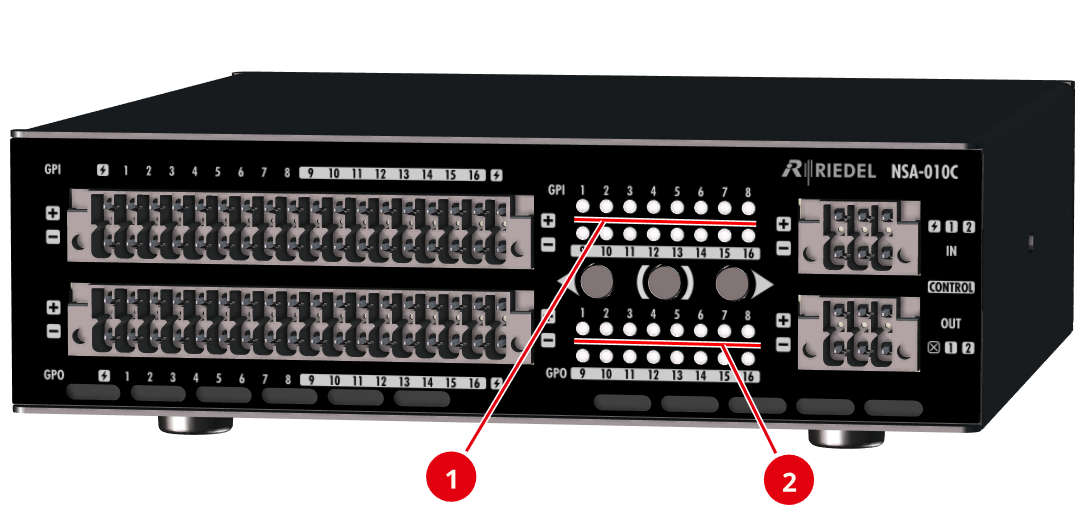
Front view
|
|
GPI |
off |
The pin state of the GPI (input) is switched off (↓ Low). |
|
green |
The pin state of the GPI (input) is switched on (↑ High). |
||
|
white blinking |
The GPI (input) is selected for testing by using the left/right buttons. |
||
|
white |
The logical state of the GPI (input) is toggled (activated) with the middle button. |
||
|
|
GPO |
off |
The pin state of the GPO (output) is switched off (↓ Low). |
|
yellow |
The pin state of the GPO (output) is switched on (↑ High). |
||
|
white blinking |
The GPO (output) is selected for testing by using the left/right buttons. |
||
|
white |
The pin state of the GPO (output) is toggled (activated) with the middle button. |


All LEDs on the front flash when the localization function of the device is active. This can be triggered both via the Find button on the device and via the web interface.
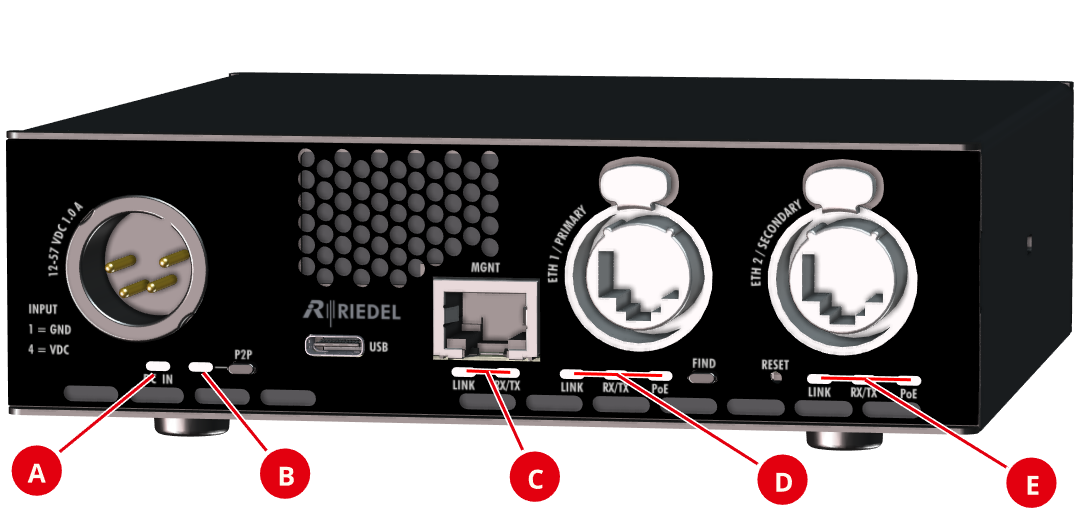
Rear view
|
|
DC In |
off |
No DC-IN input voltage available. |
|
green |
The power supply via DC-IN is ok. |
||
|
|
P2P |
(for future use) |
|
|
|
LINK |
off |
No connection to the corresponding network. |
|
green |
The corresponding network is connected. |
||
|
|
RX / TX |
off |
No Ethernet activity. |
|
green |
Ethernet activity. |
||
|
|
PoE |
off |
No PoE input voltage available. |
|
green |
The power supply via PoE is ok. |
||


