
This tab is not available on the NSA-010C.
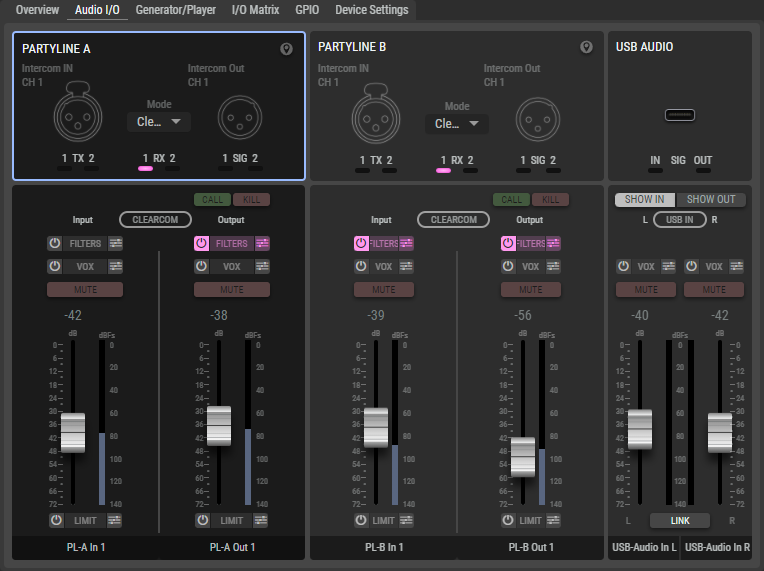
The available connector illustrations are displayed in the upper area, as they are also displayed in the Overview tab. The audio interfaces can also be configured and operated.
-
On the NSA-003A, the selection of the intercom mode of the respective party line is located in the upper area between the inputs and outputs.
-
The View selection at the bottom right of the web interface can be used to change whether All details of all channels or only those of the Selected channel are displayed.
Audio Settings
In the lower section, the levels and functions of the audio interfaces are adjusted.
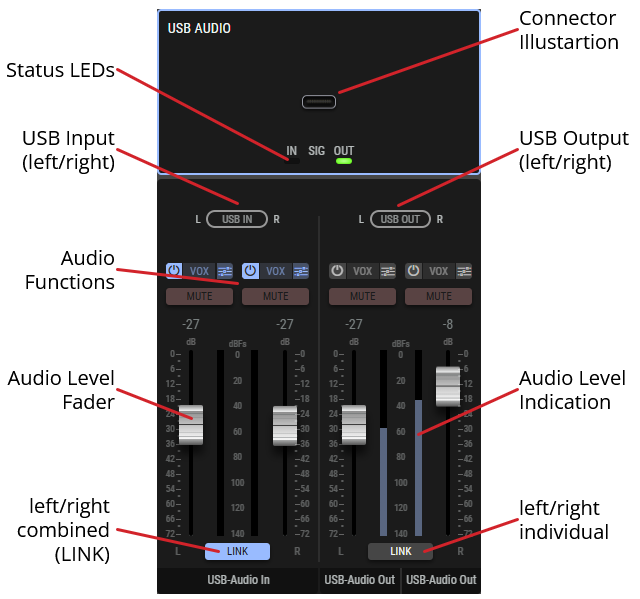
In total, the following functions are available, which are not available to all interfaces:
-
Call
-
Kill
-
High-pass/low-pass filter
-
VOX
-
Mute
-
Audio Level Fader and Indication
-
Limiter
-
Link
-
Analog/digital/auto switching
-
Mono
-
Phantom power
-
(Auto)Trim
-
The adjustable audio processes (e.g. Vox) can be activated or deactivated using the


-
The functions without adjustable parameters (e.g. Mute) are activated or deactivated by clicking on them.
-
The audio levels can be adjusted using the faders.
Customize the filter options
-
Click on the

-
Adjust the corresponding filter parameters:
-
via keyboard:
-
Click on the value.
-
Enter a value using your keyboard.
-
Confirm your entry with the Enter key.
-
-
via mouse:
-
Click on a value and hold down the mouse button.
-
Move the mouse to the right/left or up/down to adjust the value.
-
Release the mouse button to accept the value.
-
-
-
Changes are applied to the audio signal in real time.
-
If several filters are combined in an audio filter (e.g. HP / LP filter), you can activate / deactivate individual filters using their

-
Close the audio filter with the

Partyline A/B
This interface is only available on the NSA-003A.
|
Call |
Sends a shout into the partyline. |
|
|
Kill |
Switching off an open microphone. |
|
|
Filters |
Separately activatable high and low pass filter. |
High pass: 40 ... 640 Hz
|
|
Vox |
The acoustic switch (Vox) can only be used to trigger GPOs when the adjustable switching threshold is exceeded. |
Switching threshold: -140 ... 0 dBFS
|
|
Mute |
Switch to mute the audio signal. |
|
|
Fader |
Slider for setting the audio level. The current level is displayed next to it. |
|
|
Limit |
The limiter prevents the audio signal from exceeding a certain level by reducing the peak values. |
Threshold value: -80 ... 0 dBFS
|
USB Audio
This interface is not available on the NSA-010C.
|
Show In/Out |
Switches the view of the USB audio interface between input and output. |
|
|
Vox |
The acoustic switch (Vox) can only be used to trigger GPOs when the adjustable switching threshold is exceeded. |
Switching threshold: -140 ... 0 dBFS
|
|
Mute |
Switch to mute the audio signal. |
|
|
Fader |
Slider for setting the audio level. The current level is displayed next to it. |
|
|
Link |
Combines the settings of the left and right channels so that the level adjustment and muting takes place on both channels. When linking the channel legs, the right leg always takes over the parameter settings of the left leg's settings. |
|
Universal Out x
This interface is only available on the NSA-005A, NSA-006A and NSA-007A.
|
Analog / Digital |
Switches the Universal Out x audio interface to Analog or Digital mode. |
|
|
Vox |
The acoustic switch (Vox) can only be used to trigger GPOs when the adjustable switching threshold is exceeded. |
Switching threshold: -140 ... 0 dBFS Hysteresis: 0 ... 10 dB Holding time: 0 ... 6400 ms |
|
Mute |
Switch to mute the audio signal. |
|
|
Fader |
Slider for setting the audio level. The current level is displayed next to it. |
|
|
Link*D |
Combines the settings of the left and right channels so that the level adjustment and muting takes place on both channels. When linking the channel legs, the right leg always takes over the parameter settings of the left leg's settings. |
|
|
*D only in digital mode |
||
Universal In x
This interface is only available on the NSA-004A, NSA-006A and NSA-007A.
|
Analog / Auto / Digital |
Switches the Universal In x audio interface to Analog or Digital mode or automatically detects the connected audio signal in Auto mode. |
|
|
48V /
|
Switches the phantom power of the Universal In x audio interface in analog mode on (48V) or Off. In Auto mode, the phantom power is switched on automatically when a phantom-powered microphone is detected. Automatic phantom power detection only works reliably with microphones connected to the NSA Universal Input. When connecting line outputs to the NSA Universal Input, false detections are very likely to occur and the phantom power will therefore be activated, which, depending on the design of the line output device, can lead to its damage. This message also always pops up when the Phantom Power is set to auto and has to be confirmed by the user: Are you sure you want to enable "Auto Phantom Power"? |
|
|
Vox |
The acoustic switch (Vox) can only be used to trigger GPOs when the adjustable switching threshold is exceeded. |
Path: Transparent / Trimmed
|
|
Filter*A |
Activatable high-pass filter. |
High pass: 40 ... 640 Hz |
|
Mute |
Switch to mute the audio signal. |
|
|
Fader |
Slider for setting the audio level. The current level is displayed next to it. |
|
|
Auto Trim*A |
The Auto-Trim function automatically analyzes the highest level of the audio signal within the defined measurement period and adjusts the gain value to achieve the desired target level. Level reductions are applied immediately; the final adjustment is made once the measurement is complete. |
Measuring Time: 3 ... 30 Sec.
|
|
Limit*A |
The limiter prevents the audio signal from exceeding a certain level by reducing the peak values. The Limiter in the Universal Inputs is only affecting the signal on the Input's "Trimmed Output". |
Threshold value: -80 ... 0 dBFS
|
|
Link*D |
Combines the settings of the left and right channels so that the level adjustment and muting takes place on both channels. When linking the channel legs, the right leg always takes over the parameter settings of the left leg's settings. |
|
|
*A only in analog mode
|
||
Headphone
This interface is only available on the NSA-006A.
|
Mono |
Downmixing the stereo source of the headphones to mono. |
|
|
Mute |
Switch to mute the audio signal. |
|
|
HP Level |
Rotary control for setting the audio level. The current level is displayed in the center. |
|
|
Limit |
The limiter prevents the audio signal from exceeding a certain level by reducing the peak values. |
Threshold value: -80 ... 0 dBFS
|