
On this tab, general device settings such as network, PTP, NMOS can be made.
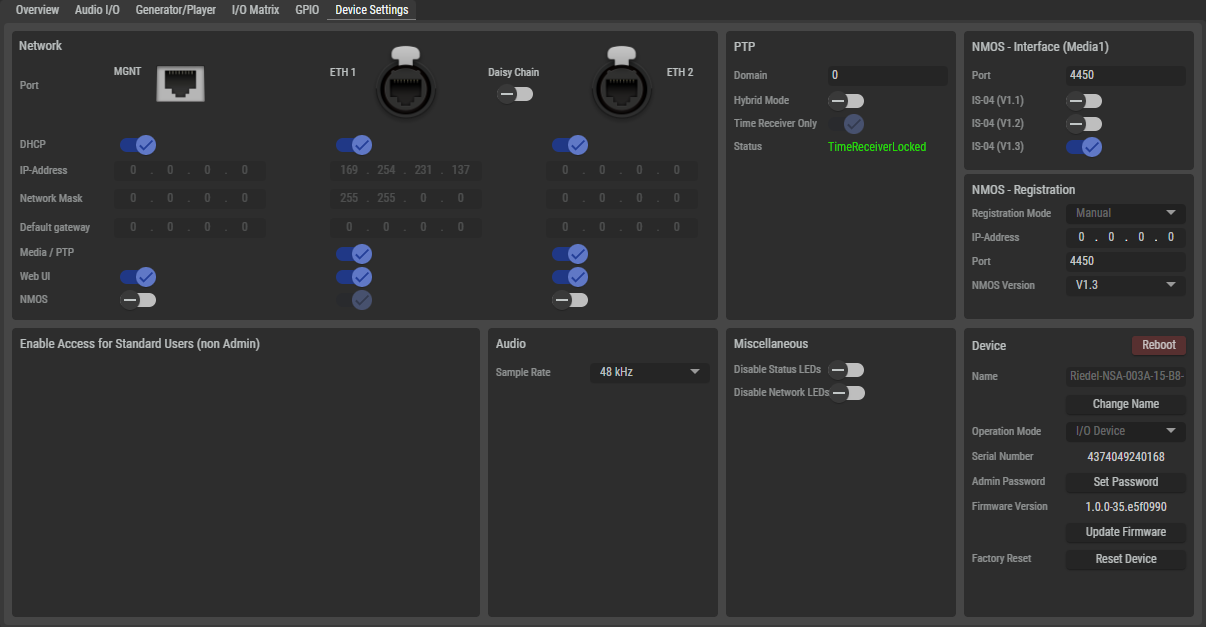
Network
|
Port |
Illustration of the corresponding network connection MGNT, ETH 1 and ETH 2. |
|
|
Daisy Chain |
NSA devices have an internal Ethernet switch that can be activated via this setting. When Daisy Chain is enabled, one of the two media ports (ETH1 or ETH2) can be used to connect another device for chaining the network. The NSA's internal switch supports RSTP (Rapid Spanning Tree Protocol) for creating network ring topologies. |
|
|
DHCP |
If DHCP client mode is selected and the Ethernet port is connected to a network with an active DHCP server, the device attempts to obtain a dynamic IP address automatically. If no server is available, the device assigns a unique link-local address (ZeroConf) to the port itself.
|
|
|
IP-Address |
Depending on the DHCP function set:
|
|
|
Network Mask |
Depending on the DHCP function set:
|
|
|
Default Gateway |
Depending on the DHCP function set:
|
|
|
Media/PTP |
Specifies which of the two Media Ports (ETH1/ETH2) the NSA expects media and PTP data on. If Media/PTP is enabled on both Media Ports, the NSA operates in SMPTE 2022-7 mode, supporting hitless merge redundant networks.
|
|
|
Web UI |
Specifies which interface(s) can be used to access the NSA's web user interface. |
|
|
NMOS |
Specifies which interface the device uses to access the NMOS register and communicate with other IS-04/05/07/08 APIs. |
|
PTP
The PTP section is only available for the NSA types NSA-003A and NSA-006A.
|
Domain |
Set the same domain number for the PTP clock available in the network. Permissible values are between 0 and 127, whereby the default value is 0. |
|
Hybrid Mode |
Set the PTP network packet transmission mode. Inactive: All messages are sent and received via multicast messages between the device and the TimeTransmitter. Active: Messages from the devices are sent to the grandmaster via unicast messages and the grandmaster publishes the messages via multicast. |
|
Time Receiver only |
Forces the use of an external grandmaster. |
|
Status |
Displays the current PTP status. TimeReceiverLocked, TimerReceiverUnlocked, TimeTransmitter |
NMOS - Interface
|
Port |
Field for configuring the port on which the NSA expects the NMOS messages. The default value is 4450. |
|
IS-04 (V1.x) |
Field for configuring the IS-04 version in which the NMOS messages to the NSA are expected. |
NMOS - Registration
|
Registration Mode |
Future function (only Manual mode is currently supported). |
|
IP-Address |
Field for configuring the IP address via which the NSA accesses the NMOS registry. |
|
Port |
Field for configuring the port via which the NSA accesses the NMOS registry. The default value is 4450. |
|
NMOS Version |
Field for configuring the IS-04 version in which the NSA accesses the NOMOS registry. The default selection is V1.3. |
Enable Access for Standard Users
The logged-in admin can define which functions are available to users who are not logged in.
Audio
|
Sample Rate |
Selection of the sample rate. A change requires a restart of the device. (44.1, 48, 96 kHz, not available for NSA-010C) |
|
Reference Level*4-5-6-7A |
Selection of the analog reference level of the device.
|
|
Auto Trim Time*4-6-7A |
The time in which the automatic trimmer measures the input signal to determine the automatically set target trim level.
|
|
Auto Trim Target Lvl*4-6-7A |
Target level to be reached by the auto trim function after automatically adjusting the trim gain after measuring.
E.g. the peak level which was measured during auto trim was -40 dBFS, the Auto Trim Target is set to -10 dBFS, so the auto trim function will set the Trim Gain up by 30 dB right after the measurement period. |
|
*4-5-6-7A only for NSA-004A, NSA-005A, NSA-006A, NSA-007A
|
|
Miscellaneous
|
Disable
|
If this option is enabled, all status LEDs of the device except for the network LEDs (MGNT, ETH 1, and ETH 2) are switched off. |
|
Disable
|
If this option is activated, the network LEDs (MGNT, ETH 1 and ETH 2) on the back of the device are switched off. |
Device
|
Reboot |
Click to restart the device after confirming the confirmation pop-up. |
|
|
Name |
Displays the name of the device. |
|
|
Change Name |
Click to change the name of the device. A change requires a restart of the device. |
|
|
Operation Mode |
The device functions as a simple I/O device. Further operating modes are planned for the future. |
|
|
Serial Number |
Displays the serial number of the device. |
|
|
Admin Password |
Click to enter or change the administrator password of the device. If a password already exists, the button gets renamed to "Change Password". |
|
|
Firmware Version |
Displays the current firmware version of the device. |
|
|
Update Firmware |
Click to update the firmware ('.rfp' file) of the device. |
|
|
Factory Reset |
Click to reset the device to factory settings. |
|