
If you do not want to deliver one long recording as a single file, BMR allows you to split the stream into smaller segments.
This is especially useful for post-production workflows where shorter files are easier to access, faster to transfer, and lighter to handle than one large continuous recording.
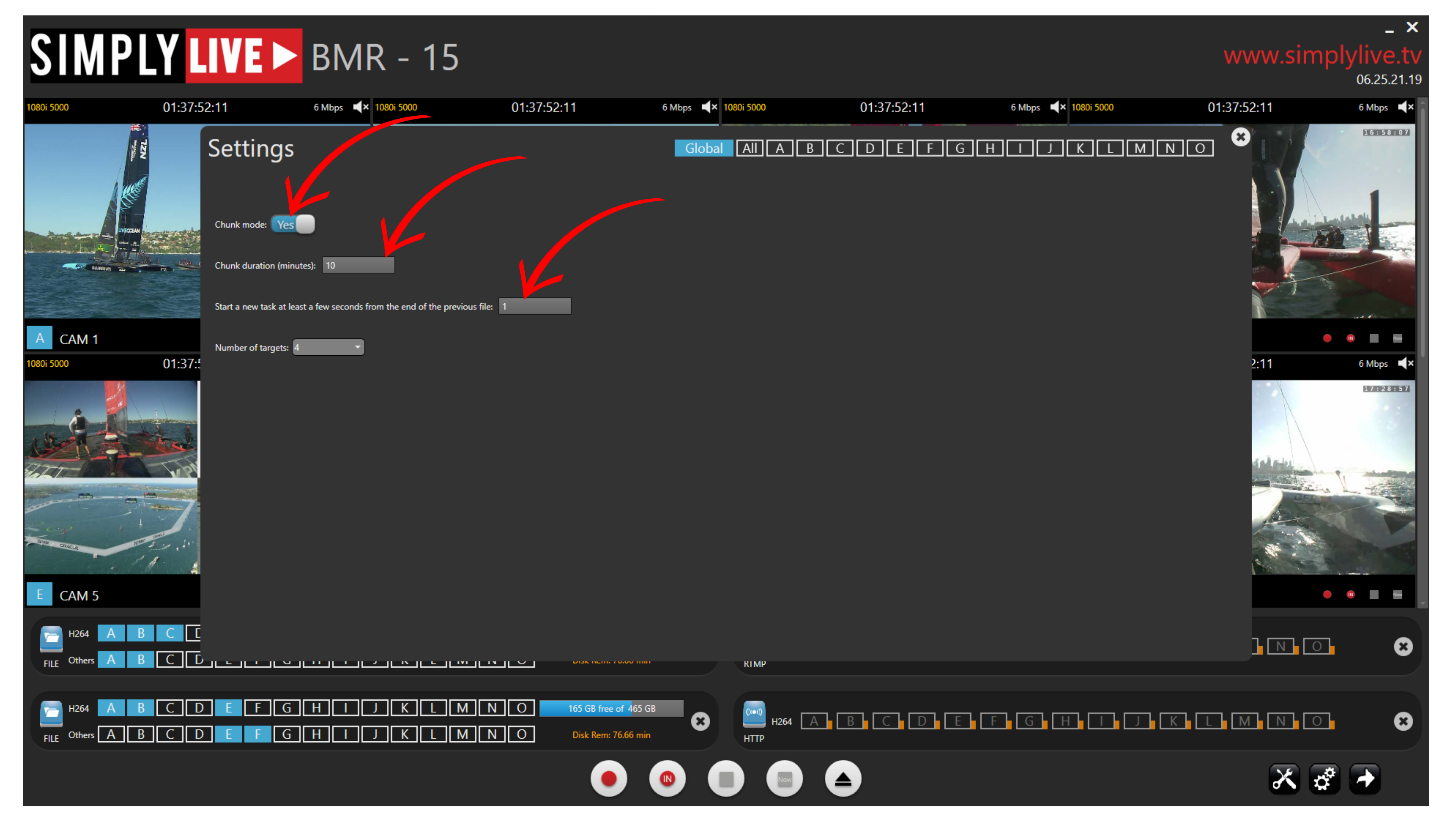
To enable this, open Settings and turn on Chunk mode.
Once Chunk mode is enabled, you can define:
-
the chunk duration
-
the overlap between segments
The chunk duration determines how long each file will be.
The overlap setting adds a small time overlap between the end of one segment and the start of the next one. This helps ensure that no action is lost between files and gives editors safer cut points when working with the material.
Info
Chunk mode splits one continuous recording into multiple smaller files, making the material easier to access and handle in post-production.
Pro Tip
Use Chunk mode whenever post-production needs fast access to the recording. Smaller segmented files are usually easier for editors to open, move, and start working with immediately than one long file.
Use Case – Post-Production Scenario
A common workflow is to segment a long recording into shorter chunks for the post-production team.
Instead of receiving one full two-hour file, the editors receive lighter segments, for example every 15 minutes, which they can access much faster while the recording is still ongoing.
Using overlap between chunks also helps protect against losing frames between the end of one file and the start of the next.