
Job Activation is the process by which a user can specify that a Production should begin.
When a Job is activated, the system resources specified in the Job Adoption are allocated to the Job so that no other Jobs can access them. When a Job is deactivated, these system resources are released so that they can be used by other Jobs.
Overview
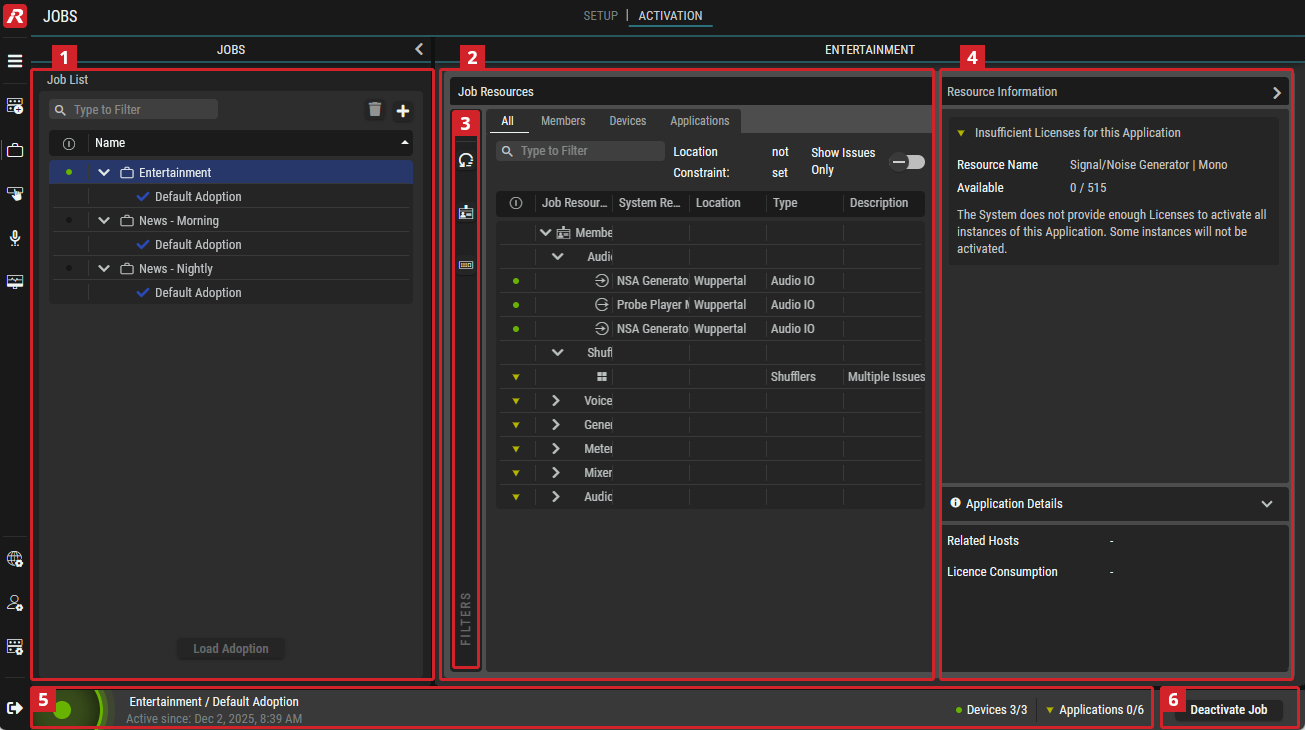

Jobs
Select a Job and the desired Adoption.
This section is identical in the Setup and Activation views and is described in chapter Setup.

Job Resources
This section gives an overview of all the resources defined in the Job as well as an indication of the adopted system resources.
|
All |
Shows all Application Types. status indicators for each Job resource
|
|---|---|
|
[Job Resources Groups] |
Shows only Job Resources of the corresponding Type:
|

|
Set a filter to display only content whose search text is found in the name. |
|
Location Constraint: |
|
|
Show Issues Only |
If enabled, only Job Resources with issues are listed. |

|
Indicates the availability of the Job Resources: |
|
Job Resource |
Name and group of the Job Resource. |
|
System Resource |
Shows the name of the Virtual Device that is created and mapped to the Hardware Device in System Commissioning > I/O Management : Virtual Devices | Virtual Devices |
|
Location |
Shows the name of the Location where the Virtual Device is registered System Commissioning > I/O Management : Virtual Devices | Locations |
|
Type |
Shows the type of the Job Resource. |
|
Description |
Shows a brief description of the warnings about Job Resources. |


Filter (Job Resources)
Filter the Job Resources. See Getting Familiar with the User Interface #Filtering.

Resources Inspector
Resource Information
This section provides detail warning and error messages of the selected Job Resource.
If nothing is selected in the Job Resources section, the inspector displays all elements for the currently selected Job with the corresponding Adoption.
|
Insufficient Resources
|
The Job contains a quantity of Applications of a type that exceeds the number of Applications of this type in the system (e.g., a user added 50 limiters to the Job, the same engines registered and the volumes loaded to these engines only provide 40 limiters, in this case 10 limiters are missing). |
|---|---|
|
Resources Consumed |
The Job contains a quantity of Applications of a type that exceeds the currently available number of Applications of this type (e.g., a user added 50 limiters to the Job, the same engines registered and the volumes loaded to these engines provide 80 limiters, but 40 are already used in other Jobs, in this case 10 limiters are missing). |
|
Insufficient Licenses for this Application |
The Job contains a quantity of Applications of a type requiring a number of license quantities (e.g. SAME PROCs) that exceeds the total number of license quantities of this type in the system (e.g., a user added 50 limiters and 2 mixers to the Job. The Limiters require 5 PROC licenses each, the mixers 20 PROC licenses each, resulting in a total quantity of 290 PROCs required for this Job. There is only 200 SAME PROC licenses available in the system, in this case 90 are missing). |
|
Licenses Consumed |
The Job contains a quantity of Applications of a type requiring a number of license quantities (e.g. SAME PROCs) that exceeds the currently available number of license quantities of this type (e.g., a user added 20 limiters and 2 mixers to the Job. The Limiters require 5 PROC licenses each, the mixers 20 PROC licenses each, resulting in a total quantity of 140 PROCs required for this Job. There is 200 SAME PROC licenses available in the system, but 100 are already consumed by other Jobs, in this case 40 are missing). |
|
No Adoption for Device |
The Job Device is not adopted to a System Device in the currently selected Adoption preset. |
|
Device used in another Job |
The Job Device is adopted to a System Device, some consumers of this Device are already in use by another Job Device in the same or another Job. |
|
System Device Mapping incomplete |
The Job Device is adopted to a system Virtual Device, but that Virtual Device has an incomplete mapping. |
|
System Device Mapping missing |
The Job Device is adopted to a system Virtual Device, but that Virtual Device has an no mapping at all. |
|
Device partly used in another Job |
Only in an active Job: marks where adoption failed for Consumer (Legs) because they are in use somewhere else (which might be another Job or also within the same Job). |
|
Adopted Host Offline |
The Job Device is adopted a System Device or a system Virtual Device that belongs to a Host that is offline. |
Application Details
This section provides Device details of the selected Job Resource.
|
Adopted System Devices |
Shows the name of the Virtual Device that is created and mapped to the Hardware Device in System Commissioning > I/O Management : Virtual Devices | Virtual Devices |
|---|---|
|
System Device Location |
Shows the name of the Location where the Virtual Device is registered System Commissioning > I/O Management : Virtual Devices | Locations |
|
Mapped Hardware Device |
Shows the name of the Hardware Device that is mapped to the Virtual Device in System Commissioning > I/O Management : Hardware Devices | Hardware Devices |
|
Related Hosts |
Shows the name of the Registered Host that belongs to the Hardware Device, that is registered to STAGE in System Commissioning > Registration : Registered Hosts |

Information Bar
This section is identical in the Setup and Activation views and is described in chapter Setup.

Activation / Deactivation

|
By activating the selected Job and its Adoption, the specified system resources are allocated to the Job and blocked for other Jobs. |
|---|---|

|
By deactivating the selected Job and its Adoption, the system resources allocated to the Job are released and are thus available again for other Jobs. |