
Licensing
Overview
hi licenses are bundles of features sold on the pricelist. hiBase and hiCore are both license bundles, with different feature scope. hiCore provides foundation routing and identity administration for new orders. hiAdvancedWorkflows replaces hiPowerWidgets and includes Portals for hiCore installations. Existing hiBase licenses include Portals; hiCore alone does not. Existing issued licenses remain valid. hiMesh and hiMeshConnect are pre-release licenses whose features may change.
Information
Licenses and Options: A purchased license bundle resolves to Options in the hi system. Options are feature flags that enable capabilities; they are not separate licenses or pricelist products.
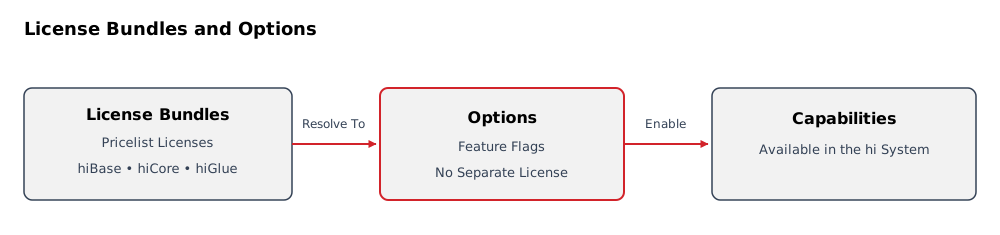
For new orders, hiCore satisfies the foundation requirement. References to hiBase as a Base Requirement describe existing hiBase installations unless the page says otherwise. Integration pages retain hiBase as the required-foundation label; hiCore satisfies that foundation requirement for new bundles. Separately licensed add-ons and device-specific licenses still apply.
Use this page to plan the licensed scope of an installation. Use License Details for the canonical license bundle datasheets, Feature Matrix for a short capability-to-license lookup, and Applying a License File for operational procedures.
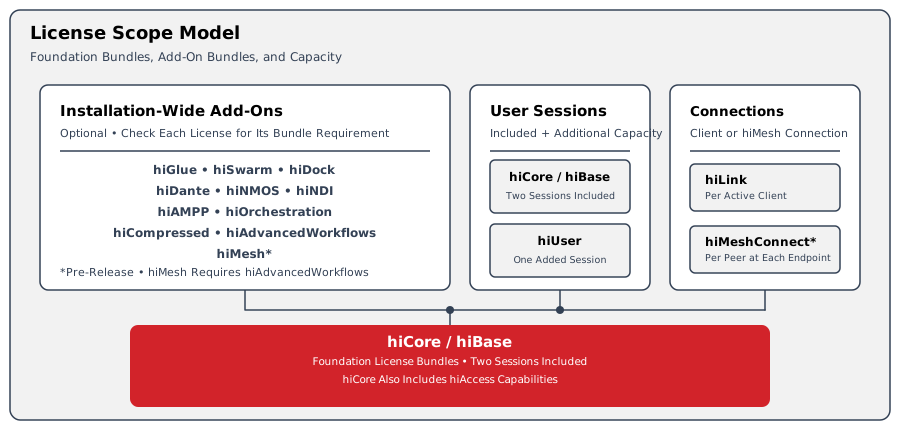
In this model, hiDock and hiMesh are installation-wide licenses. hiLink is licensed per active third-party client, which is a Northbound client or a supported third-party Hardware Panel, and requires hiDock. hiMeshConnect is counted for each peer connection at each hi system endpoint; each hiMesh license includes one local hiMeshConnect entitlement.
Select by Capability
Select the capability or deployment requirement, then open its datasheet for the Product Code, License Type, Entitlement Basis, dependencies, and scope boundary.
|
Capability or Deployment Need |
Start With |
|---|---|
|
Foundation routing
|
hiCore for the current foundation license bundle
hiBase for existing hiBase licensing |
|
Native Hardware Panels or hiContact GPIO |
hiGlue |
|
Additional concurrent browser or panel access |
hiUser |
|
External automation through the Northbound Interface |
hiDock |
|
Third-party clients (Northbound clients and supported third-party Hardware Panels) |
hiDock
hiLink per active third-party client
hiUser licenses for panel sessions beyond the included capacity |
|
Multi-server high availability |
hiSwarm |
|
Dante
|
The matching integration bundle in License Details |
|
Microsoft Entra ID administration |
Included in hiCore
hiAccess remains for legacy hiBase customers |
|
Portals |
Included in existing hiBase licenses
hiAdvancedWorkflows with hiCore |
|
PowerWidgets
|
hiAdvancedWorkflows (replaces hiPowerWidgets) |
|
hi-to-hi federation |
hiMesh (pre-release
|
|
Additional hiMesh peer connections |
hiMeshConnect (pre-release
|
License Details
Use the License Details catalog as the canonical reference for each license. Every datasheet presents the Product Code, License Type, Entitlement Basis, enabled capabilities, required combinations, scope boundary, and links to the relevant workflow or integration pages.
The Feature Matrix is a concise capability-to-license index. License Details is the authoritative source for license scope.
The catalog lists license bundles sold on the pricelist. It does not list Options as licenses. The licensing workspace shows the Options resolved from the installation's license bundles; an Option name does not identify a separately purchasable product.
Licensing Terms
The terms used in the license catalog and datasheets mean:
|
Term |
Meaning |
|---|---|
|
License Bundle |
A bundle of features sold as a license on the pricelist, such as hiBase, hiCore, or hiGlue. |
|
Option |
A feature flag resolved from a license bundle to enable a capability in the hi system. An Option is not a license or a separately purchasable pricelist product. |
|
Product Code |
The identifier shown for the software license in the hi licensing catalog. It identifies the license entitlement; it is not a statement of price. |
|
License Type |
The catalog's license-duration or capacity class. Perpetual is an ongoing software entitlement whose quantity is still defined by its Entitlement Basis; Per-Session is a concurrent user-session entitlement; Per-Client is third-party client capacity. License verification and validity are still shown and managed through the licensing workflow. |
|
Entitlement Basis |
The unit used to determine quantity. Per Installation is one for the hi installation; Per Concurrent Session is one for each additional simultaneous session; Per Active Third-Party Client is one for each simultaneously active third-party client, such as a Northbound client or a supported third-party Hardware Panel; Per hiMesh Peer Connection at Each Endpoint counts the peer on both connected hi installations; Project-Specific Deployment is sized with Riedel Customer Success for the commissioned deployment. |
|
Lifecycle |
Commercial catalog state. Released identifies a released license; Pre-release means features and availability may change; Replaced means a newer bundle takes its place for new packaging; Discontinued means it is no longer offered for new packaging. Previously issued licenses remain valid and continue to work. |
|
Base Requirement |
The foundation or other license that must also be present. hiBase is the foundation for existing hiBase installations; hiCore supplies that foundation for new orders. A separately named requirement such as hiDock or hiMesh remains an add-on unless explicitly stated as included. |
|
Includes |
An entitlement supplied with the named license. For example, each installation-wide hiMesh license includes one local hiMeshConnect entitlement. |
|
Requires |
Another entitlement that must be present for the license to be used. hiLink requires hiDock; hiMeshConnect requires hiMesh. |
|
Replaces / Replaced by |
The replacement license bundle relationship. It does not invalidate an already issued license. |
|
Floating Capacity |
A concurrently usable entitlement that returns to the available pool when the associated panel is disabled or removed. |
|
Included User Sessions |
hiBase and hiCore each include two concurrent sessions; one is reserved for the administrator. Count operator and panel sessions against the remaining capacity before adding hiUser licenses. |
Worked License Examples
Three active supported third-party Hardware Panels on one installation:
|
License or Capacity |
Quantity |
Reason |
|---|---|---|
|
hiBase or hiCore |
1 |
Provides the installation foundation and includes two concurrent user sessions. |
|
hiDock |
1 |
Installation-wide requirement for third-party clients. |
|
hiLink |
3 |
One license for each active third-party client. In this example each client is a supported third-party Hardware Panel. |
|
Included User Sessions |
2 |
One session is reserved for the administrator; one remains available for an operator or panel. |
|
Additional hiUser |
2 |
Three panel sessions are needed, and only one included session is available for those panels. |
Caution
Count user sessions for the peak simultaneous sessions. Do not count the administrator-reserved session as panel capacity.
Bundle Combinations
These established license bundle combinations remain valid. For new orders, hiCore replaces the hiBase + hiAccess combination, and hiAdvancedWorkflows replaces hiPowerWidgets. Existing issued licenses continue to work; lifecycle status and bundle scope are in License Details.
|
Planning Need |
Existing License Combination |
Current License Combination |
|---|---|---|
|
Core routing and baseband control |
hiBase |
hiCore |
|
One native hi Hardware Panel or supported RIEDEL 1200 Series SmartPanel |
hiBase + hiGlue + one hiUser session |
hiCore + hiGlue + one hiUser session |
|
One hiContact GPIO box |
hiBase + hiGlue |
hiCore + hiGlue |
|
External control gateway |
hiBase + hiDock |
hiCore + hiDock |
|
Three supported third-party Hardware Panels |
hiBase + hiDock + three hiLink licenses + two additional hiUser licenses |
hiCore + hiDock + three hiLink licenses + two additional hiUser licenses |
|
Multi-server deployment |
hiBase + hiSwarm |
hiCore + hiSwarm |
|
Dante audio routing |
hiBase + hiDante |
hiCore + hiDante |
|
NMOS discovery and connection management |
hiBase + hiNMOS |
hiCore + hiNMOS |
|
NDI discovery and routing |
hiBase + hiNDI |
hiCore + hiNDI |
|
Grass Valley AMPP integration |
hiBase + hiAMPP |
hiCore + hiAMPP |
|
Microsoft Entra ID administration |
hiBase + hiAccess |
hiCore (included) |
|
Portals |
hiBase (included) |
hiCore + hiAdvancedWorkflows |
|
Advanced Widgets
|
hiBase + hiPowerWidgets |
hiCore + hiAdvancedWorkflows |
User License Model
hi uses a floating user-session model. A license is consumed when a session starts and released when the session ends.
See the hiUser datasheet for session-counting rules and planning scenarios. See Access Control for access roles and Review License Status for viewing active license status.
Applying and Updating Licenses
Version 3.0.0 and later use the Riedel Licensing workflow. Use Applying a License File for initial activation or a supplied replacement file, Synchronize an Online License for changed entitlements, and Renew an Offline License Identity Lease for offline installations.
Installations running versions earlier than 3.0.0 use the previous licensing workflow. Plan an upgrade and any entitlement transition with Riedel Customer Success.
Riedel Licensing Portal References
Use Customer Licensing Portal for the Riedel Licensing Portal pages.
Planning Checklist
Use the following questions when preparing a deployment or purchase request:
-
Which supported device families and network integrations must the hi installation control?
-
How many browser sessions and Hardware Panels must operate at the same time?
-
How many external systems must connect through the Northbound Interface at the same time?
-
Does the project require a multi-server deployment, Microsoft Entra ID administration, Monitor Walls, advanced Widgets, or third-party clients such as Northbound clients and supported third-party Hardware Panels?
-
Which license file or online synchronization procedure applies to the installed hi version?
Use License Details to turn these answers into a bundle list. Confirm final quantities and entitlement scope with Riedel Customer Success before ordering.
Operational Implications
An enabled Option identifies a capability available to the installation. It does not replace access roles, device compatibility, or commissioning requirements.
Plan license quantities for simultaneous use. Confirm the installation's enabled scope before configuring a workflow that depends on an additional bundle.
Related Tasks and Reference
-
Applying a License File - Activate or update entitlements using the workflow for the installed hi version.
-
Manage Licensing - Inspect identity, validation, the active license, and resolved Options.
-
Access Control - Understand the roles and restrictions that govern use of enabled capabilities.
-
License Details - Confirm each bundle's dependencies, quantity basis, and scope boundary.
Trademarks
Note
All product names, logos, and brands are property of their respective owners. Copyright in third-party software and materials remains with the respective owners. Use of these names does not imply endorsement.
License information is subject to change without notice.