
Network and Firewall Ports
Overview
Use this page for deployment-level network planning. Site subnets, firewall policy, browser endpoints, cluster flows, and integration traffic must match the approved project design.
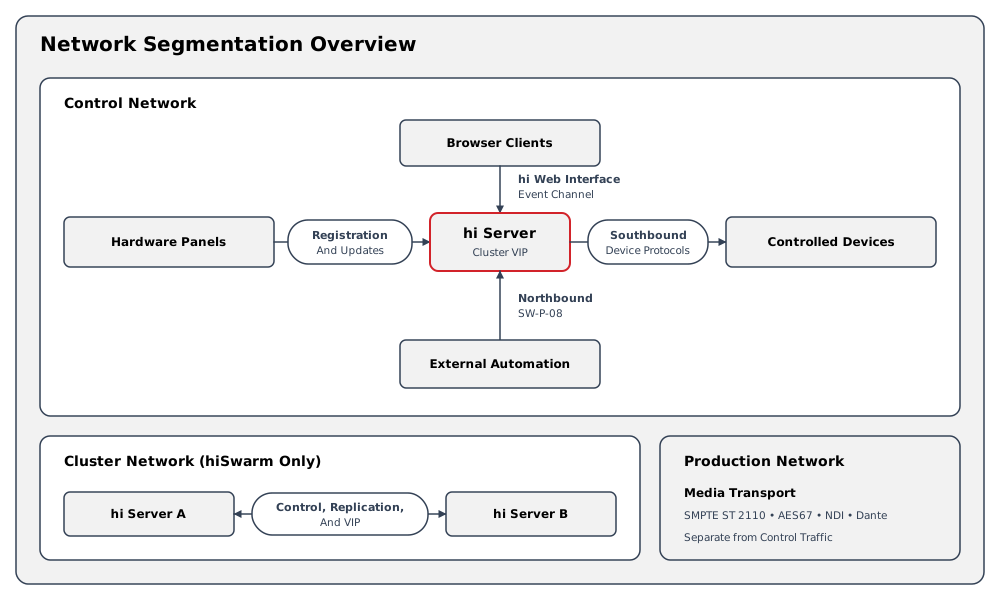
Device-specific ports are not repeated here. The relevant Integrations page describes its transport, connection direction, port behavior, authentication, and device-side requirements.
For installation, updates, and air-gapped operation, see System Requirements: Internet Connectivity. This page lists the required traffic directions and online licensing connections.
Information
A list of known firewall exceptions is available on request. Contact Riedel Customer Success with the current and target hi versions for more information.
Traffic Directions
Browser Clients to the hi server
Allow clients to reach the hostname and port supplied for the hi web interface. The endpoint can include real-time browser communication in addition to page requests.
Hardware Panels and hi-Native Devices
Allow each supported Hardware Panel or hi-native device to communicate with the hi server as defined by its Hardware and Supported Integration pages.
The hi server to Controlled Devices
Southbound requirements depend on the configured integrations. Integration Ports lists the endpoints of every production integration. Apply the firewall rules from the relevant Supported Integration page and the approved device configuration.
External Automation to the hi server
Information
For services hosted by hi, use the address and exposed port documented on the relevant integration page. Internal container and cluster Service ports may differ from the ports reachable by clients. If the installation uses a proxy or load balancer, confirm the connection details with Riedel Customer Success.
Northbound traffic depends on the licensed interface and commissioned mapping. Use the approved project network design and Northbound Interface documentation.
Multi-Server Traffic
Caution
Multi-server deployments require inter-node control, data, and client-access flows defined by the commissioned architecture. Do not infer cluster firewall rules from a generic Kubernetes deployment.
hi-Native Component Network Requirements
For endpoint and firewall requirements, see hiDot Series, Riedel hiContact, and RIEDEL 1200 Series SmartPanel devices.
Licensing Service Endpoints
Server-side licensing destinations and network requirements depend on the installed hi version. Contact Riedel Customer Success for the exact hostnames, ports, and proxy requirements before adding firewall rules.
Administrators access the Customer Licensing Portal in a browser. This portal address is separate from the server-side licensing-service destinations.
See Applying a License File for the license upload and synchronization workflow.
Integration Ports
This table lists the network endpoints of every production integration. Each integration page lists the firewall rules for that device. Open only the ports for the integrations you configure.
|
Integration |
Direction |
Transport |
Port |
Purpose |
|---|---|---|---|---|
|
AJA KUMO Compatible Router |
hi server → device |
HTTP |
80 (default) |
KUMO routing
|
|
Amazon Web Services Multiviewer |
hi server → device |
UDP |
4800 (default) |
Receives UMD labels and Tally states from hi |
|
AMWA NMOS Core Integration |
hi server → device |
HTTP |
Assigned through service discovery |
Registry resource synchronization
|
|
AMWA NMOS Core Integration |
hi server → device |
WebSocket |
Assigned through service discovery |
Query API resource-change updates |
|
AMWA NMOS Registry |
Device → hi server |
HTTP |
30010 |
NMOS global configuration information
|
|
AMWA NMOS Registry |
Device → hi server |
WebSocket |
30010 |
Subscribed resource-change updates |
|
Appear X Platform |
hi server → device |
HTTPS |
Set in the configured URL |
Authentication
|
|
Arkona AT300 // BladeRunner |
hi server → device |
HTTP |
Assigned through service discovery |
NMOS resource discovery and connection management through hi's NMOS integration |
|
Arkona AT300 // BladeRunner |
hi server → device |
WebSocket |
Assigned through service discovery |
NMOS resource-change notifications through hi's NMOS integration |
|
Artistic Licence Art-Net Parameter Controllable Device |
Device → hi server |
UDP |
6454 |
Receives ArtPollReply discovery responses |
|
Artistic Licence Art-Net Parameter Controllable Device |
hi server → device |
UDP |
6454 |
Receives ArtPoll discovery requests and ArtDmx output values |
|
Audinate Dante Core Integration |
Device → hi server |
UDP |
Assigned through service discovery |
Device and channel discovery
|
|
Audinate Dante Core Integration |
hi server → device |
TCP |
Set in the device configuration |
Domain-scoped device discovery and routing control |
|
Blackmagic Design ATEM Series |
hi server → device |
UDP |
9910 (default) |
ATEM control
|
|
Blackmagic Design ATEM Series |
hi server → device |
gRPC |
Set in the configured URL |
Dynamic Source-label updates |
|
Blackmagic Design HyperDeck Series |
hi server → device |
TCP |
9993 |
Clip
|
|
Blackmagic Design Videohub |
hi server → device |
TCP |
9990 (default) |
Videohub routing
|
|
Calrec Hydra2 |
hi server → device |
TCP |
2008 (default) |
Hydra2 routing
|
|
Cyanview RCP Parameter Controllable Device |
hi server → device |
TCP |
9000 (default) |
Exposes the Cyanview parameter tree and value updates |
|
DirectOut PRODIGY Series |
hi server → device |
TCP |
9000 (default) |
PRODIGY matrix
|
|
Ereca Stage Racer |
hi server → device |
TCP |
9000 (default) |
Ember+ matrix and parameter exchange |
|
Evertz EQX/EQT Quartz Router Controller |
hi server → device |
TCP |
4000 (default) |
Quartz routing
|
|
EVS DYVI Series |
hi server → device |
TCP |
9000 (default) |
DYVI Tally and dynamic Source-label delivery |
|
FOR-A HVS Series |
Device → hi server |
TCP |
31000 (default) |
Inbound TCP TSL Tally and UMD data |
|
FOR-A HVS Series |
Device → hi server |
UDP |
31000 (default) |
Inbound UDP TSL Tally and UMD data |
|
FOR-A HVS Series |
hi server → device |
TCP |
8901 (default) |
Optional outbound TCP dynamic-label delivery |
|
FOR-A HVS Series |
hi server → device |
UDP |
8901 (default) |
Optional outbound UDP dynamic-label delivery |
|
Generic Ember+ Compatible Router |
hi server → device |
TCP |
9000 (default) |
Ember+ matrix and parameter exchange |
|
Generic Pro-Bel SW-P-02 Compatible Router |
hi server → device |
TCP |
2001 (default) |
SW-P-02 routing and state exchange |
|
Generic Pro-Bel SW-P-08 Compatible Router |
hi server → device |
TCP |
2008 (default) |
SW-P-08 routing
|
|
Generic SNMP Parameter Controllable Device |
hi server → device |
UDP |
161 (default) |
Receives SNMP requests for objects defined by the imported MIB files |
|
Generic TSL-Compatible Multiviewer |
hi server → device |
TCP |
8901 (default) |
Receives UMD labels and Tally states from hi |
|
Generic TSL-Compatible Switcher |
Device → hi server |
TCP |
31000 (default) |
Inbound TCP TSL Tally and UMD data |
|
Generic TSL-Compatible Switcher |
Device → hi server |
UDP |
31000 (default) |
Inbound UDP TSL Tally and UMD data |
|
Generic TSL-Compatible Switcher |
hi server → device |
TCP |
8901 (default) |
Optional outbound TCP dynamic-label delivery |
|
Generic TSL-Compatible Switcher |
hi server → device |
UDP |
8901 (default) |
Optional outbound UDP dynamic-label delivery |
|
Generic VISCA PTZ Compatible Device |
hi server → device |
UDP |
52381 (default) |
VISCA camera and PTZ command exchange |
|
Grass Valley AMPP Core Integration |
hi server → device |
HTTP |
Set in the configured URL |
API-key exchange for an AMPP bearer token
|
|
Grass Valley Camera Connect |
hi server → device |
TCP |
8080 (default) |
Camera parameter discovery
|
|
Grass Valley Densité Parameter Controllable Device |
hi server → device |
HTTP |
5955 (default) |
Provides card discovery
|
|
Grass Valley K-Frame Series |
hi server → device |
TCP |
2012 (default) |
Switcher Tally
|
|
Grass Valley Kahuna / Kula Series |
hi server → device |
TCP |
50001 (default) |
Source
|
|
Grass Valley Kahuna / Kula Series |
hi server → device |
TCP |
50014 (default) |
Dynamic Source-label delivery from hi |
|
Grass Valley Kahuna / Kula Series |
hi server → device |
UDP |
50014 (default) |
Dynamic Source-label delivery from hi over UDP |
|
Grass Valley NVision NP0016 Compatible Router |
hi server → device |
TCP |
5194 (default) |
NP0016 routing
|
|
Grass Valley RollCall Parameter Controllable Device |
hi server → device |
TCP |
2051 (default) |
Provides the network map
|
|
Grass Valley Sirius / Vega Series |
hi server → device |
TCP |
2008 (default) |
SW-P-08 routing and state exchange |
|
Grass Valley Sirius / Vega Series |
hi server → device |
TCP |
2050 (default) |
RollCall parameter values
|
|
Imagine Communications CCS-P Parameter Controllable Device |
Device → hi server |
UDP |
4000 |
Receives CCS-P replies and keep-alives from the device when UDP is selected |
|
Imagine Communications CCS-P Parameter Controllable Device |
hi server → device |
TCP |
4050 (default) |
Provides CCS-P parameter and status exchange when TCP is selected |
|
Imagine Communications CCS-P Parameter Controllable Device |
hi server → device |
UDP |
4050 (default) |
Provides CCS-P parameter and status exchange when UDP is selected |
|
Imagine Communications LRC Compatible Router |
hi server → device |
TCP |
52116 (default) |
LRC routing
|
|
Imagine Communications LRC Plus Compatible Router |
hi server → device |
TCP |
52117 (default) |
LRC Plus routing
|
|
Imagine Communications Magellan SDN Orchestrator (SDNO) |
hi server → device |
TCP |
52117 (default) |
LRC Plus routing and state exchange |
|
Imagine Communications Magellan SDN Orchestrator (SDNO) |
hi server → device |
HTTP |
80 (default) |
SDNO configuration and active-database requests |
|
Imagine Communications Selenio Network Processor (SNP) |
hi server → device |
UDP |
4050 (default) |
Provides CCS-P parameter and status exchange when UDP is selected |
|
Imagine Communications Selenio Network Processor (SNP) |
hi server → device |
TCP |
4517 (default) |
Provides CCS-P parameter and status exchange over TCP |
|
Lawo Crystal Series Audio Console |
hi server → device |
TCP |
9000 (default) |
Console matrix
|
|
Lawo Ember+ Parameter Controllable Device |
hi server → device |
TCP |
9000 (default) |
Exposes the provider tree for parameter reads
|
|
Lawo mc² Series Audio Console |
hi server → device |
TCP |
9000 (default) |
Console matrix
|
|
Lawo mc² UHD Series Audio Console |
hi server → device |
TCP |
9000 (default) |
Console matrix
|
|
Matrox ConvertIP |
hi server → device |
HTTPS |
Set in the configured URL |
ConvertIP login
|
|
NDI Core Integration |
Device → hi server |
UDP |
5353 |
Local NDI Source discovery when no Discovery Server is configured |
|
NDI Core Integration |
hi server → device |
TCP |
5959 (default) |
Optional centralized Source discovery |
|
NDI Core Integration |
hi server → device |
TCP |
Assigned through service discovery |
SDK-discovered Source control and media sessions over TCP |
|
NDI Core Integration |
hi server → device |
UDP |
Assigned through service discovery |
SDK-discovered Source control and media sessions over UDP |
|
Nevion MRP Compatible Router |
hi server → device |
TCP |
4381 (default) |
MRP routing
|
|
Nevion VideoIPath Core Integration |
hi server → device |
HTTPS |
Set in the configured URL |
Configuration
|
|
Northbound Node |
Device → hi server |
TCP |
31000-31999 (configurable) |
Accept supported SW-P-08 commands from an external control system and return routing state and updates |
|
NTP Technology Penta Audio Console |
hi server → device |
TCP |
10006 (default) |
Penta routing
|
|
Panasonic KAIROS Series |
hi server → device |
TCP |
9000 (default) |
KAIROS Tally
|
|
Panasonic PTZ Series |
Device → hi server |
TCP |
31000-31999 (configurable) |
Camera update notifications received by hi |
|
Panasonic PTZ Series |
hi server → device |
HTTP |
80 (default) |
PTZ
|
|
Pixel Power Gallium Parameter Controllable Device |
hi server → device |
HTTP |
9200 (default) |
Provides Gallium core and playout parameter operations |
|
QSC Q-SYS Parameter Controllable Device |
hi server → device |
TCP |
1702 (default) |
Provides ECP access to named controls and change groups |
|
Riedel 1200 Series SmartPanel |
Device → hi server |
WebSocket |
Set in the configured URL |
Key labels
|
|
Riedel 1200 Series SmartPanel |
hi server → device |
HTTP |
4450 |
IS-07 sender inspection and receiver connection management
|
|
Riedel 1200 Series SmartPanel |
hi server → device |
HTTP |
Assigned through service discovery |
Current IS-07 event state advertised by the SmartPanel |
|
Riedel 1200 Series SmartPanel |
hi server → device |
WebSocket |
Assigned through service discovery |
Lever and rotary events advertised by the SmartPanel |
|
Riedel hiContact |
hi server → device |
TCP |
10001 |
GPO control traffic from hi to hiContact |
|
Riedel hiContact |
hi server → device |
TCP |
10002 |
GPI and GPO status received over a second connection initiated by hi |
|
Riedel hiDot Series |
hi server → device |
HTTP |
5015 |
Device information
|
|
Riedel hiDot Series |
hi server → device |
WebSocket |
5015 |
Device events and interactive display updates |
|
Riedel hiPush Series |
Device → hi server |
WebSocket |
Set in the configured URL |
Panel registration
|
|
Riedel MediorNet IP - FusioN / MuoN |
hi server → device |
HTTP |
80 (default) |
FusioN and MuoN parameter discovery
|
|
Riedel MediorNet IP - FusioN / MuoN |
hi server → device |
HTTP |
Assigned through service discovery |
NMOS discovery and media-resource control |
|
Riedel MediorNet TDM |
hi server → device |
TCP |
9000 (default) |
Ember+ matrix and parameter exchange |
|
Ross Video Carbonite Series |
Device → hi server |
TCP |
31000 (default) |
Inbound TCP TSL Tally and UMD data |
|
Ross Video Carbonite Series |
Device → hi server |
UDP |
31000 (default) |
Inbound UDP TSL Tally and UMD data |
|
Ross Video openGear Parameter Controllable Device |
hi server → device |
TCP |
5254 (default) |
Provides card parameters and parameter-value updates |
|
Ross Video openGear Parameter Controllable Device |
hi server → device |
HTTP |
8080 |
Reads frame connection properties before control connects |
|
Ross Video Ultrix Router |
hi server → device |
TCP |
8910 (default) |
SW-P-08 routing
|
|
Sony CNA-2 Parameter Controllable Device |
Device → hi server |
HTTP |
31000-31999 (configurable) |
CNA-2 assignment
|
|
Sony CNA-2 Parameter Controllable Device |
hi server → device |
HTTPS |
443 |
CNA-2 sign-in
|
|
Sony HDCU-5500 |
hi server → device |
UDP |
8900 (default) |
TSL label and Tally transmission to the HDCU |
|
Sony HDCU-5500 |
hi server → device |
TCP |
9000 (default) |
HDCU parameter monitoring and control |
|
Sony MSU-3500 |
hi server → device |
TCP |
9000 (default) |
MSU Crosspoint and parameter monitoring and control |
|
Sony Production Switchers (Serial Tally) |
hi server → device |
TCP |
950 (default) |
Serial Tally data
|
|
Sony Production Switchers (Serial Tally) |
hi server → device |
TCP |
966-981 (default) |
Optional serial-gateway control for RS-422 deployments (when a Moxa serial-over-IP gateway is used) |
|
Sony RCP-3500 |
hi server → device |
TCP |
9000 (default) |
RCP parameter monitoring and control |
|
STAGETEC Audio Console |
hi server → device |
TCP |
9003 (default) |
Console matrix
|
|
TAG Video Systems Media Control System |
hi server → device |
HTTPS |
443 (default) |
Provides output
|
|
TAG Video Systems Media Control System |
hi server → device |
TCP |
Set in the device configuration |
Receives UMD labels and Tally states from hi |
|
Techex TxCore Integration |
hi server → device |
HTTPS |
Set in the configured URL |
Authentication
|
Bandwidth and Capacity
Caution
Control-plane demand depends on concurrent clients, Hardware Panels, update frequency, discovery traffic, integrated protocols, and multi-server design. Confirm bandwidth and latency targets during project planning. Do not size the network from a generic per-session estimate.
Network Segmentation
Where supported by the site design, separate management and control traffic from high-bandwidth media transport. A multi-server design can also require dedicated inter-node networks or VLANs.
Caution
Segmentation must preserve every required traffic direction. Validate the design with the system integrator before applying restrictive firewall policy.
HTTPS and Certificate Requirements
When HTTPS is enabled:
-
Use the hostname supplied for the installation.
-
Install a certificate whose complete chain is trusted by the clients and servers that use it.
-
Confirm browser reconnection after planned service transitions or maintenance.
-
If a private or self-signed Certificate Authority is used, distribute and trust that authority through the site's approved process.
A browser waiting for manual certificate approval can prevent unattended reconnection.
Constraints
-
Do not copy a device port from another integration or software release.
-
Do not expose the hi server or controlled devices beyond the approved client and management networks.
-
Do not use browser-side reachability as proof that the hi server can reach a controlled device.
-
Record site-specific firewall rules in the installation's controlled network documentation.
Related Procedures
-
Diagnose a Node connection symptom in Troubleshooting.
-
Review security boundaries in Security Posture.
-
Confirm a device connection on its Integrations page.