
Security Posture
Overview
This page summarizes the security characteristics of a hi installation. It does not replace an installation-specific threat model, hardening standard, or compliance assessment.
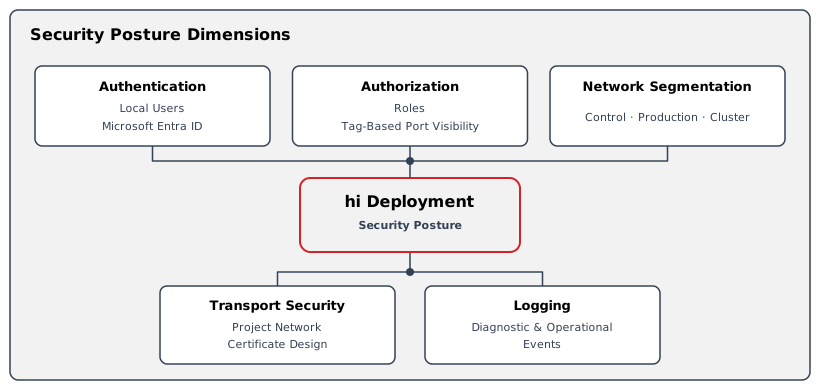
The implemented controls depend on the installed version, licenses, identity configuration, network design, and operating procedures.
Authentication
Local Authentication
Caution
An installation can provide local user authentication. Change supplied administrator credentials before routine operation and manage accounts through the approved administrative workflow.
Caution
The exact password policy and session behavior depend on the installed version and configuration. Do not infer organization-wide password compliance from the availability of local authentication.
Microsoft Entra ID
The applicable license can enable Microsoft Entra ID authentication. The user enters identity-provider credentials in the Microsoft sign-in flow. The hi installation then applies imported group mappings and configured access settings.
See hiCore for the license scope of new installations, and hiAccess for existing hiBase installations.
Authorization
The hi system combines roles with Tag-based resource visibility. Roles grant access to functions, while Tags can limit the Nodes, Sources, Destinations, and other resources visible to a user.
Destination locks can protect selected Crosspoints from routing changes. Locks are an operational control and do not replace role and Tag design.
See Access Control for the access model.
Network and Transport Security
Use Network and Firewall Ports for traffic directions, fixed hi-native ports, certificates, and segmentation considerations.
Browser, API, Northbound Interface, southbound integration, Hardware Panel, and multi-server transport controls depend on the approved project design. Some controlled devices or protocols can have security limitations outside the hi system's control.
Logging and Audit Evidence
The hi web interface provides operational and diagnostic information. Event content, retention, export, and external forwarding depend on the installed version and deployment configuration.
Confirm audit retention, access, time synchronization, evidence export, and SIEM requirements before deployment when they are part of an organizational or regulatory control.
Updates and Vulnerability Management
-
Review the Release Notes for published hi system changes.
-
Use the update and recovery procedure supplied for the hi installation.
-
Report hi product security concerns to Riedel Customer Success through Customer Support. Use the Customer Portal on my.riedel.net.
The customer is responsible for host operating-system security, hardening, patching, and updates, including Ubuntu 24.04 Server LTS on hi 3.0.0 and later. The customer is also responsible for physical host maintenance. Riedel recommends host operating-system patching and updates as standard regular maintenance, together with physical host maintenance such as cleaning fan filters. Riedel is not responsible for failures in those customer-managed host areas. See Host Maintenance Responsibility.
Caution
Do not apply generic Kubernetes, operating-system, or device recovery commands to a production installation without the approved maintenance procedure.
Constraints
-
This page makes no claim of certification or compliance with a specific framework.
-
Cipher suites, firewall rules, identity policy, and retention values are site-specific.
-
Integrated device security remains subject to the device, protocol, and project network design.
Related Procedures
-
Review intended use and residual risks in Risk Context.
-
Plan connectivity using Network and Firewall Ports.
-
Configure users through Users.
-
Diagnose sign-in or connection symptoms in Troubleshooting.