
This view allows setting the configuration parameters of each registered host.
To register a host, see chapter Registration.
Overview
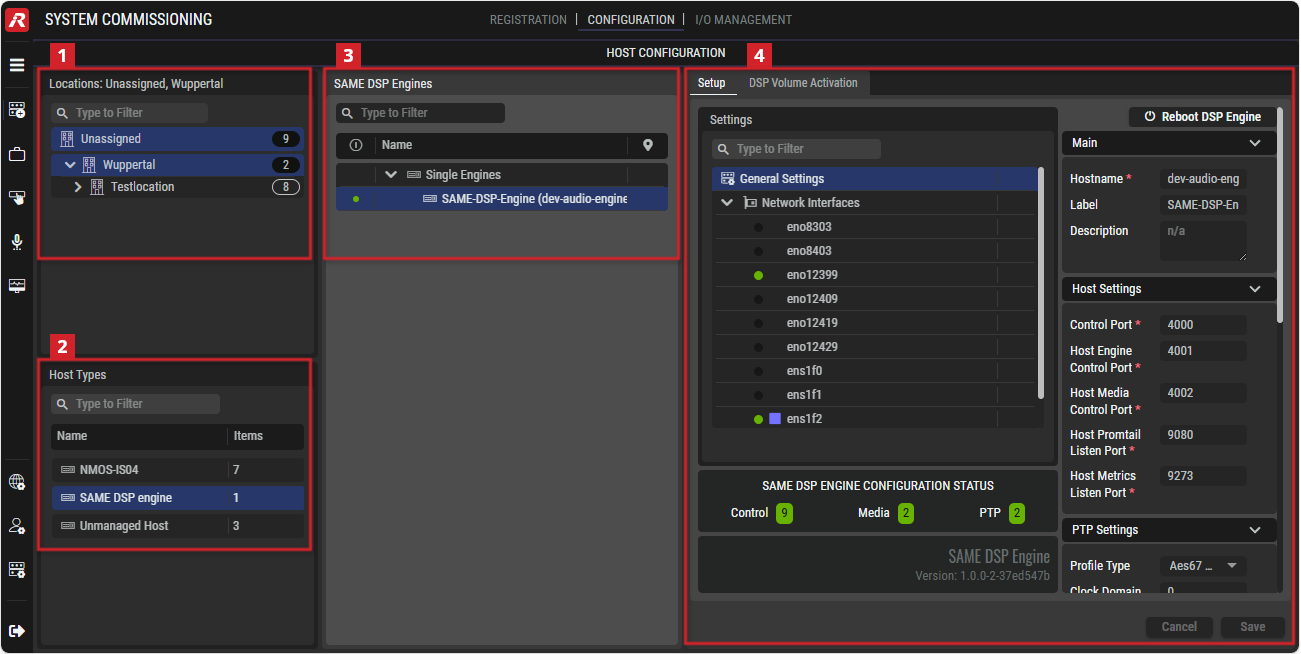
System Commissioning - Configuration
Filters allow you to quickly narrow-down a list to find a device.
See chapter Getting familiar with the User Interface #Filtering for more information.
Quicksteps for Host Configuration
Proceed as follows.
-
In Locations, select a location where the host is located to focus the list in Host Types to the host you want to configure.
-
In Host Types, select the host type you want to configure.
-
Select a host.
-
According to the host type you have selected, set the host’s parameters in the right-hand panel.
|
Host Type |
Applies to VSP |
Applies to SAME |
See Shapter |
|---|---|---|---|
|
Artist-1024 |
|
|
|
|
WebRTC Gateway |
|
|
|
|
SAME DSP-Engine |
|
|
|
|
Unmanaged Host |
|
|
|
|
NMOS-IS04 |
|
|


Locations
This section lists all locations defined in the STAGE system. To add or edit locations, see chapter Registration #Locations.

|
Set a filter to display only content whose search text is found in the name. |
|---|---|
|
Locations |
If one or more locations are selected, only host types that are located at the selected locations are displayed in the Host types section. Other host types are hidden. If no location is selected, all host types available in the STAGE system are displayed. |

Host Types
This section lists all host types that are available in the STAGE system. The host types displayed may be reduced if one or more locations are selected in the Locations section.
|
|
Set a filter to display only content whose search text is found in the name. |
|---|---|
|
Host Types |
Select one host type to show available hosts in the Hosts section. |
|
Items |
Displays the number of available host types (at the filtered locations). |

Host Selection
This section lists all hosts of the selected host type that are available in the STAGE system.
|
|
Set a filter to display only content whose search text is found in the name. |
|---|---|
|
|
Indicates whether the host is online ( |
|
Name |
Select one host to show the available configuration details in the Setup section. |


Setup
Depending on the selected host type, the available parameters differ, as described in the subchapters.