
SAME DSP-Engines can discover NMOS devices that are available on the network. STAGE relies on an external NMOS Registry to do this. First, you must configure STAGE’s connection to the NMOS Registry; see chapter System Configuration #NMOS-Discovery.
Once this has been configured, discovered NMOS hosts appear in Registration #Discovered-Hosts.
In order to configure an NMOS host, it must first be registered in STAGE. See chapter Registration. NMOS host configuration is limited. You can:
-
Edit its name and description.
-
Assign a network scope to individual Network interfaces.
All other host configuration parameters are read-only in STAGE; this configuration information comes from the NMOS host having been configured by its third-party software, or by the NMOS Registry.
Overview
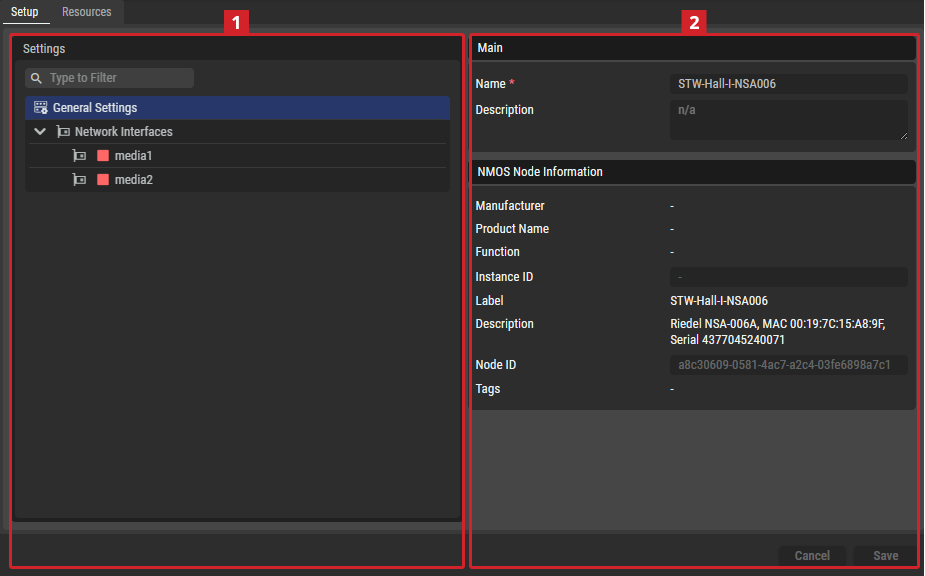
Setup Tab
Settings
Depending on the selected item in the Settings section
General Settings
Main
|
Name |
Set a friendly name for this host. This host will be identified throughout STAGE by this name. |
|---|---|
|
Description |
Set a meaningful description for this host. |
NMOS Node Information
|
Manufacturer |
This section provides read-only information from the NMOS Node Object. Fields that may be useful to copy (e.g., the Node ID or Instance ID) are read-only input fields to simplify the copying process. |
|---|---|
|
Product Name |
|
|
Function |
|
|
Instance ID |
|
|
Label |
|
|
Description |
|
|
Node ID |
|
|
Tags |
Network Interfaces
Network Management
|
Network Scope |
Set the type of traffic to exchange on this interface. See also chapter Network Architecture for more information about the different network types used by STAGE. See also chapter Network Scopes for more information about how to configure the different network scopes used by STAGE.
When two network interfaces are set to the same network scope, STAGE assumes that the network is capable of routing packets between those interfaces. That is, if you have one sender on a network scope and a receiver on the same network scope, then the network will pass multicast traffic flows between these hosts. This setting must represent the real world network topography for each host. |
|---|


NMOS Information
|
Chassis ID |
This section provides information about the Chassis ID and Port ID of the selected NMOS interface, as well as the connected variants that reflect the MAC address and ports of the connected switch. |
|---|---|
|
Port ID |
|
|
Connected Chassis ID |
|
|
Connected Port ID |
Resources Tab
Resources

|
Set a filter to display only content whose search text is found in the name. |
|---|---|

|
Indicates wheter a sender/receiver is active. |
|
STAGE Resource |
Name of the Resource used in STAGE. |
|
NMOS Resource |
Name of the Resource used in NMOS. |
|
Type |
Displays the items type: Device, Prosumer Group, Audio Producer, Audio Consumer, Number of Legs |
STAGE Device Information
|
Label |
Field to rename the related System Hardware Device. |
|---|---|
|
Type |
The type of the selected resource is a Device. |
NMOS Device Information
|
Manufacturer |
This section provides information about the selected NMOS device. This information is read-only and is for informational purposes only.
The user also sets up the preferred control endpoints for this NMOS Device. STAGE automatically selects reachable control endpoints for NMOS Hosts when they are registered, but the user can manually change this endpoint later. A status indicator shows whether the selected endpoint is available or not. |
|---|---|
|
Product |
|
|
Function |
|
|
Instance Identifier |
|
|
Label |
|
|
Description |
|
|
Type |
|
|
Device ID |
|
|
IS-05 Connection API Endpoint |
|
|
Tags |
STAGE Consumer/Sender Information
|
Label |
This section has an input field where the selected Consumer/Sender can be renamed and the type of the selected item (Audio Consumer/Producer) is displayed. |
|---|---|
|
Type |
|
|
Leg Count |
The Sender Information section also allows to change the number of expected audio legs. A warning message is shown if the currently connected stream has a different number of channels. |
NMOS Receiver/Sender Information
|
Receiver/Sender State |
The NMOS Receiver and Connected Sender Information sections show information about the related NMOS Receiver and a connected Sender if something is connected. This information is read-only and is for informational purposes only. |
|---|---|
|
Label |
|
|
Description |
|
|
Receiver/Sender ID |
|
|
Media Types |
|
|
Tags |
|
|
Interface Bindings |
|
|
Audio Channels |
|
|
Source / Destination |
The Connected Sender information section also offers a download for the related SDP (transport file) of the connected sender (direct link to the according NMOS resource). |
|
Transport File |
Related NMOS Flow Information
|
Label |
This section shows information about the related Flow. This information is read-only and is for informational purposes only. |
|---|---|
|
Description |
|
|
Flow ID |
|
|
Media Types |
|
|
Tags |
|
|
Sample Rate |