
Overview
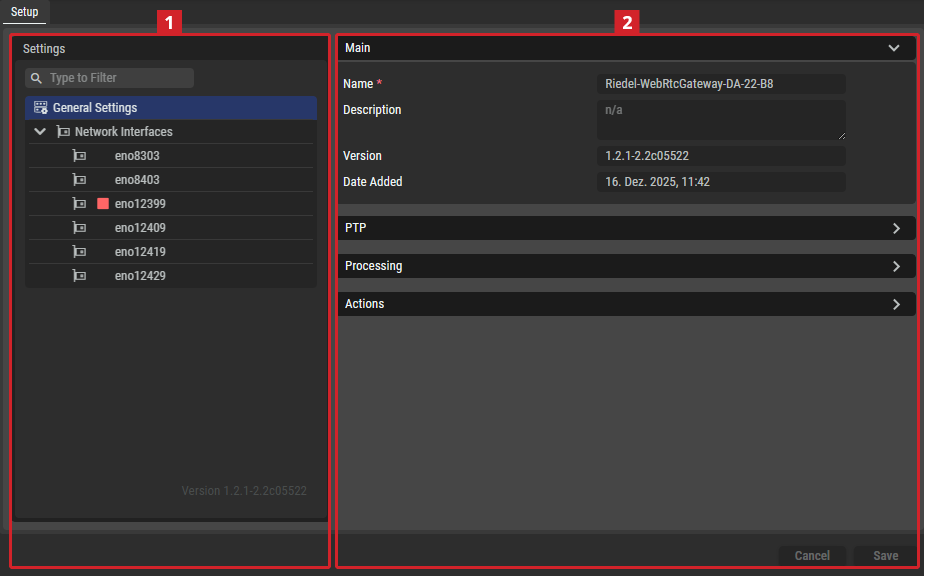
Setup Tab
Settings
Depending on the selected item in the Settings section
General Settings
|
Main |
Name |
Set a friendly name for this host. This host will be identified throughout STAGE by this name. |
|---|---|---|
|
Description |
Set a meaningful description for this host. |
|
|
Version |
Shows the WebRTC Gateway’s software version. |
|
|
Date Added |
Shows the date and time when the host was added to STAGE. |
|
|
PTP |
Preferred Interface |
Set the Ethernet port the server is to prioritize for use to communicate on the network. |
|
Profile Type |
Set the PTP profile to use as a preset configuration for the below PTP settings. Custom: Freely set the PTP parameter values.
|
|
|
PTP Domain |
Set the domain to use for this WebRTC Gateway’s PTP clock.
|
|
|
Priority 1 |
Set the Priority-1 of the PTP source.
|
|
|
Priority 2 |
Set the Priority-2 of the PTP source.
|
|
|
Announce Interval |
Set the base-2 logarithm of seconds of the interval of PTP announce messages.
|
|
|
Announce Timeout |
Set the timeout for the receipt of the aforementioned messages.
|
|
|
Sync Interval |
Set the base-2 logarithm of seconds of the interval of PTP sync messages.
|
|
|
Delay Request Interval |
Set the base-2 logarithm of seconds of the interval of PTP delay request messages.
|
|
|
Transport Type |
Set the transport protocol used for PTP packets. |
|
|
Delay Mechanism |
Set the delay mechanism in the network: E2E (End to End), P2P (Peer to Peer) or Auto. |
|
|
Slave Only |
Set if this WebRTC Gateway is to be a PTP TimeReceiver (enabled) or a PTP TimeTransmitter (disabled). |
|
|
Processing |
Maximum Connectable Clients |
Set the maximum number of clients this WebRTC Gateway is to support. Default: 100, Range: 1...1000 |
|
Opus Packet Time |
Set the real-time duration for the transmission of audio data packets. Default value: 20 ms Range: 2, 5, 10, 20, 40, 60, 120 ms |
|
|
Opus Receive Buffer |
Set the minimum Receive Buffer size for the WebRTC (Opus) service. This works in conjunction with the Additional Dynamic Receive Buffer parameter to define a dynamically sized buffer range. For example, when the buffer size parameters are set as follows:
This means the receive buffer is sized for 40ms of delay and up to a total 80ms of delay when needed. |
|
|
Additional Dynamic Receive Buffer |
Set the dynamically sized extra buffer range, beyond the Opus Receive Buffer size for the WebRTC (Opus) service. |
|
|
Actions |
Reboot |
Click to reboot the WebRTC Gateway server. |
Network Interfaces
|
Network Scope |
Network Scope |
Set the type of traffic to exchange on this interface. See also chapter Network Architecture for more information about the different network types used by STAGE. See also chapter Network Scopes for more information about how to configure the different network scopes used by STAGE.
When two network interfaces are set to the same network scope, STAGE assumes that the network is capable of routing packets between those interfaces. That is, if you have one sender on a network scope and a receiver on the same network scope, then the network will pass multicast traffic flows between these hosts. This setting must represent the real world network topography for each host. |
|
Interface Capabilities |
Select the types of network traffic that this network interface provides access to. ICE Candidate: Specifies the network interface for WebRTC use.
|
|
|
IPv4 / IPv6 |
Enabled |
Set to enable this network addressing protocol on this network interface. |
|---|---|---|
|
DHCP |
Set to enable the use of DHCP for this network interface. When your network has a working DHCP server, set this option so that this network interface automatically negotiates and acquires its dynamically allocated Ethernet interface parameters (IP Address, Network Mask, and Gateway) from the network. In this situation, it is not necessary to set the below IP Address, Network Mask, and Gateway parameters. |
|
|
|
Add new address |
Click to add a new:
|
|
|
IP Address |
When the DHCP parameter is disabled, double-click the value to set the IP address for this network interface. |
|
|
Network Mask |
When the DHCP parameter is disabled, double-click the value to set the network mask for the associated IP address. |
|
|
DNS Server Address |
When the DHCP parameter is disabled, double-click the value to set the IP address for your network’s DNS server. |
|
|
Default Gateway |
When the DHCP parameter is disabled, double-click the value to set the IP address for the local network’s router Auto (IPv6): Double-click to manually set the IP address for the local network’s router. |


