
Overview
An unmanaged host represents in STAGE a device that STAGE is unable to configure or control. However, this host can send and receive AES67 audio stream(s). Essentially it is a proxy in STAGE for this device.
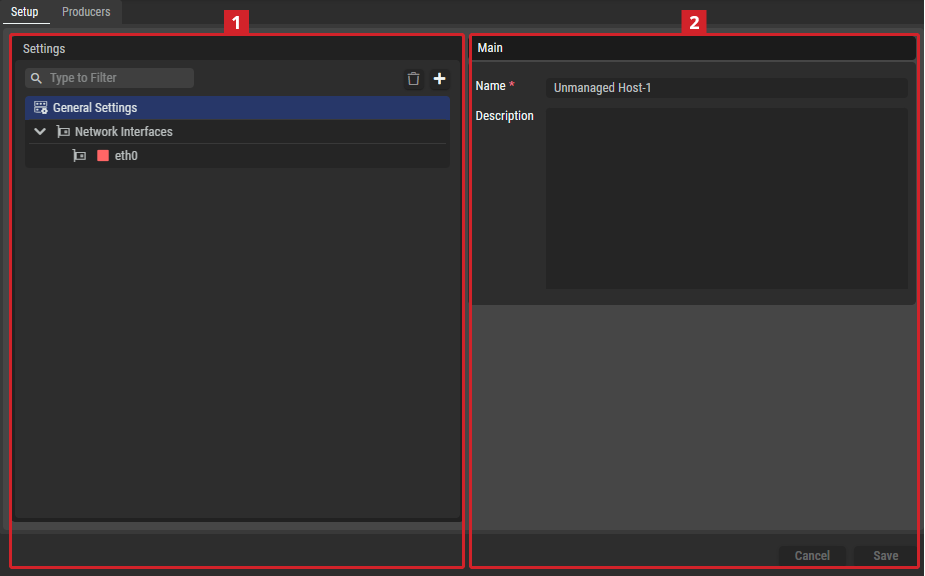
Setup Tab
Settings
Depending on the selected item in the Settings section
General Settings
|
Main |
Name |
Set a friendly name for this host. This host will be identified throughout STAGE by this name. |
|---|---|---|
|
Description |
Set a meaningful description for this host. |
Producers Tab
This configures technical details about the unmanaged host’s audio streams.
Producers
|
Main |
Set a friendly name for this host. This host will be identified throughout STAGE by this name. |
|
Set a meaningful description for this host. |
|

|
Set a filter to display only content whose search text is found in the name. |

|
Click to delete the selected Producer. |

|
Click to add a new Producer. 
New Producers can be added manually or by using an SDP file. |
|
Name |
Name of the Producer. |
|
Main |
Displays the Primary Multicast Group and Port. |
|
Redundant |
If Redundancy is enabled, the Secondary Multicast Group and Port are displayed. |
General
|
Name |
This host will be identified throughout STAGE by this name. |
|
Producer Type |
Shows the audio stream type: Audio (AES67): The stream uses the AES67 audio over IP standard. |
|
Redundancy |
When the host supports SMPTE ST 2022-7 network redundancy, this option can be enabled or disabled. Set: SMPTE ST 2022-7 network redundancy is enabled. Cleared: Only the primary interface is used for the audio stream. |
Primary/Secondary Sender Settings
|
Primary (Main) Interface |
Set the Ethernet interface that STAGE uses:
|
|
Secondary (Redundant) Interface |
Set the Ethernet interface that STAGE uses when the host supports SMPTE ST 2022-7 network redundancy, this is the BLUE network on which the host’s secondary media interface is connected. |
|
Source IP |
Shows the host’s IP address for the source media stream. |
|
Multicast Group / Port |
Set the host’s multicast destination IP address. |
Audio Sender Settings
|
Sampling Rate |
Set this WebRTC Gateway’s operating audio sampling data rate.
|
|
Chanel Count |
Set the number of supported audio channels. |
|
Audio Format |
Set the audio sampling bit depth. L16: Linear PCM 16-bit depth. L24: Linear PCM 24-bit depth. L32: Linear PCM 32-bit depth. |
|
Packet Time |
Set the duration of the audio data captured and transmitted in a single digital packet over a network. See https://en.wikipedia.org/wiki/AES67 for more information. Select one of: 125 μs, 250 μs, 333 μs, 500μs, 1 ms, 2 ms, or 4 ms. |
Stream Settings
|
RTP Payload Type |
Set the values for dynamically assigned RTP Payload Type (RFC3550) for the audio stream in the range of 96 to 127.
|
|
Multicast TTL |
Set the initial TTL value in sent packets. This sets the number of hops through network routers that are allowed before the packet is discarded. When a router receives a multicast packet, it decrements the packet’s TTL value by one. If the packet’s TTL is less than the minimum threshold set on the router’s interface, the packet is discarded. This setting tunes the network to prevent multicast packets from circulating indefinitely, to help contain multicast traffic within specific network segments. |