
Overview
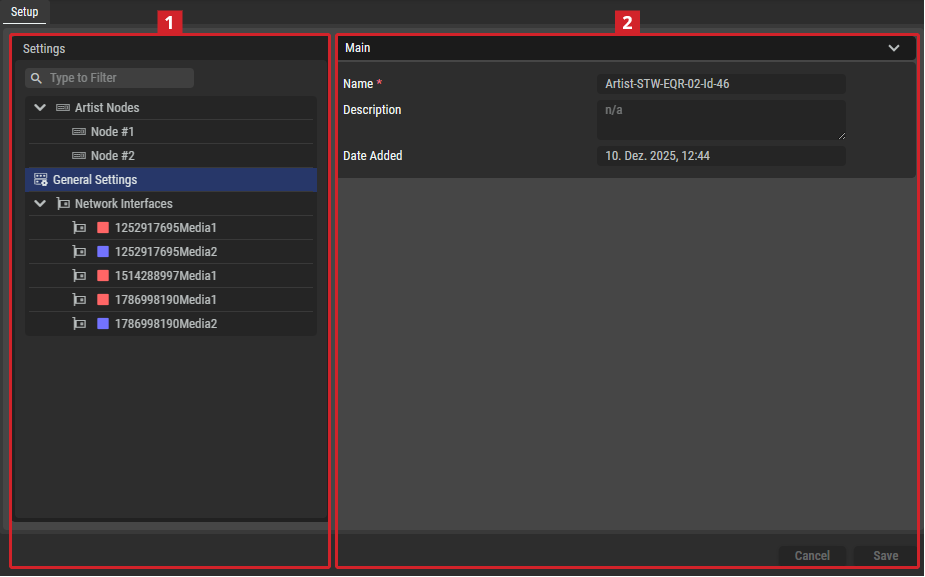
Setup Tab
Settings
Depending on the selected item in the Settings section 

General Settings
|
Main |
Name |
Set a friendly name for this host. This host will be identified throughout STAGE by this name. |
|---|---|---|
|
Description |
Set a meaningful description for this host. |
|
|
Date Added |
Date and time when the host was added to STAGE. |
Network Interface
|
Network Scope |
Set the type of traffic to exchange on this interface. See also chapter Network Architecture for more information about the different network types used by STAGE. See also chapter Network Scopes for more information about how to configure the different network scopes used by STAGE.
When two network interfaces on different hosts are set to the same network scope, STAGE assumes that the network is capable of routing packets between those interfaces on those hosts. That is, if you have one sender on a network scope and a receiver on the same network scope, then the network will pass multicast traffic flows between these hosts. This setting must represent the real world network topography for each host. |
|---|


IPv4
|
MAC Address |
Shows the MAC address for the selected network interface. |
|---|---|
|
IP Address |
Shows the static IP Address, Network Mask, and Gateway for the selected network interface. |