
Access Control
Overview
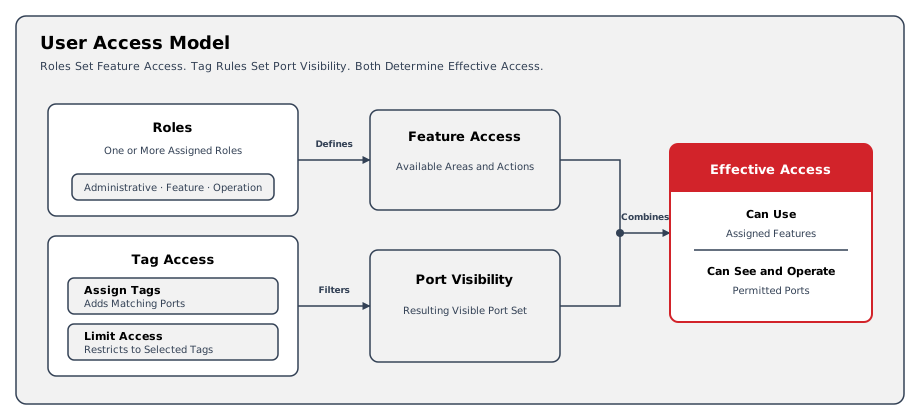
Access Control defines who can sign in, which product functions each user can access, and which Ports are visible to them. Effective access combines roles with Tag-based visibility rules.
Access control in hi combines the following mechanisms:
-
Role-based feature access - roles define which product functions a user can access.
-
Tag-based resource visibility - assigned Tags grant resource visibility, while Limit Access narrows the Tags available to the user.
-
External identity integration - Microsoft Entra ID (formerly Azure Active Directory) support allows user access to be linked to an existing identity provider where configured.
Authentication
The hi web interface requires an authenticated session. Local authentication is available by default. Microsoft Entra ID authentication can be enabled for installations that use external identity management.
hi supports two authentication methods:
-
Local authentication - a username and password managed by the hi installation.
-
Entra ID - an external identity provider used for enterprise sign-in and group-based access where licensed and configured.
For identity-administration entitlement, see Licensing - Select by Capability. hiCore includes this capability; existing hiBase installations use their hiAccess entitlement.
For sign-in behavior and identity-provider configuration, see Sign In to hi and Manage System Settings.
User and Group Assignments
For Entra ID users, group membership adds the group's configured roles and Tags to the user's assignments. Each resulting set contains unique assignments.
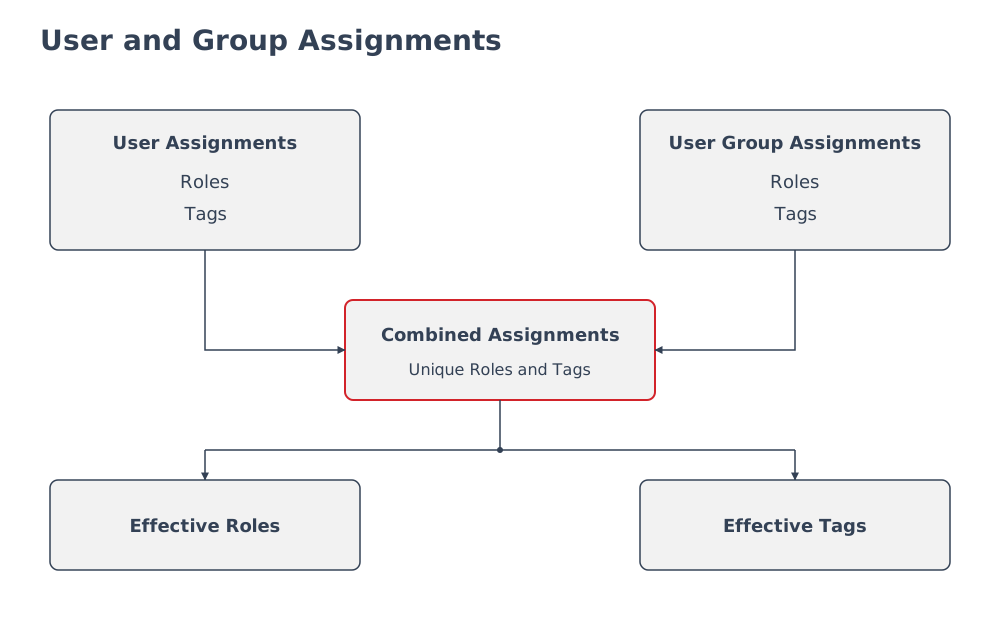
The combined roles determine feature access. Tag assignments contribute to resource visibility, with Limit Access applied separately.
User Roles
The user editor groups roles under Administrative Roles, Feature Access Roles, and Operation Roles. Feature-specific roles can appear when those features are enabled.
Administrative Roles
|
Role |
Access provided |
|---|---|
|
System administrator |
System-wide administrative access. |
|
User admin |
Manage user accounts and assign their roles. |
|
Node admin |
Add, remove, and configure Nodes, including device-specific settings. |
|
Tag admin |
Define and manage Tags and categories. |
|
Tally admin |
Define and manage Tallies. |
|
Shutdown admin |
Shut down or restart the system. |
|
Logging access |
Access system logs and create or download log collections. |
|
Licensing admin |
View and manage licensing information. |
|
Widget admin |
Create, configure, and delete Widgets. |
Feature Access Roles
|
Role |
Access provided |
|---|---|
|
Control Panel access |
Access the Control Panel, subject to the user's Tag-based visibility, and Monitor Walls whose Tags the user can access. |
|
Simplified Control Panel access |
Open a simplified Control Panel with delegated Presets and no main navigation. |
|
Monitor Wall admin |
Create and manage Monitor Walls, displays, and Multiviewer Head layouts. |
|
Simplified Power Widget access |
Access assigned Power Widgets through the simplified interface. |
|
Wiring Diagram access |
Access wiring diagrams. |
|
Port Container admin |
Create, edit, and delete Port Containers. |
|
Joystick Override admin |
Configure Joystick Override settings and Shader Groups. |
|
Rule admin |
Define and administer Rules, including their triggers and actions. |
Operation Roles
|
Role |
Access provided |
|---|---|
|
Preset admin |
Manage Presets and delegate them to users or Hardware Panels. |
|
Unlock admin |
Unlock locks on authorized Destinations. |
|
Port Container Assignment |
Modify Port assignments in Port Containers on the Control Panel. |
|
Backup admin |
Create, update, delete, and restore Backups. |
|
Snapshot admin |
Create, update, delete, and recall Snapshots. |
Most roles can be combined.
The Simplified Control Panel access and Simplified Power Widget access profiles are exclusive. Saving either one removes the user's other roles, and while a user has one of these profiles, the role editor disables the other roles. The System administrator role automatically includes all roles.
For the role-assignment workflow, see Manage Users.
Defining Access to Ports in the System
While roles define feature access, Tagging controls which Ports and related resources a user can see and operate.
Two Tag-based access mechanisms are available:
-
Assign Tags - grants access to resources carrying the assigned Tags.
-
Limit Access - applies a pre-filter that narrows which Tags remain available to the user or group.
Tag assignments and pre-filters can also come from Entra ID groups. The Account Information view shows the resulting effective configuration.
Example: Access for a Studio Operator
A Studio Operations group is imported from Microsoft Entra ID. Its configured assignments include Control Panel access and the Main Studio Tag.
An operator belonging to that group inherits those assignments. The role provides Control Panel access; the Tag provides access to the tagged resources.
|
Setting |
Purpose in This Example |
Observable Result |
|---|---|---|
|
Control Panel access role |
Provide access to the routing workspace. |
The operator can open the Control Panel. |
|
Main Studio Tag assignment |
Provide access to resources carrying that Tag. |
Aggregated Tags includes Main Studio; the operator can view the accessible tagged Ports. |
|
Limit Access pre-filter |
Restrict the available Tag view separately from Tag assignment. |
Account Information shows the pre-filter; the operator sees the permitted Tag filters. |
Use Inspect Account Information to review Aggregated Roles, Aggregated Tags, and the pre-filter together.
Then verify the Control Panel with the operator's account. Tag assignment does not replace a required role, and a pre-filter does not grant additional access.
Operational Implications
Feature access, resource access, and the available Tag view are separate parts of the configuration. Review all three when a user cannot find a workspace or Port.
Entra ID group workflows apply only to Entra ID users. Local users receive their assignments directly; they do not use imported Entra ID groups.
License Implications
Authentication and authorization do not define session entitlement. See Licensing - User License Model for the canonical session-counting rules.
Related Tasks and Reference
-
Assign Tags to Users - configure resource access for individual accounts.
-
Assign Tags to a Microsoft Entra ID User Group - configure inherited group access.
-
Set a User Access Pre-filter - restrict the available Tag view.
-
Inspect Account Information - verify effective roles, Tags, and group membership.
-
Manage Users - find role and account administration tasks.