
Manage Users
Overview
Create accounts, manage access, and maintain imported Microsoft Entra ID user groups.
Start Here
Create a Local User, or Import Microsoft Entra ID User Groups.
Explore
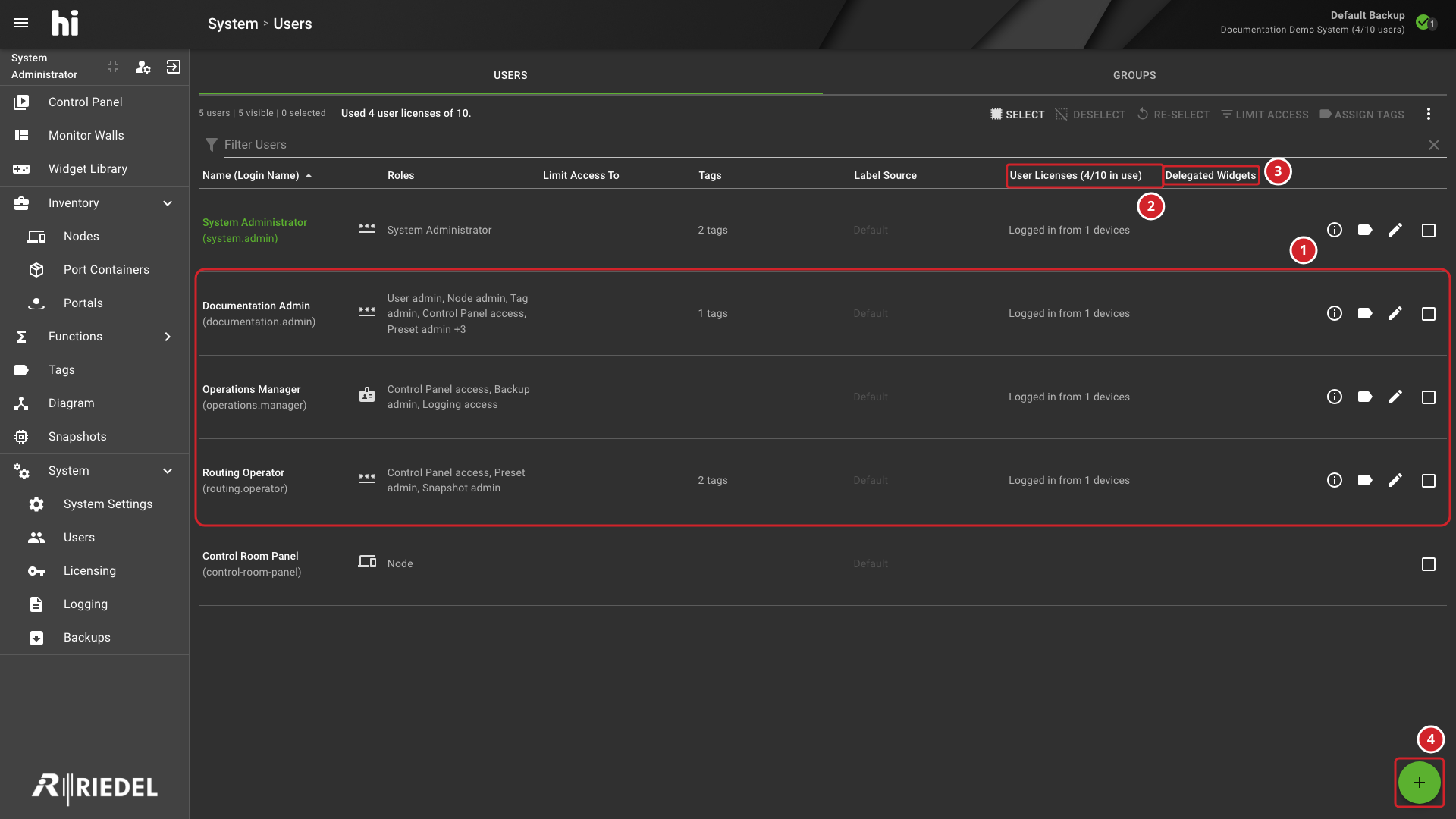
-
The rows show example user accounts and their assigned roles.
-
User Licenses shows the number of user licenses in use and the licensed limit.
-
Delegated Widgets shows the number of Widgets delegated to that user. Hover over the entry to list their names.
-
Select + to open the Add User dialog.
Enter a name in Filter Users to narrow the list. See the hiUser datasheet for session-capacity rules.
Account Information
Inspect Account Information. Review a user's effective roles, Tags, group memberships, and delegated controls.
Adding a New User
Create a Local User. Create a password-based account and assign the roles required for its responsibilities.
Roles
User Account Settings Reference. Look up local account fields, role categories, and Label Sources.
Editing a User
Edit a User. Update an existing account's settings and assigned roles.
Access to Ports (Assign Tags)
Assign Tags to Users. Grant or revoke Tag-based access to Ports and system objects.
Limit Access (Pre-filter)
Set a User Access Pre-filter. Restrict the Tags visible to selected users without changing their Tag assignments.
Clone Tags
Copy User Tag Assignments. Copy one user's Tag assignments to selected target users.
Label Overrides
Set a User Label Override. Select the Port name property displayed for users or Hardware Panel profiles.
Force Logout
End User Sessions. Terminate all active sessions for selected users.
Delete User
Delete a User. Permanently remove a selected user account or Hardware Panel profile.
Microsoft Entra ID User Groups
Information
User Group workflows require Microsoft Entra ID authentication. They are not supported for local users or non-Entra deployments.
Import Microsoft Entra ID User Groups. Import Microsoft Entra ID user groups into hi for centralized role and Tag administration.
See Assign Roles to a Microsoft Entra ID User Group.
See Assign Tags to a Microsoft Entra ID User Group.
See Set a Microsoft Entra ID User Group Access Pre-filter.
See Remove a Microsoft Entra ID User Group from hi.
User Profile (Self-Service)
Edit Your User Profile. Change your own Label Override, Tag visibility, and Control Panel colorization settings.
Next Steps
-
Use Sign In to hi to verify the selected authentication method.
-
Use Control Panel to verify Tag-based Port visibility and delegated Presets.