
Device Overview
-
Confirm the Portal shows the required Customer Account.
-
Open Devices, find the required record, and select View.
-
Confirm Product, Serial Number, and Account.
-
Review the Device Identity Lease before performing a licensing action.
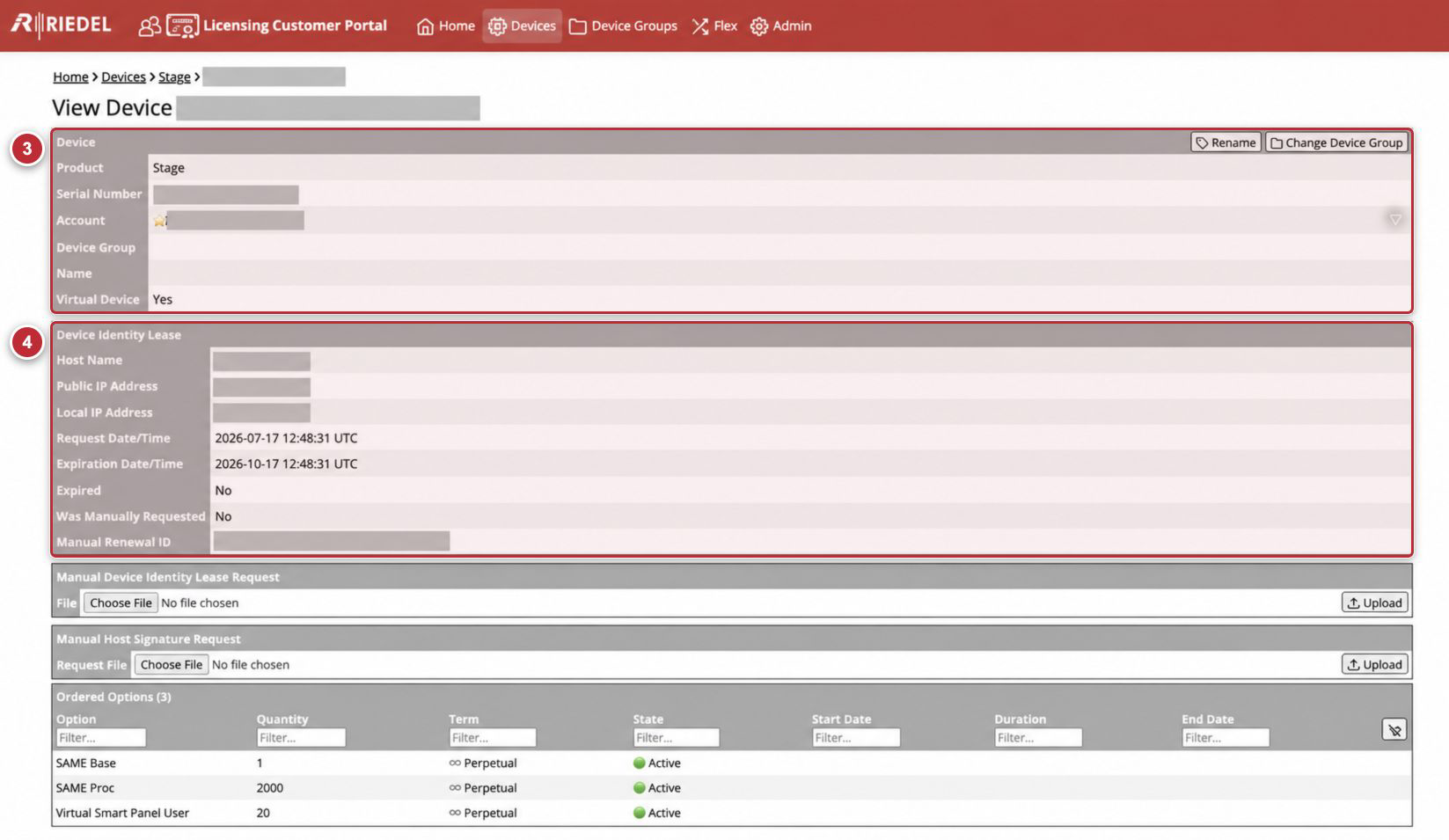
Callouts correspond to the visible Device-confirmation steps. Device identifiers, Customer Account data, host values, and IP addresses are masked.
Device Fields
|
Field |
Explanation |
|---|---|
|
Product |
The Licensed Product family. |
|
Serial Number |
The Device identifier used to match Request Files and License Files. |
|
Account |
The Customer Account that owns the record. |
|
Device Group |
The Device Group currently assigned to the Device, if any. |
|
Name |
Portal help: “Name given to the device by the customer.” The value is visible to Riedel Customer Success; do not include sensitive information. |
|
Virtual Device |
Portal help: “For physical devices, the identity is validated using the serial number. For virtual devices, host signatures or identity lease is needed.” |
Device Identity Lease
|
Field |
Explanation |
|---|---|
|
Host Name |
Host name reported with the current Device Identity Lease, when available. |
|
Public IP Address |
Public address associated with the Device Identity Lease request. Treat it as sensitive. |
|
Local IP Address |
Local address associated with the Device Identity Lease request. Treat it as sensitive. |
|
Request Date/Time |
Time at which the current lease was requested, displayed in UTC. |
|
Expiration Date/Time |
Time at which the current lease expires. Plan renewal before this value. |
|
Expired |
Yes means the displayed Device Identity Lease has expired; No means it has not. |
|
Was Manually Requested |
Indicates whether the current lease resulted from the manual workflow. |
|
Manual Renewal ID |
Identifier used by the Offline Renewal process. Treat it as customer-specific data. |
Ordered and Resolved Options
The page contains two entitlement views:
-
Ordered Options shows the Option records currently attached to the Device, including Quantity, Term, State, and applicable dates.
-
Resolved Options shows the Option set resolved for licensing, including Trial Duration where applicable.
An Option is a Portal entitlement record. It is not necessarily a separately orderable SKU or Purchased Bundle. A Licensed Product can receive several runtime Options from one Purchased Bundle, and the mapping can differ between product families.
When checking a licensing change, compare the expected Option, Quantity, Term, State, and applicable dates. Use the Licensed Product documentation and entitlement information to interpret SKUs and Purchased Bundles.
Table Fields
Ordered Options
Option, Quantity, Term, State, Start Date, Duration, and End Date.
Resolved Options
Option, Quantity, Term, Start Date, Trial Duration, and End Date.
Portal help for Trial Duration is “Number of trial days.”
Every column has a Filter… field. Select Clear filters to remove all filters from the table.
Actions
|
Action |
Explanation |
|---|---|
|
Rename |
Opens the customer-defined Device Name form. |
|
Change Device Group |
Opens the Device Group selector for this Device. |
|
Choose File |
Opens the local file picker for a Request File. |
|
Upload |
Submits the selected Request File. Confirm the Device and request type first. |
|
Download Manual Identity Lease Confirmation |
Downloads the |
|
Create License File |
Generates a current License File when the existing file is missing or outdated and the Portal permits generation. |
|
Download License File |
Downloads the current License File for the Device. |