
These plug-ins are Consumers only and are used to probe the audio signal at any point in the signal processing chain.
Dialnorm Meter Configuration
Variants are available to support the following audio leg group types:
|
Mono |
Stereo |
5.1 |
|---|---|---|
|
|
|
|
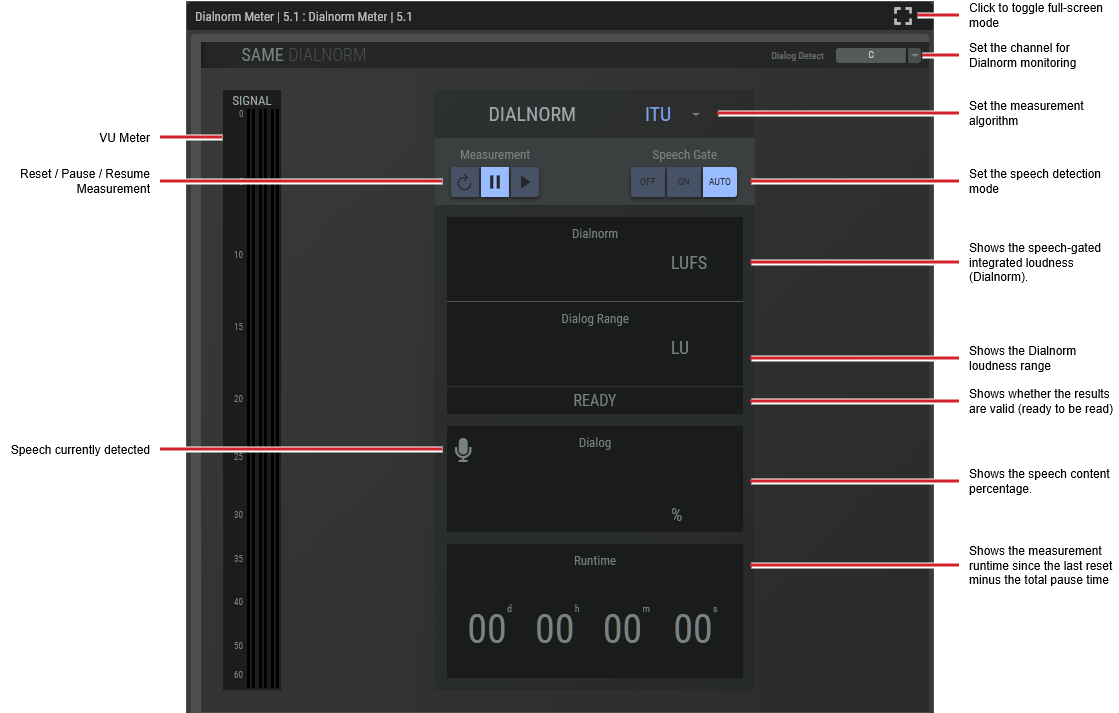
The Dialnorm meter plugin computes the speech-gated integrated loudness (Dolby Dialnorm).

For this plugin, you need to set the LUFS/LKFS units to use in the Network-Plug-in’s Mixer settings.
|
Dialog Detect |
Select the channels in which the speech Dialnorm measurement should be made. C: Only the center channel, LRC: Left, right and center channels. LR: Left and right channels, L: Only the left channel, R: Only the right channel This selection is only available in the 5.1 plugin version. In Stereo mode, the detection is always performed on the sum of the left and right channels. |
|
VU Meter |
Shows the input signal levels. |
|
[Measurement Algorithm] |
Set the measurement algorithm type. ITU BS.1770-1: An International Telecommunication Union standard for measuring audio loudness and true-peak levels. Leq(A): The Equivalent Continuous Sound Level using A-weighting, representing the constant sound level with the same total acoustic energy as a fluctuating noise over a given period of time. |
|
Measurement: Reset |
Click to reset the Dialnorm measurements. 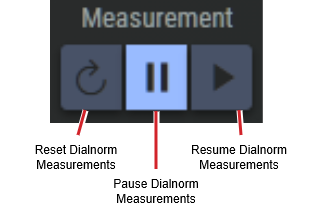
|
|
Measurement: Pause / Resume |
Click to control Dialnorm operation. Pause: Click to pause Dialnorm measurement. Resume: Click to continue Dialnorm measurement. |
|
Dialnorm |
Shows the speech-gated integrated loudness (Dialnorm). |
|
Dialog Range |
Shows the Dialnorm loudness range. |
|
Status |
Shows whether the results are valid (ready to be read). |
|
Dialog |
Shows the speech content percentage. |
|
Runtime |
Shows the measurement runtime since the last reset minus the total pause time. |
Loudness Meter Plus Configuration
Variants are available to support the following audio leg group types:
|
Mono |
Stereo |
5.1 |
|---|---|---|
|
|
|
|
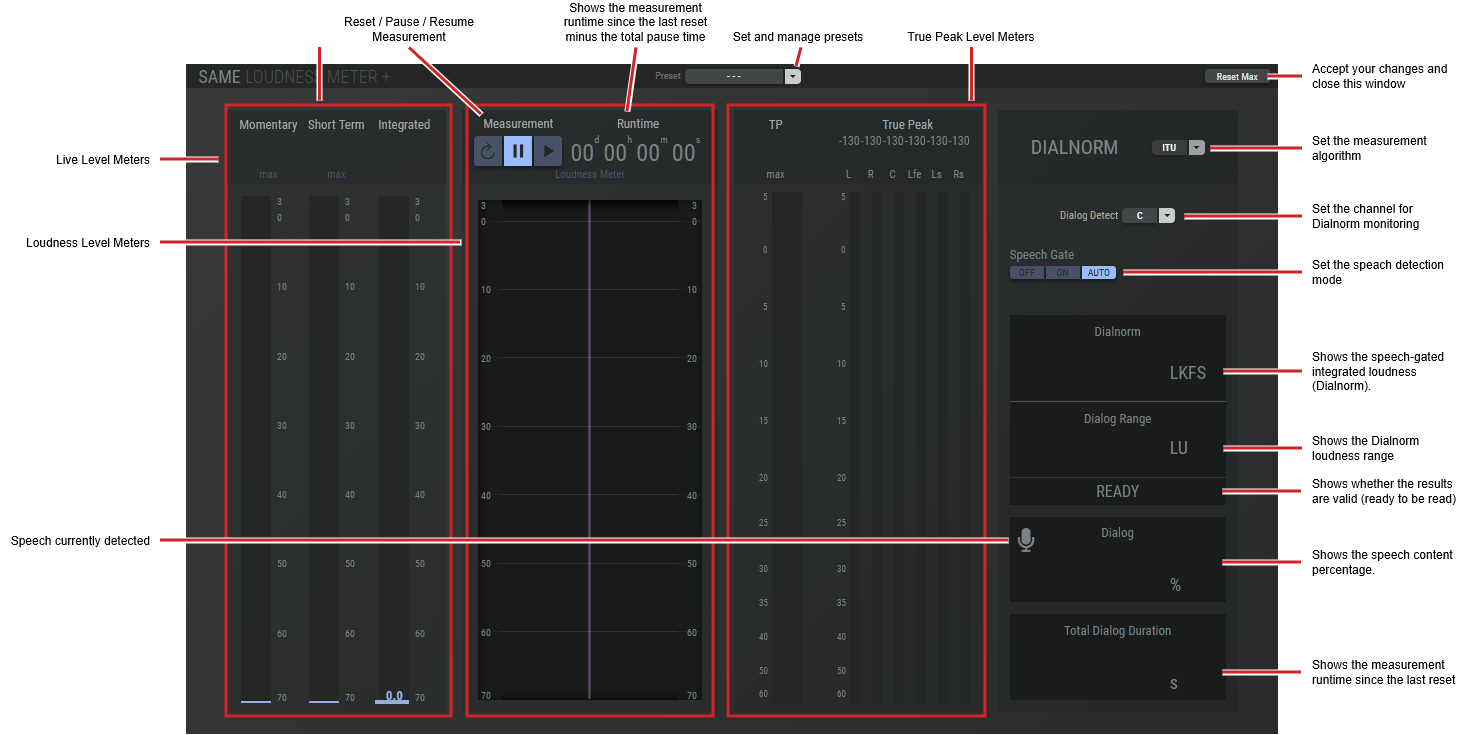
The loudness meter plus plugin computes the true peak, momentary loudness, short-term loudness, integrated loudness and the loudness range of an audio signal in accordance with EBU R 128 and ITU-R BS.1770-4 standards as well as the speech-gated integrated loudness (Dolby Dialnorm).

|
Preset |
The configuration of a SAME Application can be memorized as a preset for instant recall. See SAME Application Preset Configuration. |
|
Reset Max |
Click to reset the peak levels shown by the Max meters. |
|
Live Level Meters |
Shows the measured signal levels. Momentary: Momentary loudness (based on a 400 ms window). Short Term: Short-term loudness (based on a 3 s window). Integrated: When the Speech Gate option in Dialnorm is:
|
|
Loudness Meters |
Shows the Dialnorm loudness range. |
|
True Peak Level Meters |
Shows the peak signal level(s). TP Max: Historic maximum true peak value since the last reset of Reset Max. True Peak: True peak meter. |
|
Dialog Detect |
Select the channels in which the speech Dialnorm measurement should be made. C: Only the center channel, LRC: Left, right and center channels. LR: Left and right channels, L: Only the left channel, R: Only the right channel This selection is only available in the 5.1 plugin version. In Stereo mode, the detection is always performed on the sum of the left and right channels. |
|
[Measurement Algorithm] |
Set the measurement algorithm type. ITU BS.1770-1: An International Telecommunication Union standard for measuring audio loudness and true-peak levels. Leq(A): The Equivalent Continuous Sound Level using A-weighting, representing the constant sound level with the same total acoustic energy as a fluctuating noise over a given period of time. |
|
Measurement: Reset |
Click to reset the Dialnorm measurements.
|
|
Measurement: Pause / Resume |
Click to control Dialnorm operation. Pause: Click to pause Dialnorm measurement. Resume: Click to continue Dialnorm measurement. |
|
Dialnorm |
Shows the speech-gated integrated loudness (Dialnorm). |
|
Dialog Range |
Shows the Dialnorm loudness range. |
|
Status |
Shows whether the results are valid (ready to be read). |
|
Dialog |
Shows the speech content percentage. |
|
Runtime |
Shows the measurement runtime since the last reset minus the total pause time. |
Silence Detector Configuration
Variants are available to support the following audio leg group types:
|
Mono |
Stereo |
5.1 |
|---|---|---|
|
|
|
|
This plugin detects when a signal is below a threshold for a given amount of time.
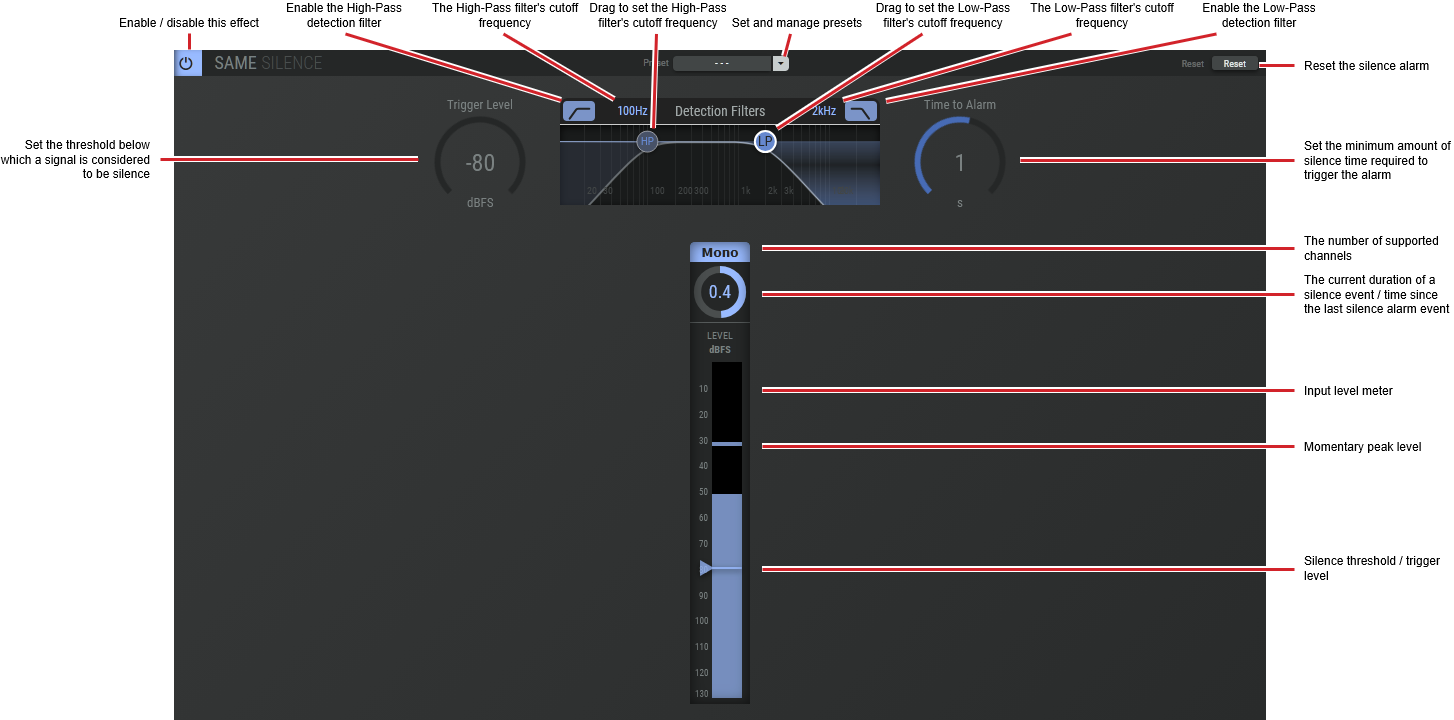
|
Preset |
The configuration of a SAME Application can be memorized as a preset for instant recall. See SAME Application Preset Configuration. |
|
Reset |
Click to reset the silence alarm. |
|
Trigger Level |
Set the threshold below which a signal is considered to be silence. |
|
Detection Filters |
Set the frequency range used to detect sound energy levels that are used for silence detection. The high-pass filter is useful to eliminate hum from masking silence. The low-pass filter is useful to eliminate hiss from masking silence. Click and drag HP or LP to set the filter’s cut-off frequencies. |
|
Time to Alarm |
Set the minimum amount of silence time required to trigger the alarm. |
|
Last Silence Count-down timer |
Shows how much time has passed since the last silence alarm was triggered. Shows a count-down timer that starts with the value set by Time to Alarm. If this count-down timer gets to zero, a silence alarm is triggered. |