
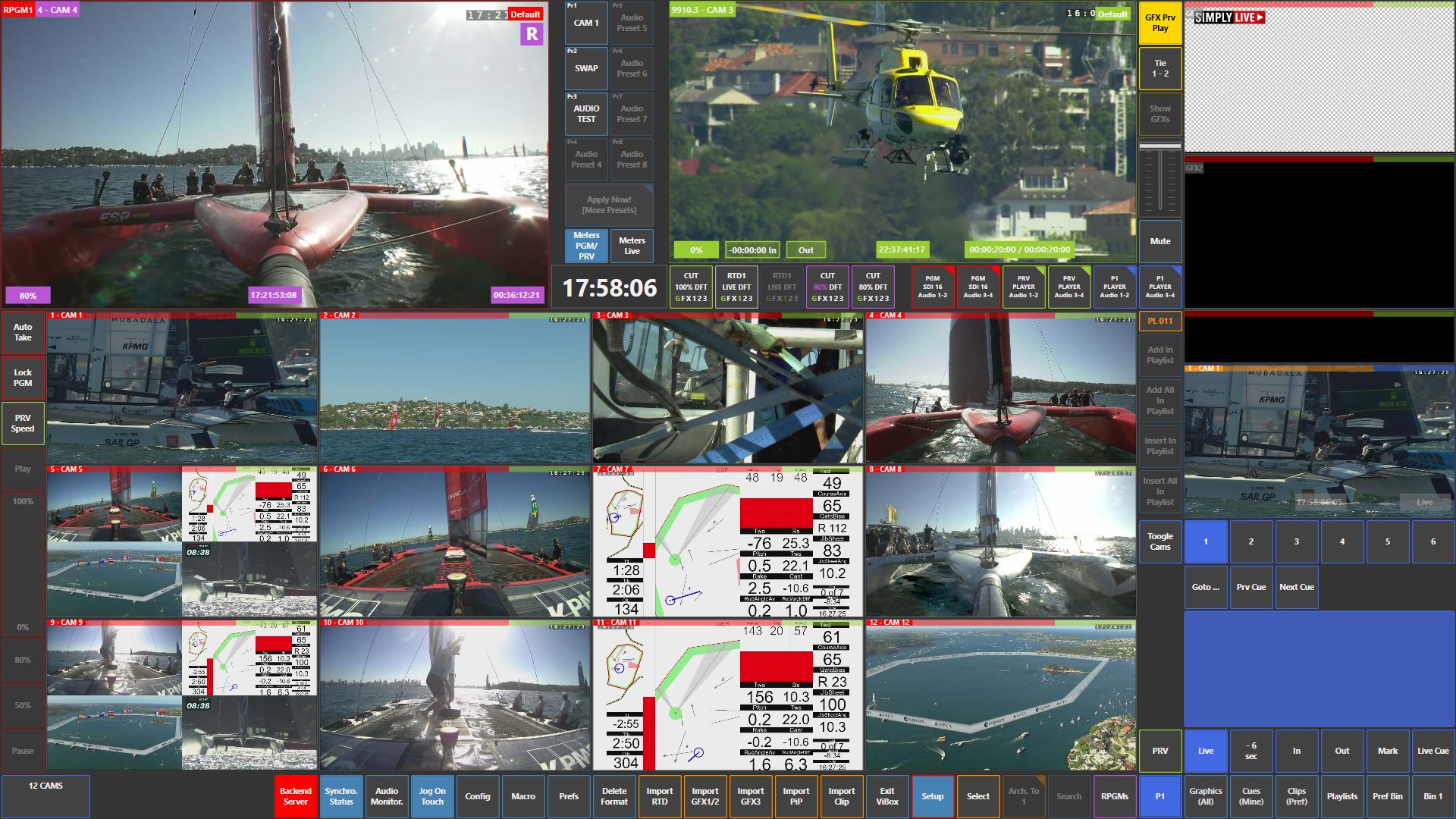
The SimplyLive Live module interface is very straightforward and designed for fast operation. Compared to other modules, you have larger camera views, clear Program and Preview monitoring, and easy access to inputs.
Layout Overview
-
Top left → Program (PGM)
-
Top centre/right → Preview (PVW)
-
Top right corner → Graphics area
-
Centre and bottom area → all input cameras
-
Right side → replay outputs, clip editing, and panel management
-
Bottom row → system controls, settings, and import options
Key Characteristics
-
The interface focuses on live operation and cooperation
-
You do not use replay channels as standard inputs in the same way as in other modules
-
Instead, you work with:
-
Camera inputs
-
Replay operator outputs
-
Clips and playlists
-
This means the Live module is designed for working together with replay operators rather than operating fully independently.
Workflow Logic
-
Cameras are taken from the input grid to Preview or Program
-
Replay outputs are accessed and controlled from the right side
-
Clips can be edited and managed directly while monitoring Preview or replay outputs
You are effectively managing:
-
Live inputs (cameras)
-
Replay outputs
-
Clip preparation and playback
All within one unified interface focused on live control.