
Preferences > 1st RCU
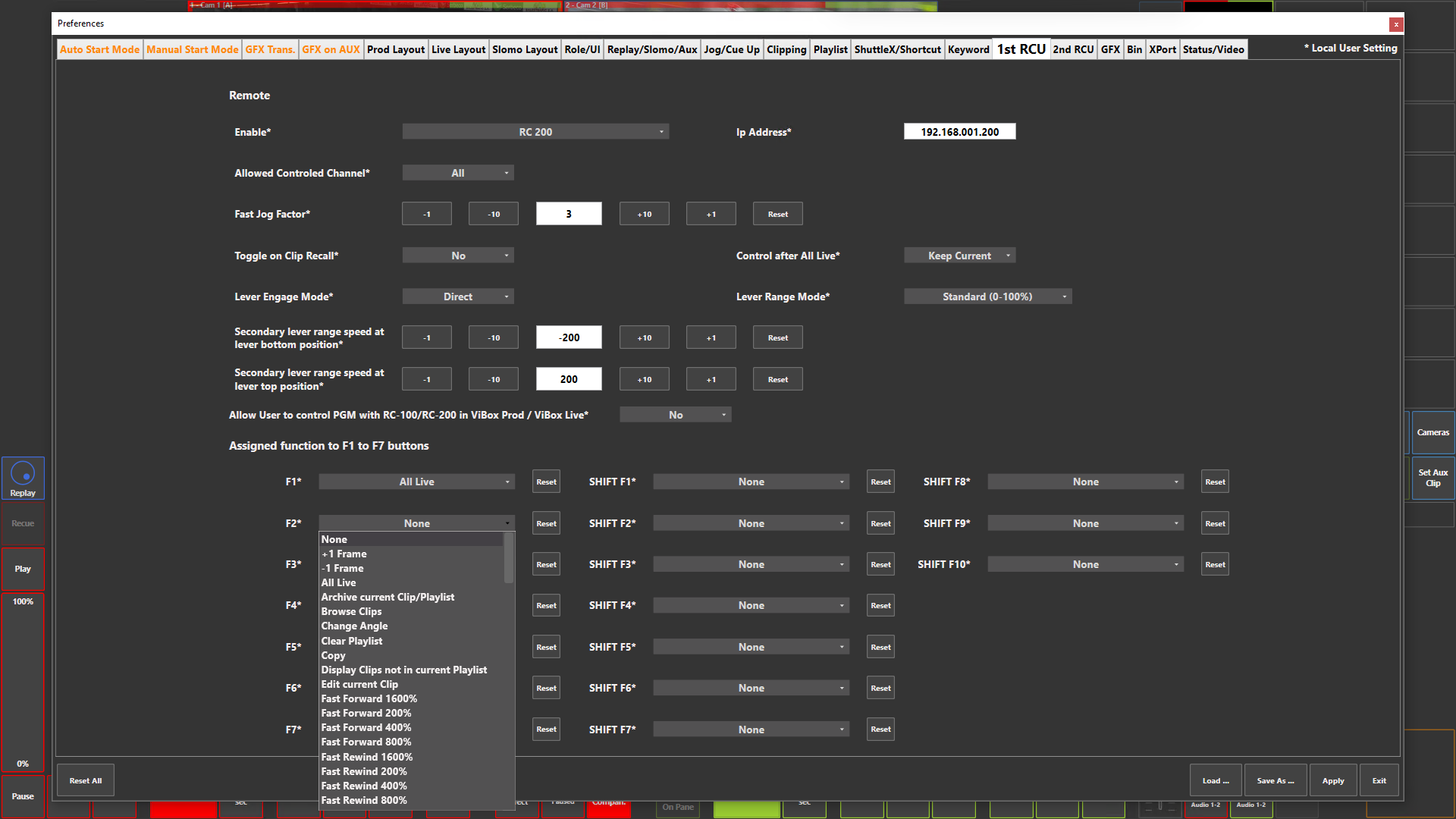
Preference Breakdown
|
Button Label |
Dropdown Menu |
Description |
Specific to Role |
|---|---|---|---|
|
Enable* |
None |
No RCU connected |
All Roles |
|
|
RC 100 |
RC-100 connected |
All Roles |
|
|
RC 10 |
RC-10 connected |
All Roles |
|
|
RC 200 |
RC-200 connected |
All Roles |
|
|
RC 200 - ViBox as listener on port 20502 |
RC-200 connected via DHCP (Cloud & Remote) |
All Roles |
|
IP Address* |
###.###.###.### |
The IP address of the RCU - No IP address needed for port 20502 option |
All Roles |
|
Allowed Controlled Channel* |
All |
RCU controls all channels |
All Roles |
|
|
PGM1 |
RCU only controls PGM 1 |
All Roles |
|
|
PGM2 |
RCU only controls PGM 2 / PRV |
All Roles |
|
|
PGM1 & Replay |
RCU only controls PGM 1 + Replay channels |
All Roles |
|
|
PGM2 & Replay |
RCU only controls PGM 2 + Replay channels |
All Roles |
|
Fast Jog Factor* |
|
Min 2 > Max 25 |
All Roles |
|
Toggle on Clip Recall* |
Yes |
Repeated Clip recall presses toggle through the clip’s camera angles. |
All Roles |
|
|
No |
Repeated Clip recall presses recall the preferred camera angle only; they do not cycle through other angles. |
All Roles |
|
Control after All Live* |
Keep Current |
When All Live is pressed, current RCU output control is kept |
All Roles |
|
|
PGM 1 |
When All Live is pressed, PGM 1 control is selected on the RCU |
All Roles |
|
|
PGM 2 |
When All Live is pressed, PGM 2 control is selected on the RCU |
All Roles |
|
|
PGM 1+2 |
When All Live is pressed, PGM 1+2 control is selected on the RCU |
All Roles |
|
|
REPLAYS |
When All Live is pressed, REPLAYS control is selected on the RCU |
All Roles |
|
Lever Engage Mode* |
Direct |
The selected speed is applied as soon as the T-Bar is moved up |
All Roles |
|
|
Conditional |
The selected speed is applied as soon as the T-Bar is moved down |
All Roles |
|
Lever Range Mode* |
Standard (0-100%) |
Sets default lever operation to standard - Lever bottom position 0% > Level top position 100% |
All Roles |
|
|
Secondary Range |
Sets default lever operation to secondary range defined by user below |
All Roles |
|
Secondary lever range speed at lever bottom position* |
|
Defines the lever bottom position speed for secondary range - Min -300 > Max 300 |
All Roles |
|
Secondary lever range speed at lever top position* |
|
Defines the lever top position speed for secondary range - Min -300 > Max 300 |
All Roles |
|
Allow User to control PGM with RC-100/RC-200 in ViBox Prod / ViBox Live* |
Yes |
Enabled RCU control of PGM ouput in Prod + Live roles |
Prod + Live |
|
|
No |
Disables RCU control of PGM ouput in Prod + Live roles |
Prod + Live |
|
F1* |
All Live (Default - Can be changed) |
Reset will take this back to "All Live" |
All Roles |
|
F2* |
Full list at the bottom |
|
All Roles |
|
F3* |
Full list at the bottom |
|
All Roles |
|
F4* |
Full list at the bottom |
|
All Roles |
|
F5* |
Full list at the bottom |
|
All Roles |
|
F6* |
Full list at the bottom |
|
All Roles |
|
F7* |
Full list at the bottom - Not visible with RC10 |
|
All Roles |
|
SHIFT F1* |
Full list at the bottom - Not visible with RC10 |
|
All Roles |
|
SHIFT F2* |
Full list at the bottom - Not visible with RC10 |
|
All Roles |
|
SHIFT F3* |
Full list at the bottom - Not visible with RC10 |
|
All Roles |
|
SHIFT F4* |
Full list at the bottom - Not visible with RC10 |
|
All Roles |
|
SHIFT F5* |
Full list at the bottom - Not visible with RC10 |
|
All Roles |
|
SHIFT F6* |
Full list at the bottom - Not visible with RC10 |
|
All Roles |
|
SHIFT F7* |
Full list at the bottom - Not visible with RC10 |
|
All Roles |
|
SHIFT F8* |
Full list at the bottom - Not visible with RC10 |
|
All Roles |
|
SHIFT F9* |
Full list at the bottom - Not visible with RC10 |
|
All Roles |
|
SHIFT F10* |
Full list at the bottom - Not visible with RC10 |
|
All Roles |
|
RCU Shortcut Options |
None |
|
All Roles |
|
|
+1 Frame |
Moves the controlled output position forward by 1 frame |
All Roles |
|
|
-1 Frame |
Moves the controlled output position backward by 1 frame |
All Roles |
|
|
All Live |
Returns all channels to their live status |
All Roles |
|
|
Archive current Clip/Playlist |
Sends the selected clip or playlist to the Export targets selected under "Arch. To" |
All Roles |
|
|
Browse Clips |
Lets you see the start of each clip in a playlist by browsing with the jog wheel |
All Roles |
|
|
Change Angle |
Lets you change the camera angle of an element in a playlist |
All Roles |
|
|
Clear Playlist |
Removes all clips from the current playlist |
All Roles |
|
|
Copy |
Copies the selected clip or playlist item |
All Roles |
|
|
Edit current Clip |
Opens the "Clip Properties" for editing |
All Roles |
|
|
Fast Forward 1600% |
Plays forward at 16x normal speed |
All Roles |
|
|
Fast Forward 200% |
Plays forward at 2x normal speed |
All Roles |
|
|
Fast Forward 400% |
Plays forward at 4x normal speed |
All Roles |
|
|
Fast Forward 800% |
Plays forward at 8x normal speed |
All Roles |
|
|
Fast Rewind 1600% |
Plays backward at 16x normal speed |
All Roles |
|
|
Fast Rewind 200% |
Plays backward at 2x normal speed |
All Roles |
|
|
Fast Rewind 400% |
Plays backward at 4x normal speed |
All Roles |
|
|
Fast Rewind 800% |
Plays backward at 8x normal speed |
All Roles |
|
|
Film Effect |
Toggles on or off the film-style playback effect |
All Roles |
|
|
Jump |
Jumps back the predefinded duration set in Pref > Jog/Cue Up |
All Roles |
|
|
Lock PGM1 |
Locks PGM 1 from any user control |
All Roles |
|
|
Lock PGM1+2 |
Locks PGM 1+2 from any user control |
All Roles |
|
|
Lock PGM2 |
Locks PGM 2 from any user control |
All Roles |
|
|
Make Pref Clip |
Sets the current clip angle loaded as the preferred clip when recalled |
All Roles |
|
|
Matchframe clips based on TC |
|
All Roles |
|
|
Move Clip |
Moves the selected clip to another location or bin |
All Roles |
|
|
Next Cue |
Jumps to the next mark created, if already looking at previous marks |
All Roles |
|
|
Next on Playlist |
Pushes on to the next playlist element while playing out the playlist |
All Roles |
|
|
Order by TC |
Sorts clips by timecode |
All Roles |
|
|
Order selected Playlist by TC |
Sorts the selected playlist items by timecode |
All Roles |
|
|
Play at Speed 1 |
Playback at Slomo speed 1 - Slomo speed set in Pref > Replay/Slomo/Aux |
All Roles |
|
|
Play at Speed 2 |
Playback at Slomo speed 2 - Slomo speed set in Pref > Replay/Slomo/Aux |
All Roles |
|
|
Previous Cue |
Jumps back to the previous mark created |
All Roles |
|
|
Search |
Opens the search function to look for clips and playlists |
All Roles |
|
|
Send loaded Clip to Bin 01 |
Sends the loaded clip to Bin 01 |
All Roles |
|
|
Send loaded Clip to Bin 02 |
Sends the loaded clip to Bin 02 |
All Roles |
|
|
Send loaded Clip to Bin 03 |
Sends the loaded clip to Bin 03 |
All Roles |
|
|
Send loaded Clip to Bin 04 |
Sends the loaded clip to Bin 04 |
All Roles |
|
|
Send loaded Clip to Bin 05 |
Sends the loaded clip to Bin 05 |
All Roles |
|
|
Send loaded Clip to Bin 06 |
Sends the loaded clip to Bin 06 |
All Roles |
|
|
Send loaded Clip to Bin 07 |
Sends the loaded clip to Bin 07 |
All Roles |
|
|
Send loaded Clip to Bin 08 |
Sends the loaded clip to Bin 08 |
All Roles |
|
|
Send loaded Clip to Bin 09 |
Sends the loaded clip to Bin 09 |
All Roles |
|
|
Send loaded Clip to Bin 10 |
Sends the loaded clip to Bin 10 |
All Roles |
|
|
Send loaded Clip to Bin 11 |
Sends the loaded clip to Bin 11 |
All Roles |
|
|
Send loaded Clip to Pref Bin |
Sends the loaded clip to Pref Bin |
All Roles |
|
|
Switch Full/Light Mode |
Toggle between Slomo layout view - Full mode includes clips and playlists / Light mode only displays the PGM and Replay channels |
All Roles |
|
|
Sync to PGM |
Synchronises the replay channels with PGM 1 |
All Roles |
|
|
Sync to PRV |
Synchronises the replay channels with PGM 2 / PRV |
All Roles |
|
|
Time Lapse Clip |
Creates a new clip with a time-lapse effect to the current clip |
All Roles |
|
|
Toggle between Cameras Layout |
Toggles through the available camera layouts |
All Roles |
|
|
Toggle current Slomo Transition |
Changes the default auto transition set in Replay/Slomo/Aux |
All Roles |
|
|
Toggle Freeze on Cue |
Enables or disables the ability to Freeze on a Cue / Mark point (FC button) |
All Roles |
|
|
Toggle Freeze on Out |
Enables or disables the ability to Freeze on an Out point (FO button) |
All Roles |
|
|
Toggle GFX 1 on Pgm |
Shows or hides Graphics Layer 1 on PGM 1 |
All Roles |
|
|
Toggle GFX 1 on Prv |
Shows or hides Graphics Layer 1 on PGM 2 / PRV |
All Roles |
|
|
Toggle GFX 2 on Pgm |
Shows or hides Graphics Layer 2 on PGM 1 |
All Roles |
|
|
Toggle GFX 2 on Prv |
Shows or hides Graphics Layer 2 on PGM 2 / PRV |
All Roles |
|
|
Toggle GFX 3 on Pgm |
Shows or hides Graphics Layer 3 on PGM 1 |
All Roles |
|
|
Toggle GFX 3 on Prv |
Shows or hides Graphics Layer 3 on PGM 2 / PRV |
All Roles |
|
|
Toggle Lever Range Mode |
Toggles the lever range between standard to secondary |
All Roles |
|
|
Toggle PiP on Pgm |
Shows or hides Picture-in-Picture on PGM 1 |
All Roles |
|
|
Toggle PiP on Prv |
Shows or hides Picture-in-Picture on PGM 2 / PRV |
All Roles |
|
|
Execute Macro 1…32 |
Runs the action sequence assigned to the selected macro function |
All Roles |