
Preferences > Slomo Layout
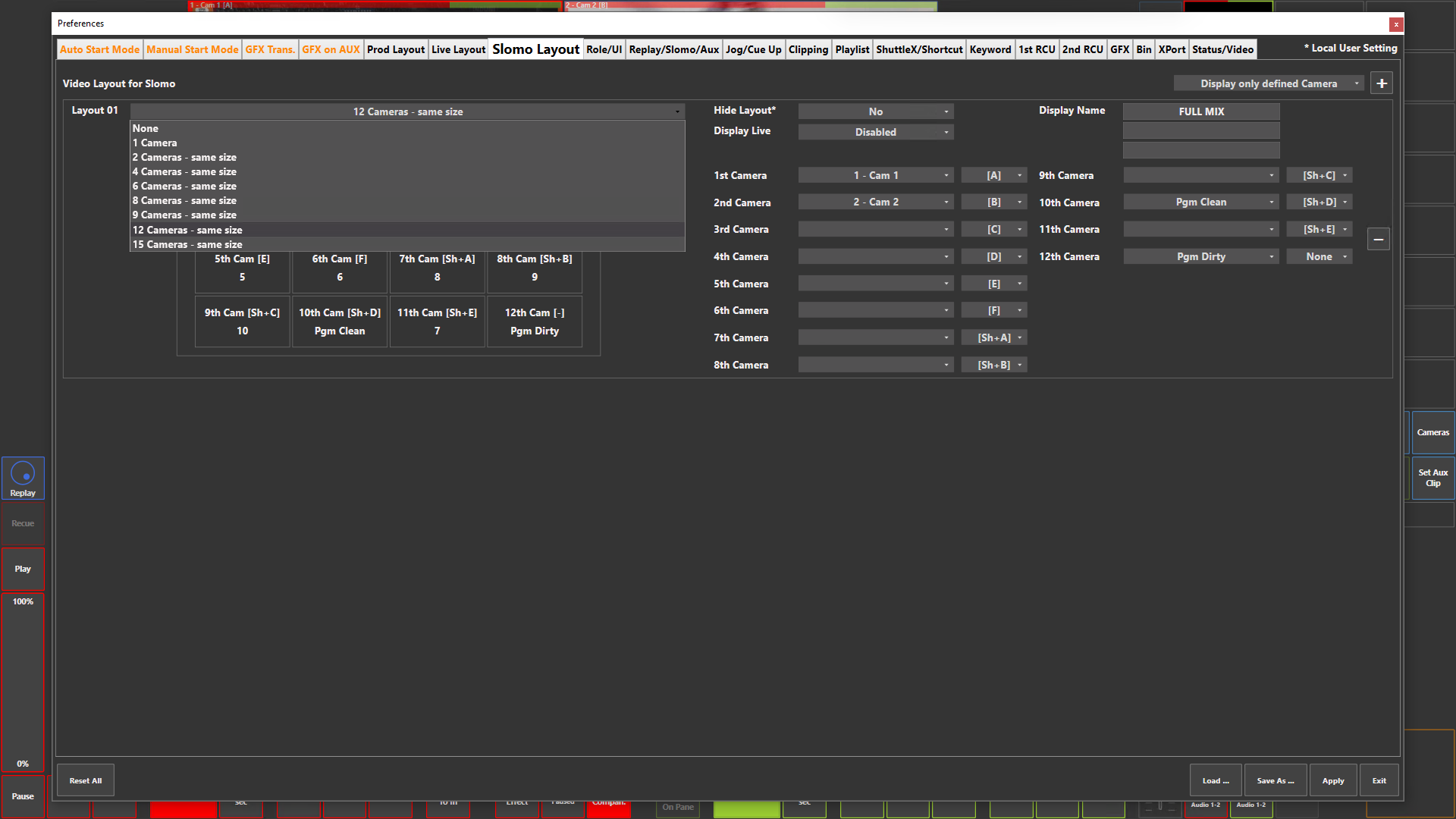
Preference Breakdown
|
Button Label |
Dropdown Menu |
Description |
Specific to Role |
|---|---|---|---|
|
Display only defined Camera |
Display only defined Camera |
Will only list the inputs configured in the Web Config |
Slomo |
|
|
Display all Camera |
Will list all possible inputs within the system configuration |
Slomo |
|
Add Layout (+) |
|
Lets the user add a new layout view |
Slomo |
|
Video Layout for Live |
|
Scrollable space where layouts are created for Slomo user |
Slomo |
|
Layout ## |
None |
Displays no inputs |
Slomo |
|
|
1 Camera |
Displays 1 input |
Slomo |
|
|
2 Cameras - same size |
Displays 2 inputs - side by side |
Slomo |
|
|
4 Cameras - same size |
Displays 4 inputs - 2 x 2 |
Slomo |
|
|
6 Cameras - same size |
Displays 6 inputs - 3 x 2 |
Slomo |
|
|
8 Cameras - same size |
Displays 8 inputs - 4 x 2 |
Slomo |
|
|
9 Cameras - same size |
Displays 9 inputs - 3 x 3 |
Slomo |
|
|
12 Cameras - same size |
Displays 12 inputs - 4 x 3 |
Slomo |
|
|
15 Cameras - same size |
Displays 15 inputs - 5 x 3 |
Slomo |
|
Hide Layout* |
No |
Layout can be loaded in the ViBox UI |
Slomo |
|
|
Yes |
Layout will not be an option in the ViBox UI |
Slomo |
|
Display Live |
Disabled |
No live inputs can be chosen in the camera dropdown menu. Replay inputs will only be displayed |
Slomo |
|
|
Enabled |
Allows live inputs to be chosen in the camera dropdown menu |
Slomo |
|
Display Name |
|
Lets the user name the Slomo layout in the way they want |
Slomo |
|
1st Camera…15th Camera |
None |
No input will be displayed |
Slomo |
|
|
Next Pl. Element on PGM |
Will display the next clip in the playlist loaded or playing on PGM 1 |
Slomo |
|
|
Next Pl. Element on PRV |
Will display the next clip in the playlist loaded or playing on PGM 2 / PRV |
Slomo |
|
|
Pgm Dirty |
Will display the PGM output with GFX layer (Note: PGM Dirty = User 1 PGM 1 only) |
Slomo |
|
|
Pgm Clean |
Will display the PGM output without GFX layer (Note: PGM Clean = User 1 PGM 1 only) |
Slomo |
|
|
Input 1…256 *(Replay) |
Select which input to be assigned to each camera in the layout. *if "Display Live" is enabled, "(Replay)" will be displayed to distinguish between each input type |
Slomo |
|
|
Input 1…256 (Live) |
Only visible if "Display Live" is enabled |
Slomo |
|
RCU Button Assign |
None |
Input cannot be loaded with RCU button |
Slomo |
|
|
[A] |
RCU button A will loaded input to PGM 1 or PGM 2 / PRV |
Slomo |
|
|
[B] |
RCU button B will loaded input to PGM 1 or PGM 2 / PRV |
Slomo |
|
|
[C] |
RCU button C will loaded input to PGM 1 or PGM 2 / PRV |
Slomo |
|
|
[D] |
RCU button D will loaded input to PGM 1 or PGM 2 / PRV |
Slomo |
|
|
[E] |
RCU button E will loaded input to PGM 1 or PGM 2 / PRV |
Slomo |
|
|
[F] |
RCU button F will loaded input to PGM 1 or PGM 2 / PRV |
Slomo |
|
|
[Sh+A] |
RCU buttons Shift > A will loaded input to PGM 1 or PGM 2 / PRV |
Slomo |
|
|
[Sh+B] |
RCU buttons Shift > B will loaded input to PGM 1 or PGM 2 / PRV |
Slomo |
|
|
[Sh+C] |
RCU buttons Shift > C will loaded input to PGM 1 or PGM 2 / PRV |
Slomo |
|
|
[Sh+D] |
RCU buttons Shift > D will loaded input to PGM 1 or PGM 2 / PRV |
Slomo |
|
|
[Sh+E] |
RCU buttons Shift > E will loaded input to PGM 1 or PGM 2 / PRV |
Slomo |
|
|
[Sh+F] |
RCU buttons Shift > F will loaded input to PGM 1 or PGM 2 / PRV |
Slomo |
|
Remove Layout (-) |
|
Delete specific layout |
Slomo |