
Preferences > Manual Start Mode
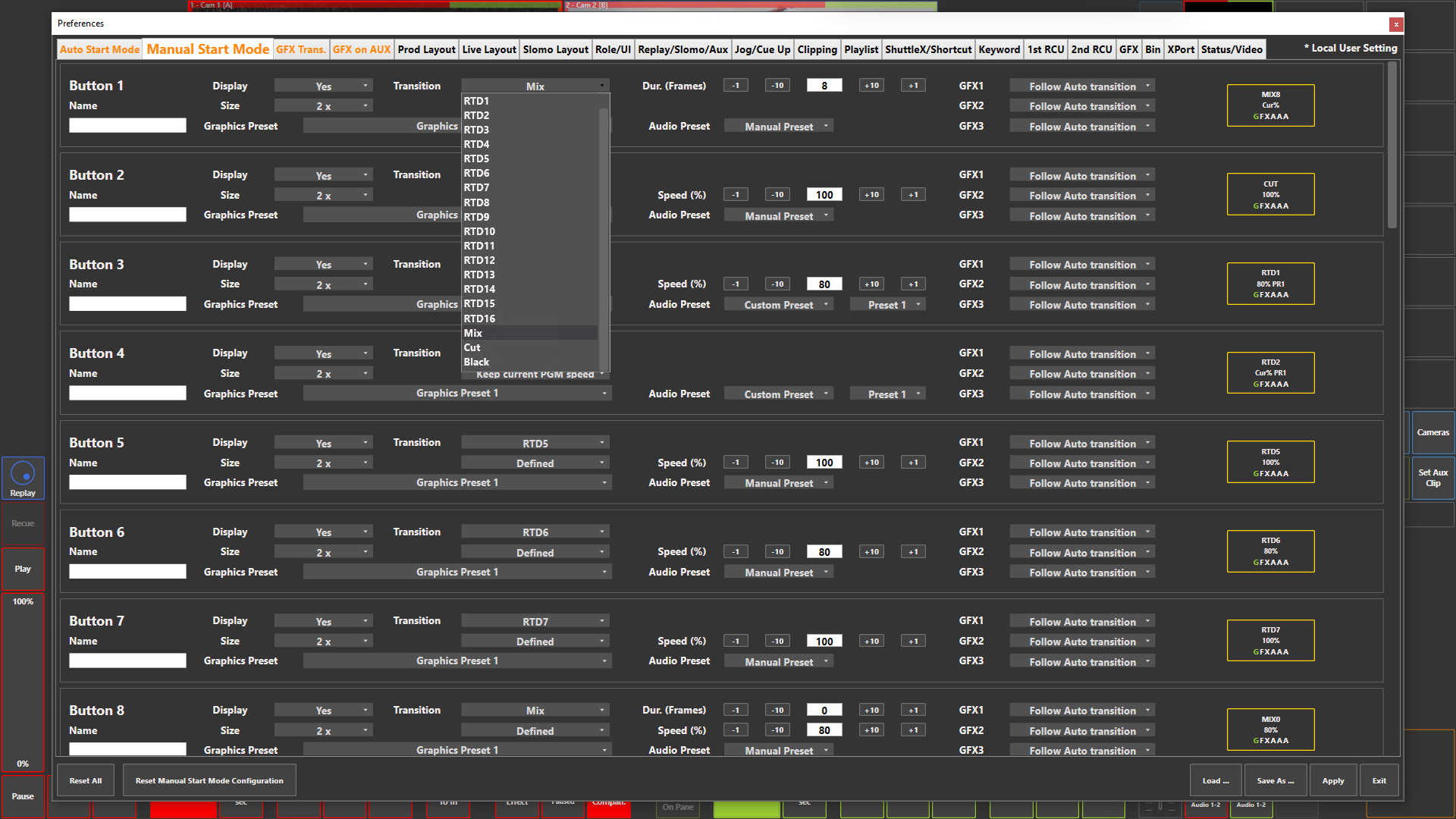
Preference Breakdown
|
Button Label |
Dropdown Menu |
Description |
User Specific |
|---|---|---|---|
|
Button 1…32 |
|
|
Prod + Live |
|
Name |
|
User can give the Manual button a label - Max 4 char at size 1x - Max 7 char at size 1.5x - Max 10 char at size 2x |
Prod + Live |
|
Display |
Yes |
Button visible |
Prod + Live |
|
|
No |
Button hidden |
Prod + Live |
|
Size |
1 x |
Button size small |
Prod + Live |
|
|
1.5 x |
Button size mid |
Prod + Live |
|
|
2 x |
Button size large |
Prod + Live |
|
Transition |
RTD1 |
Use RTD 1 on the Manual button |
Prod + Live |
|
|
RTD2 |
Use RTD 2 on the Manual button |
Prod + Live |
|
|
RTD3 |
Use RTD 3 on the Manual button |
Prod + Live |
|
|
RTD4 |
Use RTD 4 on the Manual button |
Prod + Live |
|
|
RTD5 |
Use RTD 5 on the Manual button |
Prod + Live |
|
|
RTD6 |
Use RTD 6 on the Manual button |
Prod + Live |
|
|
RTD7 |
Use RTD 7 on the Manual button |
Prod + Live |
|
|
RTD8 |
Use RTD 8 on the Manual button |
Prod + Live |
|
|
RTD9 |
Use RTD 9 on the Manual button |
Prod + Live |
|
|
RTD10 |
Use RTD 10 on the Manual button |
Prod + Live |
|
|
RTD11 |
Use RTD 11 on the Manual button |
Prod + Live |
|
|
RTD12 |
Use RTD 12 on the Manual button |
Prod + Live |
|
|
RTD13 |
Use RTD 13 on the Manual button |
Prod + Live |
|
|
RTD14 |
Use RTD 14 on the Manual button |
Prod + Live |
|
|
RTD15 |
Use RTD 15 on the Manual button |
Prod + Live |
|
|
RTD16 |
Use RTD 16 on the Manual button |
Prod + Live |
|
|
Mix |
Use Mix on the Manual button - Duration of mix to be set |
Prod + Live |
|
|
Cut |
Use Cut on the Manual button |
Prod + Live |
|
|
Black |
Use Fade to Black on the Manual button - Duration of FTB to be set |
Prod + Live |
|
Speed |
Follow Auto transition |
Will follow what is definded in Pref > Auto Start Mode |
Prod + Live |
|
|
Defined |
Set the playback speed of the next input based on what Manual button is pressed |
Prod + Live |
|
|
Keep current PGM speed |
Will playback at the current playout speed of the what is on the PGM |
Prod + Live |
|
Graphics Preset |
Graphics Preset 1 |
Will use Graphics preset 1 after the Manual button press |
Prod + Live |
|
|
Graphics Preset 2 |
Will use Graphics preset 2 after the Manual button press |
Prod + Live |
|
|
Graphics Preset 3 |
Will use Graphics preset 3 after the Manual button press |
Prod + Live |
|
Audio Preset |
Custom Preset |
Assign audio preset 1-8 applied when manual button is pressed |
Prod + Live |
|
|
Manual Preset |
No audio preset assigned to the manual button, audio presets must be pre-selected by user |
Prod + Live |
|
GFX 1 |
Follow Auto transition |
Will follow what is definded in Pref > Auto Start Mode |
Prod + Live |
|
|
Turn On |
Turn on GFX 1 layer |
Prod + Live |
|
|
Turn Off |
Turn off GFX 1 layer |
Prod + Live |
|
|
No Action |
Leave the GFX layer as it is |
Prod + Live |
|
GFX2 |
Same as Above |
Same as Above |
Prod + Live |
|
GFX3 |
Same as Above |
Same as Above |
Prod + Live |
|
Button Display |
"Name" or "Transition" |
The name set or transition selected will be displayed |
Prod + Live |
|
|
"Speed" |
The speed defined or based on the auto transition will be displayed |
Prod + Live |
|
|
G |
Graphics preset 1 will be used |
Prod + Live |
|
|
F |
Graphics preset 2 will be used |
Prod + Live |
|
|
X |
Graphics preset 3 will be used |
Prod + Live |
|
|
1 or "A" |
Number = GFX 1 layer on / off / no action - "A" = Follow auto transition |
Prod + Live |
|
|
2 or "A" |
Number = GFX 2 layer on / off / no action - "A" = Follow auto transition |
Prod + Live |
|
|
3 or "A" |
Number = GFX 3 layer on / off / no action - "A" = Follow auto transition |
Prod + Live |