
Preferences > Live Layout
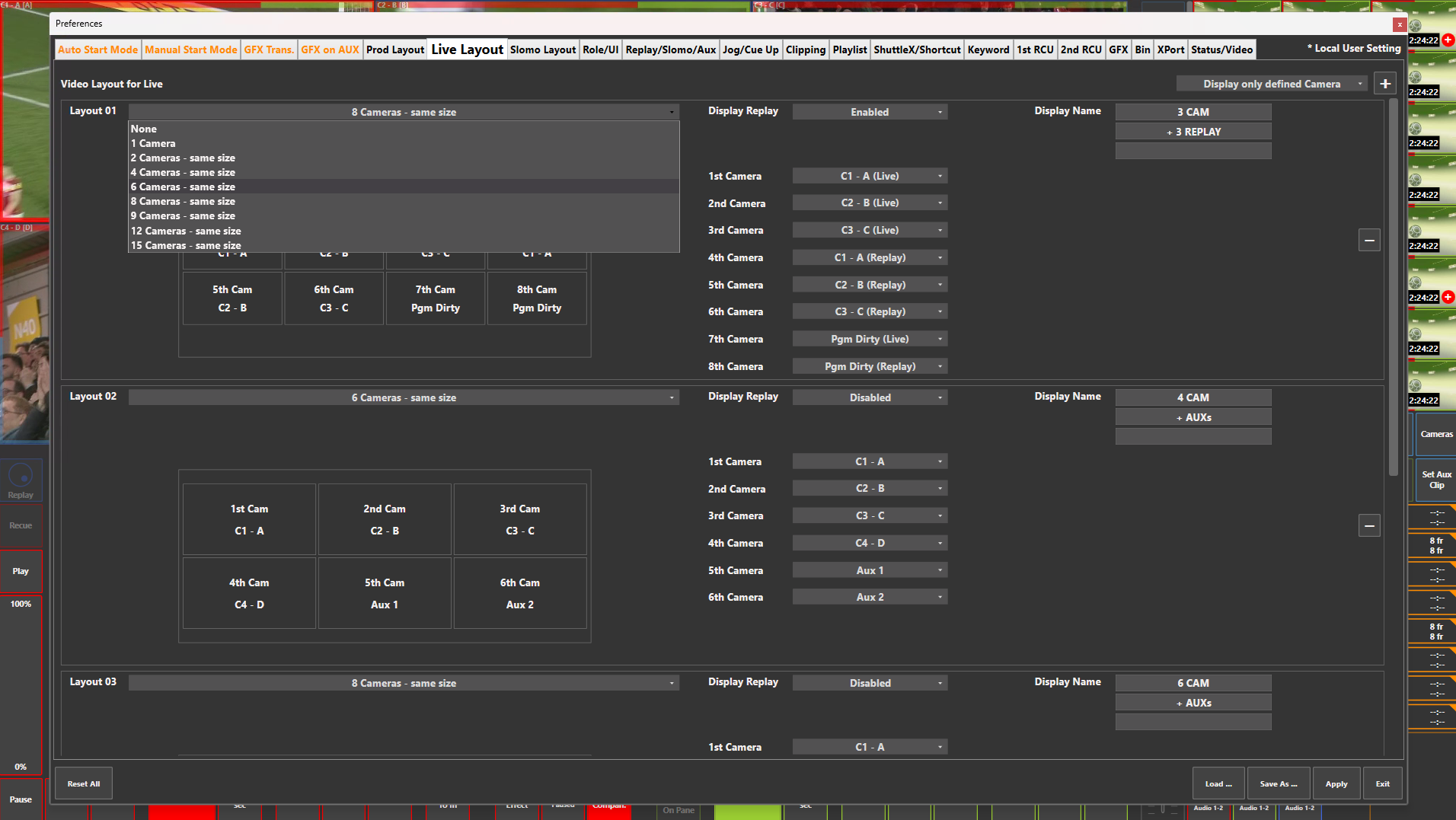
Preference Breakdown
|
Button Label |
Dropdown Menu |
Description |
Specific to Role |
|---|---|---|---|
|
Display only defined Camera |
Display only defined Camera |
Will only list the inputs configured in the Web Config |
Live |
|
|
Display all Camera |
Will list all possible inputs within the system configuration |
Live |
|
Add Layout (+) |
|
Lets the user add a new layout view |
Live |
|
Video Layout for Live |
|
Scrollable space where layouts are created for Live user |
Live |
|
Layout ## |
None |
Displays no inputs |
Live |
|
|
1 Camera |
Displays 1 input |
Live |
|
|
2 Cameras - same size |
Displays 2 inputs - side by side |
Live |
|
|
4 Cameras - same size |
Displays 4 inputs - 2 x 2 |
Live |
|
|
6 Cameras - same size |
Displays 6 inputs - 3 x 2 |
Live |
|
|
8 Cameras - same size |
Displays 8 inputs - 4 x 2 |
Live |
|
|
9 Cameras - same size |
Displays 9 inputs - 3 x 3 |
Live |
|
|
12 Cameras - same size |
Displays 12 inputs - 4 x 3 |
Live |
|
|
15 Cameras - same size |
Displays 15 inputs - 5 x 3 |
Live |
|
Display Replay |
Disabled |
No replay inputs can be chosen in the camera dropdown menu. Live inputs will only be displayed |
Live |
|
|
Enabled |
Allows replay inputs to be chosen in the camera dropdown menu |
Live |
|
Display Name |
|
Lets the user name the Live layout in the way they want |
Live |
|
1st Camera…15th Camera |
None |
No input will be displayed |
Live |
|
|
Aux 1 |
Will display the extra output that can be controlled simaltaiously or separately from the main PGM output |
Live |
|
|
Aux 2 |
Will display the extra output that can be controlled simaltaiously or separately from the main PGM output |
Live |
|
|
Input 1…256 *(Live) |
Select which input to be assigned to each camera in the layout. *if "Display Replay" is enabled, "(Live)" will be displayed to distinguish between each input type |
Live |
|
|
Input 1…256 (Replay) |
Only visible if "Display Replay" is enabled |
Live |
|
Remove Layout (-) |
|
Delete specific layout |
Live |