
Preferences > Status Video
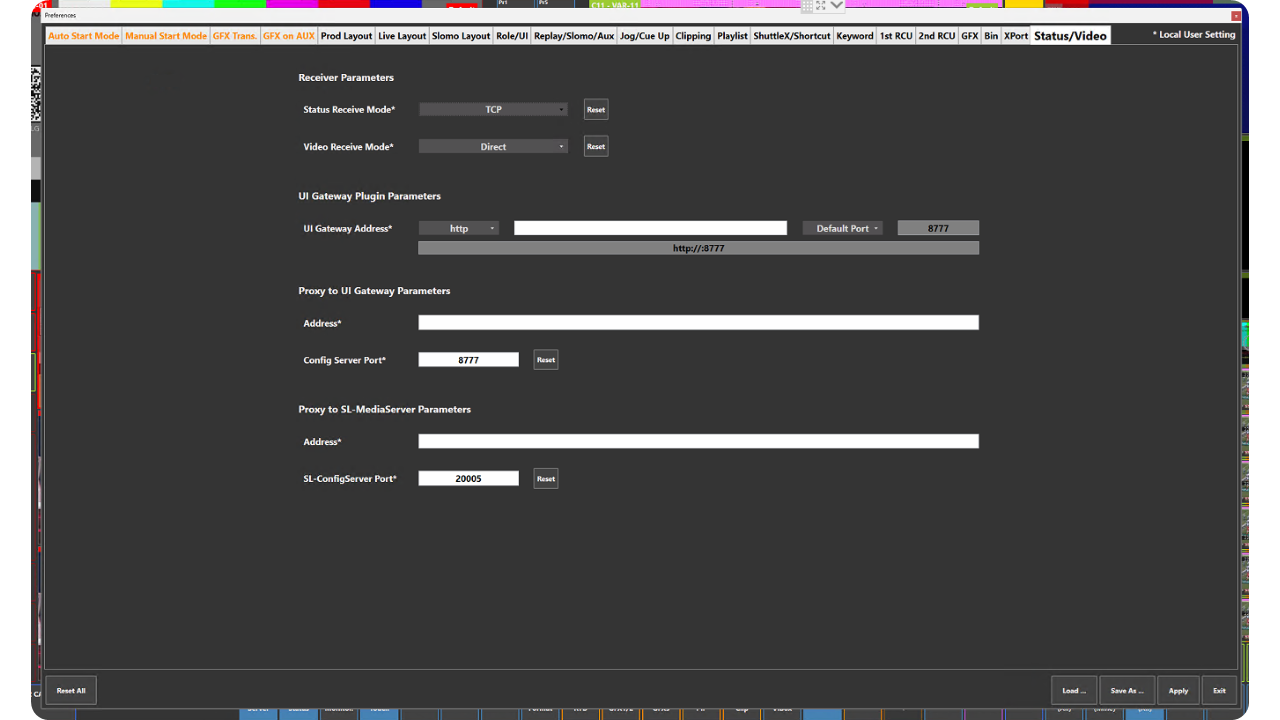
Preference Breakdown
|
Button Label |
Dropdown Menu |
Description |
Specific to Role |
|---|---|---|---|
|
Status Receive Mode* |
TCP |
ViBox UI receives status information (e.g., tally) over TCP |
All Roles |
|
|
UDP |
ViBox UI receives status information (e.g., tally) over UDP |
All Roles |
|
Video Receive Mode* |
Direct |
Video thumbnails in ViBox UI are received directly from the Backend |
All Roles |
|
|
UI Gateway Plugin |
Video thumbnails in ViBox UI are received from the UI Gateway Plugin |
All Roles |
|
|
Proxy to UI Gateway |
Video thumbnails in ViBox UI are received from the UI Gateway |
All Roles |
|
|
Proxy to SL-MediaServer |
Video thumbnails in ViBox UI are received from the SDK multiviewer |
All Roles |
|
UI Gateway Address* |
|
IP address of the UI Gateway |
All Roles |
|
Proxy to UI Gateway Address* |
|
IP address of the UI Gateway |
All Roles |
|
Config Server Port* |
|
Port used by the UI Gateway |
All Roles |
|
Proxy to SL-MediaServer Address* |
|
IP address of the backend |
All Roles |
|
SL-Config Server Port* |
|
Port used by the SL-Config Server. Default is 20005 |
All Roles |