
Preferences > Replay / Slomo / Aux
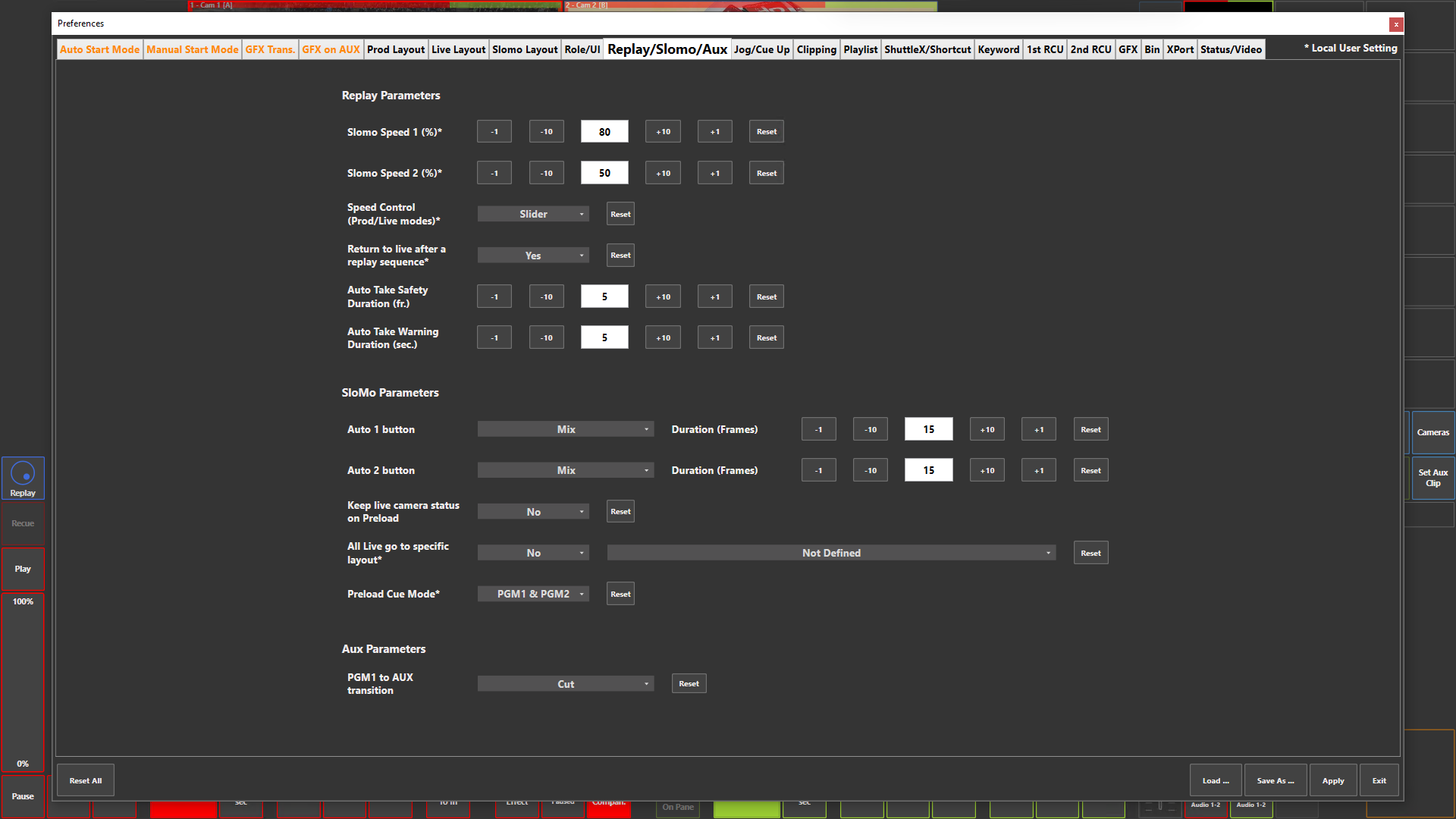
Preference Breakdown
|
Button Label |
Dropdown Menu |
Description |
Specific to Role |
|---|---|---|---|
|
Slomo Speed 1 (%)* |
|
Set predefined speed to playback button - 0% stopped > 100% full speed playback |
All Roles |
|
Reset |
|
Default value 80% |
All Roles |
|
Slomo Speed 2 (%)* |
|
Set predefined speed to playback button - 0% stopped > 100% full speed playback |
All Roles |
|
Reset |
|
Default value 50% |
All Roles |
|
*Slomo Speed 3 (%)* |
|
Only visible if Speed Control > Speed Buttons is enabled |
All Roles |
|
*Reset |
|
Default value 33% |
All Roles |
|
*Slomo Speed 4 (%)* |
|
Only visible if Speed Control > Speed Buttons is enabled |
All Roles |
|
*Reset |
|
Default value 25% |
All Roles |
|
*Slomo Speed 5 (%)* |
|
Only visible if Speed Control > Speed Buttons is enabled |
All Roles |
|
*Reset |
|
Default value 20% |
All Roles |
|
Speed Control (Prod/Live modes)* |
Slider |
Control the playback speed with slider option in ViBox UI |
Prod + Live |
|
|
Speed Buttons |
Control the playback speed with predefined speed buttons in ViBox UI - *5x speed buttons to be defined |
Prod + Live |
|
Return to live after a replay sequence* |
Yes |
|
Slomo |
|
|
No |
|
Slomo |
|
Auto Take Safety Duration (fr.) |
|
What is the difference between Safety and Warning? |
|
|
Auto Take Warning Duration (sec.) |
|
|
|
|
Auto 1 button |
|
3x Transition buttons are availiable, 1 & 2 are set here, 3 is a default Cut button |
Slomo |
|
|
Cut |
Predefined tranisiton button will cut from PRV to PGM |
Slomo |
|
|
Mix |
Predefined tranisiton button will mix at the set duration from PRV to PGM |
Slomo |
|
Auto 2 button |
Cut |
Predefined tranisiton button will cut from PRV to PGM |
Slomo |
|
|
Mix |
Predefined tranisiton button will mix at the set duration from PRV to PGM |
Slomo |
|
Keep live camera status on Preload |
Yes |
If replay channels are live, input will keep playing when loaded to PGM 1 or PGM 2 / PRV |
Slomo |
|
|
No |
If replay channels are live, input will stop at the moment loaded to PGM 1 or PGM 2 / PRV |
Slomo |
|
All Live go to specific layout* |
Yes |
When "All Live" is pressed it goes to the layout defined |
Slomo |
|
|
No |
When "All Live" is pressed the layout stays on the current view |
Slomo |
|
Layout options |
Not Definded |
No change will happen when "All Live" is pressed |
Slomo |
|
|
Layout 01…## |
Chosen layout will load when "All Live" is pressed |
Slomo |
|
Preload Cue Mode* |
PGM1 & PGM2 |
Loading cue / mark to PGM 1 or PGM 2 |
Slomo |
|
|
Replay & Select |
Loading cue / mark to Replay cameras or quick select option |
Slomo |
|
PGM1 to AUX transition |
Cut |
|
Prod + Live |
|
|
Mix |
|
Prod + Live |
|
|
RTD1 |
|
Prod + Live |
|
|
RTD2 |
|
Prod + Live |
|
|
RTD3 |
|
Prod + Live |
|
|
RTD4 |
|
Prod + Live |
|
|
RTD5 |
|
Prod + Live |
|
|
RTD6 |
|
Prod + Live |
|
|
RTD7 |
|
Prod + Live |
|
|
RTD8 |
|
Prod + Live |
|
|
RTD9 |
|
Prod + Live |
|
|
RTD10 |
|
Prod + Live |
|
|
RTD11 |
|
Prod + Live |
|
|
RTD12 |
|
Prod + Live |
|
|
RTD13 |
|
Prod + Live |
|
|
RTD14 |
|
Prod + Live |
|
|
RTD15 |
|
Prod + Live |
|
|
RTD16 |
|
Prod + Live |