
Preferences > ShuttleX / Shortcut
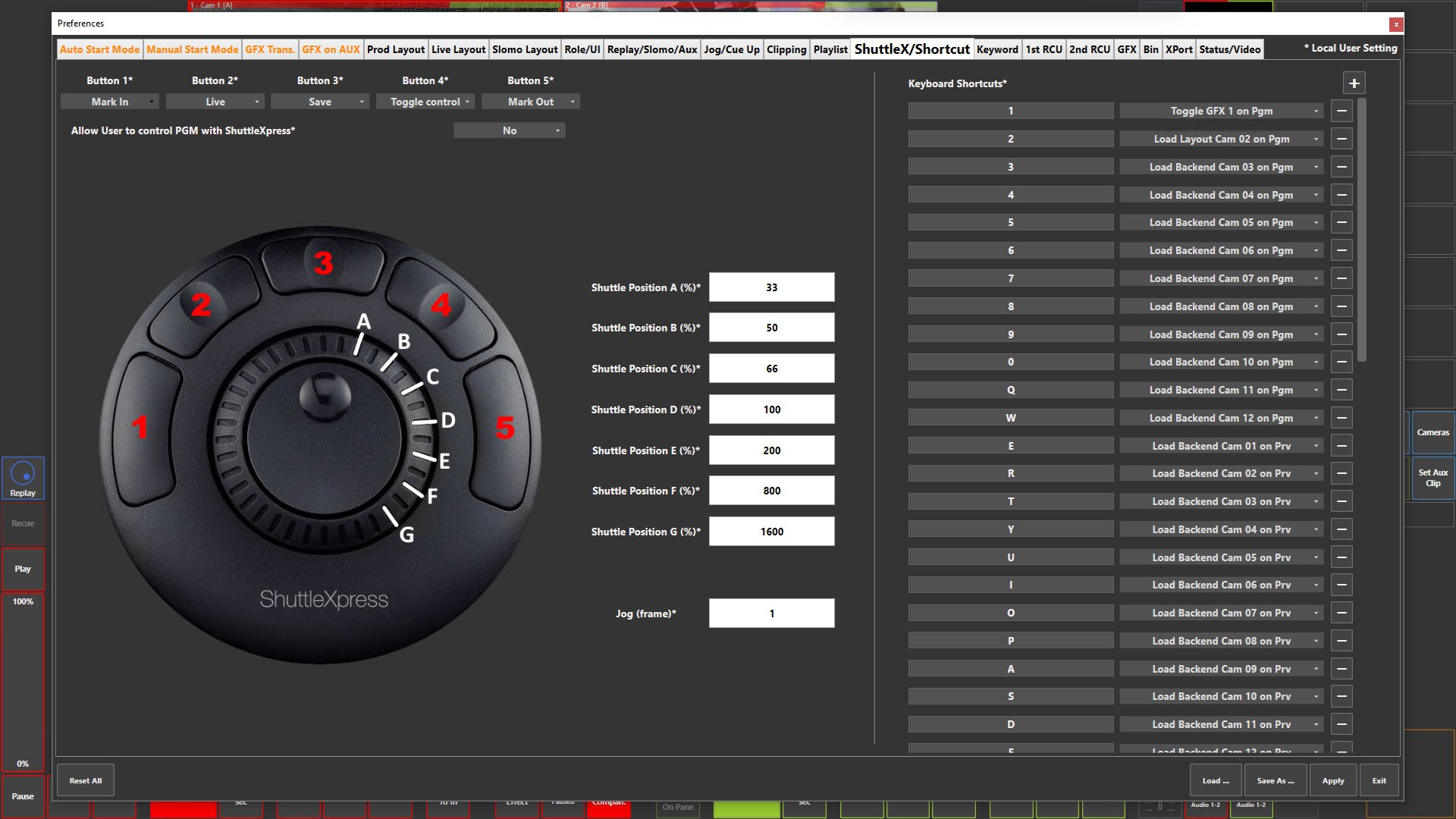
Preference Breakdown
|
Button Label |
Dropdown Menu |
Description |
Specific to Role |
|---|---|---|---|
|
Button 1* |
|
|
All Role |
|
Button 2* |
|
|
All Role |
|
Button 3* |
|
|
All Role |
|
Button 4* |
|
|
All Role |
|
Button 5* |
|
|
All Role |
|
Shuttle Xpress Options |
None |
No action |
All Role |
|
|
Toggle control |
Toggle through Replay, PRV and *PGM to choose what to control - *Option below needs to be "Yes" to control PGM |
All Role |
|
|
Jump backwards |
Jumps back definded value > 1st Jump Value (sec) then 2nd Jump Value (sec) - Jump value set in Pref > Jog/Cue Up |
All Role |
|
|
Pause |
Pauses output |
All Role |
|
|
Play |
Plays output |
All Role |
|
|
Slomo speed 1 |
Playback at Slomo speed 1 - Slomo speed set in Pref > Replay/Slomo/Aux |
All Role |
|
|
Slomo speed 2 |
Playback at Slomo speed 2 - Slomo speed set in Pref > Replay/Slomo/Aux |
All Role |
|
|
Live |
Takes controlled channel to Live |
All Role |
|
|
All Live |
Takes all channel to Live |
All Role |
|
|
Mark In |
Sets an IN point |
All Role |
|
|
Mark Out |
Sets an OUT point |
All Role |
|
|
Save |
Saves clip |
All Role |
|
|
Mark |
Marks a moment on the controlled channel |
All Role |
|
|
Live cue |
Marks a live moment |
All Role |
|
|
Previous cue |
Jumps back to the previous mark created |
All Role |
|
|
Next cue |
Jumps to the next mark created, if already looking at previous marks |
All Role |
|
|
Add to Playlist |
Adds the selected clip to the bottom of the playlist |
All Role |
|
|
Insert to Playlist |
Inserts the selected clip before the loaded playlist element on PRV |
All Role |
|
|
Insert After to Playlist |
Inserts the selected clip after the loaded playlist element on PRV |
All Role |
|
|
Cut Playlist Item |
Cuts 1 playlist element into 2 at the moment the playlist is at on PRV |
All Role |
|
|
Next PL Elem. On PGM |
Push onto the next playlist element while playing out on PGM |
All Role |
|
|
Next PL Elem. On PRV |
Push onto the next playlist element while playing out on PRV |
All Role |
|
Allow User to control PGM with ShuttleXpress* |
Yes |
Shuttle Xpress can control PGM output |
All Role |
|
|
No |
Shuttle Xpress cannot control PGM output - Will not be able to toggle to it |
All Role |
|
Shuttle Position A (%)* |
33 |
Fast-forward or rewind speed when shuttle is moved to the A range on the image |
All Role |
|
Shuttle Position B (%)* |
50 |
Fast-forward or rewind speed when shuttle is moved to the B range on the image |
All Role |
|
Shuttle Position C (%)* |
66 |
Fast-forward or rewind speed when shuttle is moved to the C range on the image |
All Role |
|
Shuttle Position D (%)* |
100 |
Fast-forward or rewind speed when shuttle is moved to the D range on the image |
All Role |
|
Shuttle Position E (%)* |
200 |
Fast-forward or rewind speed when shuttle is moved to the E range on the image |
All Role |
|
Shuttle Position F (%)* |
800 |
Fast-forward or rewind speed when shuttle is moved to the F range on the image |
All Role |
|
Shuttle Position G (%)* |
1600 |
Fast-forward or rewind speed when shuttle is moved to the G range on the image |
All Role |
|
Jog (frame)* |
1 |
Set frame value that the inner wheel jogs at |
All Role |
|
Keyboard Shortcuts |
Reference full list |
Press to "+" button, press the shortcut button on the keyboard and assign the shortcut option - The "-" button will remove this shortcut |
All Role |