
Preferences > Auto Start Mode
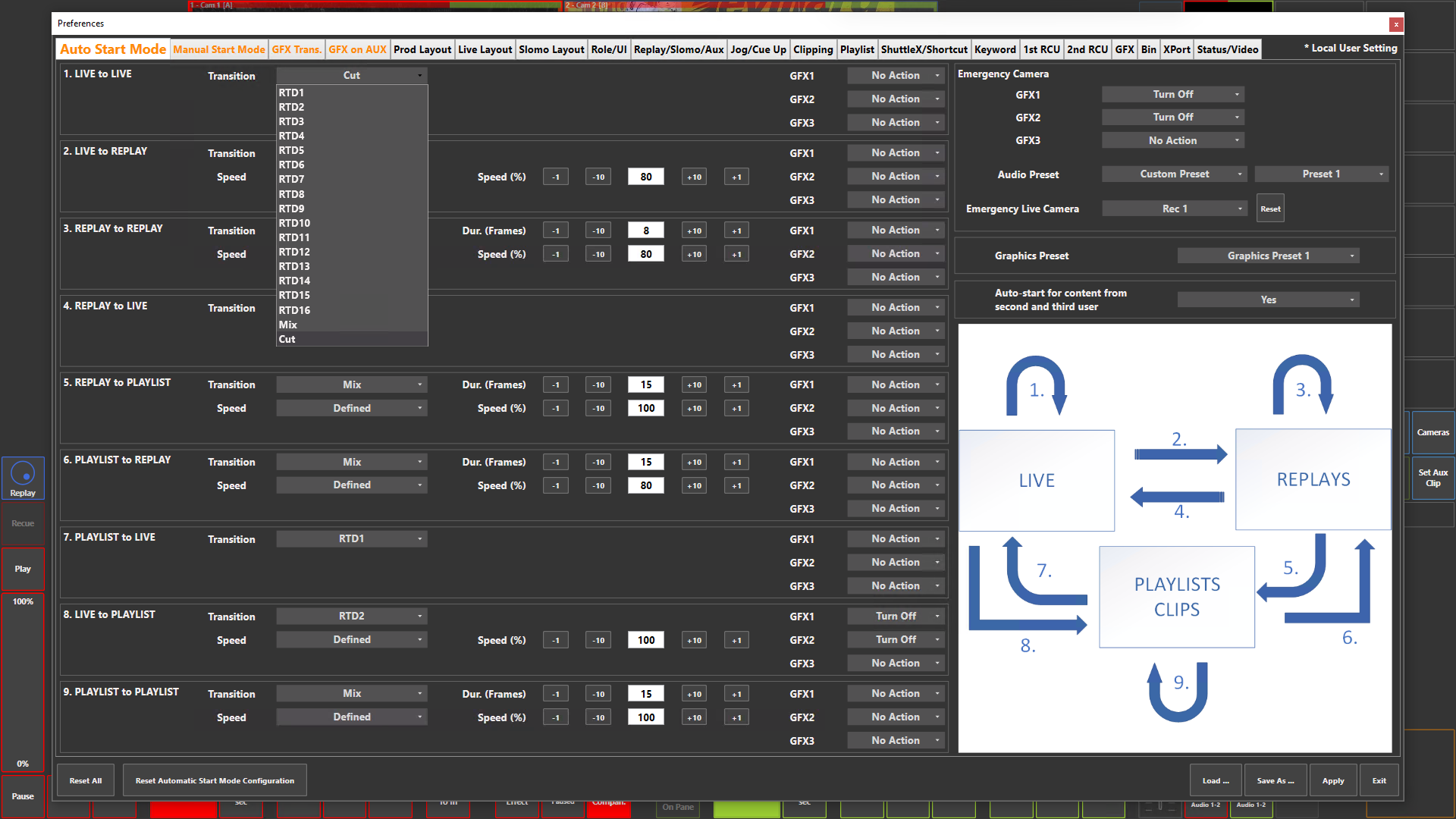
Preference Breakdown
|
Button Label |
Dropdown Menu |
Description |
User Specific |
|---|---|---|---|
|
|
Default transition from Live camera to Live camera |
Prod + Live |
|
Transition |
RTD1 |
Use RTD 1 (Replay Transition Device) to transition between cameras |
Prod + Live |
|
|
RTD2 |
Use RTD 2 to transition between cameras |
Prod + Live |
|
|
RTD3 |
Use RTD 3 to transition between cameras |
Prod + Live |
|
|
RTD4 |
Use RTD 4 to transition between cameras |
Prod + Live |
|
|
RTD5 |
Use RTD 5 to transition between cameras |
Prod + Live |
|
|
RTD6 |
Use RTD 6 to transition between cameras |
Prod + Live |
|
|
RTD7 |
Use RTD 7 to transition between cameras |
Prod + Live |
|
|
RTD8 |
Use RTD 8 to transition between cameras |
Prod + Live |
|
|
RTD9 |
Use RTD 9 to transition between cameras |
Prod + Live |
|
|
RTD10 |
Use RTD 10 to transition between cameras |
Prod + Live |
|
|
RTD11 |
Use RTD 11 to transition between cameras |
Prod + Live |
|
|
RTD12 |
Use RTD 12 to transition between cameras |
Prod + Live |
|
|
RTD13 |
Use RTD 13 to transition between cameras |
Prod + Live |
|
|
RTD14 |
Use RTD 14 to transition between cameras |
Prod + Live |
|
|
RTD15 |
Use RTD 15 to transition between cameras |
Prod + Live |
|
|
RTD16 |
Use RTD 16 to transition between cameras |
Prod + Live |
|
|
Mix |
Use a predefined duration mix between cameras |
Prod + Live |
|
|
Cut |
Direct input switch, no transition between cameras |
Prod + Live |
|
GFX 1 |
Turn On |
Turn on GFX 1 layer |
Prod + Live |
|
|
Turn Off |
Turn off GFX 1 layer |
Prod + Live |
|
|
No Action |
Leave the GFX layer as it is |
Prod + Live |
|
GFX2 |
Same as Above |
Same as Above |
Prod + Live |
|
GFX3 |
Same as Above |
Same as Above |
Prod + Live |
|
|
Default transition from Live camera to Replay camera / rPGM |
Prod + Live |
|
Transition |
Same as Above |
Define transition to go from Live to Replay camera / rPGM |
Prod + Live |
|
Speed |
Defined |
Set the playback speed at which the Replay camera / rPGM will play |
Prod + Live |
|
|
Default transition from Replay camera to Replay camera - Specific to Prod + Live role |
Prod + Live |
|
Transition |
Same as Above |
Define transition to go from Replay camera / rPGM to Replay camera / rPGM |
Prod + Live |
|
Speed |
Defined |
Set the playback speed at which the Replay camera / rPGM will play |
Prod + Live |
|
|
Keep current PGM speed |
Will playback at the current playout speed of the Replay camera / rPGM |
Prod + Live |
|
|
Default transition from Replay camera / rPGM to Live camera |
Prod + Live |
|
Transition |
Same as Above |
Define transition to go from Replay camera / rPGM to Live camera |
Prod + Live |
|
|
Default transition from Replay camera / rPGM to Clip / Playlist |
Prod + Live |
|
Transition |
Same as Above |
Define transition to go from Replay camera / rPGM to Clip / Playlist |
Prod + Live |
|
Speed |
Defined |
Set the playback speed at which the Clip / Playlist will play |
Prod + Live |
|
|
Keep current PGM speed |
Will playback at the current playout speed of the Replay camera / rPGM |
Prod + Live |
|
|
Default transition from Clip / Playlist to Replay camera / rPGM |
Prod + Live |
|
Transition |
Same as Above |
Define transition to go from Clip / Playlist to Replay camera / rPGM |
Prod + Live |
|
Speed |
Defined |
Set the playback speed at which the Replay camera / rPGM will play |
Prod + Live |
|
|
Keep current PGM speed |
Will playback at the current playout speed of the Clip / Playlist |
Prod + Live |
|
|
Default transition from Clip / Playlist to Live camera |
Prod + Live |
|
Transition |
Same as Above |
Define transition to go from Clip / Playlist to Live camera |
Prod + Live |
|
|
Default transition from Live camera to Clip / Playlist |
Prod + Live |
|
Transition |
Same as Above |
Define transition to go from Live camera to Clip / Playlist |
Prod + Live |
|
Speed |
Defined |
Set the playback speed at which the Clip / Playlist will play |
Prod + Live |
|
|
Keep current PGM speed |
Will playback at 100% |
Prod + Live |
|
|
Default transition from Clip / Playlist to Clip / Playlist |
Prod + Live |
|
Transition |
Same as Above |
Define transition to go from Clip / Playlist to Clip / Playlist |
Prod + Live |
|
Speed |
Defined |
Set the playback speed at which the Clip / Playlist will play |
Prod + Live |
|
|
Keep current PGM speed |
Will playback at the current playout speed of the Clip / Playlist |
Prod + Live |
|
Emergency Camera |
|
What to do in the case that you need to crash out of a replay, clip or playlist - Done by click on PGM in Prod or Live role |
Prod + Live |
|
Emergency Camera GFX1 |
Follow Auto transition |
On emergency, follow the auto GFX transition |
Prod + Live |
|
|
Turn On |
On emergency, turn GFX 1 layer on |
Prod + Live |
|
|
Turn Off |
On emergency, turn GFX 1 layer off |
Prod + Live |
|
|
No Action |
On emergency, leave GFX 1 layer as it currently is |
Prod + Live |
|
Emergency Camera GFX2 |
Same as Above |
Same as Above |
Prod + Live |
|
Emergency Camera GFX3 |
Same as Above |
Same as Above |
Prod + Live |
|
Audio Preset |
Custom Preset |
On emergency, go to a predefinded audio preset |
Prod + Live |
|
|
Manual Preset |
On emergency, audio preset will be manually chosen |
Prod + Live |
|
Emergency Live Camera |
Disabled |
Emergency camera disabled |
Prod + Live |
|
|
Rec 1…8 |
Define which camera is used to go to in an emergency |
Prod + Live |
|
Graphics Preset |
Graphics Preset 1 |
The production will follow Graphics preset 1 set in Pref > GFX Trans |
Prod + Live |
|
|
Graphics Preset 2 |
The production will follow Graphics preset 2 set in Pref > GFX Trans |
Prod + Live |
|
|
Graphics Preset 3 |
The production will follow Graphics preset 3 set in Pref > GFX Trans |
Prod + Live |
|
Auto-start for content from second and third user |
Yes |
Enables the auto transition features for rPGM1 and rPGM2 |
Prod + Live |
|
|
No |
Disables the auto transition features for rPGM1 and rPGM2, allowing the user to control the playout and speed |
Prod + Live |