
Preferences > GFX Trans.
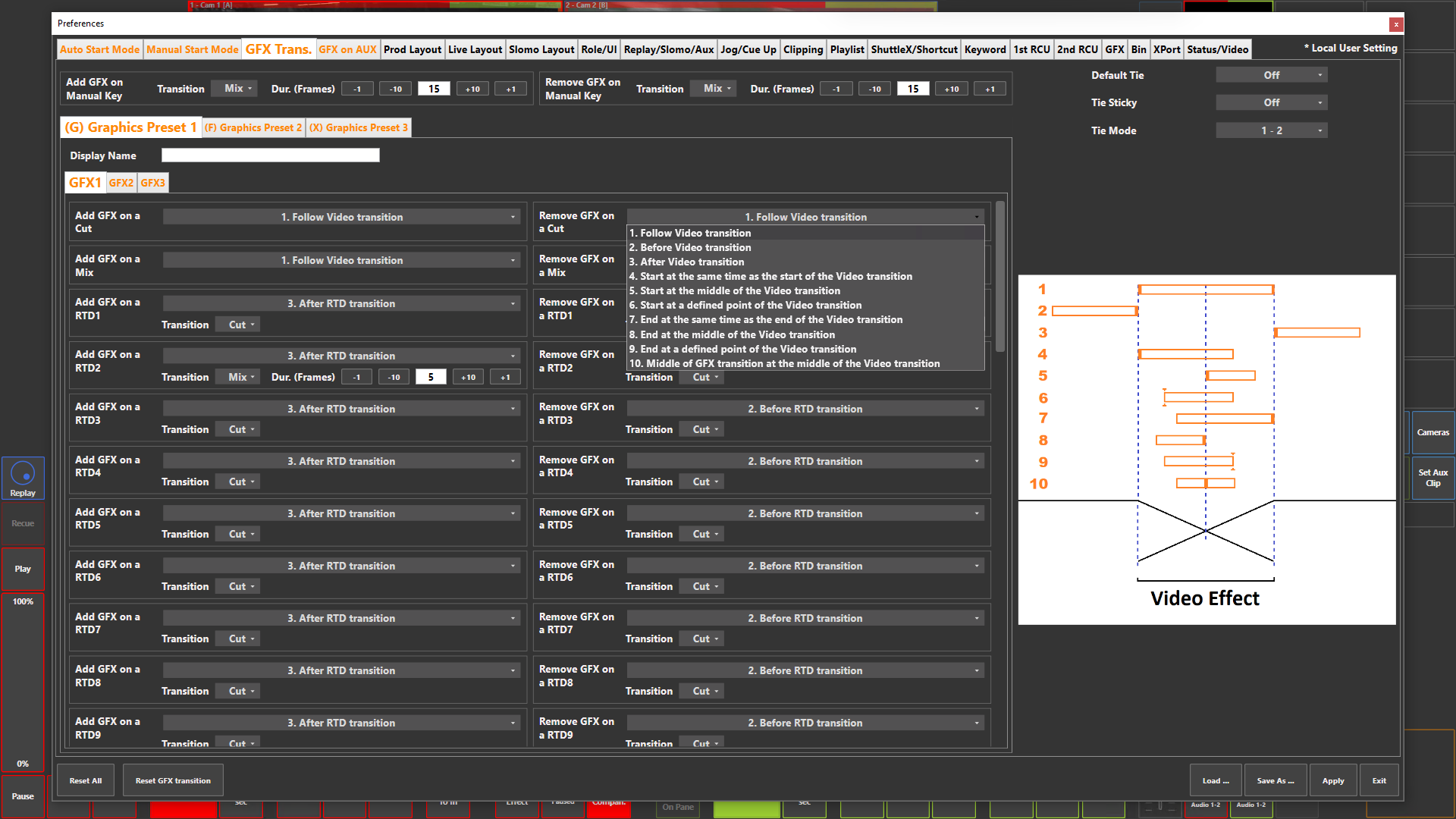
Preference Breakdown
|
Button Label |
Dropdown Menu |
Description |
User Specific |
|---|---|---|---|
|
Add GFX on Manual Key |
|
|
All Roles |
|
Transition |
Cut |
Manually key on GFX with a Cut |
All Roles |
|
|
Mix |
Manually key on GFX with a Mix and duration set |
All Roles |
|
Remove GFX on Manual Key |
|
|
All Roles |
|
Transition |
Cut |
Manually key off GFX with a Cut |
All Roles |
|
|
Mix |
Manually key off GFX with a Mix and duration set |
All Roles |
|
Default Tie |
On |
By default, the GFX "Tie" button will be enabled after an transition |
Prod + Live |
|
|
Off |
By default, the GFX "Tie" button will be disabled after an transition |
Prod + Live |
|
Tie Sticky |
On |
The GFX "Tie" button will stay turned on until disabled |
Prod + Live |
|
|
Off |
The GFX "Tie" button will stay turned off until enabled |
Prod + Live |
|
Tie Mode |
1 - 2 |
Include GFX layer 1 & 2 in "Tie" |
Prod + Live |
|
|
1 - 2 - 3 |
Include GFX layer 1, 2 & 3 in "Tie" |
Prod + Live |
|
Graphics Preset 1 (G) |
|
Graphics transitions for Graphics preset 1 |
Prod + Live |
|
Graphics Preset 2 (F) |
|
Graphics transitions for Graphics preset 2 |
Prod + Live |
|
Graphics Preset 3 (X) |
|
Graphics transitions for Graphics preset 3 |
Prod + Live |
|
Display Name |
|
User can give the preset a name |
Prod + Live |
|
GFX 1 |
|
GFX transitions related to GFX 1 layer |
Prod + Live |
|
GFX 2 |
|
GFX transitions related to GFX 2 layer |
Prod + Live |
|
GFX 3 |
|
GFX transitions related to GFX 3 layer |
Prod + Live |
|
Add / Remove GFX on a Cut |
|
GFX add and remove options on a Cut transition |
Prod + Live |
|
Add / Remove GFX on a Mix |
|
GFX add and remove options on a Mix transition |
Prod + Live |
|
Add / Remove GFX on a RTD1…RTD16 |
|
GFX add and remove options on a RTD transition |
Prod + Live |
|
Add / Remove Animated GFX on a Cut |
|
Animated GFX add and remove options on a Cut transition |
Prod + Live |
|
Add / Remove Animated GFX on a Mix |
|
Animated GFX add and remove options on a Mix transition |
Prod + Live |
|
Add / Remove Animated GFX on a RTD1…RTD 16 |
|
Animated GFX add and remove options on a RTD transition |
Prod + Live |
|
Dropdown options |
|
GFX will stay with the transition whether on or off |
Prod + Live |
|
|
|
GFX will add or remove before the tranisiton starts |
Prod + Live |
|
|
|
GFX will add or remove after the tranisiton has finished |
Prod + Live |
|
|
|
GFX will add or remove when the tranistion starts |
Prod + Live |
|
|
|
GFX will add or remove starting at the middle of the tranistion |
Prod + Live |
|
|
|
GFX will add or remove during the transition at a definded start point |
Prod + Live |
|
|
|
GFX will add or remove in time with the transition ending |
Prod + Live |
|
|
|
GFX will add or remove by the middle of the tranistion |
Prod + Live |
|
|
|
GFX will add or remove during the transition at a definded end point |
Prod + Live |
|
|
10. Middle of GFX tansition at the middle of the Video transition |
GFX will add or remove during the middle of the tranistion |
Prod + Live |
|
|
11. Follow Video transition under RTD Graphics |
GFX will stay with the transition whether on or off, but underneath the RTD |
Prod + Live |